Copper Project, from Australian company Element Software, is project management software.
N/A
Notion
Score 8.8 out of 10
N/A
Notion aims to present users with an all-in-one workspace — for notes, tasks, wikis, and databases, from Notion Labs in San Francisco.
$5
per month per user
Quire
Score 8.2 out of 10
N/A
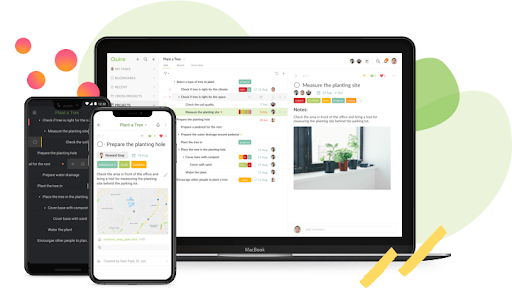
Quire is a visual collaboration platform that enables task and project management. It allows users to visualize their workflows and improves real-time collaboration.
$10.95
per month per user
Pricing
Copper Project
Notion
Quire
Editions & Modules
No answers on this topic
Free
$0
Plus
$12
per month per user
Business
$24
per month per user
Enterprise
Custom Pricing
Professional
$10.95
per month per user
Premium
$18.95
per month per user
Enterprise
$24.95
per month per user
Offerings
Pricing Offerings
Copper Project
Notion
Quire
Free Trial
No
Yes
Yes
Free/Freemium Version
No
Yes
Yes
Premium Consulting/Integration Services
No
No
Yes
Entry-level Setup Fee
No setup fee
No setup fee
No setup fee
Additional Details
—
A discount is offered for annual billing.
—
More Pricing Information
Community Pulse
Copper Project
Notion
Quire
Features
Copper Project
Notion
Quire
Project Management
Comparison of Project Management features of Product A and Product B
Copper Project
9.4
1 Ratings
19% above category average
Notion
7.3
79 Ratings
6% below category average
Quire
8.4
2 Ratings
8% above category average
Task Management
10.01 Ratings
8.174 Ratings
6.02 Ratings
Resource Management
9.01 Ratings
00 Ratings
00 Ratings
Gantt Charts
10.01 Ratings
6.846 Ratings
10.01 Ratings
Scheduling
10.01 Ratings
6.957 Ratings
10.01 Ratings
Workflow Automation
8.01 Ratings
6.455 Ratings
00 Ratings
Team Collaboration
10.01 Ratings
00 Ratings
10.01 Ratings
Support for Agile Methodology
9.01 Ratings
00 Ratings
00 Ratings
Support for Waterfall Methodology
9.01 Ratings
00 Ratings
00 Ratings
Document Management
10.01 Ratings
00 Ratings
00 Ratings
Email integration
10.01 Ratings
00 Ratings
00 Ratings
Mobile Access
10.01 Ratings
7.372 Ratings
6.01 Ratings
Timesheet Tracking
9.01 Ratings
00 Ratings
00 Ratings
Change request and Case Management
8.01 Ratings
00 Ratings
00 Ratings
Budget and Expense Management
9.01 Ratings
00 Ratings
00 Ratings
Search
00 Ratings
8.075 Ratings
00 Ratings
Visual planning tools
00 Ratings
7.968 Ratings
00 Ratings
Professional Services Automation
Comparison of Professional Services Automation features of Product A and Product B
Copper Project
9.8
1 Ratings
23% above category average
Notion
-
Ratings
Quire
-
Ratings
Quotes/estimates
10.01 Ratings
00 Ratings
00 Ratings
Invoicing
9.01 Ratings
00 Ratings
00 Ratings
Project & financial reporting
10.01 Ratings
00 Ratings
00 Ratings
Integration with accounting software
10.01 Ratings
00 Ratings
00 Ratings
Communication
Comparison of Communication features of Product A and Product B
Copper Project
-
Ratings
Notion
7.8
76 Ratings
3% below category average
Quire
-
Ratings
Chat
00 Ratings
6.329 Ratings
00 Ratings
Notifications
00 Ratings
7.568 Ratings
00 Ratings
Discussions
00 Ratings
7.349 Ratings
00 Ratings
Surveys
00 Ratings
6.720 Ratings
00 Ratings
Internal knowledgebase
00 Ratings
8.869 Ratings
00 Ratings
Integrates with Gmail and Google Hangouts
00 Ratings
8.98 Ratings
00 Ratings
Integrates with Outlook
00 Ratings
9.02 Ratings
00 Ratings
File Sharing & Management
Comparison of File Sharing & Management features of Product A and Product B
Copper Project is one of the best online project management and communication tools are available for businesses of all types. Creating and assigning the task to other team members becomes easy as it does on its own easily.
If you want a customizable solution that can be adapted for just about any scenario, I recommend using Notion. If you need a solution that's easy to share with people outside your organization, Notion is great and allows individual or team permission-setting. If you want a turnkey solution, Notion might not be the best since it requires a fair bit of set-up. There are templates that can be purchased to handle this, but I haven't found them very helpful.
Quire is useful for tracking daily to-do's or keeping track of a project. It's not as clean as some other software (such as Nuclino, for example) and can get a little messy when creating a Workspace. It was difficult for me to know what was private and what was visible to my collaborators
It has been a great find for me as it reduces my work and make me more productive at other work which I usually neglect them because of excessive work.
The platform is trending on top of list worldwide because of its stand out feature task structure.
It comprises all the best tools and strategies that involve a successful activity development system.
The biggest drawback that Copper Project has that it becomes slow at times [in my experience].
Secondly, to manage anything in the platform I have to make a ticket every time to make any changes which are frustrating for me a lot.
[In my experience] it usually becomes clunky and slow while dealing with large requests which need to be change and functionality needs to improve more.
I use Notion on my personal tablet, and unlike on the computer, I have a lot of difficulty editing backgrounds, GIFs, and page dividers. It's not as user-friendly, and often the elements end up cut off or misaligned, which is frustrating.
While the current calendar feature is helpful, I'd love to see more customization options. The Google Calendar style isn't always ideal, especially for tasks without specific times or for ongoing projects that require daily maintenance.
It would be fantastic to have more flexibility in customizing Notion pages. For example, I'd love to create planners with the freedom to add illustration boxes, stickers, or GIFs without being restricted to a fixed layout.
Very easy to use (I learned how to use everything on my own) and I was able to set up an entire ecosystem without any courses or other tools. I often say that Notion is like Lego for adults, because there we can use all the available tools to create a multitude of things, from funnels to projects with calculated deadlines and tags.
Integration of the Copper Project is amazing. It is designed on such a great module that it can easily integrate with any other software. I have a lot of software already in my organization which we are using to handle different processes in the organization, Copper Project easily integrated with them and gives me all in one platform to manage all of my activities on one platform which is a great help for me.
The company uses both Notion and Trello within the company. Notion is more for North America employees while Trello is used between Operation team overseas and in North America. Sometimes it's a preference of how the tools look like for project management. I would say both Notion and Trello are nice tools and serves our needs.
This feature is also helping me a lot in making project structure and prioritizing things according to the flow of work, which is great as it gives clear path what to do next.
Customer support of Copper Project is very professional.
I recently had some problems while using the platform, they listened to the problem carefully and responded with a more feasible and workable solution within the limited time frame, which gives me the confidence to use the platform more in-depth.