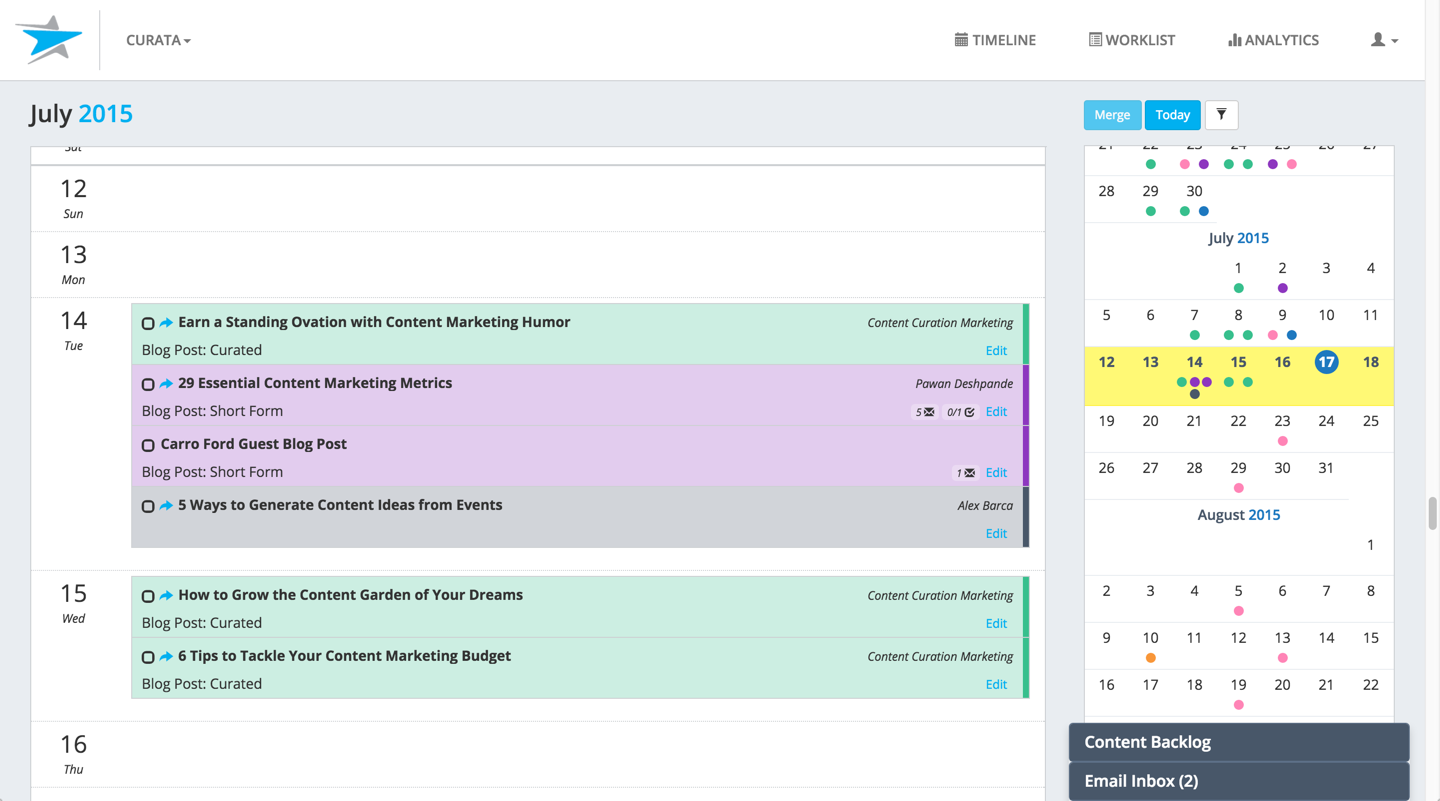
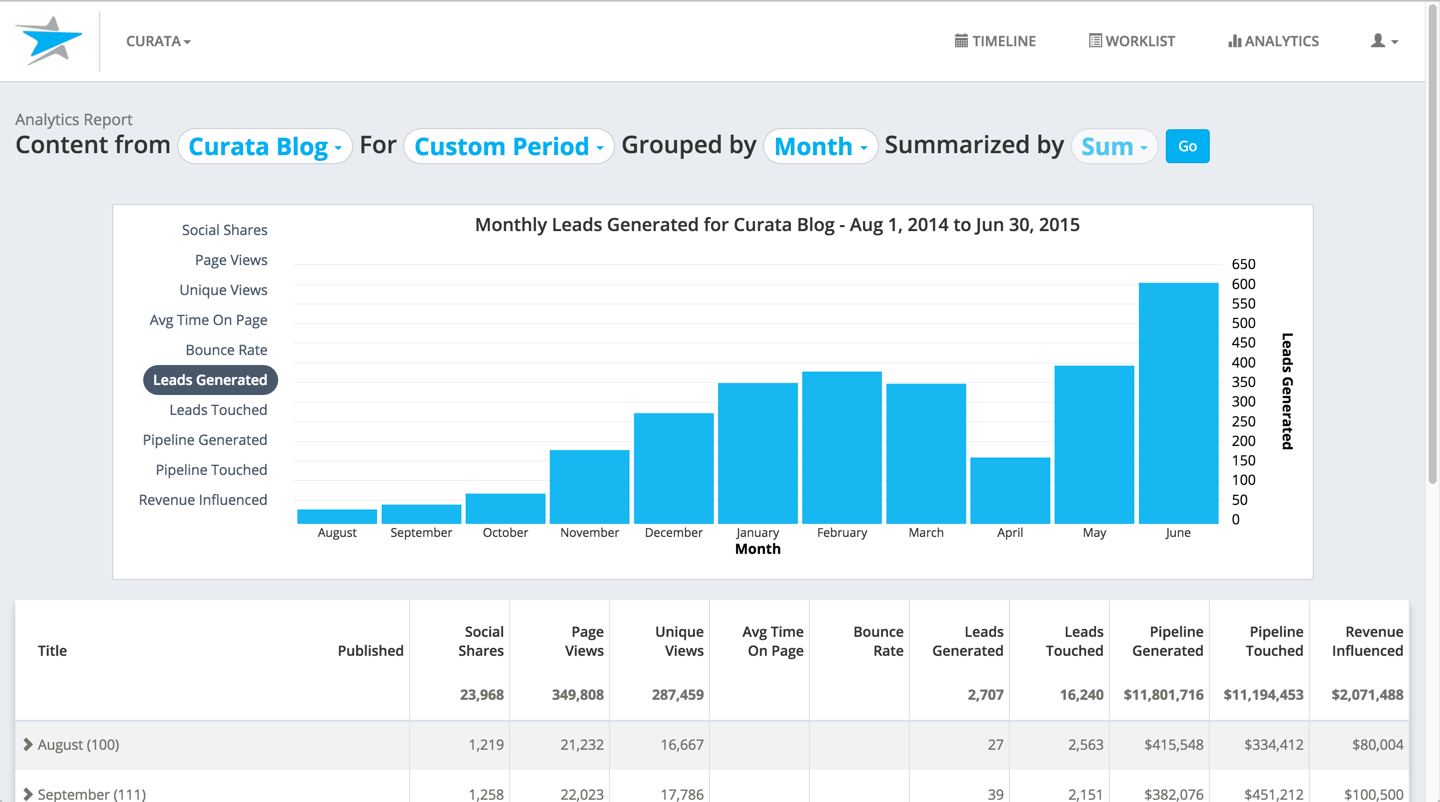
Curata's content marketing platform (Curata CMP) enables more efficient content creation with greater impact on pipeline. According to the vendor, this solution enables users to:
Analyze marketing and sales pipeline impact: Instantly access content metrics such as leads generated/touched and sales opportunities generated/touched by gated, un-gated and off-site content. Streamline content production: An easy to use editorial calendar to keep your team on the same page and…
$699
per Instance (no seat limits)
Kapost
Score 7.0 out of 10
N/A
Upland Kapost helps you create and distribute meaningful content to support the buyer journey for B2B companies.
N/A
OneSpot
Score 8.0 out of 10
N/A
N/A
N/A
Pricing
Curata
Kapost
OneSpot
Editions & Modules
Curata Software
$699
per Instance (no seat limits)
No answers on this topic
No answers on this topic
Offerings
Pricing Offerings
Curata
Kapost
OneSpot
Free Trial
No
No
No
Free/Freemium Version
No
No
No
Premium Consulting/Integration Services
No
No
No
Entry-level Setup Fee
No setup fee
No setup fee
No setup fee
Additional Details
We have 2 solutions:
- Curata CCS content curation software
- Curata CMP content marketing platform (e.g., editorial calendar, analytics engine)
—
—
More Pricing Information
Community Pulse
Curata
Kapost
OneSpot
Considered Multiple Products
Curata
Verified User
Anonymous
Chose Curata
The main difference that made me choose Curata over Percolate is that it is not complex. Curata is easier to set up, to use, and to manage. It does not involve any complicated configuration to get the content and data you need. Curata technical support is amazing, to say the …
We closely considered Rallyverse before deciding on Curata. Rallyverse had superior social sharing capabilities, but Curata's microsite and email newsletter features plus the infinite content source and feed search capabilities far outweighed what Rallyverse has to offer at …
Kapost
Verified User
Anonymous
Chose Kapost
None - I did not look at other competitors or evaluated them. I did hear word of mouth that Wrike is a main competitor and offers a very good product that rivals Kapost reputation and features.
Workfront has a lot of great features, but Kapost was the right tool for what we needed at the time. With a team of our size, we had to make sure we weren't biting off more than we could chew and the project never got off the ground. We had to be thoughtful with how we rolled …
I've used basic tools like SharePoint in the past as a content repository, but it's not user friendly, not well organized, hard to manage and not well-suited for marketing content (version control issues, etc. ). Get a dedicated tool!
ISI listing from Thomson Reuters returns bigger and more narrowed lists. If you need a narrowed list go with them. If you want a large party internal [tool] deploy Kapost, it works just fine. I also have found that the design team behind Aprimo has a bigger design background …
Kapost solves many project management aspects of creating marketing content. The automated workflows allow for faster setup of common assets and automatically remind team mates of deadlines and upcoming requests. It streamlines content creation. Hootsuite Enterprise was made …
To be honest, I've only joined the team here at SolidFire this quarter (it's my understanding that before Kapost, there was no content management system, though). But in the past, I've used WordPress way more extensively than we do here -- effectively as the in-house CMS. …
Kapost is really designed for content production and management, not more broadly for project management like Basecamp and JIRA. It's a very hybrid product that straddles tools: CMS, automated workflow management, DAM (less so, but sort of), and has unique features that make it …
I liked Curata, but it depends on the use case of how it will be used as to how effective it is for someone. If you are trying to curate content it works great. Had I not been so put off by the issue mentioned earlier I would have given more effort to learn the CMS, so I am not sure how effective it really is.
I think the filters within the custom fields and custom details is its strongest feature for us. So I would say, the more content you have, the more use you'll get out of Kapost, especially if you need to organize your content in a lot of different ways (as we do for our targeted marketing). We still format edit/publish blogs via WordPress (although we put the draft in Kapost), but blogs aren't necessarily our #1 thing. Perhaps, for people who are really blog-centric, another platform may be better. Kapost is really good, I think, for copy that has a lot of hands on it, and can really benefit from well-structured work flows and a really comprehensive metadata system.
Sets you up with a strategist. You are able to be in constant communication through Kapost with your strategist and send one another working proofs and comments.
Unity - it has made all our email campaigns have a similar look and feel. Kapost has shown results on the appropriate amount of images to use and the type of language that works.
Stay on track - each person is notified when the role before theirs is complete so they know when it is their turn to act upon something.
Search is valuable but the key words seem to take a while for the system to find, I have to use multiple word choices or switch to a specific collection.
I think some type of links from search could be useful.
For all of the features we loved when we signed on like the microsite and search capabilities and also their customer service, we will very likely renew with Curata. We also really like the evolution we have seen of the solution, just recently a new integration with Marketo (also a vendor of ours) was announced which will be very beneficial to us in optimizing our email newsletters
We are using some other systems that might have replaced Kapost, but none of them had the workflow functionality we were looking for. So, we're sticking with Kapost for now.
The calendar view is a great feature and so are the custom views. It is relatively easy to see a clear view of what content the user is responsible for and then the due dates associated to it. The ability to create and update workflows for the team is easy to navigate and keeps us on track.
The reputation of the product matches up to its reputation as one of the leaders in the space. I love that you can share and access content at your fingertips from anywhere. The downside is that it does not have the prettiest interface but you can get over this with its functionality.
We closely considered Rallyverse before deciding on Curata. Rallyverse had superior social sharing capabilities, but Curata's microsite and email newsletter features plus the infinite content source and feed search capabilities far outweighed what Rallyverse has to offer at this time. We are very happy with our decision
I've used basic tools like SharePoint in the past as a content repository, but it's not user friendly, not well organized, hard to manage and not well-suited for marketing content (version control issues, etc. ). Get a dedicated tool!