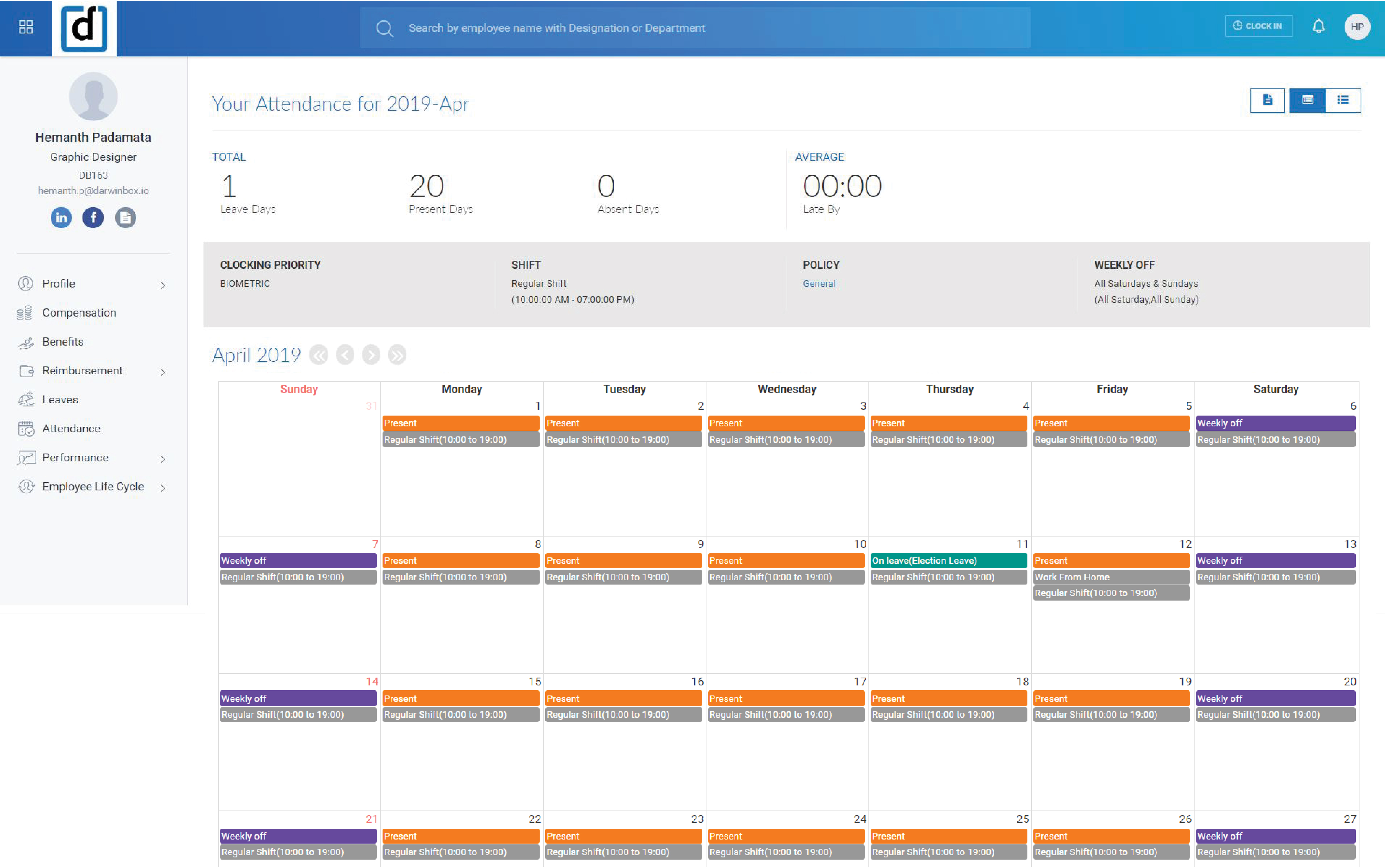
Darwinbox headquartered in Hyderabad offers an end-to-end HRMS software provide core HR functionality (e.g. employee data management), support for recruitment and onboarding, payroll management, time & attendance tracking, as well as comprehensive talent management and employee engagement features.
N/A
Intuit Online Payroll (discontinued)
Score8.4 out of 10
N/A
Intuit Online Payroll was a small business payroll option available as a standalone SaaS solution, that Intuit announced it was discontinuing in favor of Quickbooks Online Payroll, available via Quickbooks.
Darwinbox provides multiple functions and features related to Human resources and I Like the best where it maintains Attendance records and employees smartly. Darwinbox helps us to brings all the organization level activity on one platform which helps the management to take the crucial decisions. Sometimes it hangs and does not function properly due to an internet connectivity issue.
A de minimis incentive was given to thank the reviewer for their time. The incentive was not used to bias or drive a particular response, nor was the incentive contingent on a positive endorsement. More Info
I believe the ideal scenario is when you are already using the Intuit family of products and the payroll bolts on to your existing QuickBooks infrastructure. Payroll software products have been around a long time, and this is a very competitive niche. Most of the companies do a good job of filing taxes promptly, reporting W-2 items properly, providing good reports, etc. Where you might really get some extra efficiency and benefit is the fact that the payroll is woven into the accounting system, creating one seamless enterprise solution. Also, where it might be less appropriate is in a really simple use case such as a one person company where there aren't complex fringe benefits to deal with. In that scenario, you can set up the ACH debits directly with the state agency and the IRS and possibly file your own 941, 940, W-2/W-3 and state equivalent forms. Of course, if you're willing to do this and are good with details, you can save yourself some money.
A de minimis incentive was given to thank the reviewer for their time. The incentive was not used to bias or drive a particular response, nor was the incentive contingent on a positive endorsement. More Info
A de minimis incentive was given to thank the reviewer for their time. The incentive was not used to bias or drive a particular response, nor was the incentive contingent on a positive endorsement. More Info
Integration with QuickBooks Desktop. This is the key strength of IP... it is a complete, native integration and let's you maintain all employee records and time keeping in QuickBooks
Job Costing. Another key differentiation -- some payroll outsources say they do true job costing (by work or item code). Don't believe them. If its' not integrated with your accounting system, you will not get "TRUE" job costing. You can get costs ASSIGNED to jobs (which may be fine), but you won't get item level detail in QuickBooks from anyone but Intuit.
Variety of Payment options. Use Direct Deposit or manual checks... or whatever you want. Since its in QB, you can make payments any way you want.
Cash Flow. This is both good and bad, but IP will not take taxes out of your bank account until they are due. That's different than some other providers that want assurance that you have the tax payments available at the moment you push "SUBMIT."
A de minimis incentive was given to thank the reviewer for their time. The incentive was not used to bias or drive a particular response, nor was the incentive contingent on a positive endorsement. More Info
A de minimis incentive was given to thank the reviewer for their time. The incentive was not used to bias or drive a particular response, nor was the incentive contingent on a positive endorsement. More Info
My biggest issue is that they do continue to raise their prices on a regular basis and it makes people feel stuck when there are so many clients already using the system.
They do not support roaming employees, so employees that cross over into various tax jurisdictions in one pay period pose a challenge for calculating taxes and pay.
The setup can be a bit daunting still if you are not familiar with the system or the various taxes and requirements for reporting.
A de minimis incentive was given to thank the reviewer for their time. The incentive was not used to bias or drive a particular response, nor was the incentive contingent on a positive endorsement. More Info
A de minimis incentive was given to thank the reviewer for their time. The incentive was not used to bias or drive a particular response, nor was the incentive contingent on a positive endorsement. More Info
It overall helps me with applying for holidays and shows how many holidays I have left, whether it's an earned leave or casual leave, and even tells what all are the upcoming holidays. It helps me to read the firm's documentation and helps in writing things for my appraisal cycle, It even tells the performance and the tasks in my queue.
A de minimis incentive was given to thank the reviewer for their time. The incentive was not used to bias or drive a particular response, nor was the incentive contingent on a positive endorsement. More Info
I would rate it a 0. It gets worse and worse all the time. It seems like every time I go into IOP to run a payroll for one of my clients, I have one more problem.
The customer support personnel have always walked me through the steps they need to take to assist me. Never rushed through anything. Always exceptionally thorough, answering all my questions and even sharing my screen visually (I have control, not them). It actually helps me to resolve future issues and questions, if they should arise.
A de minimis incentive was given to thank the reviewer for their time. The incentive was not used to bias or drive a particular response, nor was the incentive contingent on a positive endorsement. More Info
Darwinbox helps to maintain all the things at one platform and easy to use too. It provide better usability compared with Moday.com. Darwinbox provides more functionality compared with monday.com. It is also user friendly as well. All the things we are getting one platform and on one place.
A de minimis incentive was given to thank the reviewer for their time. The incentive was not used to bias or drive a particular response, nor was the incentive contingent on a positive endorsement. More Info
It's a payroll software with decent customer support readily available and direct integration with my accounting tools. This made it a prime fit for me, and made payment and tax reporting relatively simple, and errors readily correctable. It does not have time tracking, and I still believe that this software is overpriced, but it's the best fit for me right now.
A de minimis incentive was given to thank the reviewer for their time. The incentive was not used to bias or drive a particular response, nor was the incentive contingent on a positive endorsement. More Info
The ability to view the organization structure and functional structure for the entire company.
One-stop solution for talent acquisition, payroll, leaves, reimbursements, attendance (time-sheet), holidays, etc. So I don't have to open a lot of different apps.
A de minimis incentive was given to thank the reviewer for their time. The incentive was not used to bias or drive a particular response, nor was the incentive contingent on a positive endorsement. More Info
Positive: Less of a learning curve to train payroll accountants, as they are already familiar with using Intuit. Also, in general there are a larger pool of candidates who know this system than many of the other "niche" lesser known payroll products.
Positive: More options to choose from depending on the level of service needed. For example, there is a Full Service offering if needed. This might apply to an organization that doesn't have the resources available or an internal person who has the time/bandwidth to handle the entire company's payroll. Thus, it is possible to cherry pick the level of service needed depending on the type of company/situation.
Positive: Good audit trail. This can be extremely important and cost efficient when a business is going through an external audit by an outside CPA firm and the payroll accounting function is undergoing testing (ie. less time required by the external auditor would likely lower their bill for their services).
A de minimis incentive was given to thank the reviewer for their time. The incentive was not used to bias or drive a particular response, nor was the incentive contingent on a positive endorsement. More Info