DashboardFox vs. Domo

Overview
ProductRatingMost Used ByProduct SummaryStarting Price
DashboardFox
Score 0.0 out of 10
N/A
DashboardFox is cloud-based business intelligence and dashboard software from 5000fish, built for teams that create and deliver dashboards and reports to clients, departments, or business units. It is priced by monthly active users (MAU) rather than per seat, so organizations pay for a tier instead of for every login, and accounts that do not sign in are not counted. Row-level security, white-label branding, and custom domains are included in every plan, which…
$99
per month Monthly Active User (MAU)
Domo
Score 8.5 out of 10
N/A
Domo is a full self-service business intelligence software that combines several data analysis and reporting tools into one platform. It helps users connect to multiple data sources, create robust visual reports, manage their data, send messages in real-time, manage projects, and develop new apps.N/A
Pricing
DashboardFoxDomo
Editions & Modules
Starter
$99
per month Monthly Active Users (MAU)
Growth
$249
per month Monthly Active Users (MAU)
Scale
$499
per month Monthly Active Users (MAU)
Starter
$4,995
one-time fee per user
Growth
$9,995
one-time fee per user
Business
$14,995
one-time fee per user
Premium
$19,995
one-time fee per user
No answers on this topic
Offerings
Pricing Offerings
DashboardFoxDomo
Free Trial
YesYes
Free/Freemium Version
NoNo
Premium Consulting/Integration Services
YesNo
Entry-level Setup FeeNo setup feeNo setup fee
Additional DetailsA primary pricing consideration is the licensing model: DashboardFox is priced by monthly active users (MAU), not per seat. You pay for a tier, and only users who actually log in count toward it — recipients who view shared or scheduled reports without logging in are excluded. For teams with many occasional or read-only users, this is often more cost-effective than per-seat BI tools. Feature inclusion is also notable: row-level security, white-label branding, custom domains, and unlimited reports and dashboards are standard on every plan, including the $99/month Starter tier. Higher tiers scale capacity (more MAU, concurrent load, larger datasets, FastCache, Server Sync) and support levels rather than unlocking core features. Connecting data sources incurs no cost — there are no per-connector fees and no ETL requirement. Additional factors for buyers: annual billing provides a 20% discount; every plan includes a 7-day trial with no credit card required; discounts are available for nonprofits, education, government, and agencies/resellers; and for teams preferring to avoid subscriptions, a self-hosted perpetual license is available from $4,995, with the first year of upgrades and priority support included.
More Pricing Information
Community Pulse
DashboardFoxDomo
Features
DashboardFoxDomo
BI Standard Reporting
Comparison of BI Standard Reporting features of Product A and Product B
DashboardFox
-
Ratings
Domo
9.7
72 Ratings
17% above category average
Pixel Perfect reports00 Ratings9.650 Ratings
Customizable dashboards00 Ratings9.872 Ratings
Report Formatting Templates00 Ratings9.665 Ratings
Ad-hoc Reporting
Comparison of Ad-hoc Reporting features of Product A and Product B
DashboardFox
-
Ratings
Domo
9.4
71 Ratings
16% above category average
Drill-down analysis00 Ratings9.470 Ratings
Formatting capabilities00 Ratings9.469 Ratings
Integration with R or other statistical packages00 Ratings9.01 Ratings
Report sharing and collaboration00 Ratings9.871 Ratings
Report Output and Scheduling
Comparison of Report Output and Scheduling features of Product A and Product B
DashboardFox
-
Ratings
Domo
9.0
69 Ratings
10% above category average
Publish to Web00 Ratings9.854 Ratings
Publish to PDF00 Ratings9.456 Ratings
Report Versioning00 Ratings7.01 Ratings
Report Delivery Scheduling00 Ratings9.665 Ratings
Data Discovery and Visualization
Comparison of Data Discovery and Visualization features of Product A and Product B
DashboardFox
-
Ratings
Domo
8.8
70 Ratings
10% above category average
Pre-built visualization formats (heatmaps, scatter plots etc.)00 Ratings9.770 Ratings
Location Analytics / Geographic Visualization00 Ratings9.764 Ratings
Predictive Analytics00 Ratings7.01 Ratings
Access Control and Security
Comparison of Access Control and Security features of Product A and Product B
DashboardFox
-
Ratings
Domo
9.7
71 Ratings
13% above category average
Multi-User Support (named login)00 Ratings9.768 Ratings
Role-Based Security Model00 Ratings9.665 Ratings
Multiple Access Permission Levels (Create, Read, Delete)00 Ratings9.469 Ratings
Report-Level Access Control00 Ratings9.64 Ratings
Single Sign-On (SSO)00 Ratings10.01 Ratings
Mobile Capabilities
Comparison of Mobile Capabilities features of Product A and Product B
DashboardFox
-
Ratings
Domo
8.9
63 Ratings
14% above category average
Responsive Design for Web Access00 Ratings8.461 Ratings
Mobile Application00 Ratings8.652 Ratings
Dashboard / Report / Visualization Interactivity on Mobile00 Ratings8.660 Ratings
Application Program Interfaces (APIs) / Embedding
Comparison of Application Program Interfaces (APIs) / Embedding features of Product A and Product B
DashboardFox
-
Ratings
Domo
7.7
1 Ratings
0% below category average
REST API00 Ratings8.01 Ratings
Javascript API00 Ratings8.01 Ratings
iFrames00 Ratings8.01 Ratings
Java API00 Ratings8.01 Ratings
Themeable User Interface (UI)00 Ratings7.01 Ratings
Customizable Platform (Open Source)00 Ratings7.01 Ratings
Best Alternatives
DashboardFoxDomo
Small Businesses
Yellowfin
Yellowfin
Score 8.6 out of 10
Yellowfin
Yellowfin
Score 8.6 out of 10
Medium-sized Companies
Reveal
Reveal
Score 10.0 out of 10
Reveal
Reveal
Score 10.0 out of 10
Enterprises
Kyvos Semantic Layer
Score 9.5 out of 10
Kyvos Semantic Layer
Score 9.5 out of 10
All AlternativesView all alternativesView all alternatives
User Ratings
DashboardFoxDomo
Likelihood to Recommend
-
(0 ratings)
10.0
(75 ratings)
Likelihood to Renew
-
(0 ratings)
8.0
(2 ratings)
Usability
-
(0 ratings)
9.7
(36 ratings)
Support Rating
-
(0 ratings)
9.2
(14 ratings)
Implementation Rating
-
(0 ratings)
9.1
(21 ratings)
Vendor pre-sale
-
(0 ratings)
7.5
(6 ratings)
User Testimonials
DashboardFoxDomo
Likelihood to Recommend
5000fish
No answers on this topic
Domo
I believe that companies that record large amounts of data about their product, service employers KPIs, etc, can make the best out of Domo for reporting and data analysis, but if a company handles little data and is not recording this consistently, it will not be of much use.
Read full review
Pros
5000fish
No answers on this topic
Domo
  • Exceptional Transform area of the platform - any/all raw data can be manipulated and combined to create datasources that are very useful for our departments.
  • Visualization layer is clean and is very business presentable. Its simple but includes depth. Visuals can be created/used by all roles throughout our firm, its not limited to analysts.
  • Ability to communicate and talk about insights in the data - the communication tool is exceptional. I can @ mention specific users to bring attention to a discovery. I can start a private chat. I can annotate and communicate what I am seeing. I love it.
  • Mobile experience is excellent. When I am on the road i can actively monitor and engage with my team due to my Domo dashboard on my mobile device. Its amazing to run the business and not worry while away from the office.
Read full review
Cons
5000fish
No answers on this topic
Domo
  • Copying Reports - In Excel or Google Sheets, I like to make copies of similar reports and modify them as necessary for users. In Domo, makes copies of reports (called cards) but all copies are connected. So if you adjust the copy, it changes the original. This means a user has to recreate the report from scratch and then adjust it.
  • Unforgiving SQL - Domo does allow users to write their own SQL codes, which is great. However, Domo's SQL code is pickier than the other SQL database I've used (Metabase).
  • Text Alerts - Domo's alerts aren't always the smartest. Some of my dashboards are about the sales teams monthly performance and I get notified when there is a change of more than 20%. I always get notified at the start of the month that reports have changed from 'x' number to zero. This is expected because it's a monthly report and I hate getting texts about it. The only reason I don't term them off so I can be aware if something breaks in the middle of the month.
Read full review
Likelihood to Renew
5000fish
No answers on this topic
Domo
Domo is a great up-and-coming product. There are many fantastic features that are extremely compelling to our end users, which makes Domo a great fit for our organization. As with many BI tools, there are items on the wish list that could make implementation, administration and usage easier, but I believe these will be addressed over time as the product matures and evolves. The overall concept and approach of this solution has definitely raised the bar in this area of expertise and I would like to see things advance in giving the enterprise tools that will make decision making easier and more robust in the future.
Read full review
Usability
5000fish
No answers on this topic
Domo
The built-in user support and intuitive design of Domo makes it simple to learn and use. I find I can spend hours drilling deep, or else quickly gain an overview in just a few minutes. This is a great advantage since the flexibility fits well with the demands of my role. I enjoy using Domo since I know it will give me comparative data across almost every variable I might want to explore - I look forward to it!
Read full review
Support Rating
5000fish
No answers on this topic
Domo
Pretty responsive. It took a while to get a response in selecting data points for our particular cards. Might have taken about a month? I am not sure if this was something on our end or Domo's end. But haven't had any other issues yet that required additional support from Domo.
Read full review
Implementation Rating
5000fish
No answers on this topic
Domo
It is a true web-based application so implementation is much easier and smoother compared to other non-web based BI solutions. Also, they offered consulting services during the implementation process, which was helpful. Also, they provided lots of on-demand training courses and videos, which I liked.
Read full review
Alternatives Considered
5000fish
No answers on this topic
Domo
At the end of the day, end-user adoption and taking the burden of IT to build reports was my goal. Demoing and testing many BI tools, DOMO is the one that allowed both to happen.
Read full review
Return on Investment
5000fish
No answers on this topic
Domo
  • I mentioned a "previously un-analyzable" dataset that we were able to visualize in Domo - the result was business re-alignment for increased productivity, cost savings and ROI.
  • It's tough to quantify the ability to provide insights that have been desired for years but not possible - we continue to amaze our executives and product managers with the analysis we can provide.
Read full review
ScreenShots

DashboardFox Screenshots

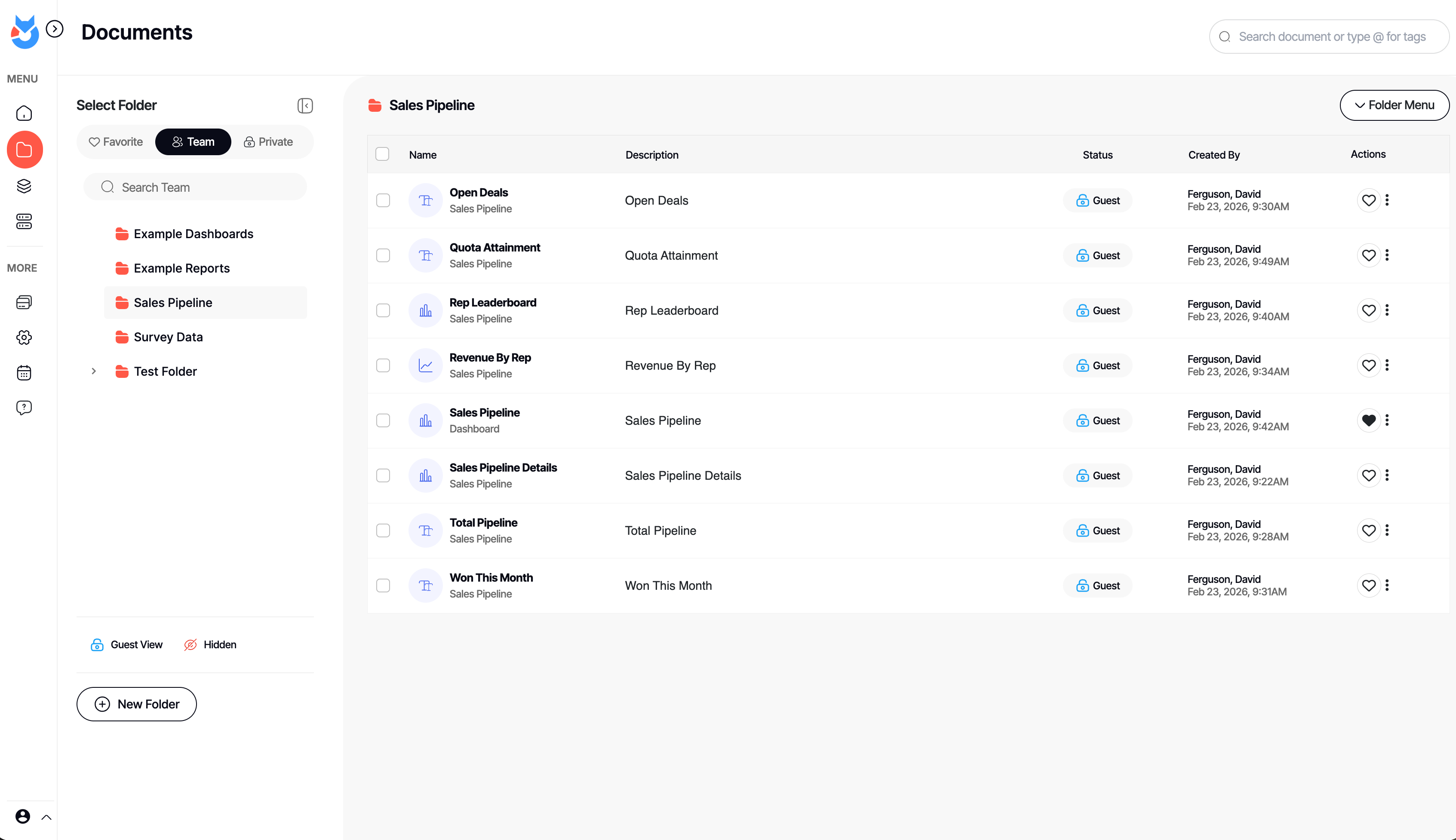
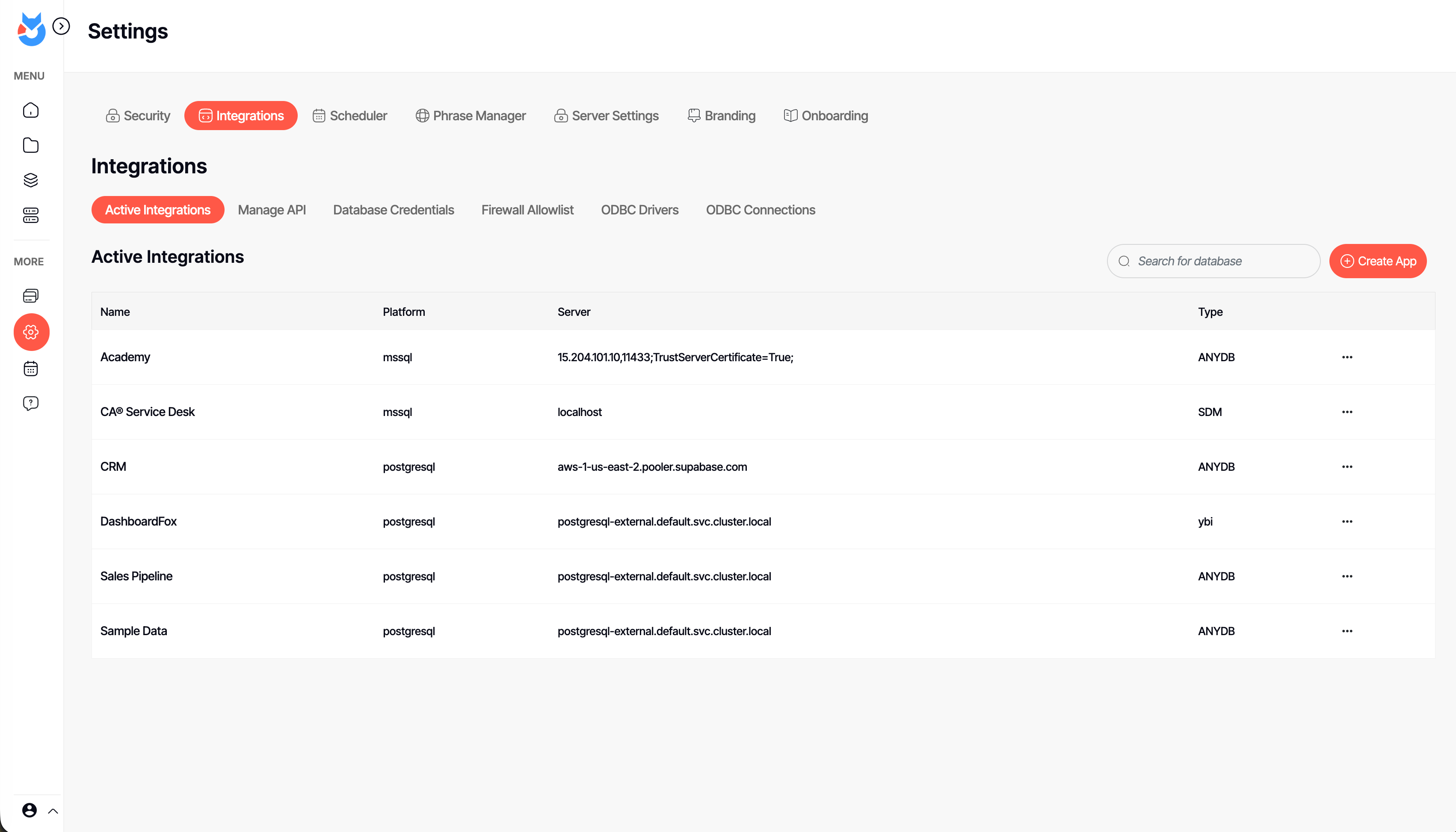
Screenshot of an interactive DashboardFox sales pipeline dashboard with KPI tiles, a revenue-by-rep chart, and a rep leaderboard. Business users filter by region, industry, or fiscal year and save their own views — self-service analytics with no SQL required.Screenshot of the Documents library in DashboardFox, where teams organize dashboards and reports into Team, Private, and Favorite folders. Share them with colleagues or clients, control guest access per item, and find any report fast with search and tags.Screenshot of DashboardFox's report Composer: pick fields, apply formulas and sorting, and preview the result live as a chart. Build dashboards and reports across 20+ visualizations without writing code, then save and share them with your team or clients.Screenshot of the App Builder in DashboardFox, where admins connect a data source and choose the exact tables and fields users can report on. Set up governed self-service reporting once, so business users only ever see the data they're allowed to.Screenshot of DashboardFox admin settings: manage data-source integrations, ODBC drivers, API access, scheduling, branding, and security in one place. Connect SQL Server, PostgreSQL, and more with no ETL, and white-label the experience for your clients.Screenshot of a single DashboardFox report shown as a color-coded calendar heatmap, flagging good, watch, and bad days at a glance. Open any report from the library, refresh or schedule it, and deliver it branded to your team or clients.

Domo Screenshots

Screenshot of Screenshot of