TrustRadius: an HG Insights company

Save this comparison

Save this comparison

Add Product

Recommended Comparisons

    Overview
    ProductRatingMost Used ByProduct SummaryStarting Price

    DocuSign CLM

    Score8.2 out of 10
    N/ADocuSign CLM, formerly SpringCM, is a cloud-based platform that can be used to manage documents, contracts and related collateral. The solution includes workflows that can be tailored to an organization's business processes. It is also designed to accelerate team collaboration. SpringCM was acquired by DocuSign in the summer of 2018.

    $15

    per month

    QuarkXPress

    Score9 out of 10
    N/AQuarkXPress from Quark Software headquartered in Denver introduces modern responsive web design with Flex Layouts, reimagined Tables, and productivity-boosting design features.

    $279

    per year

    Pricing
    DocuSign CLMQuarkXPress
    Editions & Modules
    Personal
    $15
    per month
    Real Estate Starter
    $15
    per month
    DocuSign for Realtors
    $35
    per user/per month
    Standard
    $40
    per user/per month
    Business Pro
    $60
    per user/per month
    Starter
    $75
    per month
    Intermediate
    $450
    per month
    Advanced Solutions
    Contact sales team
    Real Estate Plus, Broker Edition
    Contact sales team
    Sandbox Account
    Free
    Enterprise Offerings
    Contact sales team
    QuarkXPress Subscription License
    $279
    per year
    QuarkXPress Perpetual License
    $629
    one-time fee
    Offerings
    Pricing Offerings
    DocuSign CLMQuarkXPress
    Free Trial
    NoYes
    Free/Freemium Version
    NoNo
    Premium Consulting/Integration Services
    NoNo
    Entry-level Setup FeeNo setup feeOptional
    Additional Details——
    More Pricing Information
    Community Pulse
    DocuSign CLMQuarkXPress
    Considered Both Products
    DocuSign
    No answer on this topic
    Quark Software Inc.
    No answer on this topic
    Key User Insights
    Would buy again
    92%
    Would buy again
    33 Answers
    100%
    Would buy again
    6 Answers
    Delivers good value for the price
    100%
    Delivers good value for the price
    28 Answers
    100%
    Delivers good value for the price
    6 Answers
    Happy with the feature set
    92%
    Happy with the feature set
    33 Answers
    100%
    Happy with the feature set
    6 Answers
    Lived up to sales and marketing promises
    94%
    Lived up to sales and marketing promises
    17 Answers
    100%
    Lived up to sales and marketing promises
    5 Answers
    Implementation went as expected
    96%
    Implementation went as expected
    24 Answers
    100%
    Implementation went as expected
    5 Answers
    Features
    DocuSign CLMQuarkXPress
    Contract Authoring
    Comparison of Contract Authoring features of DocuSign CLM and QuarkXPress
    Feature
    DocuSign CLM
    6.9
    3 Ratings
    17% below category average
    QuarkXPress
    -
    Ratings
    Contract creation6.03 Ratings00 Ratings
    Contract templates5.63 Ratings00 Ratings
    Clause library/saved fields9.12 Ratings00 Ratings
    Guided logic6.83 Ratings00 Ratings
    Contract Collaboration
    Comparison of Contract Collaboration features of DocuSign CLM and QuarkXPress
    Feature
    DocuSign CLM
    7.5
    3 Ratings
    9% below category average
    QuarkXPress
    -
    Ratings
    Contract sharing8.22 Ratings00 Ratings
    Contract editing5.63 Ratings00 Ratings
    Collaborating on contracts8.12 Ratings00 Ratings
    MS Word plug-in7.31 Ratings00 Ratings
    Approval process8.53 Ratings00 Ratings
    Interdepartmental workflows7.43 Ratings00 Ratings
    Contract Monitoring
    Comparison of Contract Monitoring features of DocuSign CLM and QuarkXPress
    Feature
    DocuSign CLM
    6.2
    3 Ratings
    28% below category average
    QuarkXPress
    -
    Ratings
    Contract database6.03 Ratings00 Ratings
    Contract search6.03 Ratings00 Ratings
    Contract milestone reminders & alerts6.83 Ratings00 Ratings
    Custom contract reports5.63 Ratings00 Ratings
    Tracking contract status6.13 Ratings00 Ratings
    Compliance check6.52 Ratings00 Ratings
    Contract Management
    Comparison of Contract Management features of DocuSign CLM and QuarkXPress
    Feature
    DocuSign CLM
    7.6
    4 Ratings
    8% below category average
    QuarkXPress
    -
    Ratings
    Contract Storage7.13 Ratings00 Ratings
    Advanced Search and Filtering6.43 Ratings00 Ratings
    Customizable Contract Templates5.63 Ratings00 Ratings
    Workflow Acceleration8.22 Ratings00 Ratings
    E-Signatures9.64 Ratings00 Ratings
    Reminders and Alerts9.63 Ratings00 Ratings
    Analytics and Reporting6.42 Ratings00 Ratings
    Integration with other Systems7.43 Ratings00 Ratings
    Best Alternatives
    DocuSign CLMQuarkXPress
    Small Businesses
    No answers on this topic
    GIMP
    Score8 out of 10
    Medium-sized Companies
    Conga CLM
    Score8.8 out of 10
    Adobe Illustrator
    Score9.4 out of 10
    Enterprises
    Conga CLM
    Score8.8 out of 10
    Adobe PhotoShop
    Score9.2 out of 10
    All AlternativesView all alternativesView all alternatives
    User Ratings
    DocuSign CLMQuarkXPress
    Likelihood to Recommend
    8.0
    (39 ratings)
    9.9
    (6 ratings)
    Likelihood to Renew
    10.0
    (2 ratings)
    -
    (0 ratings)
    Usability
    8.1
    (2 ratings)
    10.0
    (1 ratings)
    Availability
    8.0
    (1 ratings)
    -
    (0 ratings)
    Performance
    8.0
    (1 ratings)
    -
    (0 ratings)
    Support Rating
    5.0
    (2 ratings)
    -
    (0 ratings)
    Product Scalability
    7.0
    (1 ratings)
    -
    (0 ratings)
    Professional Services
    10.0
    (1 ratings)
    -
    (0 ratings)
    User Testimonials
    DocuSign CLMQuarkXPress
    Likelihood to Recommend
    DocuSign
    DocuSign is useful for collecting electronic signatures on isolated documents and packets that are administered separately or integrated into another system. DocuSign is integrated into our onboarding system, Paylocity, which is where the employee completes all onboarding tasks required for employment. Integrating DocuSign with Paylocity allows us to send documents that require more than one signature along with other onboarding tasks, which makes for a less confusing onboarding experience for the worker. DocuSign also allows us to automatically run E-Verify from the integrated Form I-9 Document, which saves us lots of time onboarding each employee.
    Incentivized
    Read full review
    Quark Software Inc.
    I used QuarkXPress to maintain a proper page layout for the UI which I receive from a UIUX developer. I develop Graphic Illustrations on the digital canvas to create creative content on the page design set and to develop designer headlines and sub-headlines where writers and editors can amend the text and place the copped images.
    Read full review
    Pros
    DocuSign
    • Alerts when documents are signed
    • Notifications if customers don't complete any or all of their required tasks
    • Showing clients exactly where to sign
    • Making signing easy and fast
    Incentivized
    Read full review
    Quark Software Inc.
    • Excellent project conversion into PDFs and digital formats.
    • Incredibly user friendly and intuitive to use.
    • Works seamlessly with our Adobe Suite of programs.
    Incentivized
    Read full review
    Cons
    DocuSign
    • Increase sending limit for initial plans
    • Faster return for client service requests
    • When correcting a document, no new email is sent for notification of an update. The clients have to go back to the old document, and it feels uncomfortable for them.
    Incentivized
    Read full review
    Quark Software Inc.
    • Currently does not have a way to open really old archived QuarkXPress files.
    • Text manipulation could be expanded upon (ie be able to warp or distort text).
    • Be able to output files in InDesign format.
    Incentivized
    Read full review
    Likelihood to Renew
    DocuSign
    Before we started using DocuSign, getting contracts actually signed by new clients was one more barrier to new business and to begin work. Once we started using DocuSign, it eliminated that barrier and has become a much less cumbersome process for us and our clients
    Incentivized
    Read full review
    Quark Software Inc.
    No answers on this topic
    Usability
    DocuSign
    It is easy to use, however sometimes editing is not always the easiest, depending on, which can cause a redo or resend
    Incentivized
    Read full review
    Quark Software Inc.
    This is an industry standard. It is intuitive and pretty simple. I have been using it for 40 years and by no means do I use its potential, rather it does just what I want it to do.
    Incentivized
    Read full review
    Reliability and Availability
    DocuSign
    Its a rare occurrence that this even happens
    Incentivized
    Read full review
    Quark Software Inc.
    No answers on this topic
    Performance
    DocuSign
    Easy to use for various documents. Easy for clients as well
    Incentivized
    Read full review
    Quark Software Inc.
    No answers on this topic
    Support Rating
    DocuSign
    Honestly, personally, I have only had one issue and it had nothing to do with the product but with the login
    Incentivized
    Read full review
    Quark Software Inc.
    No answers on this topic
    Alternatives Considered
    DocuSign
    DocuSign CLM has a much improved user experience compared to similar products we have used. The streamlining of templates and traceability through the signing process are huge benefits, and better than competitors. The ability to set up designated templates for different use-case scenarios, and roll out efficient documents for signing, is invaluable, as well as other functions like Bulk Send and PowerForms.
    Incentivized
    Read full review
    Quark Software Inc.
    QuarkXPress simply blew the competition out of the water when it came to pricing and scalability in our business. Every employee that uses Quark always speaks very highly about using the software. We are not a large company but, the amount of money saved on the cost of each license was about 60% when compared to the competitors' products.
    Incentivized
    Read full review
    Scalability
    DocuSign
    Reliable for the most part, there are issues here and there but minor
    Incentivized
    Read full review
    Quark Software Inc.
    No answers on this topic
    Professional Services
    DocuSign
    Service is easy and professional
    Incentivized
    Read full review
    Quark Software Inc.
    No answers on this topic
    Return on Investment
    DocuSign
    • Positive - has helped us track renewals which allows us to get out of "bad" contracts or renew "good" ones.
    • Negative - we had hoped for it to help us determine which terms and conditions we have agreed to in other contracts. This has made contract review remain a lengthy process.
    • Positive - We are now able to find all of our contracts which has helped us get out of unnecessary contracts (which positively impacts finances).
    Incentivized
    Read full review
    Quark Software Inc.
    • On different computers, it does crash.
    • Issues with accidental (program) photo overrides.
    • Corrupted photo formats.
    Read full review
    ScreenShots

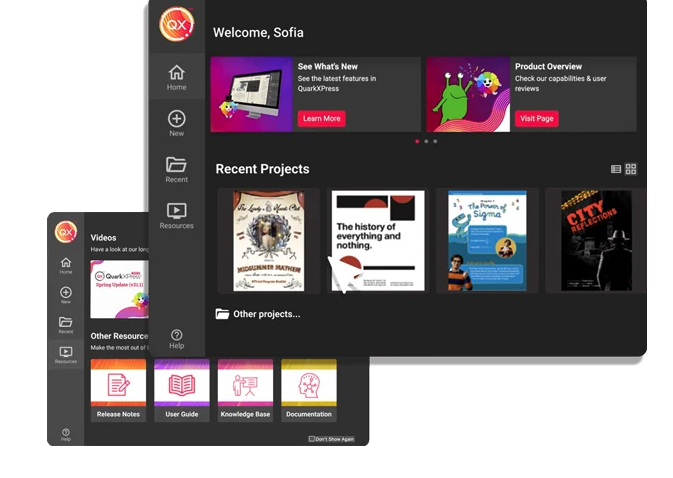
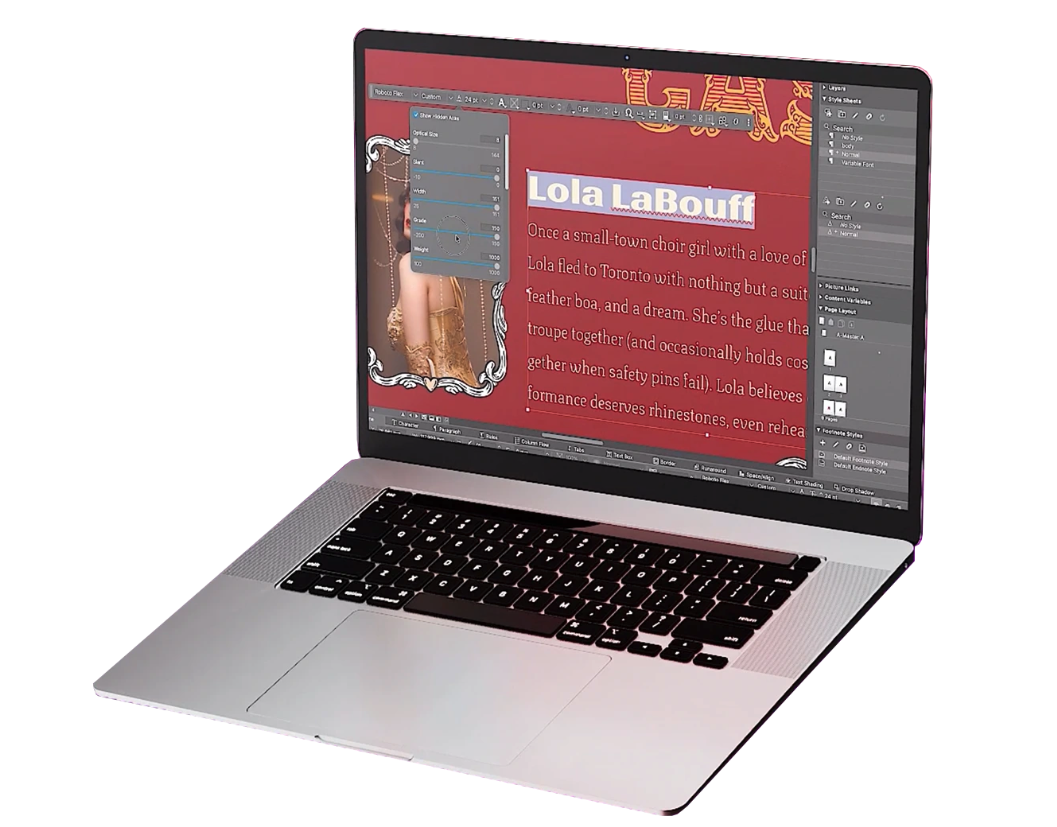
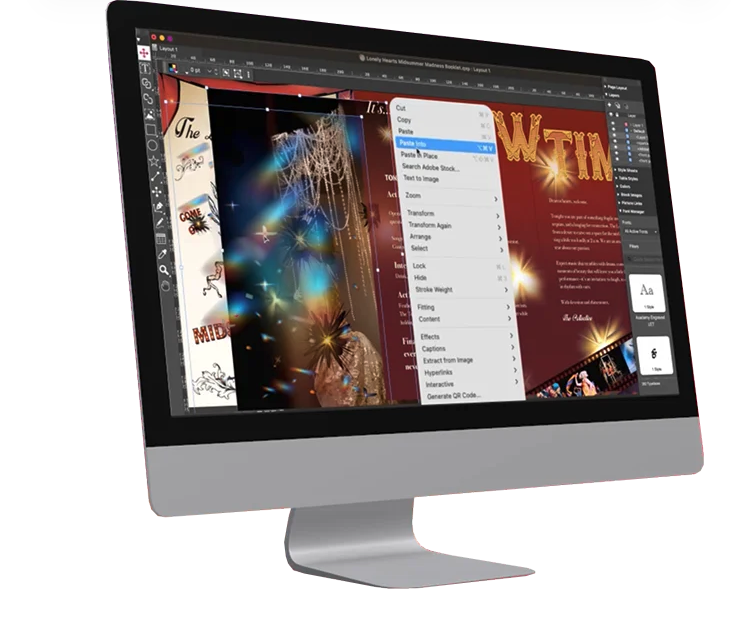
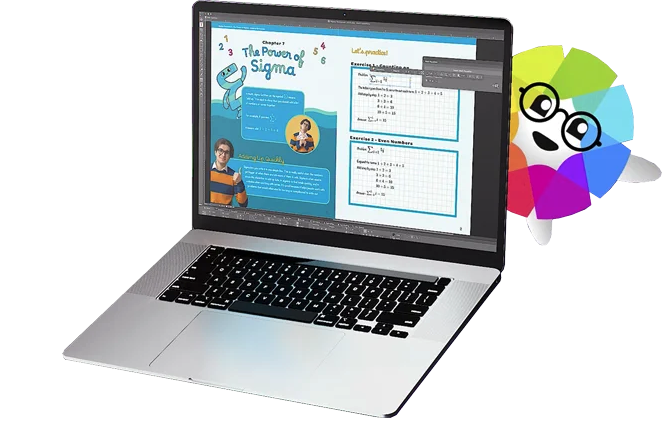
    QuarkXPress Screenshots

    Screenshot of QuarkXPress 2026 is compatible with the latest macOS® 26.x (Tahoe), macOS® 15.x (Sequoia), macOS® 14.x (Sonoma).Screenshot of the Welcome Screen in QuarkXPress 2026, which has had a fresh redesign. Here, users can create new projects, find ready-to-use project size presets, use customized workspaces and quickly access built-in tutorials and useful resources.Screenshot of where to adjust typography with Variable Fonts in QuarkXPress 2026 to enhance creative freedom. With a single font file, users can adjust font characteristics like weight, width, slant, and more with sliders.Screenshot of the Paste Into feature. Users can display content creatively by masking images or grouping items through placing them inside container shapes.Screenshot of built-in support for LaTeX and MathML, so that there's no need for external tools or plugins for advanced mathematical equations. This is ideal while working in STEM or Academia, as it enables quick and accurate editing of math equations across print and digital formats.