Overview
ProductRatingMost Used ByProduct SummaryStarting Price
Entuity
Score 8.9 out of 10
N/A
The Entuity network monitoring tool from Park Place Technologies (acquired 2019) automates network discovery and uses workflows that enable users to see when something has gone wrong. Responsive dashboards allow users to take a high-level view to gauge network health or drill down to the component level to fix network problems.N/A
Intermapper
Score 8.4 out of 10
N/A
Intermapper is a network monitoring and mapping software for hybrid environments. Intermapper provides real-time performance alerts and bandwidth monitoring with cross-platform functionality.N/A
SolarWinds Engineer's Toolset
Score 7.9 out of 10
N/A
SolarWinds® Engineer’s Toolset (ETS) helps users monitor and troubleshoot a network with over 60 tools for network management. ETS allows users to monitor and receive alerts in real time on network availability and health, and perform network diagnostics for faster troubleshooting and resolution of complex network issues. With ETS users can deploy an array of network discovery tools including Port Scanner, Switch Port Mapper or advanced Subnet Calculator, manage Cisco® devices with specialized…
$1,585
Per Instance
Pricing
EntuityIntermapperSolarWinds Engineer's Toolset
Editions & Modules
No answers on this topic
One Time Price
$1,585
Per Instance
Offerings
Pricing Offerings
EntuityIntermapperSolarWinds Engineer's Toolset
Free Trial
NoYesYes
Free/Freemium Version
NoYesNo
Premium Consulting/Integration Services
NoYesNo
Entry-level Setup FeeNo setup feeOptionalNo setup fee
Additional DetailsIntermapper pricing is based on number of devices monitored. Intermapper is free for 5 devices or less. Subscription pricing starts at $303 for 25 devices. Device-based pricing starts at $765 for 25 devices.
More Pricing Information
Community Pulse
EntuityIntermapperSolarWinds Engineer's Toolset
Features
EntuityIntermapperSolarWinds Engineer's Toolset
Network Performance Monitoring
Comparison of Network Performance Monitoring features of Product A and Product B
Entuity
8.8
1 Ratings
9% above category average
Intermapper
7.2
8 Ratings
11% below category average
SolarWinds Engineer's Toolset
-
Ratings
Automated network device discovery10.01 Ratings7.05 Ratings00 Ratings
Network monitoring10.01 Ratings8.08 Ratings00 Ratings
Baseline threshold calculation7.01 Ratings7.05 Ratings00 Ratings
Alerts9.01 Ratings7.08 Ratings00 Ratings
Network capacity planning8.01 Ratings7.03 Ratings00 Ratings
Packet capture analysis9.01 Ratings7.04 Ratings00 Ratings
Network mapping10.01 Ratings8.07 Ratings00 Ratings
Customizable reports8.01 Ratings00 Ratings00 Ratings
Wireless infrastructure monitoring9.01 Ratings7.05 Ratings00 Ratings
Hardware health monitoring8.01 Ratings7.07 Ratings00 Ratings
Best Alternatives
EntuityIntermapperSolarWinds Engineer's Toolset
Small Businesses
NinjaOne
NinjaOne
Score 9.1 out of 10
NinjaOne
NinjaOne
Score 9.1 out of 10
NinjaOne
NinjaOne
Score 9.1 out of 10
Medium-sized Companies
PingPlotter
PingPlotter
Score 8.9 out of 10
PingPlotter
PingPlotter
Score 8.9 out of 10
Intermapper
Intermapper
Score 8.4 out of 10
Enterprises
PingPlotter
PingPlotter
Score 8.9 out of 10
PingPlotter
PingPlotter
Score 8.9 out of 10
Cisco Meraki Dashboard
Score 9.0 out of 10
All AlternativesView all alternativesView all alternativesView all alternatives
User Ratings
EntuityIntermapperSolarWinds Engineer's Toolset
Likelihood to Recommend
10.0
(1 ratings)
8.0
(9 ratings)
8.6
(11 ratings)
Usability
-
(0 ratings)
-
(0 ratings)
8.2
(1 ratings)
Support Rating
10.0
(1 ratings)
9.0
(1 ratings)
8.2
(1 ratings)
User Testimonials
EntuityIntermapperSolarWinds Engineer's Toolset
Likelihood to Recommend
Park Place Technologies
I think that if your organization is network-oriented (such as telecom or ISP) deploying Entuity should be considered a mandatory step. Big organizations will benefit from the ITSM (ticketing, monitoring and CMDB) integrations.
However, if your goal is to ensure that the server layer is monitored in great level (process and service monitoring, log parsing etc.) then Entuity will not suit your needs.
Read full review
Fortra
Intermapper is a light weight, quick and easy to use monitoring application. It will get you up and monitoring key infrastructure devices with a simple management interface and effective alert system that doesn't generate a lot of noise. It provides mobile device access through a web interface and is relatively inexpensive.
Read full review
SolarWinds
I have found the toolset especially useful for scanning subnets to discover devices, and for setting up temporary real-time monitors when we are troubleshooting or setting up new connections. The most useful aspect has been the ability to apply the tools to help troubleshoot and pinpoint intermittent issues. More general tools like Orion often do not have the granularity to detect issues like intermittent packet loss which are especially impactful to applications like Voice. The toolset gives us another level of capability to dig into issues.
Read full review
Pros
Park Place Technologies
  • Exceptional network discovery and mapping.
  • Great CMDB integration capabilities.
  • Good event management integrations.
Read full review
Fortra
  • The best thing about Intermapper is that it is map-based. You start by building your map, which is done completely automatically. I've used many different monitoring software packages, Solarwinds, Nagios, Opmanager, and it is a royal PITA to create live maps with those.
  • Another great feature is that it shows you, visually, the bandwidth utilization of your network by using "ants" and color codes. Incredibly useful.
  • Alarms are very easy to setup, again much easier than the packages mentioned above.
Read full review
SolarWinds
  • Various monitoring
  • Stores history
  • Suggests indices
  • Helps to find the SQL query text
  • Helps to see what machines/users the bad queries are coming from
  • Shows current blocking session
Read full review
Cons
Park Place Technologies
  • Detailed server monitoring.
  • Detailed storage monitoring.
Read full review
Fortra
  • Setting up probes in bulk can be difficult, so it can take a long time to get the system set up correctly to start.
  • Sometimes the probes can be sensitive and report false positives.
  • Interface can be a little clunky and non intuitive at times.
Read full review
SolarWinds
  • The unifying component that is intended to be the initial interface to the tools seems clunky. I prefer to start the tools individually rather than using it.
  • The port scanner could use some improvements to make it easier to use.
Read full review
Usability
Park Place Technologies
No answers on this topic
Fortra
No answers on this topic
SolarWinds
Very easy to use and intuitive. Just be careful with the WAN Killer...it does what it says.
Read full review
Support Rating
Park Place Technologies
Entuity support has always been quick to respond and the majority of the calls I had were resolved on the first call. In addition, the product documentation is easy to read and goes into great detail of how the product works. This is probably a reason why a support call is literally the last call for Entuity (no pun intended).
Read full review
Fortra
The product works well and is very easy to maintain. As such, we haven't had many occasions to use support. When we have called them they were easy to contact and responsive to our questions. We have had the product for years and it may have been a year or better since the last time we contacted them.
Read full review
SolarWinds
Our organization uses it regularly. It is reliable, and we keep finding new uses for it
Read full review
Alternatives Considered
Park Place Technologies
The list above shows you some of the products that Entuity replaces.
The good product and excellent support behind it make it a better choice from the admin's and EA's perspective. My customers have praised the short learning curve and the swift and professional support staff. From my own experience I can tell that this product is delivered with one of the finest sets of documentation I have ever seen.
Read full review
Fortra
Intermapper is a cross between WhatsUp Gold and Nagios. WhatsUp Gold being for a less technical end-user and Nagios doing more than just SNMP scans and up down monitoring.
Read full review
SolarWinds
I haven't compared any tools similar to SolarWinds Engineer's Toolset. This might be because I'm pretty biased when it comes to monitoring, and reporting solutions. I've found that SolarWinds provides the biggest bang for the buck in my opinion. I'm sure there are other solutions on the market that compete, but I haven't tried any of them because I've been very satisfied with SolarWinds.
Read full review
Return on Investment
Park Place Technologies
  • Reconciling multiple tools (netflow, configuration, monitoring and discovery) into one tool simplified the support agreement.
  • Root cause analysis (RCA) time has been greatly reduced thanks to having all information in a single interface.
  • Security of the network devices has improved thanks to the discovery provided by Entuity.
Read full review
Fortra
  • Downtime costs money. Every minute we can get ahead of an outage is time that a plant is not sitting there waiting. We don't need to wait for a call from a plant, we know they are down immediately and we can begin troubleshooting.
Read full review
SolarWinds
  • Spend less time downloading free buggy tools
  • All the tools in one spot, so you don't have to look around for tools
  • Get to the solution sooner
Read full review
ScreenShots

Intermapper Screenshots

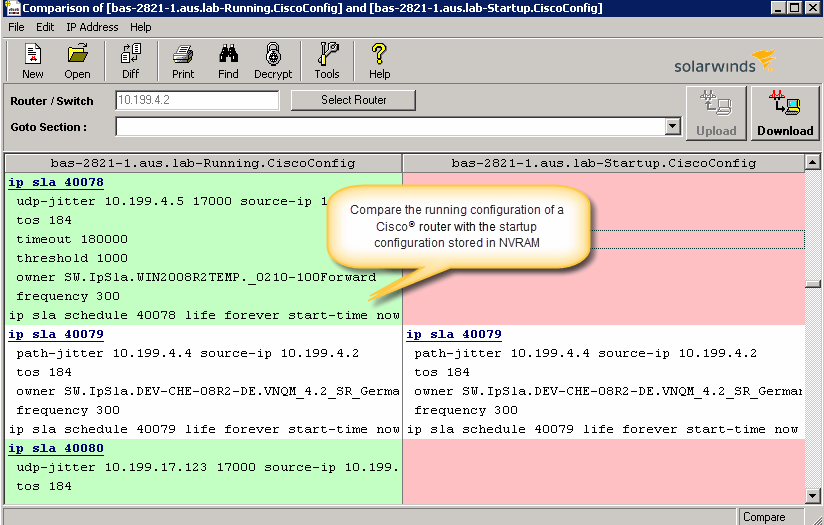
Screenshot of Intermapper maps are flexible to configure exactly to your liking.Screenshot of See your devices on a Google map. Access on any device with our web-based version.Screenshot of Device statuses give you real-time information about how your equipment is performing

SolarWinds Engineer's Toolset Screenshots

Screenshot of Perform network stress tests with Engineer's Toolset WAN Killer. You don’t need to use real traffic for studying network activities, like testing traffic and load balancing. Instead, deploy Engineer's Toolset WAN Killer to help interactively test connections and adjust the IP traffic generated to achieve the desired network load based on your requirements.Screenshot of Quickly troubleshoot your network with enhanced ping capabilities and packet route tracing, among other network bandwidth usage and monitoring tools included in ETS.Screenshot of Using ETS, you can run scans to gain insight into how routers, hubs switches, and other devices are configured by analyzing SNMP queries and viewing MIB attributes. ETS is designed to help you more easily understand whether your network and ports are using appropriate settings.Screenshot of Config Compare, a part of ETS, is built to compare the running configuration of a Cisco router with the startup configuration. With the Cisco configuration compare tool, you can easily detect the changes made to the network, switch, and router configurations that are not committed to non-volatile memory (NVRAM).Screenshot of Manage your IP network from discovery to address tracking. Discover subnets on a seed router and scan the subnet or a range of IP addresses, generate a list of subnets along with their mask, size, range, and broadcast address and actively monitor subnets to identify and track which IP addresses are in use on your network.