eSUB is a SaaS platform for commercial subcontractors running large, complex, long duration projects to proactively track and manage their costs, deadlines, deliverables and correspondence; the vendor says this can result in operational efficiencies and improved profits. eSUB is a cloud and mobile-based solution enabling real-time field updates from connected smartphones, tables and mobile PC users.
$39
per month per user
QuickBooks Time
Score8.8 out of 10
N/A
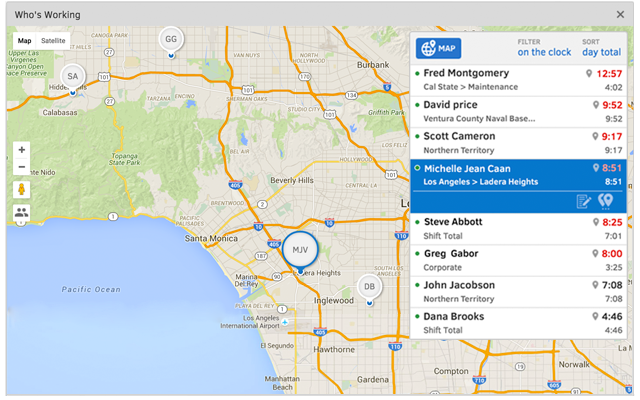
QuickBooks Time (formerly TSheets) is a cloud-based time tracking and scheduling app that allows employees to clock in and out from the job site with the devices they’ve already got in their pockets. The vendor aims to help companies replace paper timesheets with accurate, electronic time data as well as make payroll and invoicing faster and less costly. QuickBooks Time also accurately tracks time and GPS points (even without cell or internet service) then automatically syncs when back…
$0
1 user, unlimited projects
Pricing
eSUB Construction Software
QuickBooks Time
Editions & Modules
Base
$39
per month (annually) per user
Advanced
$59
per month (annually) per user
Premium
Contact
Free
$0
1 user, unlimited projects
Premium
$8
per user/month + $20 base fee/month (paid annually)
Elite
$10
per user/month + $40 base fee/month (paid annually)
If you are doing any sort of new construction, eSUB is a budget friendly option for managing the process. It's helpful for keeping track of submittals, RFI's and for foreman doing Daily Work Reports. It is not suited really well for plan management and scheduling. The modules for these are not well thought through. Also if you specialize in service work or projects that have short durations (i.e. 1-2 weeks or less), eSUB isn't the best option for you. It would take too long to set up a job vs the time it takes to do the job.
A de minimis incentive was given to thank the reviewer for their time. The incentive was not used to bias or drive a particular response, nor was the incentive contingent on a positive endorsement. More Info
It would be very useful for certain remote jobs that require a high level of presence, as in the case of web development, or remote maintenance sessions, so that when reviewing the work data it is possible to ensure that there will be no failures. By being able to include files in the management, from the equipment tab, it is possible to fully control the hours in which each change in these files were made.
A de minimis incentive was given to thank the reviewer for their time. The incentive was not used to bias or drive a particular response, nor was the incentive contingent on a positive endorsement. More Info
It is built with subcontractors in mind. There are many PM software available but this one aims at the commercial subcontractor.
It does a great job covering the basics of typical commercial work. There are areas that allow you to customize such as adding reservations of rights to documents.
It can integrate with Microsoft quite a bit, we use this in our work every day and being able to export or sync data/calendars has been helpful.
A de minimis incentive was given to thank the reviewer for their time. The incentive was not used to bias or drive a particular response, nor was the incentive contingent on a positive endorsement. More Info
Support (their help desk team is incredibly helpful and always quick to respond).
Ease of access and use (the app is user-friendly an intuitive, and the desktop version is equally as approachable).
Manager functionality (it's useful to be able to clock employees in and out at multiple events on the same day by sorting them into different groups by manager/event).
A de minimis incentive was given to thank the reviewer for their time. The incentive was not used to bias or drive a particular response, nor was the incentive contingent on a positive endorsement. More Info
A de minimis incentive was given to thank the reviewer for their time. The incentive was not used to bias or drive a particular response, nor was the incentive contingent on a positive endorsement. More Info
The desktop version of the TSheets schedule does not have a search feature. This makes it challenging to find things you are looking for without extra work
The app can be a bit buggy. Though it is a great app, there are many reasons that the app will stop syncing and can cause problems with staff scheduling
A de minimis incentive was given to thank the reviewer for their time. The incentive was not used to bias or drive a particular response, nor was the incentive contingent on a positive endorsement. More Info
TSheets tech support people, like Shawn Sommer, from Tsheets. She has been instrumental, after terminating the person in charge of TSheets I was left with a learning curve too high to climb but after 10 mins of her instructions I was able to make payroll in no time. She cleared all errors that nobody had fixed before. TSheets is not a vendor for me, TSheets is my partner in business. Thank you TSheets.
Our employees find TSheets easy to use and spend minimal time at reporting hours using it. As an administrator and user of the TSheets "data and information" I am extremely positive on the functionality and reporting that it has provided me. From its ease of set-up to training to reporting, TSheets has made us so much more efficient from an administration standpoint
A de minimis incentive was given to thank the reviewer for their time. The incentive was not used to bias or drive a particular response, nor was the incentive contingent on a positive endorsement. More Info
It has been helpful whenever I've called. They have been able to walk me through solutions and even direct me to the right answer. There was only 1hr difference between time zones so this was manageable. If we experienced bugs, their IT department was helpful at remedying and they were always rolling out updates.
A de minimis incentive was given to thank the reviewer for their time. The incentive was not used to bias or drive a particular response, nor was the incentive contingent on a positive endorsement. More Info
I have never failed to have an issue resolved within minutes of contacting Support. Jen D recently assisted my with an export issue and I was back on track in less the 10 minutes. She was knowledgable and thought about the current and future contexts of the issue and assured there would be no recurrence next payroll.
A de minimis incentive was given to thank the reviewer for their time. The incentive was not used to bias or drive a particular response, nor was the incentive contingent on a positive endorsement. More Info
eSUB is not even close when it comes to the offerings that the others have. eSUB is a happy medium for the functionality it provides and is at an affordable price point that it doesn't break the bank. Other solutions are a lot more integrated into the company processes and procedures, which means more upfront investment to get the platform to go live. eSUB's simplicity makes it easier to roll out because it doesn't integrate with as many aspects of the business.
A de minimis incentive was given to thank the reviewer for their time. The incentive was not used to bias or drive a particular response, nor was the incentive contingent on a positive endorsement. More Info
Besides Intuit Payroll (Sage), the only program I've used is WorkBrain through Menards, and it's more as a scheduling guideline for management, employees don't use it to punch in or out or record hours. However, WorkBrain does show scheduling and it matches with a punch clock to record those hours. Every other place I've used has used either punch clocks or handwritten time cards. I think the TSheets is modern, user-friendly, convenient, accessible, and cost-effective for the owners. It also streamlines payroll for the Accountant instead of manually entering all hours for multiple employees by hand into a software program like Sage.
A de minimis incentive was given to thank the reviewer for their time. The incentive was not used to bias or drive a particular response, nor was the incentive contingent on a positive endorsement. More Info
A de minimis incentive was given to thank the reviewer for their time. The incentive was not used to bias or drive a particular response, nor was the incentive contingent on a positive endorsement. More Info
A de minimis incentive was given to thank the reviewer for their time. The incentive was not used to bias or drive a particular response, nor was the incentive contingent on a positive endorsement. More Info