Futuramo creates SaaS apps to provide a collaborative workspace for teams. Futuramo Time Tracker is an app used to track, analyze, and manage time, free for teams of up to 3 users, and $6 per license for each additional user.
$6
per month
ICIMS Hire
Score8 out of 10
N/A
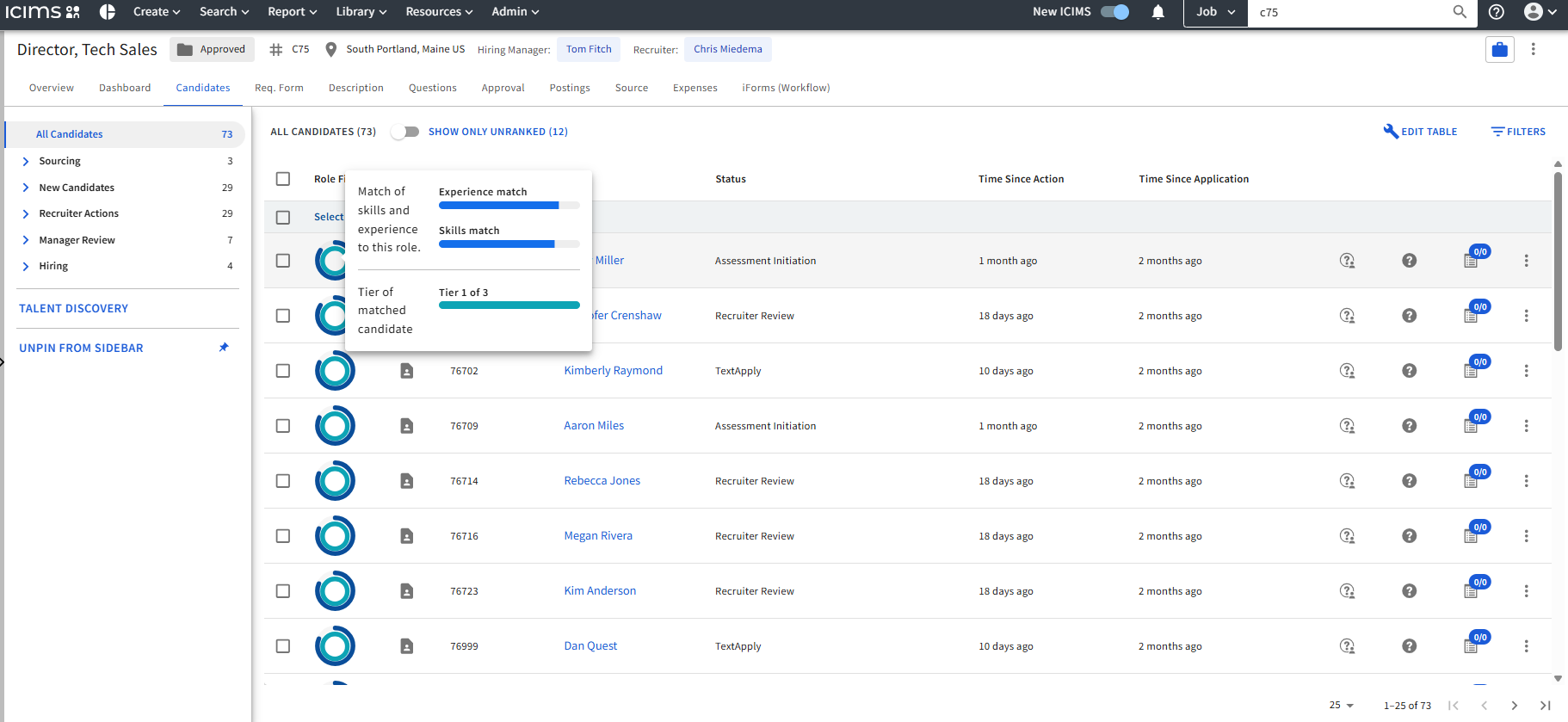
ICIMS Hire is an enterprise applicant tracking system (ATS) that supports core hiring workflows. With comprehensive support for screening, interview management, offer management, and onboarding, it is built on enterprise‑grade technology and designed to support complex, global hiring at scale.
N/A
Pricing
Futuramo Time Tracker
ICIMS Hire
Editions & Modules
Small Teams
$0.00
up to 3 team members
Growing Teams
$6.00
per each additional license
No answers on this topic
Offerings
Pricing Offerings
Futuramo Time Tracker
ICIMS Hire
Free Trial
Yes
No
Free/Freemium Version
Yes
No
Premium Consulting/Integration Services
No
Yes
Entry-level Setup Fee
No setup fee
No setup fee
Additional Details
—
Implementation pricing is determined on a per-company basis.
Starting price (does not include set up fee) - Pricing is determined on a per-company basis, tailored to organization size, configuration, and selected solutions.
Futuramo is best for when you're working alone on a project, or with a small team, given the glitches with the time tracker and the poor integration with Futuramo Tasks and Projects. Unless you're going to manually calculate the times spent on all tasks individually in order to know the total time spent on the project, I would not recommend using it on projects where you'd be billed per the time spent rather than a fixed amount.
A de minimis incentive was given to thank the reviewer for their time. The incentive was not used to bias or drive a particular response, nor was the incentive contingent on a positive endorsement. More Info
When we partnered with ICIMS in 2018, it met our needs. 8 years later, I think ICIMS can offer more. AI needs to be incorporated into its system to better service its customers. The other recommendation is that they should offer training and communicate more often with their clients. Their dashboard should also be improved to make it easier on the eyes.
A de minimis incentive was given to thank the reviewer for their time. The incentive was not used to bias or drive a particular response, nor was the incentive contingent on a positive endorsement. TR verified that a representative sample of customers was invited. More Info
The biggest pro of Futurama Time tracker is that it comes bundled with other tools. These are "Projects, Tasks, Virtual Tickets, Time Tracker, and Icons." This means I can track the time spent on each task within a project.
Time Tracker is easy to use, all you need to do is go to time tracker, enter the task you want to track, choose what project and clients it's under, and then click the play/start icon.
For projects that involve collaborating with others (either external freelancers I'm managing, or my staff) I can track the time spent on each task by each user. So I know how long each person spent on their task and how it related to the estimated time. This way I know if the project will take longer or shorter than estimated.
A de minimis incentive was given to thank the reviewer for their time. The incentive was not used to bias or drive a particular response, nor was the incentive contingent on a positive endorsement. More Info
My favorite: Workflow Auto-Process Rules. When moving a candidate to the "Phone Screen" stage, the system can automatically trigger a text message to them with a link to my calendar. Once they pick a time, it sends the calendar invite to both of us and attaches their resume for me.
It eliminates the manual emailing, making the company look incredibly fast and organized to the candidate.
The simplicity with which you are able to navigate the tooling. Very intuitive, requires little training and troubleshooting. At a prior company we were using a robust system which took me weeks to navigate and learn. As a hiring manager, this is such a drag as I am not constantly hiring people to keep the skills fresh.
ICIMS Hire is great at reporting on past applications. Whenever I have a new opening on the team, instead of spending ad money on social, I go dig for "star candidates" that applied 1 year ago, for example, and start there. I personally hired a returning candidate this way which is such a great relationship builder with possible future candidates.
A de minimis incentive was given to thank the reviewer for their time. The incentive was not used to bias or drive a particular response, nor was the incentive contingent on a positive endorsement. TR verified that a representative sample of customers was invited. More Info
I'ver been using Futuramo for almost 2 years, primarily because they reached out to me to be one of the first users/testers. I've also shared some glitches that could be improved but the timer glitch is still there. When I start the timer to track a project, instead of the timer to start counting, it remains at 00:00 which is worrying because it makes me feel like it's not actually tracking what I'm working on. I was once 18 mins unto a task and when I checked the tracker it said 00:16 I was so worried I ended the task. Interestingly when I ended the task, it showed the correct time which was 18 minutes. I'm happy the timer was working but I'm also frustrated and in near-panic.
Like TopTracker, I wish there was a way to take screenshots of what I'm doing, that way I can be sure that the rest of the team is actually working on the timed tasks.
In the Time Tracker section of Futuramo, where the tasks timed are listed, I wish it was possible to actually click on any of the tasks there to see things like mouse clicks and keyboard taps. Similar to how Hubstaff and Upwork tracker tracks "productivity" (I'm not sure what this is called).
If you track a task not originally in Futuramo Task but created in Time Tracker, connected to a project or client, when you go to Futuramo Task, it won't be listed there. And when you to go Futuramo Projects, you still wouldn't see it there. I would like to go to Futuramo Project and see all the tasks there, both those timed and those yet to start.
A de minimis incentive was given to thank the reviewer for their time. The incentive was not used to bias or drive a particular response, nor was the incentive contingent on a positive endorsement. More Info
A de minimis incentive was given to thank the reviewer for their time. The incentive was not used to bias or drive a particular response, nor was the incentive contingent on a positive endorsement. More Info
We would highly likely renew iCIMS Hire because it consistently delivers strong value across our recruiting process. It streamlines workflows, improves collaboration between teams, and provides reliable reporting and insights. The system is scalable, user-friendly, and continues to evolve with new features, making it a dependable long-term solution for our hiring needs.
A de minimis incentive was given to thank the reviewer for their time. The incentive was not used to bias or drive a particular response, nor was the incentive contingent on a positive endorsement. More Info
The platform is intuitive once configured and makes managing candidate pipelines, status updates, and communication straightforward. However, certain tasks—like custom reporting, bulk updates, and navigating between modules can feel a bit cumbersome and could benefit from a more modern interface. Overall, it’s reliable and effective for structured, high-volume recruiting environments like federal hiring.
A de minimis incentive was given to thank the reviewer for their time. The incentive was not used to bias or drive a particular response, nor was the incentive contingent on a positive endorsement. More Info
There is always ample advance notice before the software goes down for maintenance and this is usually done at off-peak hours. As for system failures - I can't think of any that have effected us in over two years od use.
A de minimis incentive was given to thank the reviewer for their time. The incentive was not used to bias or drive a particular response, nor was the incentive contingent on a positive endorsement. More Info
We can think of no dissatisfaction with our daily use of iCims, involving its response time to commands or incompatibility with any other software we presently use.
A de minimis incentive was given to thank the reviewer for their time. The incentive was not used to bias or drive a particular response, nor was the incentive contingent on a positive endorsement. More Info
Before pandemic and iCIMS Talent Cloud acquisitions I would give 10 without a doubt. Unfortunately, I see a strong decrease in the support model, which seems to be mainly connected with the fact that acquired companies/tools/features need to be integrated with the platform, and knowledge of newly provided services and tools were not yet incorporated fully into the support.
A de minimis incentive was given to thank the reviewer for their time. The incentive was not used to bias or drive a particular response, nor was the incentive contingent on a positive endorsement. More Info
I would say I believe iCims online training is very good. It's informative, visually appealing, and simple in explaining all the different aspects of iCims. I also really like the new candidate onboarding, and all the other training curricula you have up to be able to inform or send out to the candidate. I like you can attach a URL link for videos as well so you can really customize the training. I feel that overall, I would like to see more. Perhaps, more robust options with the training, if that's something iCims is expanding on in the future.
A de minimis incentive was given to thank the reviewer for their time. The incentive was not used to bias or drive a particular response, nor was the incentive contingent on a positive endorsement. More Info
A de minimis incentive was given to thank the reviewer for their time. The incentive was not used to bias or drive a particular response, nor was the incentive contingent on a positive endorsement. More Info
Fully available automation, lesser bad data quality, more information is gathered at the time of applicant profile creation without having the need to ask for any follow ups or additional notifications. Integrates better with Oracle, Workday and SAP than other similar systems. Service tickets are resolved faster than other vendors we worked with.
A de minimis incentive was given to thank the reviewer for their time. The incentive was not used to bias or drive a particular response, nor was the incentive contingent on a positive endorsement. More Info
iCims is currently pretty good and the best TAS for us at our stage of growth - but further improvement and enhancements will only help make it even better.
A de minimis incentive was given to thank the reviewer for their time. The incentive was not used to bias or drive a particular response, nor was the incentive contingent on a positive endorsement. More Info
Increased productivity: Futuramo Time Tracker makes it easy to know how long it'll actually take me to complete a task, and when put together, how long it'd take me to complete a project.
Track Billables: While calculating all the time spent on each task manually was exhausting, once that was done, I knew how long it took me and my team to complete a project and was able to bill my client for just that time.
A de minimis incentive was given to thank the reviewer for their time. The incentive was not used to bias or drive a particular response, nor was the incentive contingent on a positive endorsement. More Info
A de minimis incentive was given to thank the reviewer for their time. The incentive was not used to bias or drive a particular response, nor was the incentive contingent on a positive endorsement. More Info