GitLab is an intelligent orchestration platform for DevSecOps, where software teams enable AI at every stage of the software lifecycle to ship faster. The platform enables teams to automate repetitive tasks across planning, building, securing, testing, deploying, and maintaining software.
$0
per month per user
IBM Cloud Kubernetes Service
Score 7.9 out of 10
Mid-Size Companies (51-1,000 employees)
IBM Cloud Kubernetes Service is a
managed Kubernetes offering, delivering user tools and built-in security for rapid delivery of applications
that users can bind to cloud services related to IBM Watson®, IoT, DevOps
and data analytics. As a certified K8s provider, IBM Cloud Kubernetes
Service provides intelligent scheduling, self-healing, horizontal
scaling, service discovery and load balancing, automated rollouts and
rollbacks, and secret and configuration management. The Kubernetes…
N/A
SonarQube
Score 8.0 out of 10
N/A
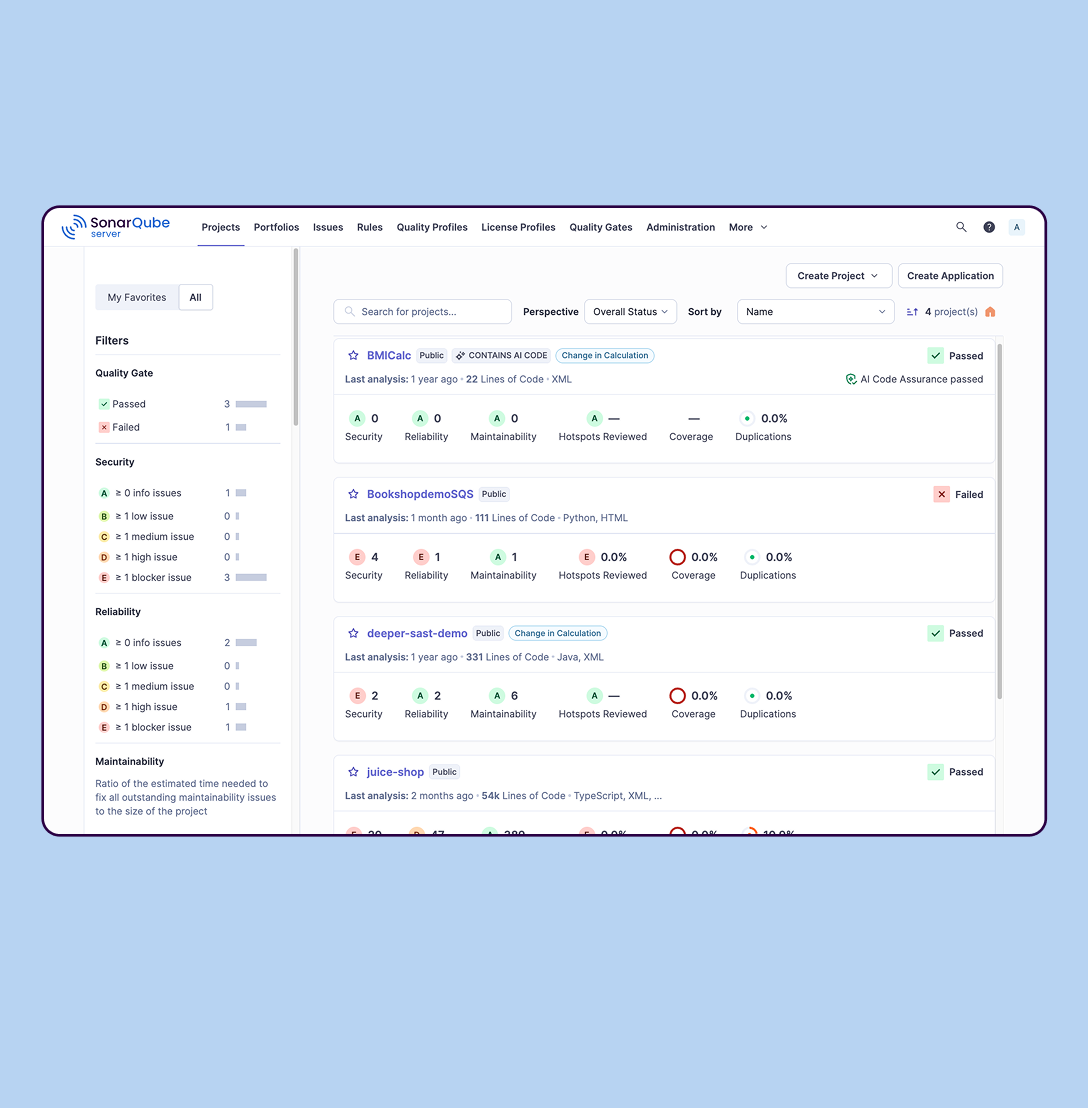
SonarQube is an automated code review solution, serving as the verification layer for code quality and SDLC security. SonarQube is used to ensure that code is secure, reliable, and maintainable. It is available through SaaS or self-managed deployment.
$0
Pricing
GitLab
IBM Cloud Kubernetes Service
SonarQube
Editions & Modules
GitLab Free (self-managed)
$0
GitLab Free
$0
GitLab Premium
$29
per month per user
GitLab Premium (self-managed)
$29
per month per user
GitLab Ultimate
Contact Sales
GitLab Ultimate (self-managed)
Contact Sales
No answers on this topic
Cloud-based: Free
$0
Self-managed: Developer
Starting at $720 annually
per year per installation
Self-managed: Enterprise
Contact sales for pricing
per year per installation
Cloud-based: Enterprise
Contact sales for pricing
per year per installation
Cloud-based: Teams
Starting at $32 per month
per month per installation
Self-managed: Data Center
Contact sales for pricing
per year per installation
Offerings
Pricing Offerings
GitLab
IBM Cloud Kubernetes Service
SonarQube
Free Trial
Yes
No
Yes
Free/Freemium Version
Yes
Yes
Yes
Premium Consulting/Integration Services
Yes
Yes
No
Entry-level Setup Fee
Optional
Optional
No setup fee
Additional Details
GitLab Credits enable flexible, consumption-based access to agentic AI capabilities in the GitLab platform, allowing you to scale AI adoption at your own pace while maintaining cost predictability. Powered by Duo Agent Platform, GitLab’s agentic AI capabilities help software teams to collaborate at AI speed, without compromising quality and enterprise security.
If usage exceeds monthly allocations and overage terms are accepted, automated on-demand billing activates without service interruption, so your developers never lose access to AI capabilities they need.
Real-time dashboards provide transparency into AI consumption patterns. Software teams can see usage across users, projects, and groups with granular attribution for cost allocation. Automated threshold alerts facilitate proactive planning. Advanced analytics deliver trending, forecasting, and FinOps integration.
Other solutions were studied, however GitHub being a SaaS solution causes security issues whithin many organizations. Bitbucket on the other hand can be installed and maintained however it must require licensing purchases. Although GitLab free version doesn't provide a lot of …
We migrated from Gerrit to GitLab, and minus a few minor bumps during migration, GitLab has been hands down better. Our devs have faster time to code review with notifications, the UI is easy to navigate and, and our pipeline is integrated and automated, so once everything is …
We are coming from Bitbucket, and we switch to Gitlab to improve the source code management and the reading, which is better on Gitlab. The Merge request flow is also better than Bitbucket. This allows us to use Gitlab CI, which is well-integrated. Compared to GitHub, it is …
GitLab offers us the CE as an on-premise option without additional cost. We can deploy easily GitLab CE using docker official images. The GitLab CI option is more mature and simple than GitHub Actions.
Cost aside, the current field of source code management systems is exceptional. GitLab, however, rises above them all. The community version has all of the basic features needed by virtually any company and the pricing for additional features is in line with the value obtained.
This is a very difficult question, because there are a lot of similarities and the differences are minor but could be important if your use-case requires something like that. For example if you need a cluster that is ready sooner than 45 minutes or a data center/location in …
Gitlab, if you have the right license, ships with a static analysis tool. It integrates better with Gitlab, but didn't seem to have the same quality output that Sonarqube did. Sonarqube's community version is plenty suitable for day to day analysis operations.
SonarQube deployment worked well with our pipeline and had the right integrations with our IDE as well as it worked well with analyzing .NET frameworks when compared to GitHub and GitLab which has some of the functionality and can do some checks, but SonarQube made more sense …
Verified User
Engineer
Chose SonarQube
Jenkins and GitLab are not exact alternatives for SonarQube, however, they do provide functionality for running and executing build pipelines for various languages and generating reports. However, they are not extensible, have no integration with IDEs and not suitable for …
GitLab is good if you work a lot with code and do complex repository actions. It gives you a very good overview of what were the states of your branches and the files in them at different stages in time. It's also way easier and more efficient to write pipelines for CI\CD. It's easier to read and it's easier to write them. It takes fewer clicks to achieve the same things with GitLab than it does for competitor products.
IBM Cloud Kubernetes Service also stands out in environments where the workloads vary continuously and require befitting scale. The product excels particularly in microservices structures, wherein the companies would harness the capacity for container orchestration and automated scaling. Still, it may face the challenges due to monolith applications that have not been originally developed for using container technology.
SonarQube is excellent if you start using it at the beginning when developing a new system, in this situation you will be able to fix things before they become spread and expensive to correct. It’s a bit less suitable to use on existing code with bad design as it’s usually too expensive to fix everything and only allows you to ensure the situation doesn’t get worse.
IBM has a strong focus on serverless and Kubernetes. This shows in the platform. Deploying containers to Kubernetes was very easy.
Deploying a Kubernetes cluster through the GUI is very easy and quick. On top of that, IBM Cloud offers a single node cluster for Free.
Container Registry is a very good product for managing container images. Integration with Kubernetes was seemless.
Portability. To transition from Google Cloud Kubernetes to IBM Cloud Kubernetes took almost no effort. We mostly use the CLI and the standard tools such as kubectl were present.
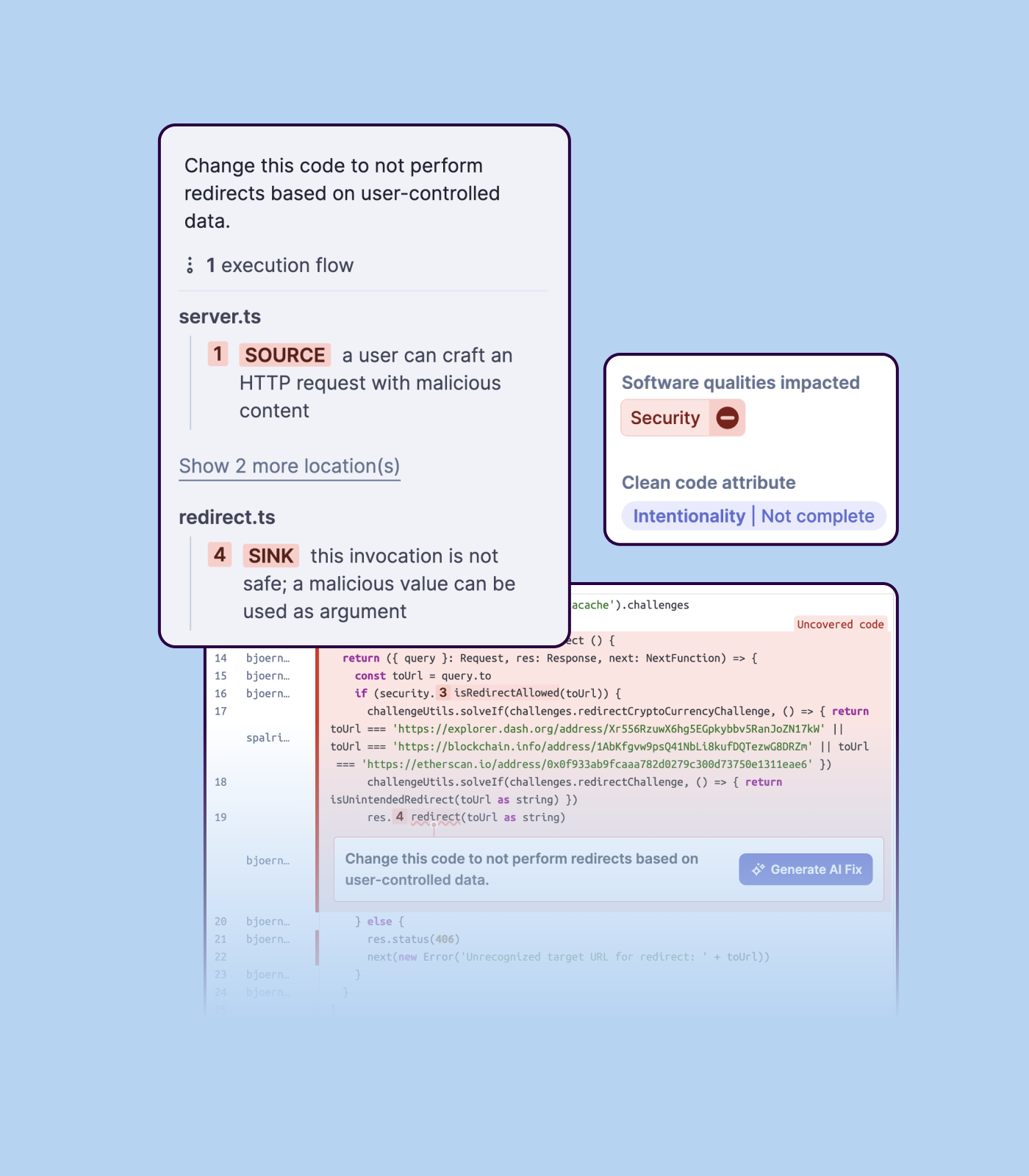
Detecting bugs and vulnerabilities: SonarQube can identify a wide range of bugs and vulnerabilities in code, such as null pointer exceptions, SQL injection, and cross-site scripting (XSS) attacks. It uses static analysis to analyze the code and identify potential issues, and it can also integrate with dynamic analysis tools to provide even more detailed analysis.
Measuring code quality: SonarQube can measure a wide range of code quality metrics, such as cyclomatic complexity, duplicated code, and code coverage. This can help teams understand the quality of their code and identify areas that need improvement.
Providing actionable insights: SonarQube provides detailed information about issues in the code, including the file and line number where the issue occurs and the severity of the issue. This makes it easy for developers to understand and address issues in the code.
Integrating with other tools: SonarQube can be integrated with a wide range of development tools and programming languages, such as Git, Maven, and Java. This allows teams to use SonarQube in their existing development workflow and take advantage of its powerful code analysis capabilities.
Managing technical debt: SonarQube provides metrics and insights on the technical debt on the codebase, enabling teams to better prioritize issues to improve the quality of the code.
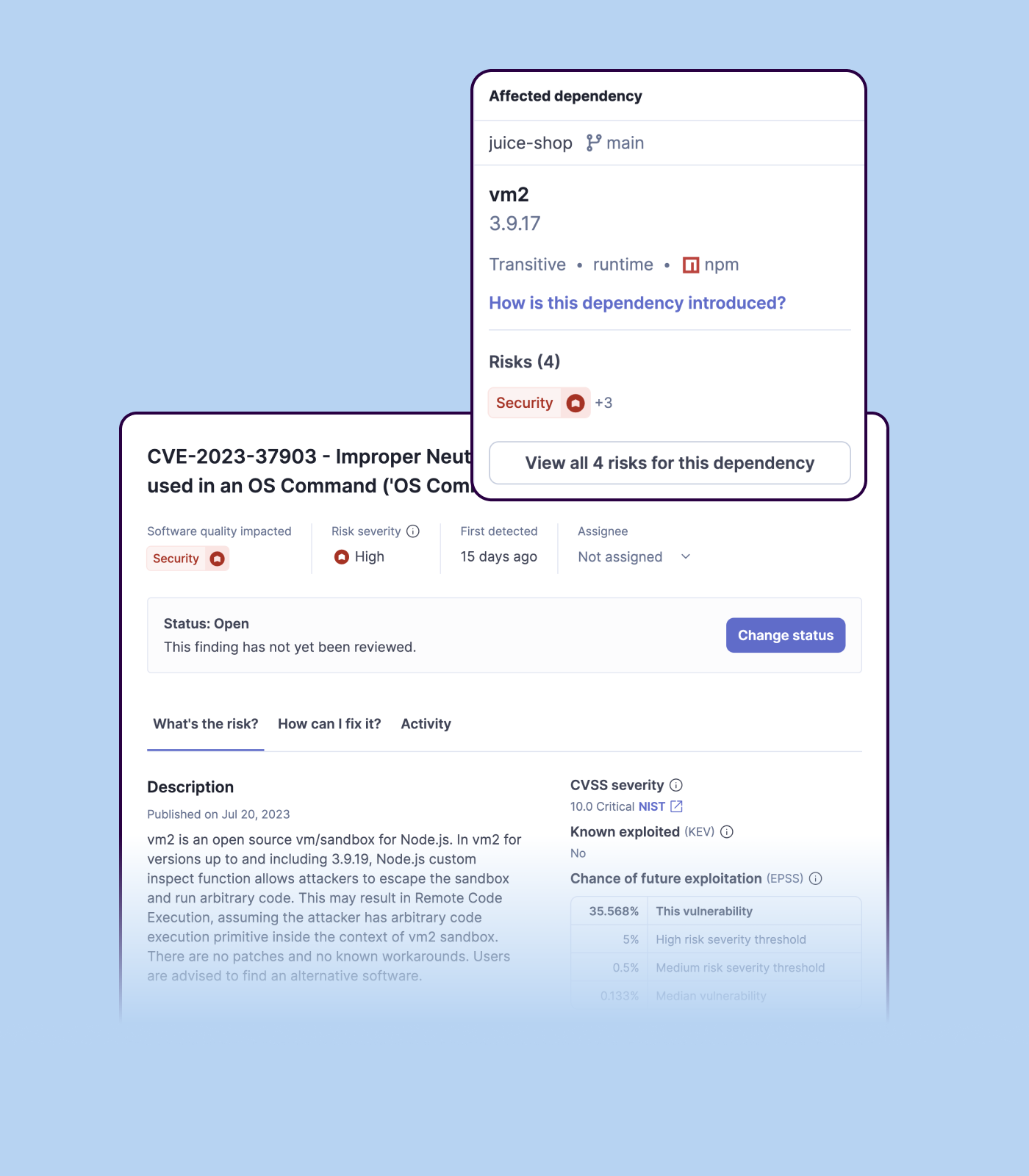
Compliance with coding standards: SonarQube can check the code against industry standards like OWASP, CWE and more, making sure the code is compliant with security and coding standards.
I constantly get this error even when everything is well configured prefect.exceptions.AuthorizationError: [{'path': ['auth_info'], 'message': 'AuthenticationError: Forbidden', 'extensions': {'code': 'UNAUTHENTICATED'}}]
Then sometimes the error disapear without changine anything, happened twice to me. Should there be an issue with the authentication service? Please let's improve or let users know why this may be happening.
Improve the UX in the browse console when removing many images at once
UX on the process of installing KeyCloack operator
Importing a new custom quality profile on SonarQube is a bit tricky, it can be made easier
Every second time when we want to rerun the server, we have to restart the whole system, otherwise, the server stops and closes automatically
When we generate a new report a second time and try to access the report, it shows details of the old report only and takes a lot of time to get updated with the details of the new and fresh report generated
I really feel the platform has matured quite faster than others, and it is always at the top of its game compared to the different vendors like GitHub, Azure pipelines, CircleCI, Travis, Jenkins. Since it provides, agents, CI/CD, repository hosting, Secrets management, user management, and Single Sign on; among other features
We have our application running on a CentOS compartment on IBM Cloud Kubernetes Service. We have been utilizing the help since IBM Cloud initially dispatched. We liked the adaptability and versatility that IBM Cloud Kubernetes Service give us. Since we are tiny, the Kubernetes administration is just utilized at present inside my venture bunch.
I find it easy to use, I haven't had to do the integration work, so that's why it is a 9/10, cause I can't speak to how easy that part was or the initial set up, but day to day use is great!
We actually haven't had any real problems in our clusters recently and the results we have gotten from adopting IBM Cloud Kubernetes Service have been beyond even our greatest expectations. The community has helped optimize the use of the system and make it relatively simpler to use.
I've never had experienced outages from GItlab itself, but regarding the code I have deployed to Gitlab, the history helps a lot to trace the cause of the issue or performing a rollback to go back to a working version
GItlab reponsiveness is amazing, has never left me IDLE. I've never had issues even with complex projects. I have not experienced any issues when integrating it with agents for example or SSO
At this point, I do not have much experience with Gitlab support as I have never had to engage them. They have documentation that is helpful, not quite as extensive as other documentation, but helpful nonetheless. They also seem to be relatively responsive on social media platforms (twitter) and really thrived when GitHub was acquired by Microsoft
The self-guided support was solid, and there are plenty of online videos to guide first time users, but I think one area of improvement is a faster way to transfer a large quantity of files from our local machine to the cloud for storage (Aspera)
We we easily able to integrate the SonarQube steps into our TFS process via the Microsoft Marektplace, we didn't have the need to call SonarQube support. We've used their online documentation and community forum if we ran into any issues.
Online training is really an important resource for using these tools. IBM's help center is rich in useful information and tips. Also, external guides and tutorials are available (e.g. on youtube), but I followed only IBM ones and I had no difficulties.
Ease of use. Very intuitive. We have been looking for a product that allows us to orchestrate our docker containers in a way where it allows us to effectively scale our applications to production. It also provides us a way of monitoring all our infrastructure in a very clear concise way.
Gitlab seems more cutting-edge than GitHub; however, its AI tools are not yet as mature as those of CoPilot. It feels like the next-generation product, so as we selected a tool for our startup, we decided to invest in the disruptor in the space. While there are fewer out-of-the-box templates for Gitlab, we have never discovered a lack of feature parity.
We mainly selected [IBM Cloud Kubernetes Service] because IBM fabric blockchain service is mostly compatible with it. To have all the infrastructure in a single cloud to get the best output we selected the [IBM Cloud Kubernetes Service].
SonarQube is an open-source. It's a scalable product. The costs for this application, for the kind of job it does, are pretty descent. Pipeline scan is more secured in SonarQube. Its a very good tool and its support multiple languages. Its main core competency is of static code analysis and that is why SonarQube exists and it does it exceedingly well. The quality of scan on code convention, best practices, coding standards, unit test coverage etc makes them one of the best competent tool in the market
IBM's CKS does not offers automatic autoscaling nor vertical scaling (automatic). Other services like Google Kubernetes Engine scales up and down very well
Positive ROI from the standpoint of flagging several issues that would have otherwise likely been unaddressed and caused more time to be spent closer to launch
Slightly positive ROI from time-saving perspective (it's an automated check which is nice, but depending on the issues it finds, can take developers time to investigate and resolve)