TrustRadius: an HG Insights company

Save this comparison

Save this comparison

Add Product

Recommended Comparisons

    Overview
    ProductRatingMost Used ByProduct SummaryStarting Price

    HotSchedules

    Score8 out of 10
    N/AHotSchedules is a cloud-based scheduling, labor and communication management software solution serving the restaurant and hospitality industry. According to the vendor, key benefits include: Build & Communicate Schedules The scheduling and labor management software reduces the time it takes managers to create and communicate schedules. All scheduling and employee information is stored in one central location, so managers have access to time-off requests,…

    $2

    per month per employee

    Teamsly

    N/AN/ATeamsly is a cloud-based workforce management platform for hourly, shift-based, deskless, frontline, and field teams. Available on the web, iOS, and Android, Teamsly brings employee scheduling, job and crew scheduling, time and attendance, GPS time tracking, timesheets, team communication, task management, digital forms, audits, employee training, paid time off, labor-cost management, and workforce reporting into one connected system. The platform is designed to…

    $29

    per month per Location

    Pricing
    HotSchedulesTeamsly
    Editions & Modules
    Essentials
    $2
    per month per employee
    Plus
    $4
    per month per employee
    Quote-Based
    Quote-based pricing
    Free
    $0
    per month Per Location
    Basic
    $29
    per month Per Location
    All-In-One
    $59
    per month Per Location
    Offerings
    Pricing Offerings
    HotSchedulesTeamsly
    Free Trial
    YesYes
    Free/Freemium Version
    NoYes
    Premium Consulting/Integration Services
    NoNo
    Entry-level Setup FeeNo setup feeNo setup fee
    Additional Details—Teamsly uses flat per-location pricing rather than per-employee pricing. The Free plan supports one location with up to 10 employees. Basic and All-In-One paid plans include unlimited employees, helping businesses maintain predictable costs as their teams grow. Basic costs $29 per location per month with monthly billing or $24 per location per month when billed annually. All-In-One costs $59 per location per month with monthly billing or $49 per location per month when billed annually. Both paid plans include a 30-day free trial with no credit card required. Teamsly does not charge setup fees or require a locked-in contract, and customers can upgrade, downgrade, or change plans as their operational needs evolve.
    More Pricing Information
    Best Alternatives
    HotSchedulesTeamsly
    Small Businesses
    Jolt
    Score9.7 out of 10
    Deputy
    Score8.6 out of 10
    Medium-sized Companies
    Jolt
    Score9.7 out of 10
    Harri
    Score6 out of 10
    Enterprises
    No answers on this topic
    Enterprise eTIME, by ADP (discontinued)
    Score10 out of 10
    All AlternativesView all alternativesView all alternatives
    User Ratings
    HotSchedulesTeamsly
    Likelihood to Recommend
    1.0
    (167 ratings)
    -
    (0 ratings)
    Likelihood to Renew
    9.1
    (2 ratings)
    -
    (0 ratings)
    Usability
    8.9
    (12 ratings)
    -
    (0 ratings)
    Support Rating
    8.9
    (4 ratings)
    -
    (0 ratings)
    User Testimonials
    HotSchedulesTeamsly
    Likelihood to Recommend
    HotSchedules and Fourth
    For small to medium-sized companies HotSchedules works great when business is very static. If you are simply using HotSchedules for a schedule writing tool, it is phenomenal. However, it does miss the mark as a labor control software. Needs more controls to keep managers aware of spending versus historical sales data.
    Incentivized
    Read full review
    Teamsly
    No answers on this topic
    Pros
    HotSchedules and Fourth
    • Communication is so simple on HotSchedules. Whether it is communicating a new schedule release, or a quick note about tonight's shift we as managers are able to easily communicate and know that it will reach our team through text notifications, or email notifications.
    • The Meal Break planning tool is very useful in being able to help our floor leaders clearly understand and plan for what breaks are needed throughout the shift. This allows them to come up with a strategic game plan quickly and spend more time with our guests.
    • Shift Swaps and Releases are so seamless. This is our favorite tool as it makes helping our team cover shifts extremely easy and painless. On the flip side it also makes staff who want more hours be able to find what is available in real time.
    Incentivized
    Read full review
    Teamsly
    No answers on this topic
    Cons
    HotSchedules and Fourth
    • Clocking In and out can be a little slow. It takes longer to clock in then our previous method. Before we just had a card you swiped and it would clock you in. Took 2 seconds. Now with the Hotschdules method we use it take 30 seconds or so. Not a huge issue but it can add up if you have one computer and a line of employees waiting to clock in.
    • Time Cards. It does not allow you to view someones current time until the "punch" has ended. If the manager would like to check what time the employee clocked in/out from lunch they have to wait until the employee has clocked out for the day before the record is generated. As a shift lead you may send and employee to lunch but forget to note what time you sent them. Awhile passes and you feel like they should be back by now, so you want to go in and see what time they left for lunch but it does not show you that punch record because the employee is still "clocked in" they are just on their "Meal Break"
    • The ability to customize the restrictions for Clocking in and out. You can set it up so that employees can only clock in from a specific location, however if you have a manager who is allowed to work from home they would not be able to clock in without being at the same location as set in the software. It would be nice to see it able to be customized per user.
    Incentivized
    Read full review
    Teamsly
    No answers on this topic
    Likelihood to Renew
    HotSchedules and Fourth
    Ease of use, efficiently creating and posting staff schedules.
    Incentivized
    Read full review
    Teamsly
    No answers on this topic
    Usability
    HotSchedules and Fourth
    6 Years of Experience provides me the insight on the upgrades and changes that HotSchedules has done to improve the experience of its users. There are so many features that we still have not started or used to the fullest, but we believe that we are currently getting a strong value out of the money that is paid for this product.
    Incentivized
    Read full review
    Teamsly
    No answers on this topic
    Support Rating
    HotSchedules and Fourth
    On rare occasions a phone call has been required to find the solution to a problem, the HotSchedules response staff have been helpful, courteous, and genuinely seem to care for their clients and take pride in what they do. The consistent development and fine tuning of the platform, interface, and mobile environment shows that this is not a program full of people who rest on their laurels.
    Incentivized
    Read full review
    Teamsly
    No answers on this topic
    Alternatives Considered
    HotSchedules and Fourth
    I have not used any other Scheduling software for employees. As a campground manager in the summer season, we are using campground master for reservations. it is very similar in process to employee scheduling. the ability to the user of that program to set up their own parameters for time and reservations is something that would benefit the employee scheduling software.
    Incentivized
    Read full review
    Teamsly
    No answers on this topic
    Return on Investment
    HotSchedules and Fourth
    • Saving time on scheduling means our managers can focus more on guest experience, managing the floor and other areas that contribute to the success of our business.
    Incentivized
    Read full review
    Teamsly
    No answers on this topic
    ScreenShots

    HotSchedules Screenshots

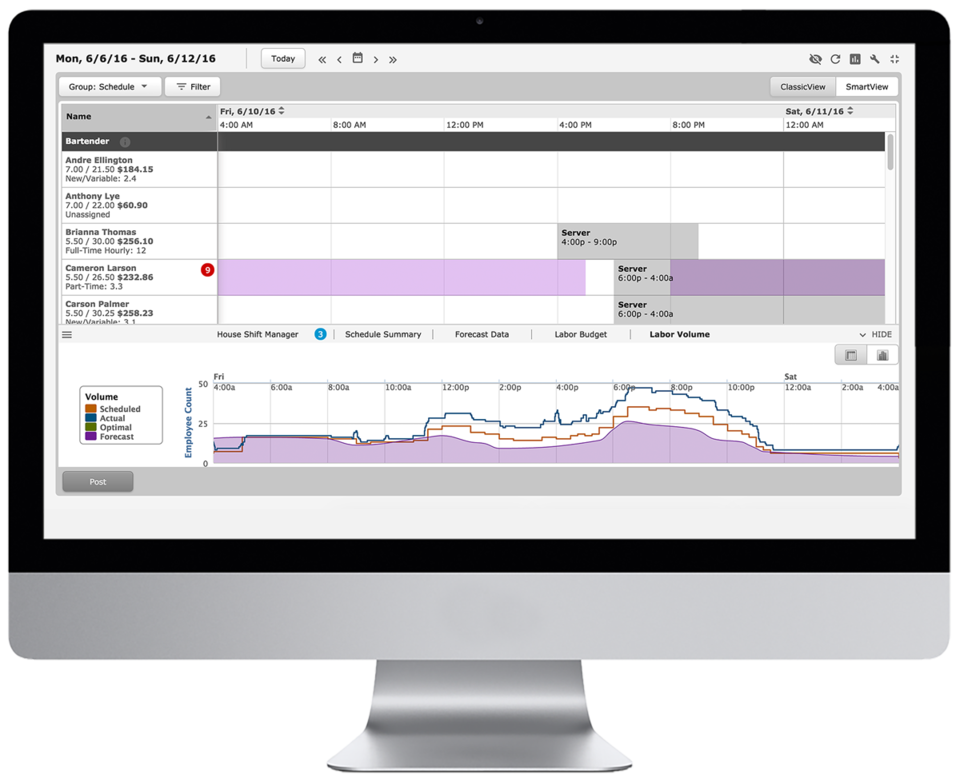
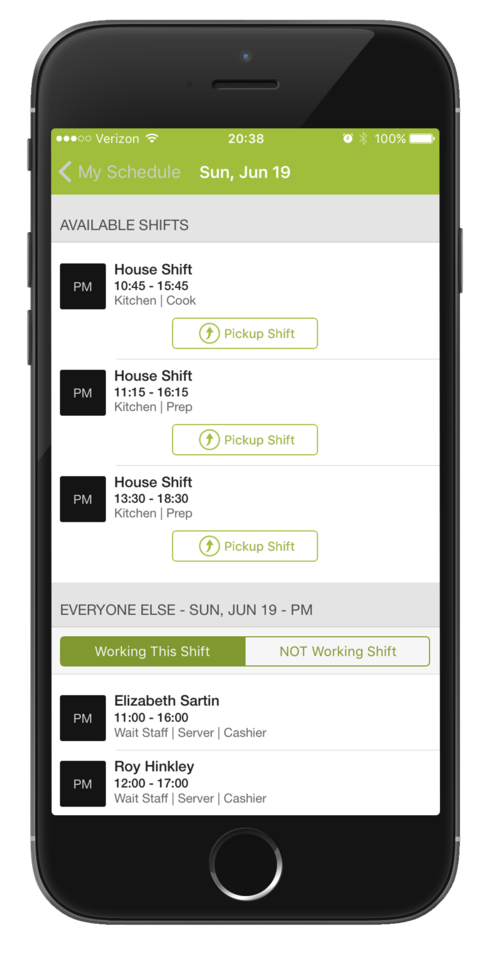
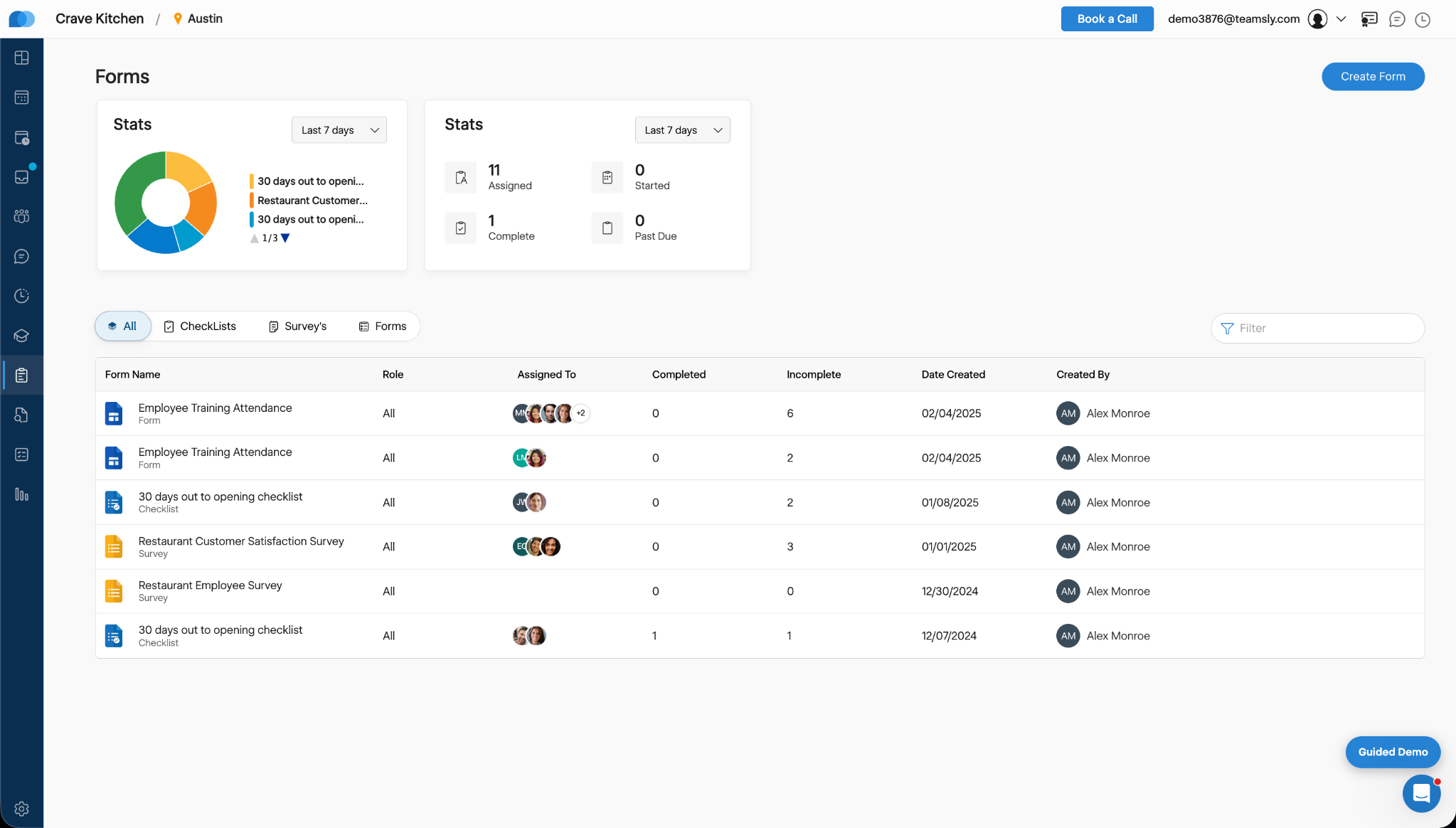
    Screenshot of Time-Off, Availability, Employee Hours, Sales Volume are all available in the scheduler.Screenshot of Employees are able to swap and pick-up shifts from the HotSchedules Mobile App. All shift changes or requests require a manager's approval.Screenshot of Managers and employees can communicate with each other from the mobile and web apps - from anywhere and at anytime.Screenshot of Employees can submit a time-off, request - paid, or unpaid - and can request to work or request off right from the mobile app.Screenshot of Managers can view sales and labor data from their phone.

    Teamsly Screenshots

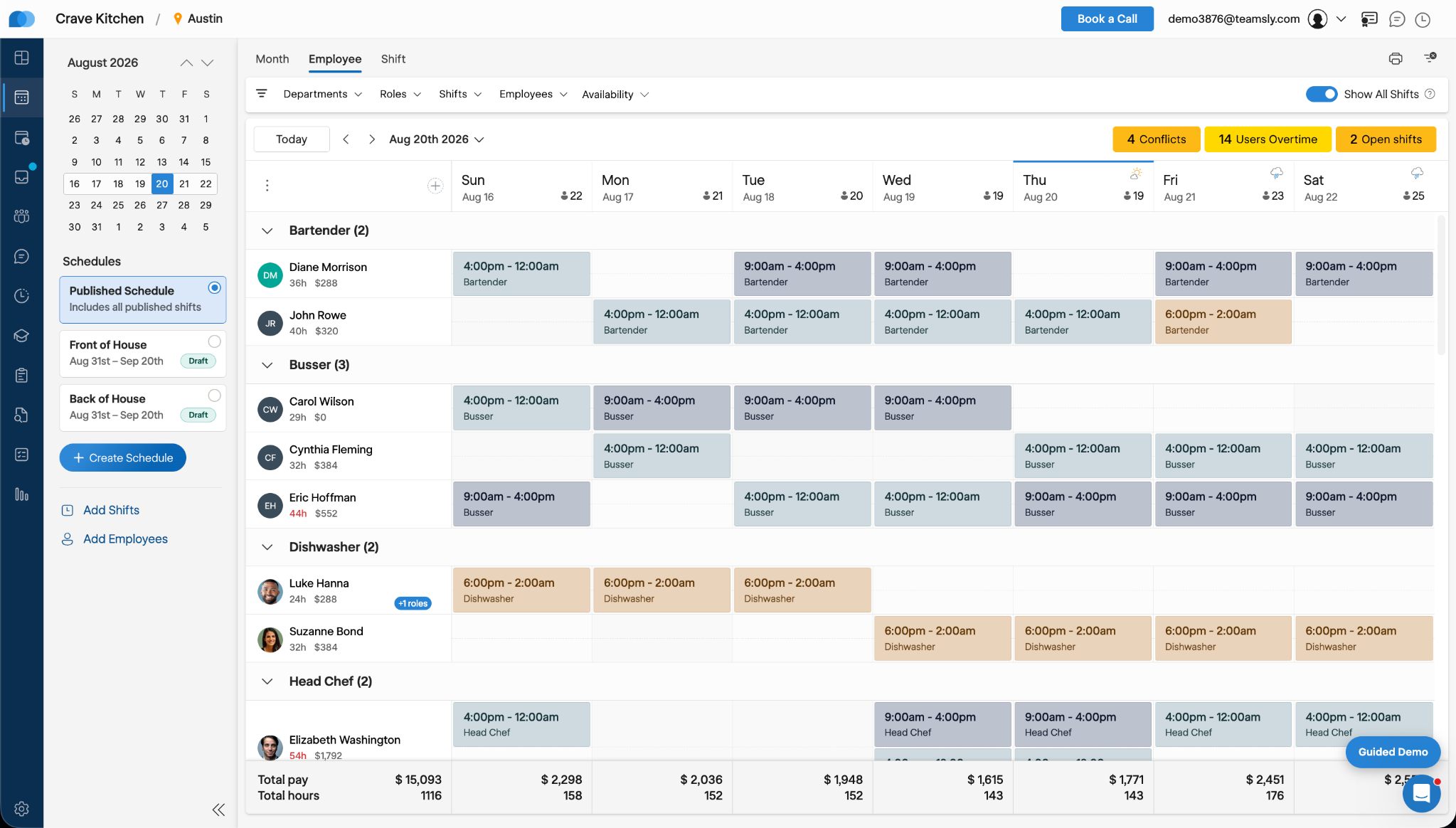
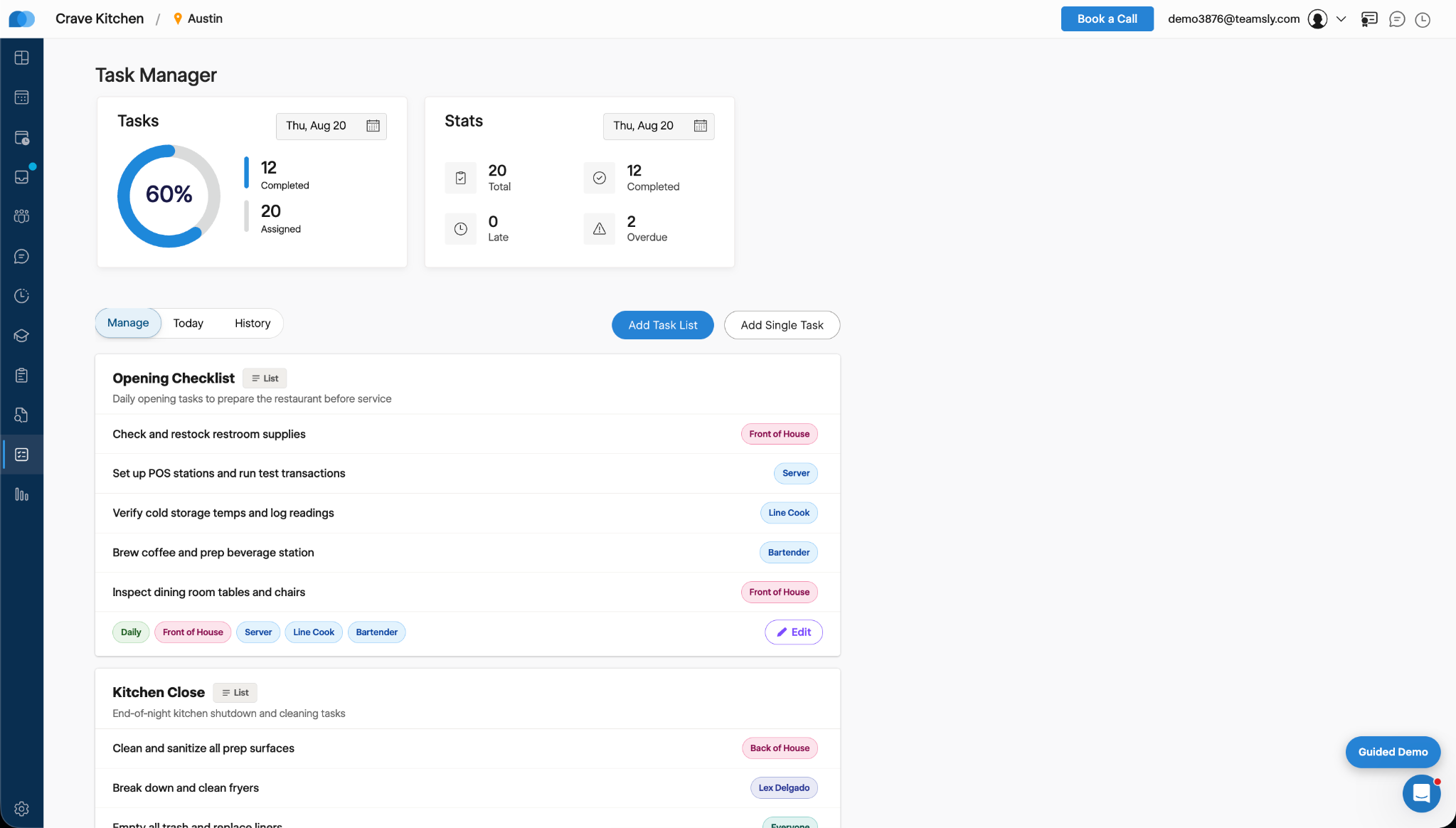
    Screenshot of Teamsly’s employee scheduling software, which gives managers a role-based weekly view of every employee and shift. Managers can create separate draft and published schedules, filter by department, role, shift, employee, or availability, identify scheduling conflicts, projected overtime, and open shifts, and review scheduled hours and estimated labor costs before publishing changes to the team.Screenshot of Teamsly’s workforce management dashboard. This brings daily staffing and operational data into one centralized view. Managers can monitor open shifts, shift swaps, employee requests, availability requests, scheduled coverage by role, paid hours, overtime, estimated pay, paid breaks, training quiz completion, and a visual shift timeline—making urgent staffing and workforce priorities easier to identify.Screenshot of Teamsly’s employee timesheet and time tracking software, which organizes timecards, paid hours, regular hours, overtime, paid and unpaid breaks, and estimated pay. Managers can compare scheduled hours with actual hours, spot timecard issues, review attendance data by employee and date range, add missing timecards, and download detailed reports for payroll preparation.Screenshot of Teamsly’s task management software, which helps managers create one-time tasks and recurring operational checklists, assign work by employee or role, and monitor completion from one dashboard. Status metrics show assigned, completed, late, and overdue work, while Today and History views strengthen accountability across opening, closing, cleaning, food preparation, and other repeatable team workflows.Screenshot of where Teamsly centralizes digital forms, checklists, and surveys for frontline and deskless teams. Managers can create and assign workflows such as employee training attendance forms, new-location opening checklists, customer satisfaction surveys, and employee surveys, then track assigned, started, completed, incomplete, and past-due submissions from a filterable reporting dashboard.Screenshot of Teamsly’s audit management software, which standardizes inspections and evaluations for employees, external participants, locations, equipment, and other operational subjects. Managers can assign audits, set scoring goals, monitor average scores, track completed and incomplete work, and identify past-due audits across food safety, employee hygiene, equipment maintenance, storage, workplace cleanliness, training, and knowledge.