HP OpenView (Discontinued) vs. SolarWinds Server & Application Monitor vs. IBM Turbonomic

Overview
ProductRatingMost Used ByProduct SummaryStarting Price
HP OpenView (Discontinued)
Score 4.0 out of 10
N/A
HP OpenView, later HP BTO was a system and network monitoring tool from Hewlett-Packard, and is now End of Life (EOL).N/A
SolarWinds Server & Application Monitor
Score 7.7 out of 10
N/A
SolarWinds Server & Application Monitor (SAM) delivers application and server monitoring capabilities. SAM allows for self-service for easy setup, 1200+ monitoring templates, and customization options, as well as integrate with other SolarWinds products.N/A
IBM Turbonomic
Score 8.8 out of 10
Enterprise companies (1,001+ employees)
IBM Turbonomic is a performance and cost optimization platform for public, private, and hybrid clouds used by cloud, infrastructure operations, and architecture to assure application performance while eliminating inefficiencies by dynamically resourcing applications through automated actions. One of the key features of IBM Turbonomic is its ability to continuously adjust application resources in real time. By monitoring resource utilization and application performance,…N/A
Pricing
HP OpenView (Discontinued)SolarWinds Server & Application MonitorIBM Turbonomic
Editions & Modules
No answers on this topic
IBM® Turbonomic On-Prem
Varies - Request a Quote
per month IBM Turbonomic On-prem optimizes data center resources in real time, ensuring app performance at the lowest cost by aligning infrastructure supply with dynamic application demand.
IBM® Turbonomic Cloud Standard
Varies - Request a Quote
per month For customers with more than USD 1.6 million in annual cloud spend or 50 Managed Virtual Servers (MVS) or greater
IBM® Turbonomic Hybrid Standard
Varies - Request a Quote
per month Advanced hybrid cloud optimization capabilities for customers with 200 managed virtual servers (MVS) or more
Offerings
Pricing Offerings
HP OpenView (Discontinued)SolarWinds Server & Application MonitorIBM Turbonomic
Free Trial
NoYesYes
Free/Freemium Version
NoNoNo
Premium Consulting/Integration Services
NoNoYes
Entry-level Setup FeeNo setup feeNo setup feeOptional
Additional DetailsSAM pricing starts at $2,995.Volume discounting available.
More Pricing Information
Community Pulse
HP OpenView (Discontinued)SolarWinds Server & Application MonitorIBM Turbonomic
Considered Multiple Products
HP OpenView (Discontinued)

No answer on this topic

SolarWinds Server & Application Monitor
Chose SolarWinds Server & Application Monitor
SolarWinds is comparable to many of the network monitoring solutions above. They are doing similar things. SolarWinds has a great user community called THWACK. SolarWinds is an affordable solution no matter the size of the network. Their support is decent. They are more of a …
Chose SolarWinds Server & Application Monitor
SolarWinds Server & Application Monitor is way more user-friendly than PRTG. We can't get OpenView anymore, but we moved from that to SolarWinds at one point and never looked back. Prime really doesn't offer any application monitoring.
Chose SolarWinds Server & Application Monitor
We looked into other monitoring programs such as Ciscoview and HP Openview and other products but found that Solarwinds Server & Application Monitor seemed to supply more of exactly what we were looking for as well as came across as a better overall product for our company. …
IBM Turbonomic
Chose IBM Turbonomic
We used to use Solarwinds' Virtualization and Storage manager products. These were good products but always seemed to lack the full automation that VMTurbo brings to the table. I also tested VMWare's vCops at the time (now vRops). This product was very overwhelming and had a …
Chose IBM Turbonomic
I believe there is a specific tool for every job. Most vendors are trying to cram everything in to a single pane of glass which is beneficial to smaller shops. While in the ideal world it would be nice, in the real world there are things that get overlooked in such a large …
Chose IBM Turbonomic
VMTurbo's health performance data had more information to believe the recommendations were more viable. Also, the scope of devices available for performance review such as Azure, Cisco UCS, and Nutanix were other key factors. Lastly there were some great product reviews.
Features
HP OpenView (Discontinued)SolarWinds Server & Application MonitorIBM Turbonomic
Application Performance Management
Comparison of Application Performance Management features of Product A and Product B
HP OpenView (Discontinued)
-
Ratings
SolarWinds Server & Application Monitor
6.5
280 Ratings
18% below category average
IBM Turbonomic
-
Ratings
Application monitoring00 Ratings7.0270 Ratings00 Ratings
Database monitoring00 Ratings7.0234 Ratings00 Ratings
Threshold alerts00 Ratings6.8275 Ratings00 Ratings
Predictive capabilities00 Ratings6.0219 Ratings00 Ratings
Application performance management console00 Ratings7.3243 Ratings00 Ratings
Collaboration tools00 Ratings5.7151 Ratings00 Ratings
Out-of-the box templates to monitor applications00 Ratings6.5260 Ratings00 Ratings
Application dependency mapping and thresholding00 Ratings5.5220 Ratings00 Ratings
Virtualization monitoring00 Ratings7.3238 Ratings00 Ratings
Server availability and performance monitoring00 Ratings7.0273 Ratings00 Ratings
Server usage monitoring and capacity forecasting00 Ratings6.8254 Ratings00 Ratings
IT Asset Discovery00 Ratings5.7202 Ratings00 Ratings
Cloud Management
Comparison of Cloud Management features of Product A and Product B
HP OpenView (Discontinued)
-
Ratings
SolarWinds Server & Application Monitor
-
Ratings
IBM Turbonomic
8.1
21 Ratings
8% below category average
Cloud Management Security00 Ratings00 Ratings7.515 Ratings
Automation and Orchestration00 Ratings00 Ratings8.820 Ratings
Cost Management00 Ratings00 Ratings8.021 Ratings
Cloud Management Performance Monitoring00 Ratings00 Ratings8.421 Ratings
Governance and Compliance00 Ratings00 Ratings7.619 Ratings
Resource Management00 Ratings00 Ratings9.320 Ratings
Systems Integration00 Ratings00 Ratings6.820 Ratings
Best Alternatives
HP OpenView (Discontinued)SolarWinds Server & Application MonitorIBM Turbonomic
Small Businesses
Panda Systems Management
Score 7.8 out of 10
GitLab
GitLab
Score 8.8 out of 10
VMware Cloud Director
Score 8.5 out of 10
Medium-sized Companies
ManageEngine ADAudit Plus
Score 9.0 out of 10
ManageEngine Site24x7
Score 9.5 out of 10
Cohesity
Cohesity
Score 8.4 out of 10
Enterprises
ManageEngine ADAudit Plus
Score 9.0 out of 10
ManageEngine Site24x7
Score 9.5 out of 10
vRealize Operations (discontinued)
Score 9.2 out of 10
All AlternativesView all alternativesView all alternativesView all alternatives
User Ratings
HP OpenView (Discontinued)SolarWinds Server & Application MonitorIBM Turbonomic
Likelihood to Recommend
8.0
(1 ratings)
8.8
(278 ratings)
9.2
(147 ratings)
Likelihood to Renew
-
(0 ratings)
8.9
(10 ratings)
9.0
(24 ratings)
Usability
-
(0 ratings)
8.6
(29 ratings)
7.9
(21 ratings)
Availability
-
(0 ratings)
9.9
(3 ratings)
10.0
(3 ratings)
Performance
-
(0 ratings)
6.0
(3 ratings)
8.0
(6 ratings)
Support Rating
-
(0 ratings)
9.0
(21 ratings)
8.0
(25 ratings)
In-Person Training
-
(0 ratings)
-
(0 ratings)
8.2
(3 ratings)
Online Training
-
(0 ratings)
4.5
(1 ratings)
10.0
(3 ratings)
Implementation Rating
-
(0 ratings)
4.5
(3 ratings)
9.7
(18 ratings)
Configurability
-
(0 ratings)
1.0
(2 ratings)
10.0
(3 ratings)
Contract Terms and Pricing Model
-
(0 ratings)
-
(0 ratings)
9.1
(2 ratings)
Ease of integration
-
(0 ratings)
4.5
(2 ratings)
7.3
(5 ratings)
Product Scalability
-
(0 ratings)
9.9
(3 ratings)
7.3
(4 ratings)
Professional Services
-
(0 ratings)
-
(0 ratings)
10.0
(1 ratings)
Vendor post-sale
-
(0 ratings)
4.5
(2 ratings)
10.0
(3 ratings)
Vendor pre-sale
-
(0 ratings)
4.5
(2 ratings)
10.0
(3 ratings)
User Testimonials
HP OpenView (Discontinued)SolarWinds Server & Application MonitorIBM Turbonomic
Likelihood to Recommend
Discontinued Products
HP Openview really helped us when we migrated our old SAP Data from IBM Platform to OpenText.
Read full review
SolarWinds
It is a well-suited software for monitoring and surveillance of your deployed nodes. The error-readability and filter options for filtering out logs and errors could be improved. But overall, it has a good UI design, is user-friendly, and is very easy to learn and access for new users.
Read full review
IBM
Datacenter Consolidation and Hardware Optimization: This scenario is relevant to you as a hardware manager. It applies when you have physical servers (like Power or System z) and want to maximize virtual machine density. Why it works: IBM Turbonomic analyzes the peak usage times of each VM. If VM "A" is active during the day and VM "B" at night, it places them on the same physical host. Ideal scenario: Data migration projects or when you're told, "[...], there's no budget for more servers this year, make everything fit on what we have." Consolidación de Datacenters y Optimización de Hardware,Este escenario te toca de cerca como encargado de Hardware. Cuando tienes servidores físicos (como los Power o System z) y quieres maximizar la densidad de máquinas virtuales.Por qué funciona: IBM Turbonomic analiza las horas pico de cada VM. Si la VM "A" es activa de día y la VM "B" de noche, las coloca en el mismo host físico.Escenario ideal: Proyectos de migración de datos o cuando te dicen: "[...], no hay presupuesto para más servidores este año, haz que quepa todo en lo que tenemos". This review was originally written in Spanish and has been translated into English using a third-party translation tool. While we strive for accuracy, some nuances or meanings may not be perfectly captured.
Read full review
Pros
Discontinued Products
  • SAP Batch Job monitoring.
  • File Systems
  • Database Montioring
Read full review
SolarWinds
  • Monitor Azure Cloud Severs- We use SolarWinds SAM to monitor Active Directory and DNS on Several DCs published on Azure Cloud.
  • Monitor Hyper V and VMware - SolarWinds SAM monitors applications on both Hyper V and VMware, while also monitoring the physical host machines.
  • It also helps us monitor Warranty expiration for physical servers.
Read full review
IBM
  • Presentation is nice. Its easy to understand what your looking at and the data that is being presented to you.
  • Properly identify resource utilization and recommendations for action on how VMs can be improved and resources can be better utilized.
  • It was also able to tell us the same information and analysis for cloud resources. I was not expecting that.
Read full review
Cons
Discontinued Products
  • Monitoring interface should be more user friendly.
Read full review
SolarWinds
  • Custom application monitors can be a little tricky to configure.
  • Logic in custom alerts can be a little hard to follow and figure out.
  • Inability to monitor certificates on custom applications or SQL Server.
  • Can be a little slow at times with on-prem SQL server.
Read full review
IBM
  • It would be nice if the UI included a break-down of features that are both licensed as well as un-licensed. That way, you could not only see what you have, but what you don't.
  • The right-sizing recommendations are great, but very little info is given about why the recommendation is being made. More info would not only increase understanding, but would also help drive decision-making.
Read full review
Likelihood to Renew
Discontinued Products
No answers on this topic
SolarWinds
We are heavily invested in Solarwinds products for a reason. They are generally easy to setup and run with, requiring only some interfacing with support or help articles on rare occasions. They do what we bought them to do and we can't ask for more.
Read full review
IBM
We are certainly happy with Turbonomic as a whole and have invested quite a bit of time and effort into learning the ins and outs of the product. We have our reporting setup the way we want it and have gained definite value from these features. I will say though that many products nowadays are offering more native monitoring, reporting, and alerting features which may eventually steer us away from this product
Read full review
Usability
Discontinued Products
No answers on this topic
SolarWinds
SolarWinds Server & Application Monitor is quite easy to use and super versatile. It allows you to do just about anything you can through premade templates or through scripting. You can use an agent on the servers if you want to, or you can monitor through WMI or SNMP credentials. You can customize thresholds for alerting quickly, and you can configure alerts to be as complex or as simple as you want.
Read full review
IBM
Excellent approach to larger VM organizational management. They have an very clean integrated dashboard that allows us to see everything in our environment and what that is doing in real-time. It works on multiple hyper-visors really well and integrates capacity planning on my local site as well as my cloud locations.
Read full review
Reliability and Availability
Discontinued Products
No answers on this topic
SolarWinds
The tool works and monitors items 24x7, it only requires maintenance a little more frequently due to security fixes in the Windows operating system.
Read full review
IBM
VMTurbo has not caused any outages by not doing what we expect it to do.
Read full review
Performance
Discontinued Products
No answers on this topic
SolarWinds
The graphical interface and the performance of the database leave a little to be desired, they could be better explored.Some functionality and screens do not work well depending on the browser used. The integrations never had any problems or caused crashes in other systems.
Read full review
IBM
It allocates resources among applications by showing more on the cost breakdown by cloud service, with metrics on cloud provider information like Azure Management, Identity, Networking, Storage with costs per day, and total services costs. This then could facilitate and show the corresponding actions thereafter upon scaling.
Read full review
Support Rating
Discontinued Products
No answers on this topic
SolarWinds
I think there was only a couple times I had to open a support case for SAM and one time they got multiple engineers on the phone to get a better idea what I was trying to monitor and was able to point me in the best direction to monitor that system.
Read full review
IBM
When I contact support I get a quick response and they are able to solve my problem quickly. I also get a sense that they want to make sure that we are getting value from the product and walk me through whatever steps are needed to accomplish my goals.
Read full review
In-Person Training
Discontinued Products
No answers on this topic
SolarWinds
No answers on this topic
IBM
Alex (from VMTurbo) has worked with the product for years and helped develop the product. He was very knowledgeable and was able to provide our support team with details knowledge on how to get our deployment configured correctly as well as help with another VMTurbo POC within another customers environment.
Read full review
Online Training
Discontinued Products
No answers on this topic
SolarWinds
It was sufficient to read their documentation and watch videos.
Read full review
IBM
After buying VMTurbo Operations Manager, I was invited to an online user training event. I felt this training was effective and dug just deep enough to be informative yet still keep my attention. Additionally, the webinar was free.
Read full review
Implementation Rating
Discontinued Products
No answers on this topic
SolarWinds
Make sure SNMP and WMI are configured ahead of time
Read full review
IBM
The implementation was very simple. Just upload an OVA file and power on the VM. Once it comes up enter some networking information and you can then access the web interface. From there, just begin configuring the system for your environment by adding you license and the various virtual environments and storage through the inventory tab
Read full review
Alternatives Considered
Discontinued Products
User friendly, easy to access and more detailed info during the monitoring.
Read full review
SolarWinds
Nagios requires far more manual work to configure than SolarWinds does, though that also encourages customization and perfect-fit solutions. Nagios also requires far, far fewer resources to run than SolarWinds: SolarWinds wants great gobs of memory and disk, while Nagios is refreshingly humble. Nagios starts working from the first minute, too, whereas SolarWinds needs lots of set-up time.
Read full review
IBM
As the organization had experience of years in using IBM products, we had the confidence that they will provide us with great support. And we needed a reliable solution as a financial institute to ensure continuous operations. Even though the price was very high, we made the correct decision to go ahead with IBM Turbonomic as the feedback from existing users in the region was very positive. We needed a solution which was capable of handling our automation requirements. All these were green in IBM Turbonomic.
Read full review
Scalability
Discontinued Products
No answers on this topic
SolarWinds
It is hard to find the recommended SQL setup and convince others that is the way you should configure the server when you set it up
Read full review
IBM
It’s very scalable.
Read full review
Professional Services
Discontinued Products
No answers on this topic
SolarWinds
No answers on this topic
IBM
Professional services were always there to guide us in our transformation to the cloud. They understood our business model and then were able to provide guidance on what we needed from the tool.
Read full review
Return on Investment
Discontinued Products
  • Biggest support in maintaining 10,000 Linux servers.
Read full review
SolarWinds
  • Ability to sunset multiple legacy monitoring platforms.
  • A single pane of glass across global locations (Enterprise Operations Console) simplifies monitoring for junior staff.
  • A single toolset allows staff from across the global environment to share knowledge and quickly set up/modify monitoring.
Read full review
IBM
  • Application performance has been a big one. With Turbonomic keeping everything running at top performance, it can make changes when extra resources are need, quicker than somebody being notified and then making the necessary changes.
  • Turbonomic has been a great cost savings for us on multiple occasions. We use it every time we are improving servers.
  • With the planning feature we get the best performance form new hardware purchases
Read full review
ScreenShots

SolarWinds Server & Application Monitor Screenshots

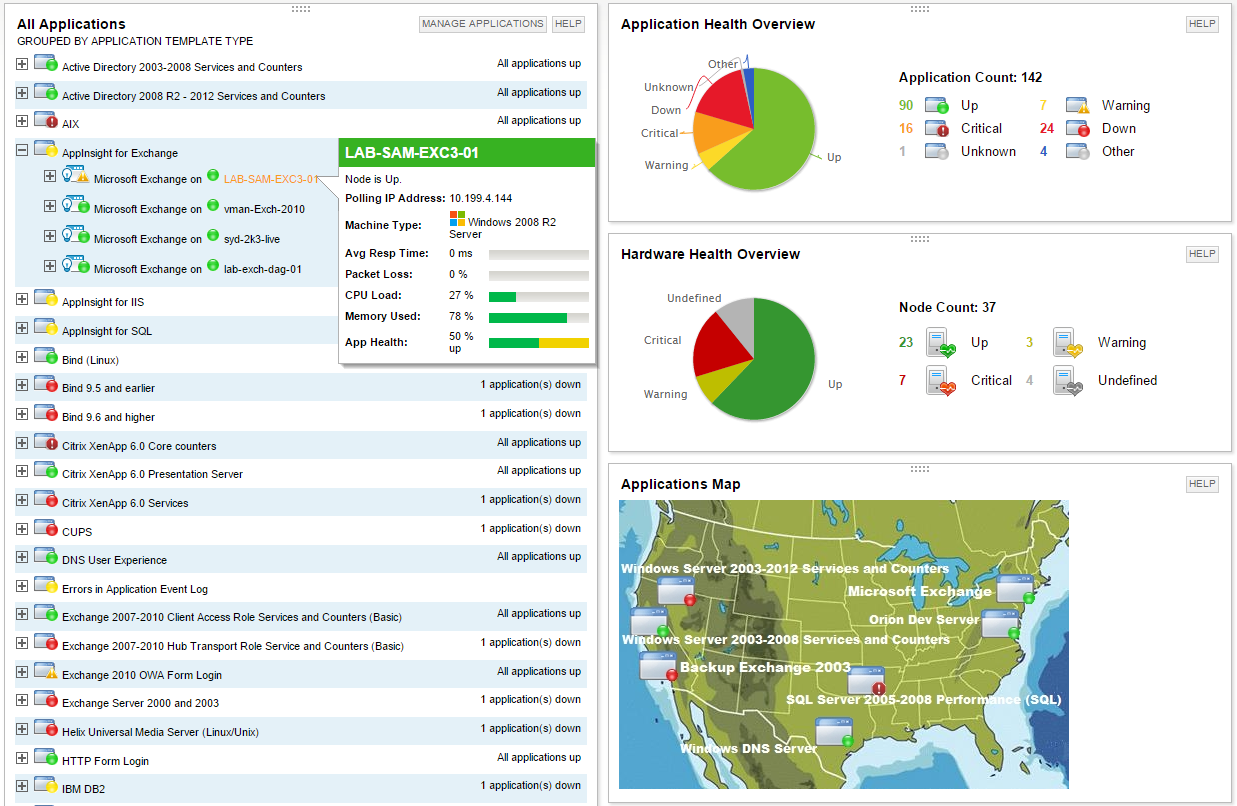
Screenshot of Multi-vendor application performance monitoringScreenshot of Multi-vendor server monitoringScreenshot of Application dependency mapping with AppStack™ dashboardScreenshot of Microsoft Exchange performance monitoring with AppInsight™ templateScreenshot of Microsoft IIS performance monitoring with AppInsight™ templateScreenshot of Server hardware health monitoring

IBM Turbonomic Screenshots

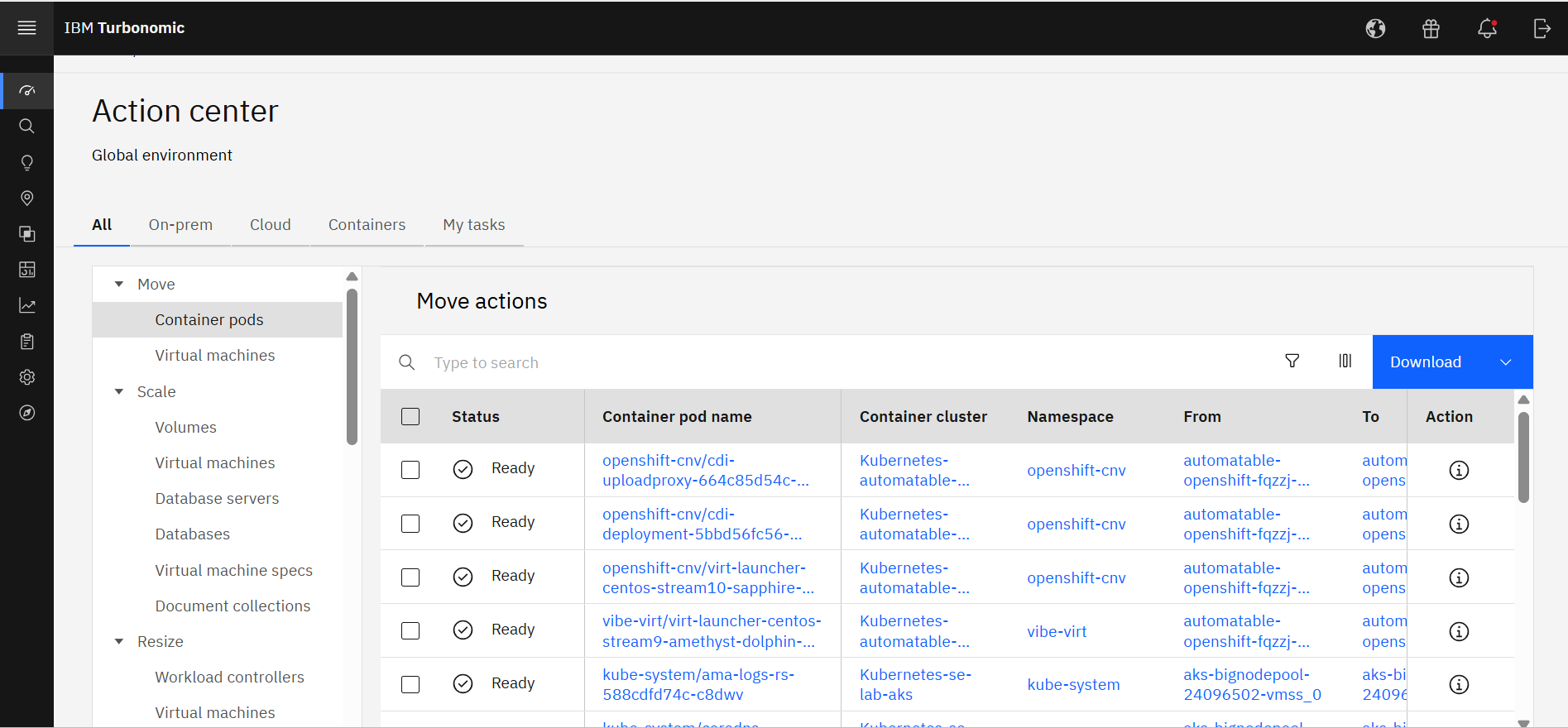
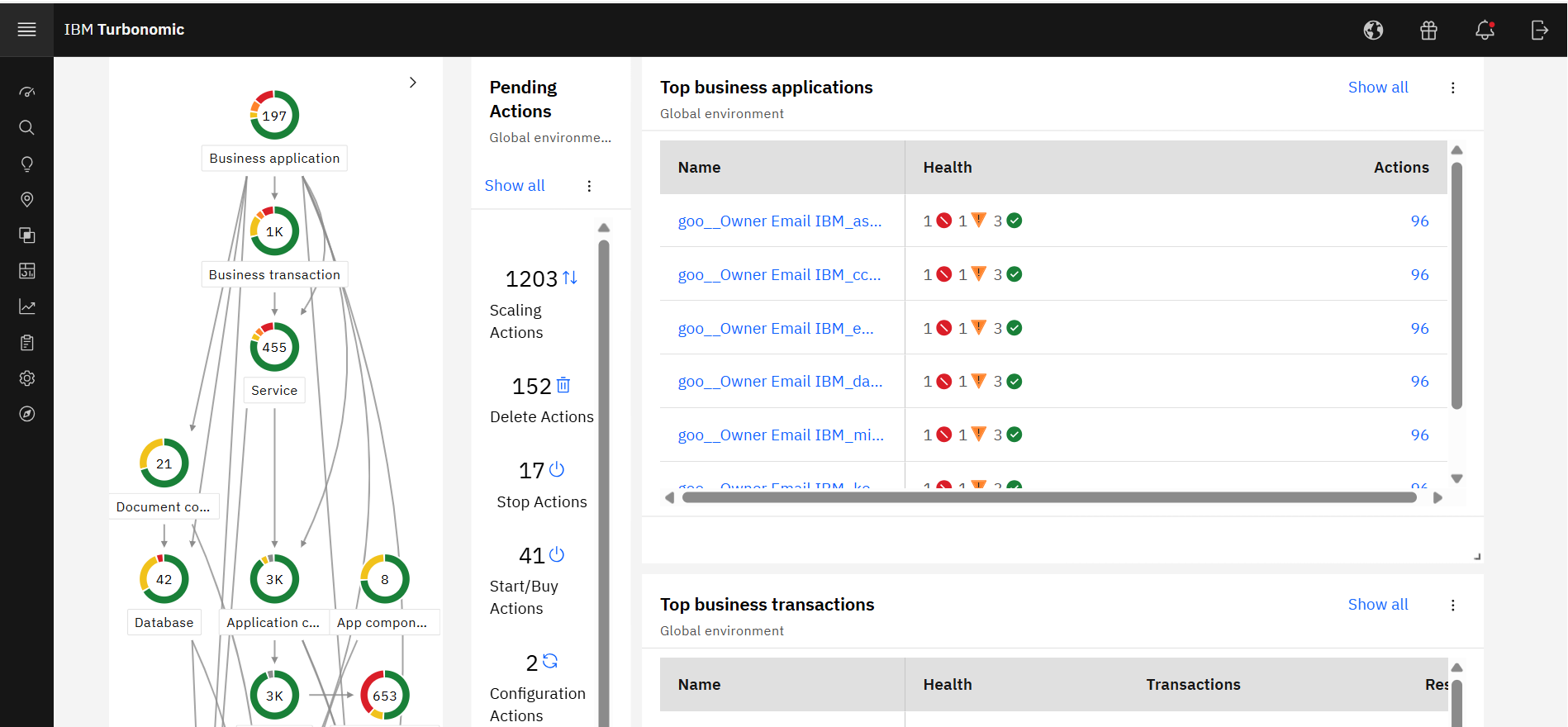
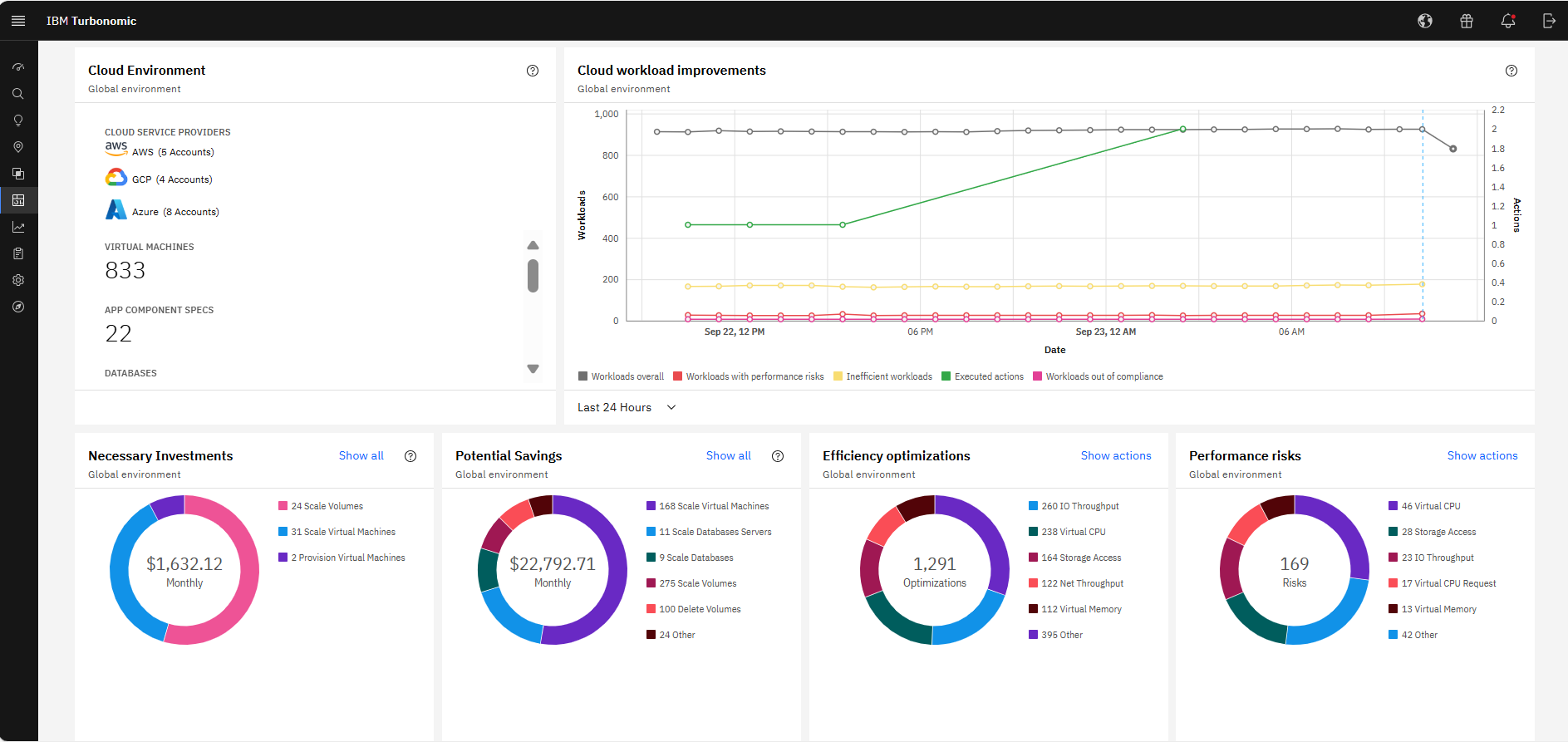
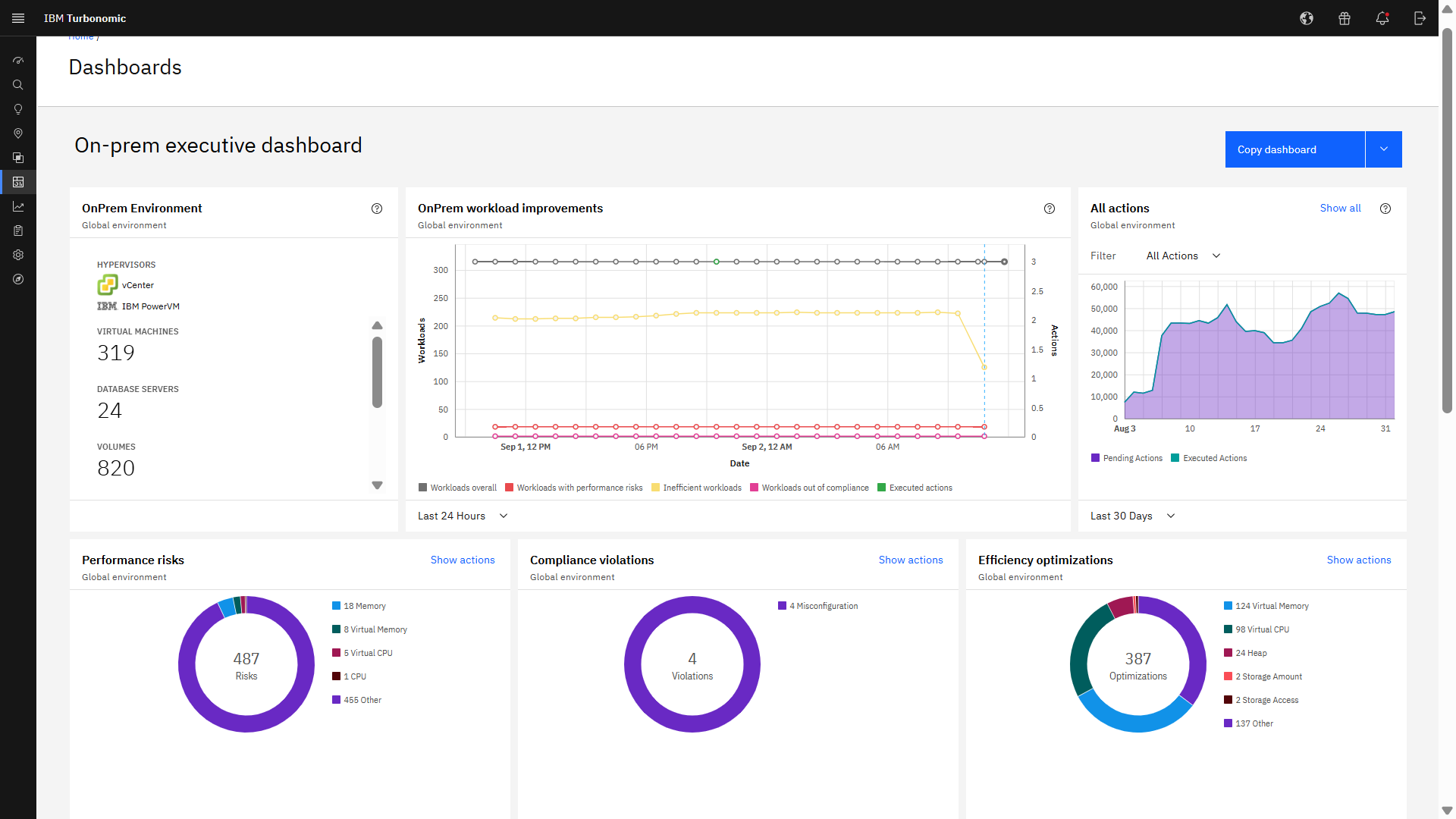
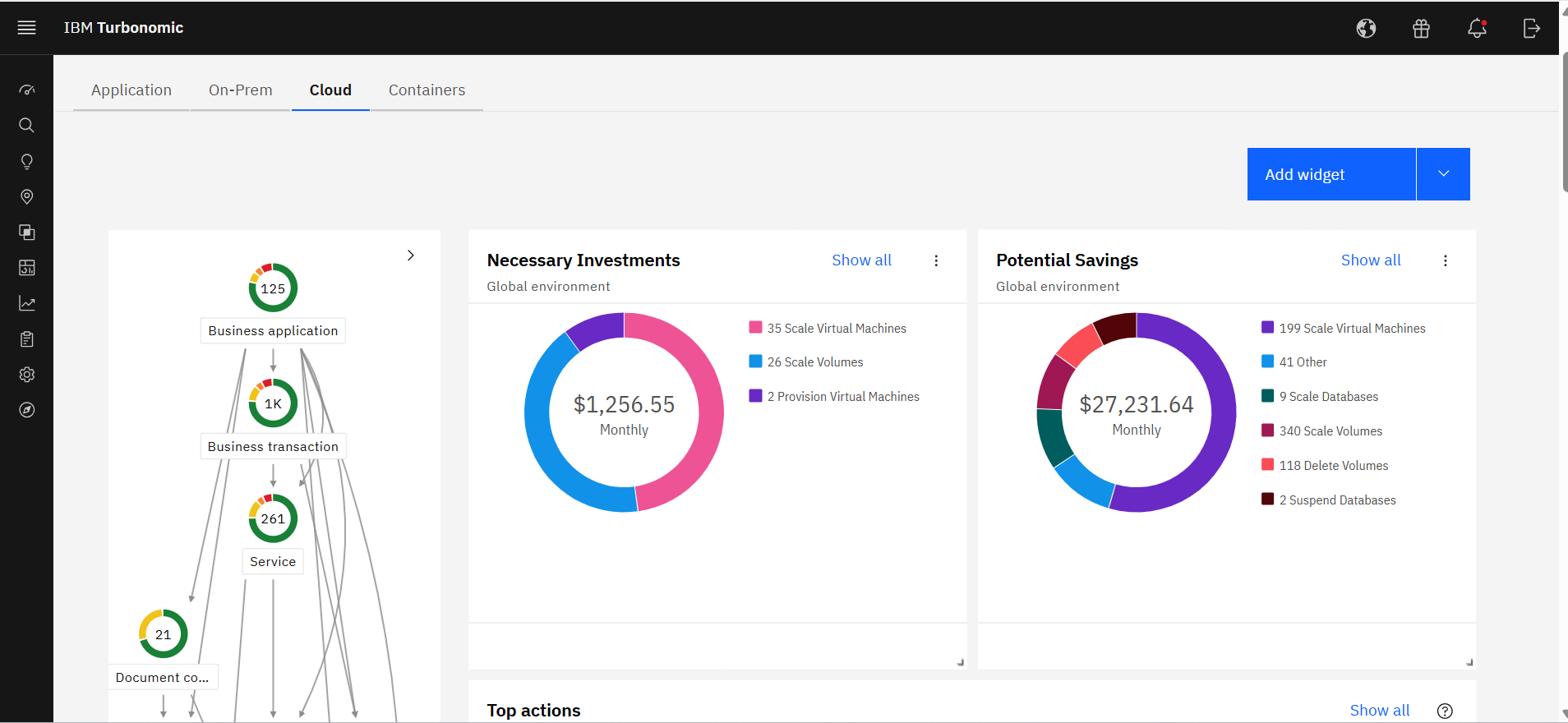
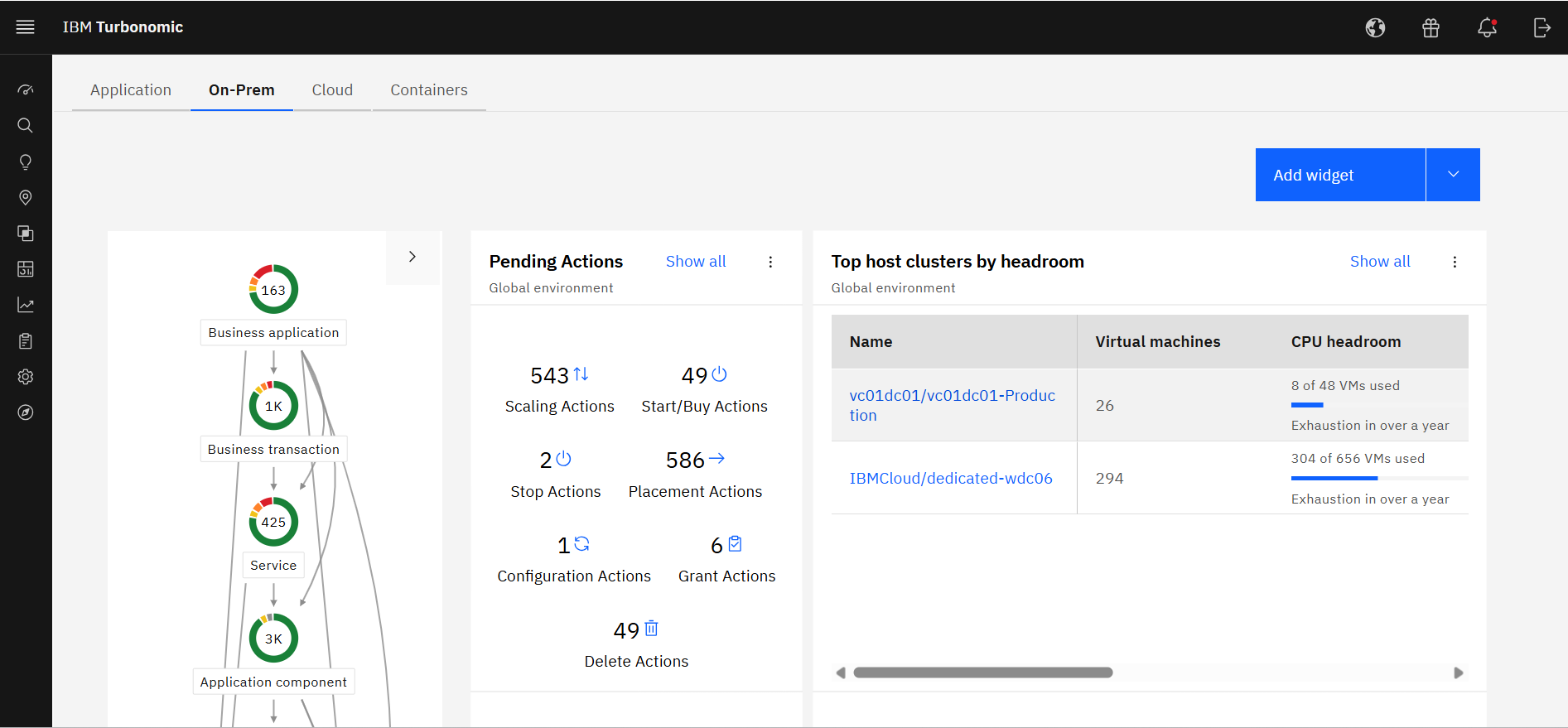
Screenshot of IBM Turbonomic Action Center, where it shows the list of optimization actions across the global environment—on-prem and cloud—that should be taken to minimize cost while assuring performance.Screenshot of IBM Turbonomic Application, a view that shows the global environment across private and public infrastructure from the context of individual application components. Users can optimize one application at a time by viewing each app's pending actions. The Supply Chain at left shows all of the entities across applications and their interdependencies.Screenshot of The IBM Turbonomic Cloud Executive Dashboard, an out of the box dashboard that allow users to rapidly communicate value to executives. This view shows the cloud cost savings opportunities realized and not yet realized over any time period.Screenshot of The IBM Turbonomic On-prem Executive Dashboard, an out of the box dashboard that allow users to rapidly communicate value to executives. This view shows the savings opportunities realized and not yet realized over any time period.Screenshot of an IBM Turbonomic Cloud view, where the public cloud environment(s) and all of the pending actions required to bring them into an efficient, performant state. The Supply Chain at left shows all of the entities in the public cloud(s) and their interdependencies.Screenshot of The IBM Turbonomic On-Prem view that shows the user's private data center environment(s) and all of the pending actions required to bring them into an efficient, performant state. The Supply Chain at left shows all of the entities in data center(s) and the interdependencies between them.