Chose IBM Analytics Engine
We have tried the following solutions in the past and I must say they can't compare to IBM Analytics Engine:

| Product | Rating | Most Used By | Product Summary | Starting Price |
|---|---|---|---|---|
 IBM Analytics Engine | N/A | IBM BigInsights is an analytics and data visualization tool leveraging hadoop. | N/A | |
 Jaspersoft | N/A | Jaspersoft commercial edition is an embedded business intelligence suite designed to be built-into SaaS products as an integrated reporting engine. It provides reports and dashboards for customer-facing applications without requiring app developers to build their own reporting engine. | N/A | |
 Orbit Reporting and Analytics | N/A | Orbit Reporting + Analytics is a self-service reporting and BI solution for all ERP, Custom and Cloud applications from the company of the same name in Alpharetta. Orbit integrates with ERP and key business applications, providing access to real-time data from all data sources -- empowering business users to build interactive reports, charts, and dashboards. | N/A |
| IBM Analytics Engine | Jaspersoft | Orbit Reporting and Analytics | ||||||||||||||||||||||
|---|---|---|---|---|---|---|---|---|---|---|---|---|---|---|---|---|---|---|---|---|---|---|---|---|
| Editions & Modules | No answers on this topic | No answers on this topic | No answers on this topic | |||||||||||||||||||||
| Offerings |
| |||||||||||||||||||||||
| Entry-level Setup Fee | No setup fee | No setup fee | No setup fee | |||||||||||||||||||||
| Additional Details | — | Jaspersoft offers flexible pricing for ISVs and SaaS per customer or by CPU core. | — | |||||||||||||||||||||
| More Pricing Information | ||||||||||||||||||||||||
| IBM Analytics Engine | Jaspersoft | Orbit Reporting and Analytics | |
|---|---|---|---|
| Considered Multiple Products | IBM Analytics Engine  Ejaz Hussain Senior Analyst Chose IBM Analytics Engine Our data analytics team happened to try IBM Analytics just to get acquainted with it & it turned out that this tool fits our business requirement better than the one which we were using in terms of the features along with the level of support that they provide. so, choosing the …  Prasanna Nattuthurai Graduate Assistant Chose IBM Analytics Engine
| Jaspersoft  Himanshu Bhardwaj Senior Quality Assurance Analyst Chose Jaspersoft TIBCO does a better job in providing seamless data mapping and migration from one legacy system to other without any loss of traffic or compromising the security of the data. Whereas with another tool sometimes because of the integral framework there may be some questions as to …  Lokesh Katamaneni Software Engineer Chose Jaspersoft Very interactive and easy to understand.  Brian Baley Business Analyst / Sr. Applications Developer Chose Jaspersoft I haven't evaluated anything similar.  Jhonattan Smith Peláez Nimisica Líder de gestión de la configuración e infraestructura Chose Jaspersoft Facility in Data integration was one of the main reasons to choose TIBCO Jaspersoft. Besides the multi-dimension in analytics.  Suresh Regonda Project Manager Chose Jaspersoft It was under the budget and covered all the requirements the client needed  Yogesh Ailawadi, CISSP Sr. Director, Product Management Chose Jaspersoft None  Pedro G. Jiménez Developer Tibco Jaspersoft ETL Chose Jaspersoft Tibco Jaspersoft is a stronger competitor than the Microsoft Reports and ETL products. The flexibility and power of using the software, multi platform and deployment and monitoring has no comparison to what you use. It would be interesting to integrate some features of … | Orbit Reporting and Analytics |
| IBM Analytics Engine | Jaspersoft | Orbit Reporting and Analytics | |||||||||||||||||||||||||||
|---|---|---|---|---|---|---|---|---|---|---|---|---|---|---|---|---|---|---|---|---|---|---|---|---|---|---|---|---|---|
| BI Standard Reporting |
| ||||||||||||||||||||||||||||
| Ad-hoc Reporting |
| ||||||||||||||||||||||||||||
| Report Output and Scheduling |
| ||||||||||||||||||||||||||||
| Data Discovery and Visualization |
| ||||||||||||||||||||||||||||
| Access Control and Security |
| ||||||||||||||||||||||||||||
| Mobile Capabilities |
| ||||||||||||||||||||||||||||
| Application Program Interfaces (APIs) / Embedding |
|
| IBM Analytics Engine | Jaspersoft | Orbit Reporting and Analytics | |
|---|---|---|---|
| Small Businesses | No answers on this topic |  Yellowfin Score 8.6 out of 10 | Yellowfin Score 8.6 out of 10 |
| Medium-sized Companies |  Cloudera Manager Score 9.9 out of 10 |  Reveal Score 10.0 out of 10 | Reveal Score 10.0 out of 10 |
| Enterprises |  Apache Spark Score 8.9 out of 10 |  Kyvos Semantic Layer Score 9.5 out of 10 | Kyvos Semantic Layer Score 9.5 out of 10 |
| All Alternatives | View all alternatives | View all alternatives | View all alternatives |
| IBM Analytics Engine | Jaspersoft | Orbit Reporting and Analytics | |
|---|---|---|---|
| Likelihood to Recommend | 9.5 (0 ratings) | 7.3 (0 ratings) | 6.0 (0 ratings) |
| Likelihood to Renew | - (0 ratings) | 8.0 (0 ratings) | - (0 ratings) |
| Usability | - (0 ratings) | 7.9 (0 ratings) | 7.0 (0 ratings) |
| Availability | - (0 ratings) | 8.0 (0 ratings) | - (0 ratings) |
| Performance | - (0 ratings) | 7.0 (0 ratings) | - (0 ratings) |
| Support Rating | - (0 ratings) | 7.0 (0 ratings) | 3.0 (0 ratings) |
| In-Person Training | - (0 ratings) | 8.0 (0 ratings) | - (0 ratings) |
| Online Training | - (0 ratings) | 6.5 (0 ratings) | - (0 ratings) |
| Implementation Rating | - (0 ratings) | 7.8 (0 ratings) | - (0 ratings) |
| Configurability | - (0 ratings) | 7.0 (0 ratings) | - (0 ratings) |
| Ease of integration | - (0 ratings) | 7.0 (0 ratings) | - (0 ratings) |
| Product Scalability | - (0 ratings) | 8.0 (0 ratings) | - (0 ratings) |
| Vendor post-sale | - (0 ratings) | 8.0 (0 ratings) | - (0 ratings) |
| Vendor pre-sale | - (0 ratings) | 8.0 (0 ratings) | - (0 ratings) |
| IBM Analytics Engine | Jaspersoft | Orbit Reporting and Analytics | |
|---|---|---|---|
| Likelihood to Recommend |
|
|
 Jaclyn Parker, MPA Director Of Corporate Social Responsibility |
| Pros |
|
|
Jaclyn Parker, MPA Director Of Corporate Social Responsibility |
| Cons |
|
|
|
| Likelihood to Renew | No answers on this topic |
 Robert Mills Sr. Software Architect | No answers on this topic |
| Usability | No answers on this topic |
 Gerald Meachem Senior Software Analyst |
Jaclyn Parker, MPA Director Of Corporate Social Responsibility |
| Reliability and Availability | No answers on this topic |
| No answers on this topic |
| Performance | No answers on this topic |
| No answers on this topic |
| Support Rating | No answers on this topic |
 Ashley Lee CSR/Project Management for Software Development |
|
| In-Person Training | No answers on this topic |
Ashley Lee CSR/Project Management for Software Development | No answers on this topic |
| Online Training | No answers on this topic |
 Davide Marzucco Post Provisioning & Deployment Manager | No answers on this topic |
| Implementation Rating | No answers on this topic |
| No answers on this topic |
| Alternatives Considered |
Prasanna Nattuthurai Graduate Assistant |
Himanshu Bhardwaj Senior Quality Assurance Analyst |
|
| Scalability | No answers on this topic |
| No answers on this topic |
| Return on Investment |
|
|
|
| ScreenShots | Jaspersoft Screenshots   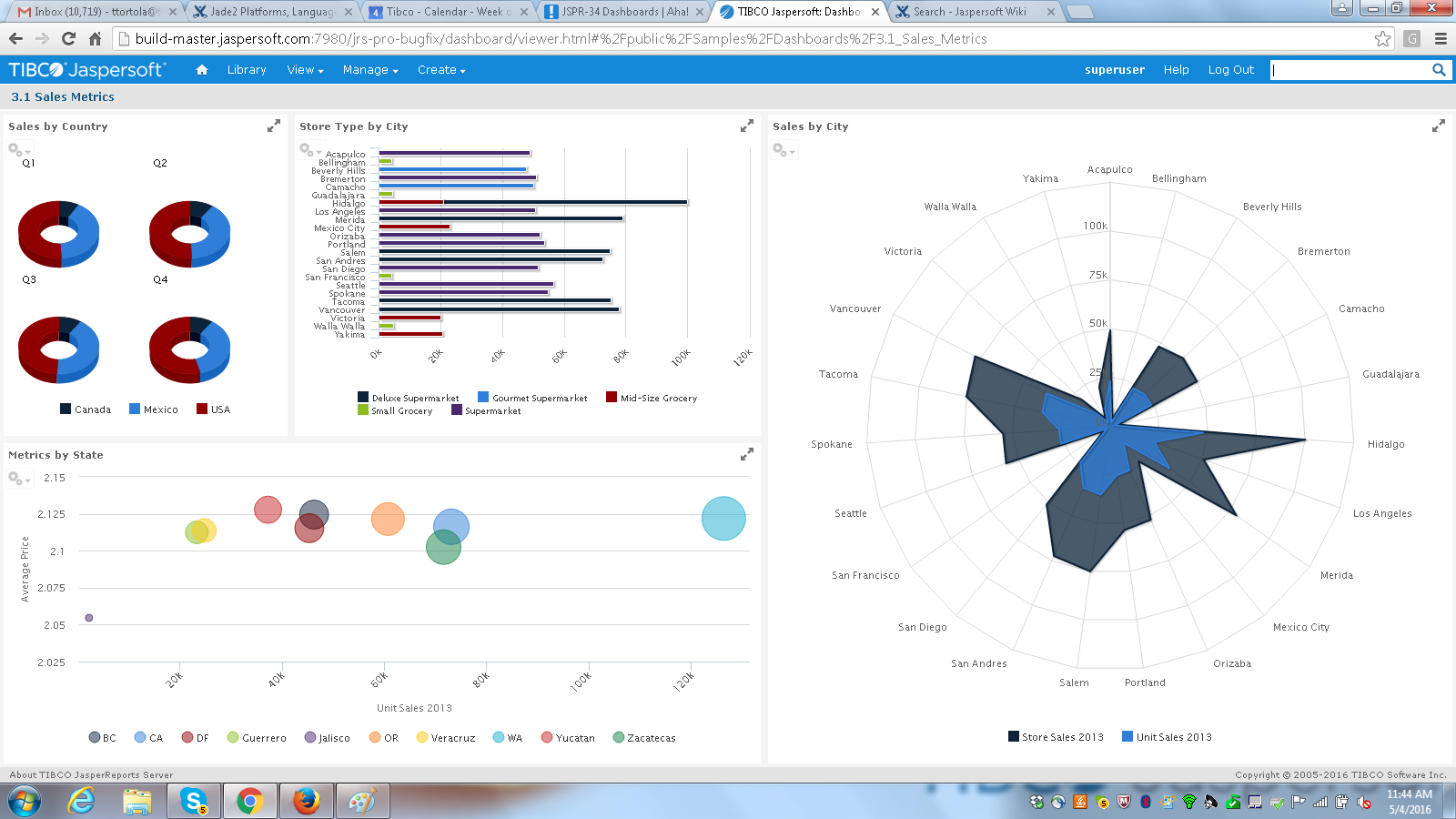 |