IBM Engineering Lifecycle Management (ELM) is an end-to-end engineering solution used to manage system requirements to design, workflow, and test management, extending the functionality of ALM tools for better complex-systems development.
N/A
QuickBooks Time
Score 8.8 out of 10
N/A
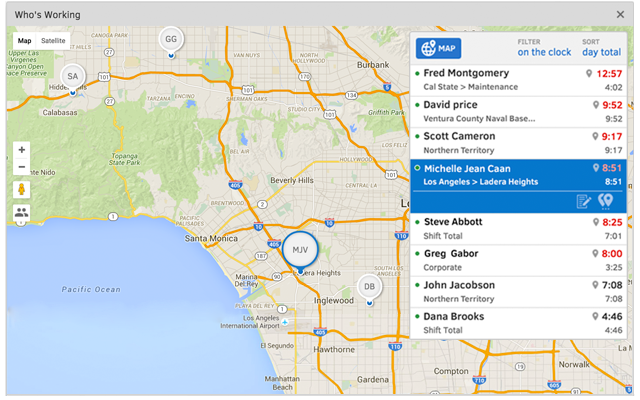
QuickBooks Time (formerly TSheets) is a cloud-based time tracking and scheduling app that allows employees to clock in and out from the job site with the devices they’ve already got in their pockets. The vendor aims to help companies replace paper timesheets with accurate, electronic time data as well as make payroll and invoicing faster and less costly. QuickBooks Time also accurately tracks time and GPS points (even without cell or internet service) then automatically syncs when back…
$0
1 user, unlimited projects
Pricing
IBM Engineering Lifecycle Management
QuickBooks Time
Editions & Modules
No answers on this topic
Free
$0
1 user, unlimited projects
Premium
$8
per user/month + $20 base fee/month (paid annually)
Elite
$10
per user/month + $40 base fee/month (paid annually)
The software is robust enough to handle highly complex software development or other product development and can be used well beyond the range to do what a client needs. However, because of the inability to hold its users to proper best practices, things can get wildly out of hand and cascade over the years, creating unnecessary technical debt. The system has a lot of usable features, but they don't funnel users toward the correct processes and practices.
It would be very useful for certain remote jobs that require a high level of presence, as in the case of web development, or remote maintenance sessions, so that when reviewing the work data it is possible to ensure that there will be no failures. By being able to include files in the management, from the equipment tab, it is possible to fully control the hours in which each change in these files were made.
Support (their help desk team is incredibly helpful and always quick to respond).
Ease of access and use (the app is user-friendly an intuitive, and the desktop version is equally as approachable).
Manager functionality (it's useful to be able to clock employees in and out at multiple events on the same day by sorting them into different groups by manager/event).
I feel like it is too heavy sometimes and updating is not very straight forward. For example, if I want to change an incident ticket (IN) to a service request (SR) and add some comment for the change, I have to first change the IN to SR, then click refresh which takes a few seconds, then add a comment. If I forget the refresh step, my comment will be discarded without warning like my ticket is not in the latest status. This also happens when somebody else changes the ticket during my edit as I can not lock the ticket exclusively.
The desktop version of the TSheets schedule does not have a search feature. This makes it challenging to find things you are looking for without extra work
The app can be a bit buggy. Though it is a great app, there are many reasons that the app will stop syncing and can cause problems with staff scheduling
At the moment we are required by contract to continue to use the IBM DOORS software for our current client. Given that it can be expensive, if we were to use it after our current client's needs were met, we would have to secure other projects in order to justify the continued use of the software.
TSheets tech support people, like Shawn Sommer, from Tsheets. She has been instrumental, after terminating the person in charge of TSheets I was left with a learning curve too high to climb but after 10 mins of her instructions I was able to make payroll in no time. She cleared all errors that nobody had fixed before. TSheets is not a vendor for me, TSheets is my partner in business. Thank you TSheets.
The UI is terrible and not intuitive. Users need training in order to complete tasks. Much like SAP, it's not the clearest tool. The tracing feature is especially complicated because you must write the scripts yourself. There is a learning curve. Also, even the setup, installation, and logging in each time takes a considerable amount of time.
Our employees find TSheets easy to use and spend minimal time at reporting hours using it. As an administrator and user of the TSheets "data and information" I am extremely positive on the functionality and reporting that it has provided me. From its ease of set-up to training to reporting, TSheets has made us so much more efficient from an administration standpoint
It does a basic job and has the potential to complete some robust reporting tasks, however, it really is a clunky piece of software with a terrible user interface that makes using it routinely quite unpleasant. Many of our legacy and maintenance projects still use DOORS but our department and company use many alternatives and are looking for better tools.
I have never failed to have an issue resolved within minutes of contacting Support. Jen D recently assisted my with an export issue and I was back on track in less the 10 minutes. She was knowledgable and thought about the current and future contexts of the issue and assured there would be no recurrence next payroll.
It was easier to do all the change management-related activities, even configurations were handled very effectively. New process definitions and initiatives made it easier for better project deliverables. Effective resource allocations and better reporting and defect management. The overall cost of the tool is great too and well within budget.
Besides Intuit Payroll (Sage), the only program I've used is WorkBrain through Menards, and it's more as a scheduling guideline for management, employees don't use it to punch in or out or record hours. However, WorkBrain does show scheduling and it matches with a punch clock to record those hours. Every other place I've used has used either punch clocks or handwritten time cards. I think the TSheets is modern, user-friendly, convenient, accessible, and cost-effective for the owners. It also streamlines payroll for the Accountant instead of manually entering all hours for multiple employees by hand into a software program like Sage.
It's part of CLM suite so it can be used to manage the whole lifecycle with tight integration with development module (Rational Team Concert) and quality module (Rational Quality Manager).
Comprehensive reports and dashboards provide better visibility.