TrustRadius: an HG Insights company

Save this comparison

Save this comparison

Add Product

Recommended Comparisons

    Overview
    ProductRatingMost Used ByProduct SummaryStarting Price

    IBM Verify

    Score8.7 out of 10
    N/AIBM Verify, formerly known as IBM Cloud Identity, is an identity-as-a-service (IDaaS) offering that aggregates dynamic user, device and environmental context to automate risk protection and continuously authenticate any user to any resource.

    $1.81

    per month per user

    Teams Manager

    Score8 out of 10
    Mid-Size Companies (51-1,000 employees)
    IT administrators can keep control of their Microsoft 365 environment with Teams Manager. Teams Manager is used to prevent the uncontrolled creation of Teams and Groups and automate governance processes. Key Features: • Governance Dashboard and Reports – provides an overview of the M365 environment (inactive or ownerless teams, teams with guests etc.) • Provisioning of new teams & SharePoint sites – with channels,…

    $1.60

    per year

    Pricing
    IBM VerifyTeams Manager
    Editions & Modules
    No answers on this topic
    Extra Large (4,000+ users)
    $1.60
    per year per user
    Small (up to 249 users)
    1,599
    per year per installation
    Medium (up to 999 users)
    4,049
    per year per installation
    Large (up to 4000 users)
    6,499
    per year per installation
    Offerings
    Pricing Offerings
    IBM VerifyTeams Manager
    Free Trial
    YesYes
    Free/Freemium Version
    NoNo
    Premium Consulting/Integration Services
    YesYes
    Entry-level Setup FeeOptionalOptional
    Additional DetailsSample Pricing Breakdown (NOTE: for competitive pricing per contract, please consult with your IBM Security Account Rep) Users: 5,000 SSO* -- USD 1.71 per user per month MFA* -- USD 1.71 per user per month Adaptive Access* -- USD 1.71 per user per month Lifecycle and provisioning** -- USD 2.01 per user per month Identity analytics** -- USD 2.13 per user per month * Single sign-on (SSO), multifactor authentication (MFA) and adaptive access pricing based on total active monthly users per use case. Costs decrease if users are active less than once per month. ** Lifecycle and provisioning and identity analytics pricing based on total users per use case.Prices are starting prices. Not listed here are the different support and service packages.
    More Pricing Information
    Community Pulse
    IBM VerifyTeams Manager
    Considered Both Products
    IBM
    No answer on this topic
    Solutions2Share
    No answer on this topic
    Key User Insights
    Would buy again
    90%
    Would buy again
    47 Answers
    90%
    Would buy again
    9 Answers
    Delivers good value for the price
    91%
    Delivers good value for the price
    42 Answers
    100%
    Delivers good value for the price
    8 Answers
    Happy with the feature set
    90%
    Happy with the feature set
    47 Answers
    100%
    Happy with the feature set
    10 Answers
    Lived up to sales and marketing promises
    100%
    Lived up to sales and marketing promises
    33 Answers
    No answers on this topic
    Implementation went as expected
    95%
    Implementation went as expected
    40 Answers
    100%
    Implementation went as expected
    5 Answers
    Features
    IBM VerifyTeams Manager
    Identity Management
    Comparison of Identity Management features of IBM Verify and Solutions2Share Teams Manager
    Feature
    IBM Verify
    9.3
    54 Ratings
    13% above category average
    Solutions2Share Teams Manager
    -
    Ratings
    ID-Management Access Control8.949 Ratings00 Ratings
    ID Management Single-Sign On (SSO)9.351 Ratings00 Ratings
    Multi-Factor Authentication9.850 Ratings00 Ratings
    Password Management9.447 Ratings00 Ratings
    Account Provisioning and De-provisioning9.346 Ratings00 Ratings
    ID Management Workflow Automation9.349 Ratings00 Ratings
    ID Risk Management8.947 Ratings00 Ratings
    Best Alternatives
    IBM VerifyTeams Manager
    Small Businesses
    JumpCloud
    Score9.3 out of 10
    No answers on this topic
    Medium-sized Companies
    OneLogin by One Identity
    Score9.4 out of 10
    No answers on this topic
    Enterprises
    RSA Access Manager (Discontinued)
    Score10 out of 10
    No answers on this topic
    All AlternativesView all alternativesView all alternatives
    User Ratings
    IBM VerifyTeams Manager
    Likelihood to Recommend
    8.9
    (53 ratings)
    8.0
    (10 ratings)
    Likelihood to Renew
    9.1
    (2 ratings)
    -
    (0 ratings)
    Usability
    7.3
    (16 ratings)
    8.0
    (1 ratings)
    Availability
    7.7
    (20 ratings)
    -
    (0 ratings)
    Support Rating
    8.2
    (16 ratings)
    -
    (0 ratings)
    Configurability
    7.1
    (20 ratings)
    -
    (0 ratings)
    Contract Terms and Pricing Model
    7.3
    (8 ratings)
    -
    (0 ratings)
    Professional Services
    8.3
    (5 ratings)
    -
    (0 ratings)
    User Testimonials
    IBM VerifyTeams Manager
    Likelihood to Recommend
    IBM
    It is well-suited for managing different users and roles and assigning permissions based on their defined roles. It is well-suited when one needs to add extra layers of authentication for certain roles or users, create custom rules for some users, and so on.
    Incentivized
    Read full review
    Solutions2Share
    It's well suited if you or your organization performs tasks incorporating other Microsoft programs such as OneNote or Planner. Teams Manager allows for easy management of that software usage; if you do not use any of those, I'm not sure if there is much advantage in using it to manage workflow.
    Incentivized
    Read full review
    Pros
    IBM
    • IBM Security Verify provides comprehensive identity and access management (IAM) capabilities.
    • IBM Security Verify provides multi-factor authentication (MFA) capabilities.
    • IBM Security Verify provides robust identity and access governance capabilities.
    • IBM Security Verify provides comprehensive auditing capabilities.
    • IBM Security Verify provides a comprehensive platform for managing and protecting privileged accounts.
    Incentivized
    Read full review
    Solutions2Share
    • Handles different teams and teams members
    • Giving them permissions as per their job profile and necessity
    • Seeing the projects' progress through one platform
    Incentivized
    Read full review
    Cons
    IBM
    • The mobile app can be a bit buggy at times if it gets fixed it would be great.
    • UI seems a bit old compared to modern tools out there.
    • There is a bit of a learning curve; if the developers can make it more intuitive it would be awesome.
    Incentivized
    Read full review
    Solutions2Share
    • user interface can be enhanced to seperate the color coding for different channels
    • It would be great to receive notifications in Outlook for Shifts and be able to approve/deny requests and schedule changes there while it's synced with the Outlook calendar.
    Incentivized
    Read full review
    Likelihood to Renew
    IBM
    It works flawlessly, i have never faced any major issues with this. It has all the features such as Iam and security management. I think its a good investment and the benefits we reap from this software are worth the price.
    Incentivized
    Read full review
    Solutions2Share
    No answers on this topic
    Usability
    IBM
    While setup and implementation takes work and time, the flexibility and possibilities make up for that in the long run. This is not a product you can just install and run, but if you design and implement your ruleset well, it will save you a lot of work afterwards. Just make sure that the systems you want to use it for have an existing and proven connector.
    Incentivized
    Read full review
    Solutions2Share
    It is a well-designed and polished application on Teams. Most of its issues stem from Teams UI and UX, which could be improved further. However, if you can fit the team manager to your needs, it can become a very powerful tool to manage data flow.
    Incentivized
    Read full review
    Reliability and Availability
    IBM
    It has never let us down since its inception and installation. User credentials and secure access have always been guaranteed. Ironclad security (through single sign-on, MFA, etc.) has ensured that our user credential details are safe as is our information/data. The correct access is given to users, based on role-based access with segregation of duty and the principle of least privilege being deployed. The IBM support has also been first class and they have proactively resolved any minor issues we have encountered.
    Incentivized
    Read full review
    Solutions2Share
    No answers on this topic
    Support Rating
    IBM
    The support team has always been the primary consultation base when we are faced by performance problems. From the deployment stage the team has managed to monitor the operation lifecycle and give best insights based on their observation. It works 24/7 to enhance productive service delivery to clients. The IBM Security Verify Support team has been the main player in the successful performance of this software.
    Incentivized
    Read full review
    Solutions2Share
    No answers on this topic
    Alternatives Considered
    IBM
    We conducted a comparison study between IBM Verify and Okta as well as Duo Security before making our selection. IBM Verify emerged as the perfect fit because its superior capability to integrate with our current system environment surpassed competitor security solutions. IBM Verify demonstrated superior reliability through its enterprise-class scalability and fully transparent auditing mechanisms.
    Incentivized
    Read full review
    Solutions2Share
    We still use it for our one-off situations, but mostly stick to Teams as it is much more user-friendly and allows better sharing capabilities through virtual meetings. Skype is not as easily customized, so it's a no-brainer to use Microsoft Teams and Team Manager for all of our instant messaging and virtual meeting needs.
    Incentivized
    Read full review
    Contract Terms and Pricing Model
    IBM
    The licensing terms were favourable due to their flexibility based on the size and purpose of implementation. The billing frequency is done on quarterly basis. The vendor team has enacted best user policies that gives the company the full control of this platform. It is cost-effective as compared to most security verification tools in the market.
    Incentivized
    Read full review
    Solutions2Share
    No answers on this topic
    Professional Services
    IBM
    In the case of adjustments, we were often able to carry them out completely on our own and only used professional services for new requirements. Particularly in the case of access management, it is very positive that we usually needed IBM for a task in less than an hour and then developed the solution further on our own.
    Incentivized
    Read full review
    Solutions2Share
    No answers on this topic
    Return on Investment
    IBM
    • Use of the software has enabled us to track access to our premises and systems, which has, in turn, reduced unauthorised access.
    • The software has enabled us to centralize identify and access management.
    • IBM Verify use in our organisation has reduced security risks by ensuring compliance, streamlining, and automating all critical identity management processes.
    Incentivized
    Read full review
    Solutions2Share
    • Positive in regards to easy access to quick answers through instant messaging
    • Positive in that the Managers have a secure place to go to retrieve sensitive information.
    • Negative in that we do not fully utilize the tool.
    Incentivized
    Read full review
    ScreenShots

    IBM Verify Screenshots

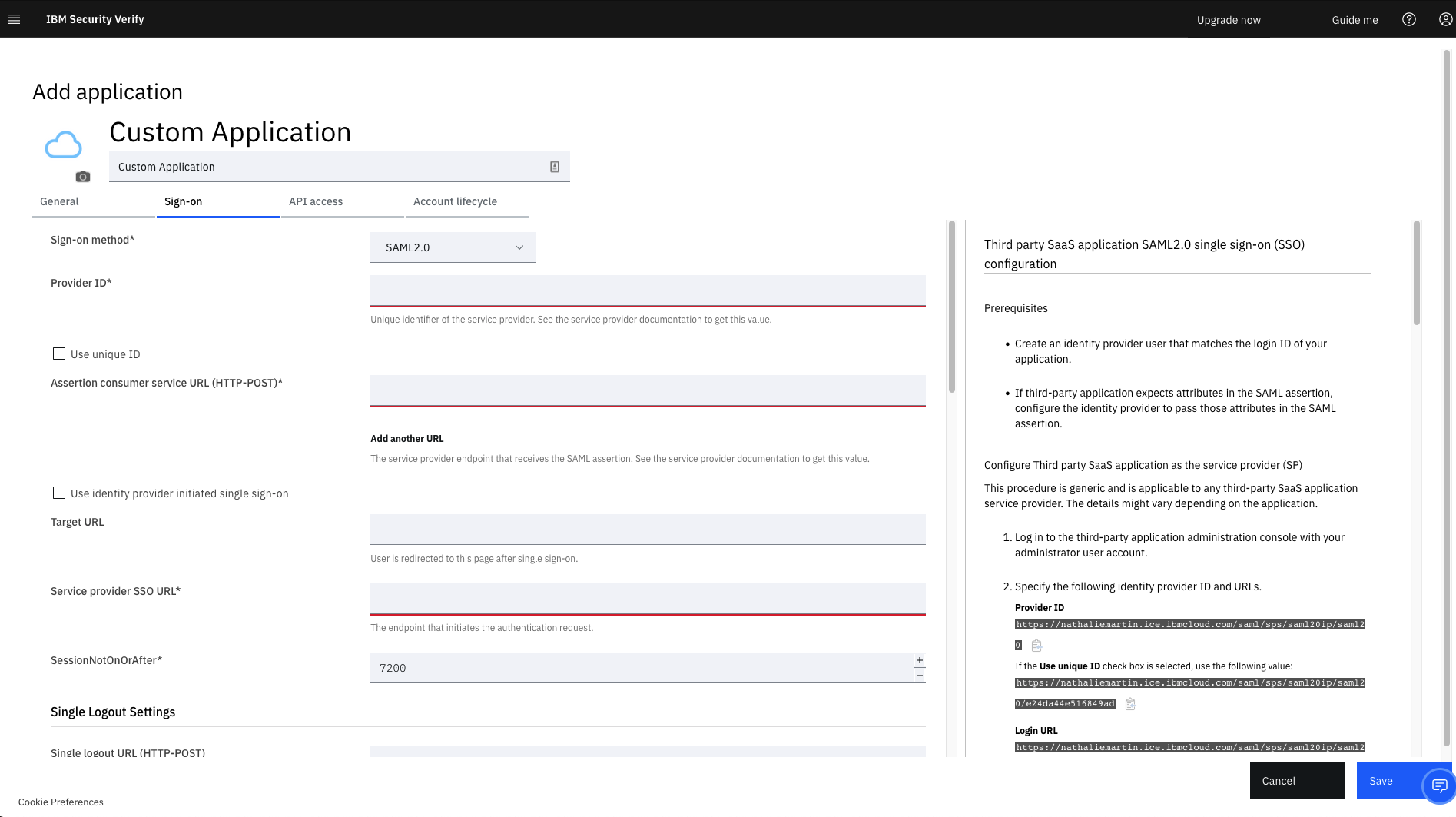
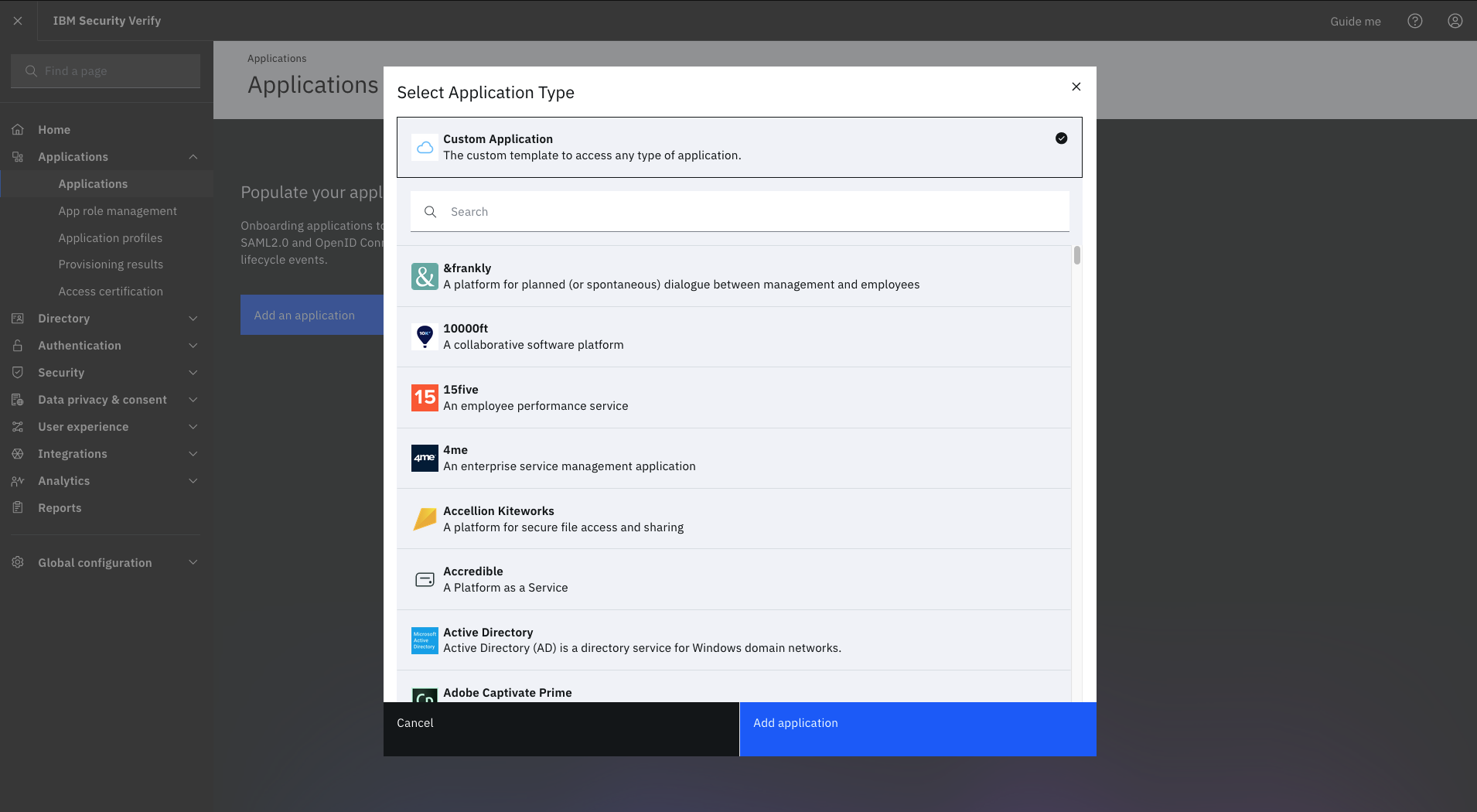
    Screenshot of IBM Verify (for CIAM) - Privacy and ConsentScreenshot of IBM Verify - Custom Application TemplateScreenshot of IBM Verify - Select Application TypeScreenshot of IBM Verify - Privacy Policy

    Teams Manager Screenshots

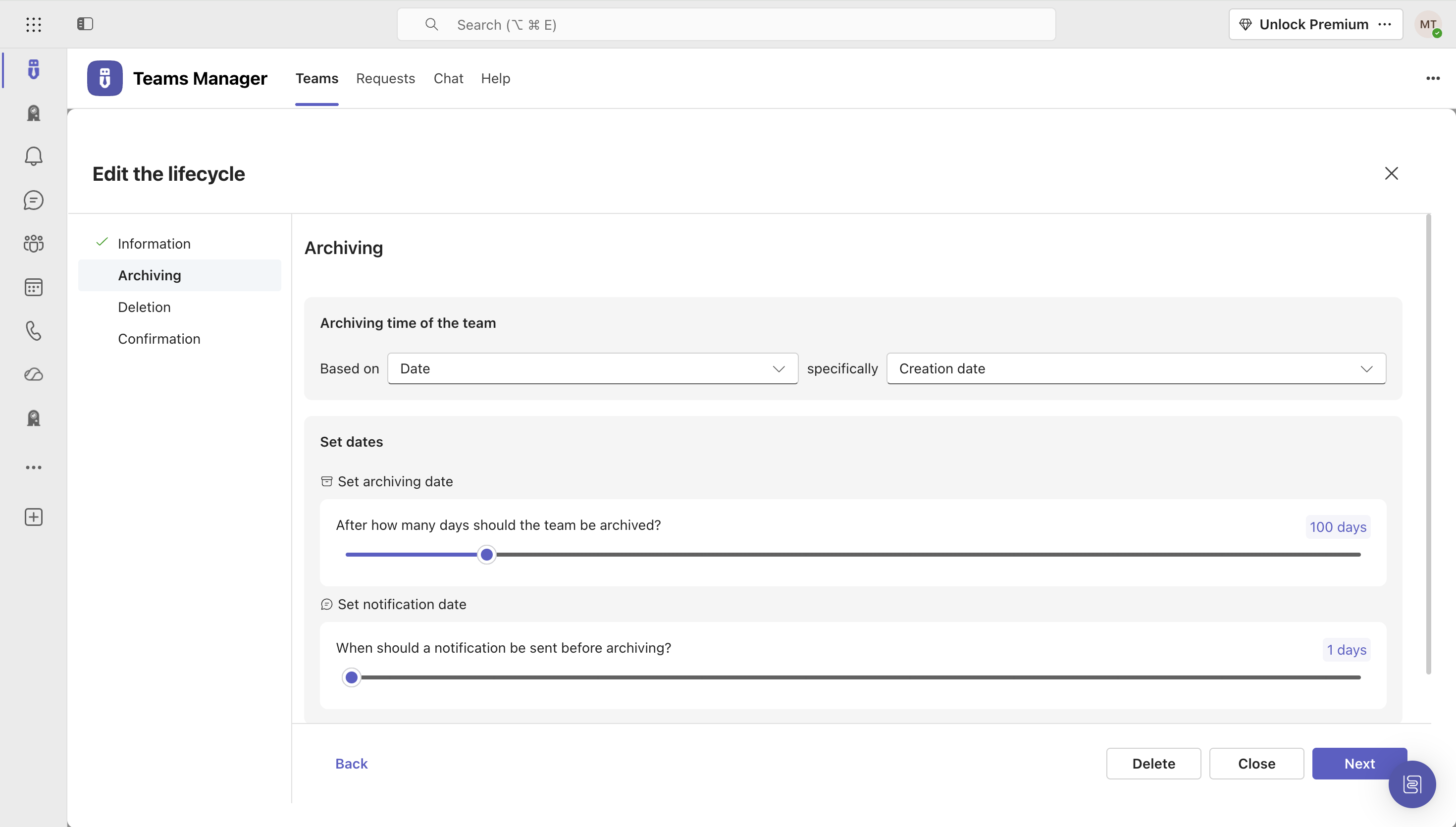
    Screenshot of Governance Dashboard and Reports – for an overview of Microsoft 365 environmentsScreenshot of Automated request and approval process for new teams, M365 groups and SharePoint sitesScreenshot of Templates and provisioning for teams and SharePoint sites (with channels, tabs, apps, folders, Planner with tasks, OneNote with content and more)Screenshot of Lifecycles for teams: inactive or obsolete teams can automatically be archived or even deleted after a specified period of timeScreenshot of Naming conventions for teams, OneNotes, Planners and SharePoint URLs: rules for uniform, relevant names with predefined prefixes and suffixesScreenshot of Policy packages for teams: automatically enforce governance policies for team requests, approvals, access reviews and more