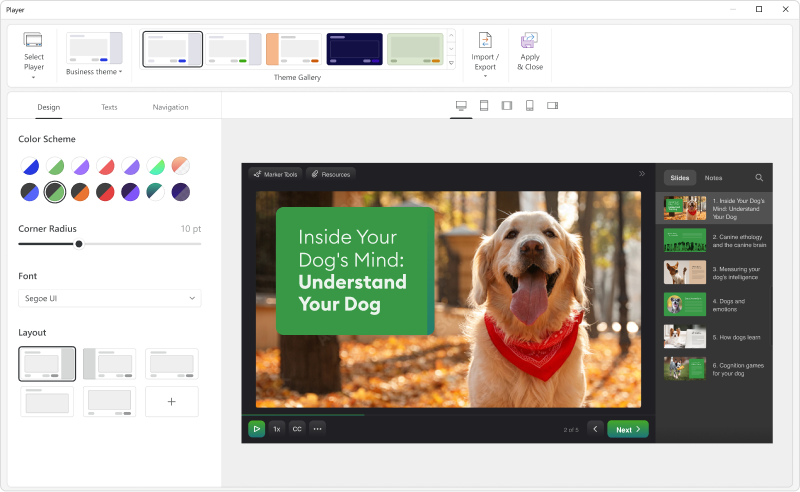
iSpring Suite is an authoring tool with AI-assisted features for creating slide-based online courses, quizzes, and video lessons in Microsoft PowerPoint. Instructional designers, corporate L&D and HR teams, educators, and independent course developers can build training content without relying on multiple specialized tools. iSpring Suite enables users to: Generate a course from a topic. Users can describe what to teach or upload subject…
$970
per year per user
Snagit
Score9.7 out of 10
N/A
Snagit is screen capture and recording software from TechSmith, that lets users capture the screen and camera, add additional context, and share images, GIFs, or videos across preferred platforms.
$39
per year per user
Pricing
iSpring Suite
Snagit
Editions & Modules
No answers on this topic
No answers on this topic
Offerings
Pricing Offerings
iSpring Suite
Snagit
Free Trial
Yes
Yes
Free/Freemium Version
Yes
No
Premium Consulting/Integration Services
No
No
Entry-level Setup Fee
No setup fee
No setup fee
Additional Details
Academic, non-profit, government and volume discounts are available.
One-time license cost
One license per user - install on 2 machines, for work and home use
Compatible with Windows and MacOS
Optional Maintenance renewal - first year included
FREE Upgrade to the next version
Phone, chat and email support
Access to Snagit Certification with 20+ exclusive how-to videos
Enhanced Screencast integration to share content, plus the newest starter Assets for Snagit
More Pricing Information
Community Pulse
iSpring Suite
Snagit
Considered Both Products
iSpring Solutions Inc
Verified User
Chose iSpring Suite
We've used Techsmith's "Camtasia" product, but only for video creation. It has a more powerful interface and feature-set, but none of the other tools that are in iSpring Suite.
A de minimis incentive was given to thank the reviewer for their time. The incentive was not used to bias or drive a particular response, nor was the incentive contingent on a positive endorsement. More Info
Consultant in Professional Services at Inviden, LLC (Information Technology & Services, 1-10 employees)
Chose iSpring Suite
Please see earlier responses, which featured this aspect. If TrustRadius provided an overview of all questions to be asked (perhaps in a sidebar to the right) during this evaluation, I could have more effectively organized my responses.
A de minimis incentive was given to thank the reviewer for their time. The incentive was not used to bias or drive a particular response, nor was the incentive contingent on a positive endorsement. More Info
Training Coordinator in Human Resources at JR Automation (Machinery, 1001-5000 employees)
Chose iSpring Suite
Learning and using iSpring Suite was infinitely easier than Captivate. It is much more intuitive and is an add-on to PowerPoint. From my experience, converting a PowerPoint into an eLearning course was much simpler with iSpring and the resolution of the finished eLearning was …
A de minimis incentive was given to thank the reviewer for their time. The incentive was not used to bias or drive a particular response, nor was the incentive contingent on a positive endorsement. More Info
iSpring Suite gives me a platform to easily create training courses for any number of subjects, custom-designed to fit my workplace. I can include quizzes that allow me to track both the completion rate of the course and the success rate of the training. Its user-friendliness stands out and makes my role as Training Director much easier on a day-to-day basis.
I have recommended Snagit several times. Discussion of screenshot programs is not something that often arises often, in my work environment. When such a situation does arise, I make it clear that Snagit is my go-to solution for anything related to screenshot capture. It opens the captured image directly into an editor window for quick and easy manipulation.
A de minimis incentive was given to thank the reviewer for their time. The incentive was not used to bias or drive a particular response, nor was the incentive contingent on a positive endorsement. More Info
A de minimis incentive was given to thank the reviewer for their time. The incentive was not used to bias or drive a particular response, nor was the incentive contingent on a positive endorsement. More Info
Being able to take screen captures quickly and with just a keystroke is a prime feature. I took several screenshots just yesterday to show folks, which saved me from taking the time to meet with [...] everyone.
Obviously recording and sharing video is Snagit's strength. It does this as well as any product I have used. It is not an editor but there are a lot of capture features that cover just about any situation.
One great feature that Snagit has is the ability to pull text from a capture. We don't use this a lot but when it is needed it is a huge time saver.
The settings and tools within Snagit are intuitive and easy to find.
A de minimis incentive was given to thank the reviewer for their time. The incentive was not used to bias or drive a particular response, nor was the incentive contingent on a positive endorsement. More Info
Add details on what the customized play includes when the mouse hovers over the icon. It took a bit of time to realize that this was where we could select different layouts.
A de minimis incentive was given to thank the reviewer for their time. The incentive was not used to bias or drive a particular response, nor was the incentive contingent on a positive endorsement. More Info
A de minimis incentive was given to thank the reviewer for their time. The incentive was not used to bias or drive a particular response, nor was the incentive contingent on a positive endorsement. More Info
I think that the tool is excellent for what it is being used for. I particuarly like the ability to capture content from the screen whilst using the scroll wheel on my mouse. It is very annoying when your try to capture something with grab and you can't scroll which leads to multiple images
A de minimis incentive was given to thank the reviewer for their time. The incentive was not used to bias or drive a particular response, nor was the incentive contingent on a positive endorsement. More Info
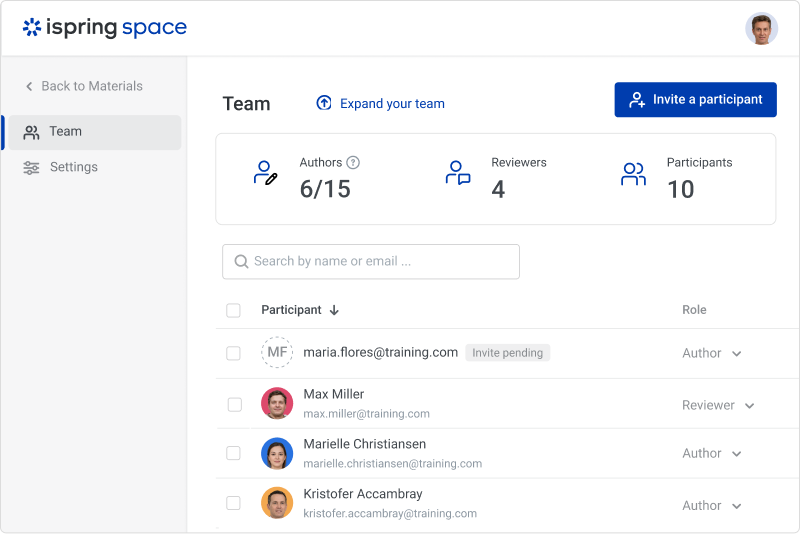
iSpring Suite is a perfect tool overall to create contents in collaboration with colleagues. There are some difficulties though in usability but the usability is OK in total. We are fully satisfied with the customer support. There are simple online tutorials and a team of competent support colleagues. The support content is sometimes not simply accessible, you need to search for them longer.
A de minimis incentive was given to thank the reviewer for their time. The incentive was not used to bias or drive a particular response, nor was the incentive contingent on a positive endorsement. More Info
It's button centric for easy access to every feature. Everything allows undo! It works like any other standard Windows application. Everyone can be a professional without having to select every feature yourself by using the built in styles with just one click of a button in most cases. Every button is clearly labeled too.
A de minimis incentive was given to thank the reviewer for their time. The incentive was not used to bias or drive a particular response, nor was the incentive contingent on a positive endorsement. More Info
Great software is only exceeded by their fantastic support. Prompt responses, complete with clearly outlined steps to follow, are just the beginning. There are tremendous resources and continual webinars to challenge what we think we know about the iSpring Suite. I often use PowerPoint to lay out marketing slides, add music and narration, then publish them as an MP4 video. I can count on iSpring support to assist me when I need help.
I've actually never had to contact support as the tool is easy to use. One aspect is that they upgrade and send email notifications of the upgrades. They don't charge extra for upgrades and their enhancements fall in line with the way we use the tool. We haven't had to submit any upgrade requests as the tool already does what we need it to do.
A de minimis incentive was given to thank the reviewer for their time. The incentive was not used to bias or drive a particular response, nor was the incentive contingent on a positive endorsement. More Info
It's a simple next next finish install. The SnagIt Library in the user profile should probably be backed up to make sure they have access to their old screen captures. We frequently will go back to previous captures and add context bubbles etc. when software changes to show the "old" vs "new". Also, go to SnagIt's website and download the additional Stamp Sets for the user. These are terrific. I wish there was one download to get them all, but you have to download and install them one set at a time. It's worth it - especially for training how-to's.
A de minimis incentive was given to thank the reviewer for their time. The incentive was not used to bias or drive a particular response, nor was the incentive contingent on a positive endorsement. More Info
Ultimately, I selected iSpring Suite because of the ease of use and small learning curve. I needed to be able to start creating content immediately, and after doing trial periods with iSpring as well as some of the other options, it was clear that I could be up and running the quickest with iSpring. I don't see any features that are missing for what I need, and it was also the cheapest option.
A de minimis incentive was given to thank the reviewer for their time. The incentive was not used to bias or drive a particular response, nor was the incentive contingent on a positive endorsement. More Info
Windows free snipping tool - Con: had to save each screen shot before I could take another screen shot and couldn't draw nice circles/rectangles around the area of the screen shot to bring attention. Chrome plugin options - Con: editing tools were lacking.
A de minimis incentive was given to thank the reviewer for their time. The incentive was not used to bias or drive a particular response, nor was the incentive contingent on a positive endorsement. More Info
It has enhance my reputation personally within the organization. This has led to other departments requesting me by name to head up eLearning development projects, even delaying their own deadlines to ensure that I am involved.
Other than a few duds (I let some inexperienced vocal talent slip thru in the heat of multiple conflicting deadlines), learner feedback has skyrocketed over that developed before I became involved and standardized the effort on iSpring
A de minimis incentive was given to thank the reviewer for their time. The incentive was not used to bias or drive a particular response, nor was the incentive contingent on a positive endorsement. More Info