TrustRadius: an HG Insights company

Save this comparison

Save this comparison

Add Product

Recommended Comparisons

    Overview
    ProductRatingMost Used ByProduct SummaryStarting Price

    Jedox

    Score8.8 out of 10
    N/AJedox is a Business Intelligence and Corporate Performance Management solution. According to the vendor, their solution’s unified planning, analysis and reporting empowers decision makers from finance, sales, purchasing and marketing. Additionally, the vendor says this solution helps business users work smarter, streamline business collaboration, and make insight-based decisions with confidence. The vendor also says 1,900 organizations in 127 countries are using Jedox for real-time planning…N/A

    QuickBooks Desktop Pro

    Score7.8 out of 10
    N/AQuickbooks Desktop Pro is accounting software from Intuit, Inc. It includes core accounting features, plus analytics and exportable reports. It is offered in on-premise and SaaS forms.N/A
    Pricing
    JedoxQuickBooks Desktop Pro
    Editions & Modules
    No answers on this topic
    No answers on this topic
    Offerings
    Pricing Offerings
    JedoxQuickBooks Desktop Pro
    Free Trial
    YesNo
    Free/Freemium Version
    YesNo
    Premium Consulting/Integration Services
    YesNo
    Entry-level Setup FeeNo setup feeNo setup fee
    Additional Details——
    More Pricing Information
    Community Pulse
    JedoxQuickBooks Desktop Pro
    Considered Both Products
    Jedox AG
    No answer on this topic
    Intuit
    No answer on this topic
    Key User Insights
    Would buy again
    No answers on this topic
    88%
    Would buy again
    29 Answers
    Delivers good value for the price
    No answers on this topic
    93%
    Delivers good value for the price
    28 Answers
    Happy with the feature set
    No answers on this topic
    97%
    Happy with the feature set
    32 Answers
    Lived up to sales and marketing promises
    No answers on this topic
    83%
    Lived up to sales and marketing promises
    20 Answers
    Implementation went as expected
    No answers on this topic
    96%
    Implementation went as expected
    25 Answers
    Features
    JedoxQuickBooks Desktop Pro
    BI Standard Reporting
    Comparison of BI Standard Reporting features of Jedox and QuickBooks Desktop Pro
    Feature
    Jedox
    9.1
    4 Ratings
    19% above category average
    QuickBooks Desktop Pro
    -
    Ratings
    Pixel Perfect reports9.14 Ratings00 Ratings
    Customizable dashboards9.14 Ratings00 Ratings
    Report Formatting Templates9.14 Ratings00 Ratings
    Ad-hoc Reporting
    Comparison of Ad-hoc Reporting features of Jedox and QuickBooks Desktop Pro
    Feature
    Jedox
    8.3
    3 Ratings
    7% above category average
    QuickBooks Desktop Pro
    -
    Ratings
    Drill-down analysis8.23 Ratings00 Ratings
    Formatting capabilities8.23 Ratings00 Ratings
    Integration with R or other statistical packages8.53 Ratings00 Ratings
    Report sharing and collaboration8.53 Ratings00 Ratings
    Report Output and Scheduling
    Comparison of Report Output and Scheduling features of Jedox and QuickBooks Desktop Pro
    Feature
    Jedox
    7.9
    3 Ratings
    0% below category average
    QuickBooks Desktop Pro
    -
    Ratings
    Publish to Web8.53 Ratings00 Ratings
    Publish to PDF7.93 Ratings00 Ratings
    Report Versioning7.03 Ratings00 Ratings
    Report Delivery Scheduling8.23 Ratings00 Ratings
    Data Discovery and Visualization
    Comparison of Data Discovery and Visualization features of Jedox and QuickBooks Desktop Pro
    Feature
    Jedox
    5.6
    3 Ratings
    27% below category average
    QuickBooks Desktop Pro
    -
    Ratings
    Pre-built visualization formats (heatmaps, scatter plots etc.)5.93 Ratings00 Ratings
    Location Analytics / Geographic Visualization5.53 Ratings00 Ratings
    Predictive Analytics5.63 Ratings00 Ratings
    Access Control and Security
    Comparison of Access Control and Security features of Jedox and QuickBooks Desktop Pro
    Feature
    Jedox
    8.8
    3 Ratings
    5% above category average
    QuickBooks Desktop Pro
    -
    Ratings
    Multi-User Support (named login)8.83 Ratings00 Ratings
    Role-Based Security Model8.83 Ratings00 Ratings
    Multiple Access Permission Levels (Create, Read, Delete)8.83 Ratings00 Ratings
    Mobile Capabilities
    Comparison of Mobile Capabilities features of Jedox and QuickBooks Desktop Pro
    Feature
    Jedox
    7.4
    3 Ratings
    1% above category average
    QuickBooks Desktop Pro
    -
    Ratings
    Responsive Design for Web Access8.53 Ratings00 Ratings
    Mobile Application7.03 Ratings00 Ratings
    Dashboard / Report / Visualization Interactivity on Mobile7.03 Ratings00 Ratings
    Budgeting, Planning, and Forecasting
    Comparison of Budgeting, Planning, and Forecasting features of Jedox and QuickBooks Desktop Pro
    Feature
    Jedox
    8.4
    4 Ratings
    4% above category average
    QuickBooks Desktop Pro
    -
    Ratings
    Long-term financial planning7.04 Ratings00 Ratings
    Financial budgeting9.04 Ratings00 Ratings
    Forecasting9.04 Ratings00 Ratings
    Scenario modeling7.04 Ratings00 Ratings
    Management reporting10.04 Ratings00 Ratings
    Consolidation and Close
    Comparison of Consolidation and Close features of Jedox and QuickBooks Desktop Pro
    Feature
    Jedox
    9.5
    3 Ratings
    20% above category average
    QuickBooks Desktop Pro
    -
    Ratings
    Financial data consolidation10.03 Ratings00 Ratings
    Journal entries and reports7.02 Ratings00 Ratings
    Multi-currency management10.02 Ratings00 Ratings
    Intercompany Eliminations10.03 Ratings00 Ratings
    Local and consolidated reporting10.02 Ratings00 Ratings
    Detailed Audit Trails10.02 Ratings00 Ratings
    Financial Reporting and Compliance
    Comparison of Financial Reporting and Compliance features of Jedox and QuickBooks Desktop Pro
    Feature
    Jedox
    9.3
    4 Ratings
    13% above category average
    QuickBooks Desktop Pro
    -
    Ratings
    Financial Statement Reporting9.04 Ratings00 Ratings
    Management Reporting9.04 Ratings00 Ratings
    Excel-based Reporting10.04 Ratings00 Ratings
    Automated board and financial reporting9.04 Ratings00 Ratings
    Analytics and Reporting
    Comparison of Analytics and Reporting features of Jedox and QuickBooks Desktop Pro
    Feature
    Jedox
    9.7
    4 Ratings
    25% above category average
    QuickBooks Desktop Pro
    -
    Ratings
    Personalized dashboards9.04 Ratings00 Ratings
    Color-coded scorecards10.03 Ratings00 Ratings
    KPIs9.03 Ratings00 Ratings
    Cost and profitability analysis10.03 Ratings00 Ratings
    Key Performance Indicator setting10.03 Ratings00 Ratings
    Benchmarking with external data10.02 Ratings00 Ratings
    Integration
    Comparison of Integration features of Jedox and QuickBooks Desktop Pro
    Feature
    Jedox
    9.0
    4 Ratings
    11% above category average
    QuickBooks Desktop Pro
    -
    Ratings
    Flat file integration9.04 Ratings00 Ratings
    Excel data integration9.04 Ratings00 Ratings
    Direct links to 3rd-party data sources9.04 Ratings00 Ratings
    Payroll Management
    Comparison of Payroll Management features of Jedox and QuickBooks Desktop Pro
    Feature
    Jedox
    -
    Ratings
    QuickBooks Desktop Pro
    6.6
    69 Ratings
    14% below category average
    Pay calculation00 Ratings6.364 Ratings
    Benefit plan administration00 Ratings6.338 Ratings
    Direct deposit files00 Ratings6.656 Ratings
    Salary revision and increment management00 Ratings6.352 Ratings
    Reimbursement management00 Ratings7.754 Ratings
    Customization
    Comparison of Customization features of Jedox and QuickBooks Desktop Pro
    Feature
    Jedox
    -
    Ratings
    QuickBooks Desktop Pro
    5.7
    43 Ratings
    28% below category average
    API for custom integration00 Ratings6.535 Ratings
    Plug-ins00 Ratings5.039 Ratings
    Security
    Comparison of Security features of Jedox and QuickBooks Desktop Pro
    Feature
    Jedox
    -
    Ratings
    QuickBooks Desktop Pro
    8.5
    101 Ratings
    4% above category average
    Single sign-on capability00 Ratings8.482 Ratings
    Role-based user permissions00 Ratings8.695 Ratings
    Reporting & Analytics
    Comparison of Reporting & Analytics features of Jedox and QuickBooks Desktop Pro
    Feature
    Jedox
    -
    Ratings
    QuickBooks Desktop Pro
    8.5
    117 Ratings
    8% above category average
    Dashboards00 Ratings8.4100 Ratings
    Standard reports00 Ratings8.9117 Ratings
    Custom reports00 Ratings8.1114 Ratings
    General Ledger and Configurable Accounting
    Comparison of General Ledger and Configurable Accounting features of Jedox and QuickBooks Desktop Pro
    Feature
    Jedox
    -
    Ratings
    QuickBooks Desktop Pro
    7.5
    124 Ratings
    2% below category average
    Accounts payable00 Ratings9.3119 Ratings
    Accounts receivable00 Ratings9.2121 Ratings
    Cash management00 Ratings9.2107 Ratings
    Bank reconciliation00 Ratings9.7119 Ratings
    Expense management00 Ratings9.4108 Ratings
    Time tracking00 Ratings7.451 Ratings
    Fixed asset management00 Ratings5.669 Ratings
    Multi-currency support00 Ratings6.931 Ratings
    Multi-division support00 Ratings8.958 Ratings
    Regulations compliance00 Ratings8.342 Ratings
    Electronic tax filing00 Ratings8.355 Ratings
    Self-service portal00 Ratings5.941 Ratings
    Global Financial Support00 Ratings4.217 Ratings
    Primary and Secondary Ledgers00 Ratings7.240 Ratings
    Intercompany Accounting00 Ratings7.943 Ratings
    Localizations00 Ratings4.219 Ratings
    Journals and Reconciliations00 Ratings8.876 Ratings
    Enterprise Accounting00 Ratings6.838 Ratings
    Configurable Accounting00 Ratings7.647 Ratings
    Centralized Rules Framework00 Ratings5.427 Ratings
    Standardized Processes00 Ratings8.555 Ratings
    Inventory Management
    Comparison of Inventory Management features of Jedox and QuickBooks Desktop Pro
    Feature
    Jedox
    -
    Ratings
    QuickBooks Desktop Pro
    5.8
    59 Ratings
    23% below category average
    Inventory tracking00 Ratings6.056 Ratings
    Automatic reordering00 Ratings6.035 Ratings
    Location management00 Ratings6.032 Ratings
    Manufacturing module00 Ratings5.218 Ratings
    Order Management
    Comparison of Order Management features of Jedox and QuickBooks Desktop Pro
    Feature
    Jedox
    -
    Ratings
    QuickBooks Desktop Pro
    6.8
    77 Ratings
    8% below category average
    Pricing00 Ratings7.555 Ratings
    Order entry00 Ratings8.555 Ratings
    Credit card processing00 Ratings7.251 Ratings
    Cost of goods sold00 Ratings8.063 Ratings
    Order Orchestration00 Ratings5.220 Ratings
    End-to-end order visibility00 Ratings6.123 Ratings
    Order exception Resolution00 Ratings5.218 Ratings
    Best Alternatives
    JedoxQuickBooks Desktop Pro
    Small Businesses
    No answers on this topic
    QuickBooks Self-Employed (discontinued)
    Score4.2 out of 10
    Medium-sized Companies
    IBM Planning Analytics
    Score8.5 out of 10
    MYOB
    Score8.3 out of 10
    Enterprises
    Oracle Fusion Cloud Enterprise Performance Management
    Score7.2 out of 10
    Microsoft Dynamics GP
    Score5.4 out of 10
    All AlternativesView all alternativesView all alternatives
    User Ratings
    JedoxQuickBooks Desktop Pro
    Likelihood to Recommend
    9.0
    (8 ratings)
    8.5
    (135 ratings)
    Likelihood to Renew
    9.0
    (3 ratings)
    8.0
    (19 ratings)
    Usability
    9.0
    (2 ratings)
    9.1
    (42 ratings)
    Availability
    8.0
    (2 ratings)
    8.3
    (2 ratings)
    Performance
    7.0
    (2 ratings)
    -
    (0 ratings)
    Support Rating
    9.0
    (3 ratings)
    1.2
    (29 ratings)
    In-Person Training
    -
    (0 ratings)
    10.0
    (1 ratings)
    Online Training
    8.0
    (1 ratings)
    -
    (0 ratings)
    Implementation Rating
    9.0
    (2 ratings)
    9.0
    (6 ratings)
    Configurability
    9.0
    (2 ratings)
    -
    (0 ratings)
    CPA Rating
    -
    (0 ratings)
    8.5
    (22 ratings)
    Data Sharing and Collaboration
    6.7
    (7 ratings)
    -
    (0 ratings)
    Data Sources
    8.9
    (7 ratings)
    -
    (0 ratings)
    Ease of integration
    9.0
    (1 ratings)
    -
    (0 ratings)
    Product Scalability
    4.0
    (2 ratings)
    8.0
    (1 ratings)
    Vendor post-sale
    10.0
    (1 ratings)
    -
    (0 ratings)
    Vendor pre-sale
    10.0
    (1 ratings)
    -
    (0 ratings)
    User Testimonials
    JedoxQuickBooks Desktop Pro
    Likelihood to Recommend
    Jedox AG
    Best suited for financial consolidation and / or as a highly customized and compact EPM / BI solution (up to 100 CCU) with individual workflows, planning and reporting functionalities, with moderate number of users (no restrictions for any industry, all industries are covered well). It also has advanced reporting & data analysis requirements and provides an integration and reporting layer of imported data from different external systems (via ETL). It can help with migrating your legacy Excel-based business models to the Web. It is not well suited for Enterprise BI applications with expecting >500 CCU (users at the same time working with the system) - this may cause serious performance issues, as all data is kept in RAM. Jedox is also less suited for applications with heavy document management requirements (document management is not an out of the box functionality in Jedox and rather requires custom development through custom widgets etc.).
    Read full review
    Intuit
    For a small business, QuickBooks Desktop Pro is great! For a larger, more complex business, another system may be more beneficial. We actually run multiple businesses on QuickBooks Desktop Pro, but all are very small. The help feature is sometimes so beneficial, and sometimes it seems like you just can't get the right answer and need to find a workaround - but this is usually for more complex issues.
    Read full review
    Pros
    Jedox AG
    • Using the Excel add-in means that our team was almost instantly productive, being able to use a familiar interface to present and manipulate data.
    • Allows us to quickly do analysis and comparison of current and historic data.
    • Really good to produce meaningful management reporting that can be adapted responsively to business requirements.
    • Implementing Jedox in our budget cycle dramatically reduced the time and complexity of the process, while making it more transparent.
    Incentivized
    Read full review
    Intuit
    • It is easy to manage and adjust inventory on hand.
    • It is easy to make reports and customize them to your needs.
    • We also use it to pay our employees directly.
    • It is easy to make year-to-year comparisons to see where we can make improvements and the current financial situation.
    Incentivized
    Read full review
    Cons
    Jedox AG
    • Diversity. Jedox can be applied to many different use cases from small to large deployments and from budgeting to enterprise class BI solutions. But rarely is one tool able to fulfill all of these requirements in one organisation. This value proposition can be complicated for prospective users.
    • Awareness. Jedox punches above its weight in capability and scalability, but not enough people have heard about it and therefore procurement processes can be drawn out as a result.
    Read full review
    Intuit
    • QuickBooks Desktop Pro has been around for a few years and after an update[,] they force you to look at the changes/updates before you can use [them] after updating.
    • QuickBooks Desktop Pro does not have 2FA.
    • QuickBooks Desktop Pro should offer a way to store backups to a personal cloud without having to map a local network drive.
    Incentivized
    Read full review
    Likelihood to Renew
    Jedox AG
    For a period of 5 years all our customers using Jedox have renewed their licenses.
    Read full review
    Intuit
    I'd love to keep using it, and do intend to - though we've not been pleased with price increases over the past several years. In fact, we used to subscribe to the payroll service, but QuickBooks priced themselves out of reach for us, so we discontinued that. Currently, pricing would be the primary reason for NOT renewing, if we didn't.
    Incentivized
    Read full review
    Usability
    Jedox AG
    To me Jedox deserves 10/10 because it is a consistent one-in-all platform with a modern look and feel. It is intuitive to use and allows you to make intuitive applications integrating traditional business intelligence with performance management functionality. It certainly has a short
    learning curve, especially for those that are familiar with MS Excel. An example: I've lost count but Jedox it is available in more than 25 languages. Another: Jedox does not require programming skills... it is developed to be used by the business.
    Read full review
    Intuit
    The set up was quite easy. I took some online training causes, and figured our the rest pretty quickly. The only issue I had during the implementation process was it was very hard to change some of the GL Account name to reflect the needs of a non-profit organization, such as Net Assets. At the end I had to scratch what I did, and used the existing formats that the third-party bookkeeping firm shared. Everything else is simple and easy to manage and implement.
    Incentivized
    Read full review
    Reliability and Availability
    Jedox AG
    Jedox has
    very few bugs. Reports are available through an Excel add-in, the web and/or
    mobile device (IOS/Android). In my opinion, availability also means high
    performance, not having to wait for the system to give you the required reports,
    analysis, dashboards instantly.
    Read full review
    Intuit
    I haven't experienced a time when QuickBooks Pro was unavailable when I needed it in the entire 20 years of using the software
    Incentivized
    Read full review
    Performance
    Jedox AG
    Jedox is the fastest OLAP tool on the market. It can use GPU cards to increase performance even more
    Read full review
    Intuit
    No answers on this topic
    Support Rating
    Jedox AG
    Jedox support in general is a professional and fast responding team. An easy-to-use ticketing system is in place. Bug-related questions are solved fast (responses come usually in a few hours after the question), but some questions / tickets, that are not Jedox-related bugs (for example some advanced questions about Jedox functionality), may be forwarded to Application Management team for further processing and then it may take several days or even weeks to get a response here -> there is room for improvement here.
    Read full review
    Intuit
    They are awful. Intuit doesn't spend real money on support. They appear to have typically said, first-level script readers who are sending messages to the senior people for anything even a little bit difficult. Many of them don't speak particularly good English. Considering that they recently doubled (or, if you are paying annually, tripled) their pricing, and touted as one of the benefits that it includes [..] support, it's a real ripoff. However, we have to use the product because it is ubiquitous. I look forward to the day a competitor comes up with something good enough, which has excellent support, that matches all the features QuickBooks Desktop Pro currently has [...] or at least gives us a way to have all the functionality we currently have without excessive sacrifice [...] so that we can switch. I was very satisfied with QuickBooks for many years. This latest [rise] in price, and their sheer gall at touting the benefit of the 100 to 200% increase as being [the] inclusion of support, is what turned me so far against them.
    Incentivized
    Read full review
    In-Person Training
    Jedox AG
    No answers on this topic
    Intuit
    Best thing I ever did was to attend a two day training seminar on QuickBooks, I learned an immense amount in a short time with hands on training by experts. I strongly recommend such training for anyone using any part of the software. It will pay for itself in the first month.
    Read full review
    Implementation Rating
    Jedox AG
    The implementation of SSO, SAML Authentication, HTTPS, Server splitting (Frontend / Backend servers) could be more standardized and made more user friendly to set up (e.g. via setup guide). Otherwise the implementation of Jedox is quick and simple when compared to other similar technologies.
    Read full review
    Intuit
    We implemented the software ourselves. The training we received on the software was done by taking a community course teaching us how to use QuickBooks. It allowed me to get started with some basics of how to use the program and have not needed much assistance since completing the course work.
    Incentivized
    Read full review
    Alternatives Considered
    Jedox AG
    Calumo is similar product to Jedox. I have used it extensively in my previous role. It was a major contender when we evaluated a BI platform for NIDA. Calumo is a great product as well and it was a very close call. Where we found Jedox to be a better fit for NIDA was the ability to prepare dynamic reports with ease without the need to learn MDX which was used extensively by Calumo to make dynamic reports which expand or shrink based on the underlying data. Another major benefit we saw in Jedox was the whole ETL process could be managed within Jedox instead of doing it in SQL server which negates having a dedicated SQL specialist role when the scale expands.
    Incentivized
    Read full review
    Intuit
    We tried switching from QuickBooks Desktop Pro to QuickBooks Online, but there were a lot of issues and bugs so we ultimately decided to stay with Desktop Pro. Unfortunately, we are losing a lot of Online Banking capabilities on 5/31 as we have an older version of QB, but we plan to stick with Desktop Pro. In terms of invoicing, SaaSOptics beats QuickBooks in almost all aspects as it's all automated and takes seconds to create and send invoices. However, SaaSOptics is not really a full ERP program so it wouldn't serve us as a main bookkeeping software like QB.
    Incentivized
    Read full review
    Scalability
    Jedox AG
    Scalability is often another word for speed. Given enough data, enough users or enough calculations, the tool becomes slower and slower. You will find that Jedox has a very high performance that can even be increased by the use of grafical cards. Other thaen that it does not only offer BI (looking back based on historical ERP data) but also allows you to look forward through integrated budgetting, planning, forecasting, workflow and collaboration. Not easy to find a tool that can support so much business functionality. So, also pretty scalable in that respect.
    Read full review
    Intuit
    No answers on this topic
    Return on Investment
    Jedox AG
    • Financial budgeting and Forecasting are done in a centralized fashion in Jedox now instead of a decentralized excel based approach. A lot of cost savings and improved reliability
    • Easy to use self-help Dashboards and detailed reports
    • Web-based reporting instead of excel based
    Incentivized
    Read full review
    Intuit
    • Training time is low compared to other accounting packages
    • It was difficult to adapt to DCAA requirements, [which] required [the] hiring of [a] special consultant for that
    • QuickBooks Desktop Pro is a standard for small companies and makes it easy to hire bookkeepers
    Incentivized
    Read full review
    ScreenShots

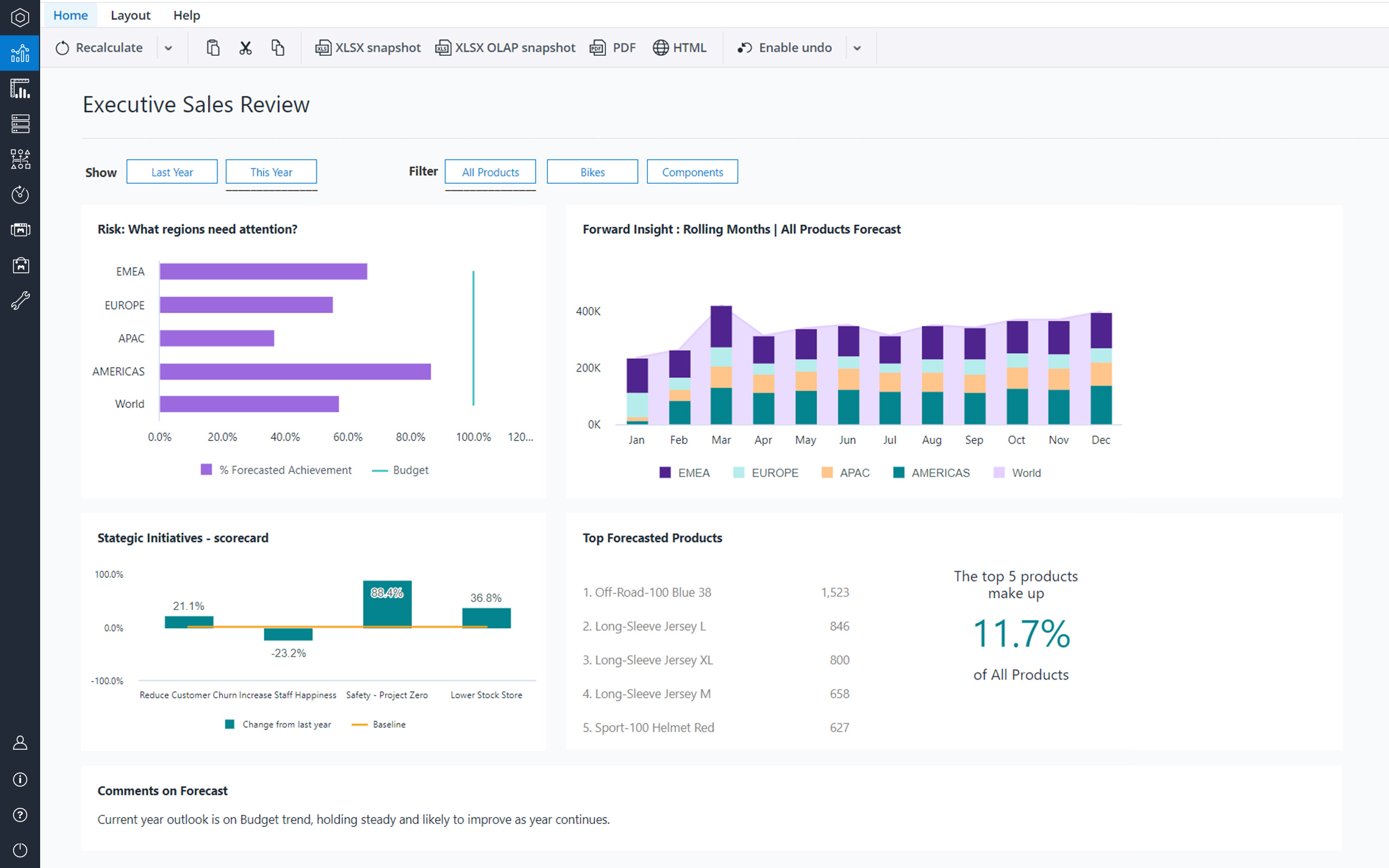
    Jedox Screenshots

    Screenshot of Management Dashboard with Google Maps WidgetScreenshot of ABC Analysis (Procurement)Screenshot of Executive Sales ReviewScreenshot of Finance DashboardScreenshot of Sales DashboardScreenshot of Start