Jira Work Management vs. OFFLIGHT

Overview
ProductRatingMost Used ByProduct SummaryStarting Price
Jira Work Management
Score 8.2 out of 10
N/A
Jira Core is Atlassian's general purpose business and project management tool available to smaller companies or teams and designed to suit a variety of purposes (e.g. marketing planning, product roadmap, etc.). In Jira Core, Workflows define process and enable teams to track tasks. Jira Core Cloud instances also have boards that let users visualize workflows and drag and drop tasks from to-do to done. It is available on the cloud.
$7.53
per month per user
OFFLIGHT
Score 0.0 out of 10
N/A
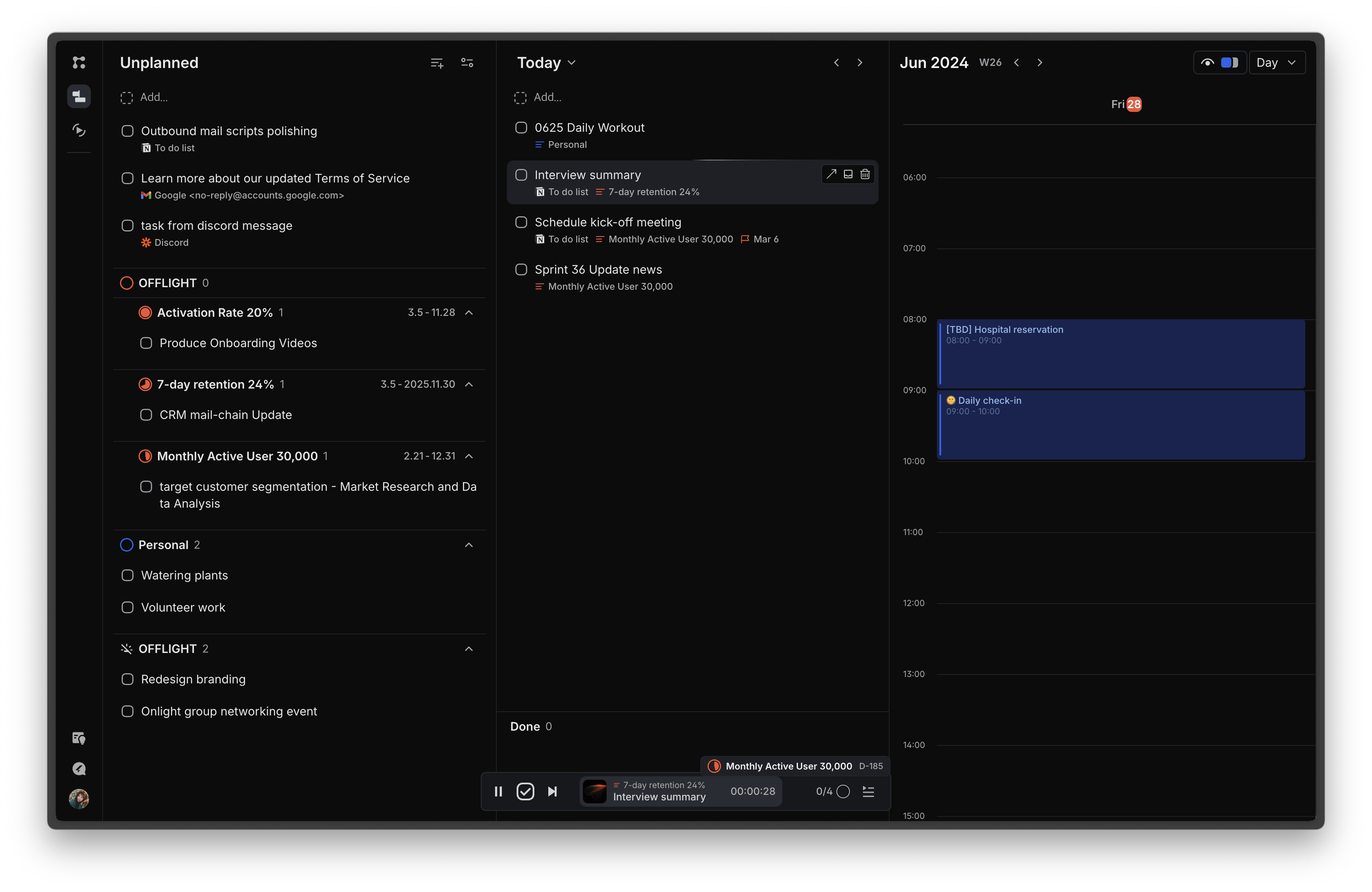
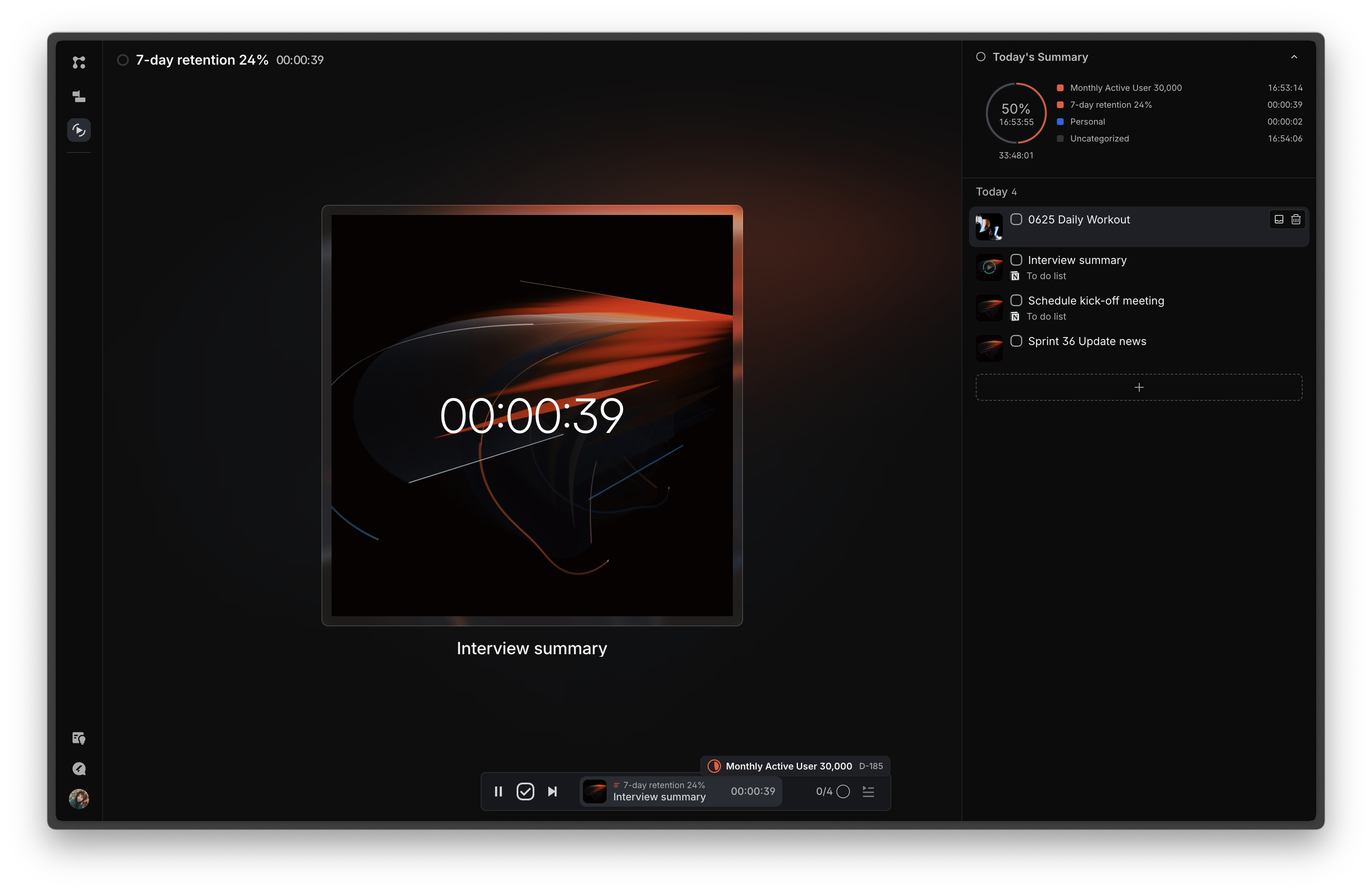
OFFLIGHT is a productivity software designed to centralize task management, facilitate goal setting and tracking, assist in daily planning, and enhance focus during work sessions. Key Features: Unified Task Management: Consolidates tasks from various tools and platforms into one centralized location. Goal Setting and Tracking: Allows users to set, manage, and track their goals. Daily Planning: Provides a time-blocking…
$6.99
per month per user
Pricing
Jira Work ManagementOFFLIGHT
Editions & Modules
Free
$0
Starter - Monthly
$7.53
per month per user
Premium - Monthly
$13.53
per month per user
Starter - Annually
$22,500
per year User tier: 201-300
Premium - Annually
$40,500
per year User tier: 201-300
Enterprise
Contact Sales
No answers on this topic
Offerings
Pricing Offerings
Jira Work ManagementOFFLIGHT
Free Trial
YesYes
Free/Freemium Version
YesYes
Premium Consulting/Integration Services
NoNo
Entry-level Setup FeeNo setup feeNo setup fee
Additional DetailsOFFLIGHT are currently in open beta testing. OFFLIGHT offer only the Believer Plan for pricing, but the service can be used for free without any plan purchase. However, those who purchase the Believer Plan can maintain the price for a lifetime.
More Pricing Information
Community Pulse
Jira Work ManagementOFFLIGHT
Features
Jira Work ManagementOFFLIGHT
Project Management
Comparison of Project Management features of Product A and Product B
Jira Work Management
7.8
30 Ratings
1% above category average
OFFLIGHT
-
Ratings
Task Management8.530 Ratings00 Ratings
Resource Management8.529 Ratings00 Ratings
Gantt Charts7.223 Ratings00 Ratings
Scheduling8.125 Ratings00 Ratings
Workflow Automation7.427 Ratings00 Ratings
Team Collaboration8.729 Ratings00 Ratings
Support for Agile Methodology8.129 Ratings00 Ratings
Support for Waterfall Methodology8.220 Ratings00 Ratings
Document Management7.124 Ratings00 Ratings
Email integration7.524 Ratings00 Ratings
Mobile Access6.618 Ratings00 Ratings
Timesheet Tracking8.118 Ratings00 Ratings
Change request and Case Management8.522 Ratings00 Ratings
Budget and Expense Management7.217 Ratings00 Ratings
Professional Services Automation
Comparison of Professional Services Automation features of Product A and Product B
Jira Work Management
8.7
19 Ratings
12% above category average
OFFLIGHT
-
Ratings
Quotes/estimates9.215 Ratings00 Ratings
Invoicing9.712 Ratings00 Ratings
Project & financial reporting8.517 Ratings00 Ratings
Integration with accounting software7.510 Ratings00 Ratings
Best Alternatives
Jira Work ManagementOFFLIGHT
Small Businesses
Stackby
Stackby
Score 9.0 out of 10
7shifts
7shifts
Score 9.8 out of 10
Medium-sized Companies
InEight
InEight
Score 9.5 out of 10
Todoist
Todoist
Score 9.1 out of 10
Enterprises
InEight
InEight
Score 9.5 out of 10
Whimsical
Whimsical
Score 9.2 out of 10
All AlternativesView all alternativesView all alternatives
User Ratings
Jira Work ManagementOFFLIGHT
Likelihood to Recommend
8.2
(30 ratings)
-
(0 ratings)
Usability
7.8
(13 ratings)
-
(0 ratings)
User Testimonials
Jira Work ManagementOFFLIGHT
Likelihood to Recommend
Atlassian
Jira Work Management suits projects involving multiple teams, such as product development. In our case, the design, development, and QA teams use Jira to track tasks from ideation to deployment. Custom workflows and real-time updates ensure that all teams are on the same page, and the ability to link related tasks helps manage dependencies effectively.
Read full review
OFFLIGHT Inc.
No answers on this topic
Pros
Atlassian
  • Provide a roadmap of all epics
  • Provide a backlog in which you can see all the possible work to be done to create your sprint plan
  • Have all our projects within reach
  • Have a dashboard with editable columns to manage your work
  • Be able to filter by person
  • Be able to see past sprints
Read full review
OFFLIGHT Inc.
No answers on this topic
Cons
Atlassian
  • More clarification on where to find useful tools and resources for new users.
  • Breakdown of Projects, Tasks, Sub-tasks, bugs is hard to follow and cannot be changed once created.
  • The ability to customize the dashboard/home page to fit the needs of individuals could use some work.
Read full review
OFFLIGHT Inc.
No answers on this topic
Usability
Atlassian
As we are Atlassian users overall, this entire ecosystem is truly built from a 360 perspective. It becomes the one source of truth, and we can easily see where we are in our projects and where to emphasize focus in the upcoming period. There are some areas for minor improvements, but they are more a matter of preference rather than business necessity
Read full review
OFFLIGHT Inc.
No answers on this topic
Alternatives Considered
Atlassian
The evolution of Jira Service Desk to Jira work management is accompanied by lot of new features like the List View which allows inline editing, easy column management, the Calendar View bases on extensible modal and state categories, the Timeline View supports tasks and subtasks, the Boards which allow the categorization of status and allow the visibility of subtasks on the cards, Forms can be created very easily, Project templates can be used based on the business area.
Read full review
OFFLIGHT Inc.
No answers on this topic
Return on Investment
Atlassian
  • For our marketing team, Jira Work Management caused us to lose valuable work time due to manual updates that could have been automated.
  • Due to lack of creative review tools within Jira Work Management, our team had to pursue other tools that do not integrate with Jira Work Management, thus creating additional OpEx.
Read full review
OFFLIGHT Inc.
No answers on this topic
ScreenShots

OFFLIGHT Screenshots

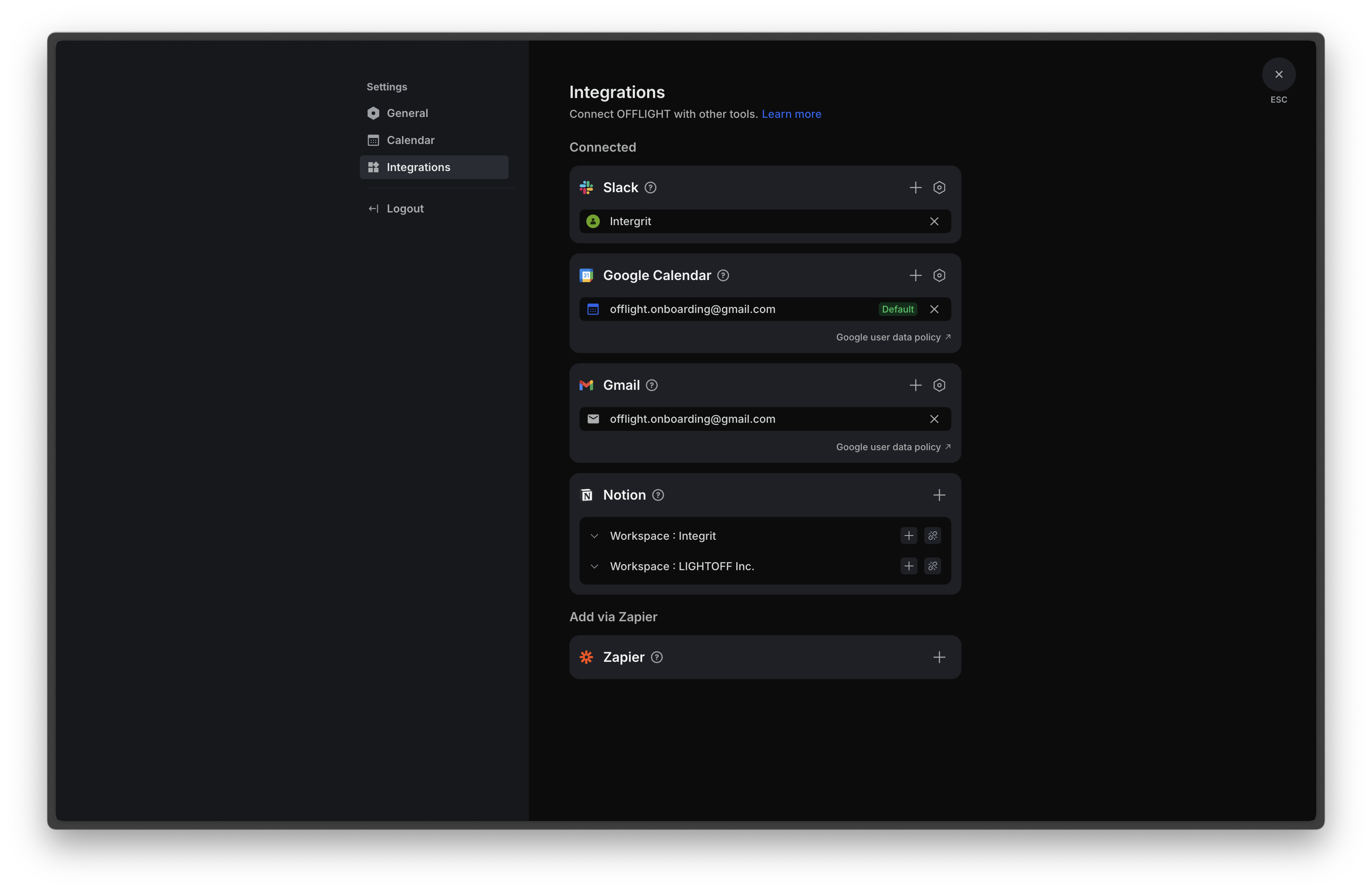
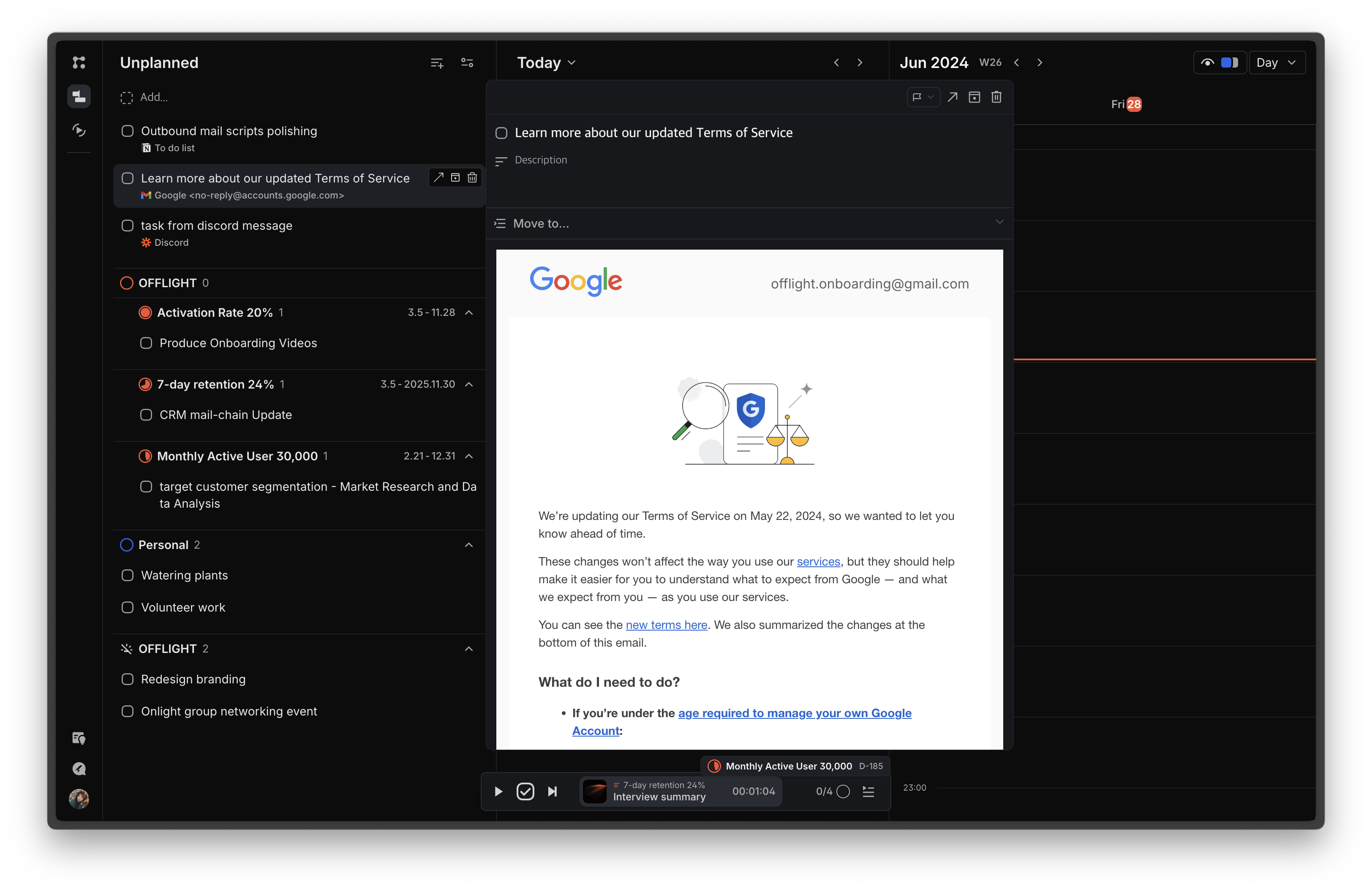
Screenshot of the page that features an inbox for incoming tasks and a planning board for task scheduling. The schedule can be viewed through the integrated Google Calendar and register events on the calendar using time blocks.Screenshot of the Focus page, where today's tasks are displayed to minimize information exposure and increase immersion. Time can be tracked for each task, with statistics on how time today was spent on different goals or lists based on the time tracking information.Screenshot of Screenshot of the Gmail integration that allows users to import emails based on their preferences: all emails, emails with specific labels, or starred emails. Additionally, if a previously imported email receives a reply, a task is automatically created. Users can view email content within the service, and completing tasks in OFFLIGHT will archive the corresponding emails in Gmail, supporting two-way synchronization.