TrustRadius: an HG Insights company

Jive vs. Lightning Tools Lightning Conductor vs. Virola Messenger

Save this comparison

Save this comparison

Add Product

Recommended Comparisons

    Overview
    ProductRatingMost Used ByProduct SummaryStarting Price

    Jive

    Score8.7 out of 10
    N/AJive Software, part of the Aurea family of customer experience solutions, provides the gateway to an organization's most important assets – its knowledge and people. Jive's interactive intranet solution promises to connect people, information and ideas to help businesses outpace their competitors. The vendor says the product has more than 30 million users worldwide across every industry, and is consistently recognized as a leader by top analyst firms.N/A

    Lightning Tools Lightning Conductor

    Score9 out of 10
    Mid-Size Companies (51-1,000 employees)
    The Lightning Conductor is a content aggregation tool for Microsoft SharePoint Online and Microsoft Teams. Users can build rich, modern content reports based upon SharePoint lists, SharePoint Search, Microsoft Graph or Microsoft 365 Groups. Content can be aggregated from lists and libraries, and other applications such as Planner, To Do, OneDrive, and Teams.

    $2,200

    per year per installation

    Virola Messenger

    Score8.5 out of 10
    N/AVirola Messenger is a corporate messenger for secure team collaboration. Both self-hosted and cloud Virola servers are available. Main features: private and group chat rooms file transfer and unlimited storage reactions, mentions, replies and discussions continuous voice and video meetings voice meetings recording live avatars issue tracking with task board screen sharing remote…

    $22

    per month 11 users (minimum)

    Pricing
    JiveLightning Tools Lightning ConductorVirola Messenger
    Editions & Modules
    No answers on this topic
    Lightning Conductor WSP
    From 1950
    per year One WFE
    Lightning Conductor Enterprise Edition
    POA
    per year Four or more WFE
    Lightning Conductor Online
    From 2200
    per year per installation
    Lightning Conductor Plus (Includes Data Viewer)
    From 2500
    per year per installation
    Lightning Conductor Online Enterprise Edition (>10,000 users)
    POA
    per year per installation
    Annual Subscription
    $1.30
    per month per user
    Monthly Subscription
    $1.56
    per month per user
    Perpetual License
    $31.24
    one-time fee per user
    Offerings
    Pricing Offerings
    JiveLightning Tools Lightning ConductorVirola Messenger
    Free Trial
    NoYesNo
    Free/Freemium Version
    NoNoYes
    Premium Consulting/Integration Services
    NoYesYes
    Entry-level Setup FeeNo setup feeNo setup feeNo setup fee
    Additional Details—Prices stated are minimum per installation for "stock" products. $2.20 per user/year on top of base price. Enterprise editions can be amended to suit business needs if deemed necessary, additional costs incurred and TBD. All packages include free technical support. Free upgrades available to latest versions of tool as they are released. (online version)—
    More Pricing Information
    Features
    JiveLightning Tools Lightning ConductorVirola Messenger
    Project Management
    Comparison of Project Management features of Jive and Lightning Tools Lightning Conductor and Virola Messenger
    Feature
    Jive
    -
    Ratings
    Lightning Tools Lightning Conductor
    8.6
    2 Ratings
    11% above category average
    Virola Messenger
    7.8
    2 Ratings
    1% above category average
    Task Management00 Ratings8.82 Ratings8.52 Ratings
    Search00 Ratings8.42 Ratings7.01 Ratings
    Mobile Access00 Ratings00 Ratings8.02 Ratings
    Communication
    Comparison of Communication features of Jive and Lightning Tools Lightning Conductor and Virola Messenger
    Feature
    Jive
    -
    Ratings
    Lightning Tools Lightning Conductor
    -
    Ratings
    Virola Messenger
    9.5
    2 Ratings
    17% above category average
    Chat00 Ratings00 Ratings9.52 Ratings
    File Sharing & Management
    Comparison of File Sharing & Management features of Jive and Lightning Tools Lightning Conductor and Virola Messenger
    Feature
    Jive
    -
    Ratings
    Lightning Tools Lightning Conductor
    -
    Ratings
    Virola Messenger
    9.0
    2 Ratings
    11% above category average
    Video files00 Ratings00 Ratings9.02 Ratings
    Audio files00 Ratings00 Ratings9.02 Ratings
    Best Alternatives
    JiveLightning Tools Lightning ConductorVirola Messenger
    Small Businesses
    HCL Connections
    Score9 out of 10
    Flock
    Score9.5 out of 10
    Flock
    Score9.5 out of 10
    Medium-sized Companies
    HCL Connections
    Score9 out of 10
    Troop Messenger
    Score9.8 out of 10
    Troop Messenger
    Score9.8 out of 10
    Enterprises
    HCL Connections
    Score9 out of 10
    Cisco Business Edition 7000 (discontinued)
    Score9 out of 10
    Cisco Business Edition 7000 (discontinued)
    Score9 out of 10
    All AlternativesView all alternativesView all alternativesView all alternatives
    User Ratings
    JiveLightning Tools Lightning ConductorVirola Messenger
    Likelihood to Recommend
    9.1
    (37 ratings)
    9.0
    (4 ratings)
    8.5
    (2 ratings)
    Likelihood to Renew
    6.6
    (17 ratings)
    9.1
    (1 ratings)
    -
    (0 ratings)
    Usability
    6.1
    (4 ratings)
    -
    (0 ratings)
    -
    (0 ratings)
    Availability
    5.0
    (1 ratings)
    -
    (0 ratings)
    -
    (0 ratings)
    Performance
    9.0
    (1 ratings)
    -
    (0 ratings)
    -
    (0 ratings)
    Support Rating
    6.9
    (2 ratings)
    9.1
    (1 ratings)
    -
    (0 ratings)
    Online Training
    5.0
    (3 ratings)
    -
    (0 ratings)
    -
    (0 ratings)
    Implementation Rating
    3.0
    (1 ratings)
    -
    (0 ratings)
    -
    (0 ratings)
    User Testimonials
    JiveLightning Tools Lightning ConductorVirola Messenger
    Likelihood to Recommend
    Aurea
    It's definitely worth considering Jive for the type of application we've developed i.e. a central shared repository for all employees to host and discuss information. I can't say I have ever used a superior tool, but they may exist. I'm just not sure I would want to use it exclusively for file hosting, though. It does integrate with various other tools, so perhaps it would be fine if used in conjunction with another tool for that purpose.
    Incentivized
    Read full review
    Lightning Tools
    Having experience of SharePoint On Premise and also SharePoint Online, there isn't an out of the box app/webpart that enables you to 'roll up content' from a variety of source's (in my case SP Lists, but there are many other data sources it works with) across site collections with an easy to use and intuitive interface which is what Lightning tools excels at.
    Read full review
    Provide Support Live Chat
    This is fantastic for offices that have employees working from home. It is a much cleaner and easier way to discuss projects or even have informal conversations. However if all employees are working from the same office, the features are limited as conversation, screen sharing, and task management are less valuable.
    Incentivized
    Read full review
    Pros
    Aurea
    • Individual design
    • Presence of Russian language (localization can be independently established)
    • You can configure several information tapes with different themes. One for work, the second for communication
    • A newly-arrived network user immediately receives a prepared block for beginners. After completing several game tasks, the user will receive the basics of using Jive.
    • There is a template for each scenario. There is even a template for planning R&D, and there are more than twenty of them.
    • Integrates with MS Office, Google Drive, Google Docs
    • There are all platforms (even Winphone and blackberry)
    • You can create forum threads
    Incentivized
    Read full review
    Lightning Tools
    • Aggregate documents across SharePoint site & libraries
    • Filtering for owner/person responsible & due dates
    • Ease of end-user filtering on columns
    • Color-coding & other formatting
    Read full review
    Provide Support Live Chat
    • Secure chatting
    • Chatrooms
    • File transfer/ sharing
    Incentivized
    Read full review
    Cons
    Aurea
    • Search functionality is very weak
    • The information architecture and taxonomy doesnt allow for easy discoverability of content
    • It's hard to navigate the and find spaces/groups that I already know about
    • The main profile/interface does not allow easy access to key tasks or common tasks.
    Read full review
    Lightning Tools
    • Mobile Friendly
    • Calendar/Gantt views
    • Complex/Custom Logic
    Read full review
    Provide Support Live Chat
    • A cleaner interface.
    • More intuitive for older generations.
    • Customizable notification tones
    Incentivized
    Read full review
    Likelihood to Renew
    Aurea
    There are always external factors that can impact this decision but currently, the Jive platform is maintaining its lead in the market place in this area. If the innovation in this space by Jive continues, then this number will remain high. Integration with other systems and adaptability to changes in the market or in client needs will also make this decision hard to predict more then 6 months into the future
    Read full review
    Lightning Tools
    No answers on this topic
    Provide Support Live Chat
    No answers on this topic
    Usability
    Aurea
    It was harder to use that expected. The admin needs to be code savvy to truly customize the system. And users need to trained on the system and the setup. Trainings and monitoring need to continue to enforce use.
    Read full review
    Lightning Tools
    No answers on this topic
    Provide Support Live Chat
    No answers on this topic
    Reliability and Availability
    Aurea
    Uptime was OK. But there was one day that the system crashed for a whole day. Our company was unable to operate. And all the plugins to word/excel froze causing those systems to freeze.

    Jive posted a statement to the media saying all customers were up, but we were not.
    Read full review
    Lightning Tools
    No answers on this topic
    Provide Support Live Chat
    No answers on this topic
    Performance
    Aurea
    The product worked as designed. It just didn't work for our needs.
    Read full review
    Lightning Tools
    No answers on this topic
    Provide Support Live Chat
    No answers on this topic
    Support Rating
    Aurea
    They did an OK job when I needed them. Except for the one day the system went down. Jive pointed the finger at the hosting company, and the hosting company pointed the finger at Jive. No reliable information came to us.
    Read full review
    Lightning Tools
    The Lightning Tools support team responds quickly, and team members are very friendly and helpful.
    Read full review
    Provide Support Live Chat
    No answers on this topic
    Online Training
    Aurea
    Jive online training is there. It is OK/average. I feel some other companies are doing better. It is not a piece that is required to have a successfully implementation, but it could be useful to improve it
    Read full review
    Lightning Tools
    No answers on this topic
    Provide Support Live Chat
    No answers on this topic
    Implementation Rating
    Aurea
    If I did this over, I would hire out the implementation. They know the best practices and could have guided us to make an easier to use setup.
    Read full review
    Lightning Tools
    No answers on this topic
    Provide Support Live Chat
    No answers on this topic
    Alternatives Considered
    Aurea
    We had a Google phone number set up before and Jive was a lot better option than that. It is more consistent and can be configured much easier and with more advanced settings. Additionally, based on the pricing as well as working with the rep on our account, it was a perfect option for us
    Incentivized
    Read full review
    Lightning Tools
    I haven't found another product to compare this one to. Only in SharePoint Online which has a similar App 'Highlight Webpart' ... it's far too complicated to set up and requires learning yet another language and exporting and importing via PowerShell to get any real results that would be useful.
    Read full review
    Provide Support Live Chat
    It's really early to judge Virola's capabilities with other offerings or tools in the marketplace but with the set of features the tool offers at the moment at the negligible price it can surely be counted as a dark horse to make its way through to be one of the best. Provide that it has the ability to support larger teams, it can really be successful in the future.
    Incentivized
    Read full review
    Return on Investment
    Aurea
    • reduce email traffic
    • reduce amount of files/documents scattered & lost across shared drives
    • increased discovery, awareness and interaction of historically more separated individuals & team functions across the organisation
    • from an IT perspective, we've benefited from improved IT operations (e.g. troubleshooting info shared and easily searched/found with all team members - such that even junior team members can solve technical problems outside of business hours, lessening the burden for standby/call-in for more senior team members)
    Incentivized
    Read full review
    Lightning Tools
    • Policies easier to portray
    Read full review
    Provide Support Live Chat
    • Kept everyone in the loop
    • Allowed for seamless project discussions from inside and outside the office.
    • Great way to share screens which was very important.
    Incentivized
    Read full review
    ScreenShots

    Jive Screenshots

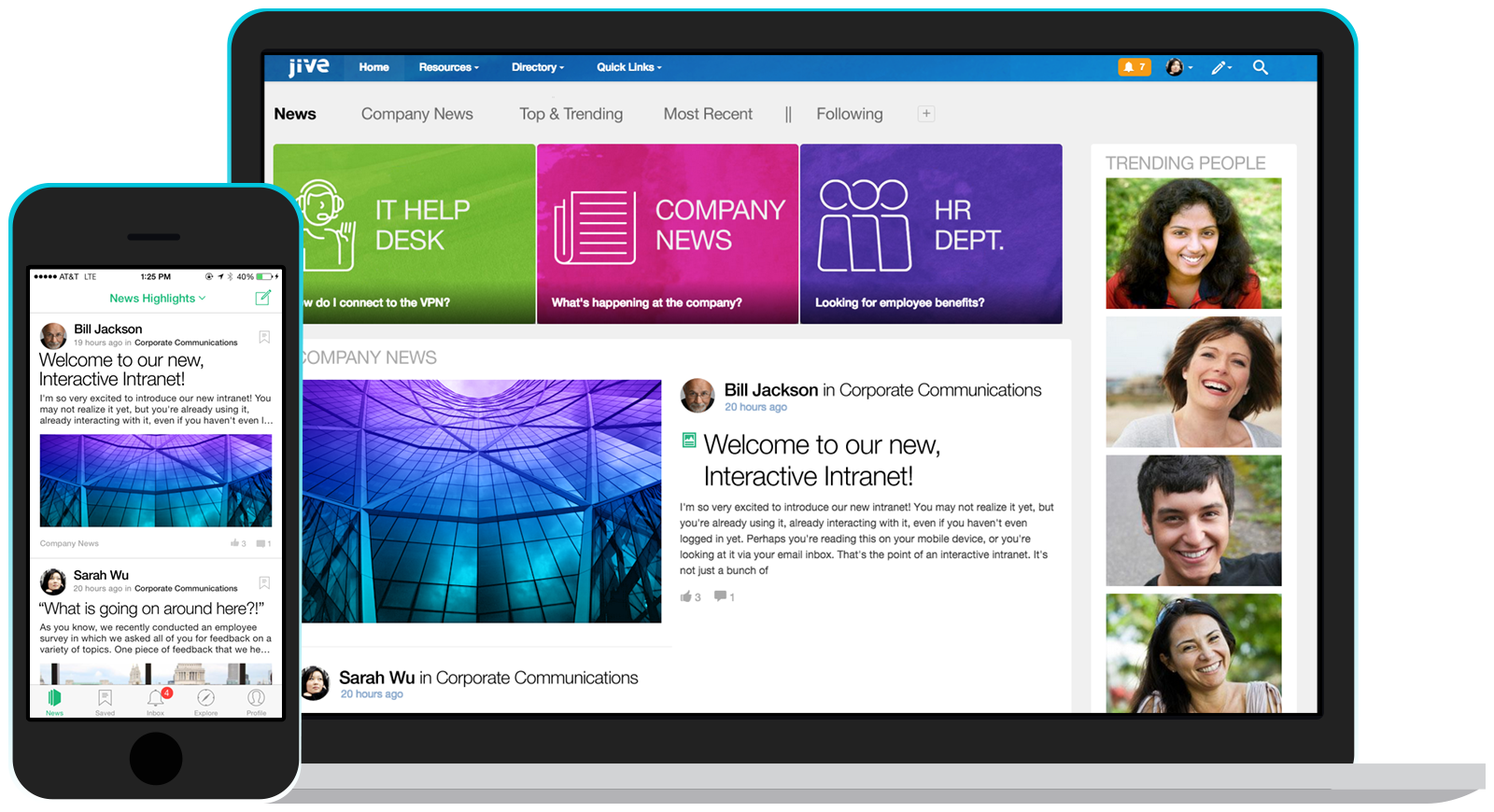
    Screenshot of Jive's Interactive Intranet software provides a single platform for employee collaboration without complication.

    Lightning Tools Lightning Conductor Screenshots

    Screenshot of MODERN SHAREPOINT LIST ROLLUP
The Lightning Conductor is a SharePoint Content Aggregator that can be configured quickly by business users. The Lightning Conductor can be used to aggregate content from SharePoint Lists such as Tasks, Document Libraries, Contact Lists, and Custom Lists making it easy to view content in one place even if it is distributed across many sites and site collections. Key data can be highlighted using conditional formatting and data-bars as shown. Content from Search and Microsoft Graph can also be aggregated with the Lightning Conductor.Screenshot of CONTENT AGGREGATION WITHIN MICROSOFT TEAMS
The Lightning Conductor Web Part can be used within Microsoft SharePoint or Microsoft Teams. Even if content is stored within SharePoint sites, it is useful to have aggregated Documents, Tasks, Announcements, Calendars or Custom Lists from multiple sites displayed in a single handy view in Microsoft Teams. The Lightning Conductor can be added as a Teams Tab in any Microsoft Teams Channel.Screenshot of BUILDING REPORTS ON MICROSOFT GRAPH
The Lightning Conductor can be used (without code) to aggregate content from Microsoft Graph as well as Search and SharePoint Lists. This example displays Microsoft Planner Plans and Microsoft Planner Tasks where users can Add new Tasks, Assign Users to Planner Tasks, Delete Tasks, and Complete Tasks. The same can be performed on Microsoft To Do items and displayed within Modern SharePoint pages or Microsoft Teams Tabs. The Lighting Conductor can also contain multiple views of content, making it ideal to display all of your tasks from SharePoint Task lists, Microsoft To Do and Microsoft Planner in a single web part or Teams Tab.

*Microsoft Graph Reports are only available for SharePoint Online and not SharePoint 2019.Screenshot of BUILDING REPORTS ON MICROSOFT 365 GROUPS
Powered by Microsoft Graph, the Microsoft 365 Group Rollup Provider enables users to aggregate content by browsing and selecting Microsoft 365 Groups. Within Microsoft 365 Groups, you’ll be able to select entities such as Drive Items, Owners, Members, Planner Plans, Planner Tasks, Events, Posts,  Sites, Lists, and Calendars.

*Microsoft Graph Reports are only available for SharePoint Online and not SharePoint 2019.Screenshot of AGGREGATING USING SEARCH
When performance is critical, search can be used for rollups. The Lightning Conductor offers three data source configurations to get to content. Object Model (Real Time Aggregation from SharePoint Lists), Microsoft Graph (Aggregation from Graph Entities such as Planner, OneDrive, Outlook), and Search. The Search Data Source enables the aggregation of content from large SharePoint lists and libraries when performance is critical. Thousands of documents can be displayed in under a second using Search.Screenshot of HIGHLIGHTING KEY BUSINESS DATA WITHIN VIEWS
End users and Site Owners can highlight the data that is important to them, the data that they need to prioritize. Using conditional formatting, data bars, and icons, conditions can be configured to highlight the data that is most important. Icons and Data Bars can be any color or size desired. Examples include highlighting High Priority tasks, Showing data bars for the completion progress of Tasks, or indicating which tasks are assigned to any particular user.

    Virola Messenger Screenshots

    Screenshot of Virola Messenger desktop and mobile client appsScreenshot of Issues and discussions in Virola MessengerScreenshot of Virola Messenger mobile client appScreenshot of Task board in Virola MessengerScreenshot of Screen sharing and remote control in Virola Messenger