TrustRadius: an HG Insights company

Jive vs. Lightning Tools Social Squared Discussion Board

Save this comparison

Save this comparison

Add Product

Recommended Comparisons

    Overview
    ProductRatingMost Used ByProduct SummaryStarting Price

    Jive

    Score8.7 out of 10
    N/AJive Software, part of the Aurea family of customer experience solutions, provides the gateway to an organization's most important assets – its knowledge and people. Jive's interactive intranet solution promises to connect people, information and ideas to help businesses outpace their competitors. The vendor says the product has more than 30 million users worldwide across every industry, and is consistently recognized as a leader by top analyst firms.N/A

    Lightning Tools Social Squared Discussion Board

    Score9.1 out of 10
    Enterprise companies (1,001+ employees)
    Social Squared is a SharePoint Discussion Board App that can be deployed across SharePoint Online and Microsoft Teams. Social Squared improves productivity and efficiency by providing structured discussion forums for employee and student discussions. For Microsoft SharePoint Social Squared is a SharePoint discussion board application where users can post questions within relevant forums and receive answers to their questions from subject matter experts. The…

    $2,200

    per year per installation

    Pricing
    JiveLightning Tools Social Squared Discussion Board
    Editions & Modules
    No answers on this topic
    Social Squared Discussion Board
    From $2200
    per year per installation
    Social Squared Discussion Board Enterprise Edition
    POA
    per year per installation
    Offerings
    Pricing Offerings
    JiveLightning Tools Social Squared Discussion Board
    Free Trial
    NoYes
    Free/Freemium Version
    NoNo
    Premium Consulting/Integration Services
    NoYes
    Entry-level Setup FeeNo setup feeNo setup fee
    Additional Details—Prices stated are minimum per installation for "stock" products. $2.20 per user/year on top of base price. Enterprise editions can be amended to suit business needs if deemed necessary, additional costs incurred and TBD. All packages include free technical support. Free upgrades available to latest versions of tool as they are released.
    More Pricing Information
    Features
    JiveLightning Tools Social Squared Discussion Board
    Project Management
    Comparison of Project Management features of Jive and Lightning Tools Social Squared Discussion Board
    Feature
    Jive
    -
    Ratings
    Lightning Tools Social Squared Discussion Board
    9.1
    1 Ratings
    17% above category average
    Mobile Access00 Ratings9.11 Ratings
    Search00 Ratings9.11 Ratings
    Communication
    Comparison of Communication features of Jive and Lightning Tools Social Squared Discussion Board
    Feature
    Jive
    -
    Ratings
    Lightning Tools Social Squared Discussion Board
    9.1
    1 Ratings
    14% above category average
    Chat00 Ratings9.11 Ratings
    Notifications00 Ratings9.11 Ratings
    Discussions00 Ratings9.11 Ratings
    Internal knowledgebase00 Ratings9.11 Ratings
    File Sharing & Management
    Comparison of File Sharing & Management features of Jive and Lightning Tools Social Squared Discussion Board
    Feature
    Jive
    -
    Ratings
    Lightning Tools Social Squared Discussion Board
    9.1
    1 Ratings
    13% above category average
    Versioning00 Ratings9.11 Ratings
    Video files00 Ratings9.11 Ratings
    Audio files00 Ratings9.11 Ratings
    Document collaboration00 Ratings9.11 Ratings
    Access control00 Ratings9.11 Ratings
    Best Alternatives
    JiveLightning Tools Social Squared Discussion Board
    Small Businesses
    HCL Connections
    Score9 out of 10
    Flock
    Score9.5 out of 10
    Medium-sized Companies
    HCL Connections
    Score9 out of 10
    Troop Messenger
    Score9.8 out of 10
    Enterprises
    HCL Connections
    Score9 out of 10
    Cisco Business Edition 7000 (discontinued)
    Score9 out of 10
    All AlternativesView all alternativesView all alternatives
    User Ratings
    JiveLightning Tools Social Squared Discussion Board
    Likelihood to Recommend
    9.1
    (37 ratings)
    9.1
    (1 ratings)
    Likelihood to Renew
    6.6
    (17 ratings)
    -
    (0 ratings)
    Usability
    6.1
    (4 ratings)
    9.1
    (1 ratings)
    Availability
    5.0
    (1 ratings)
    -
    (0 ratings)
    Performance
    9.0
    (1 ratings)
    -
    (0 ratings)
    Support Rating
    6.9
    (2 ratings)
    -
    (0 ratings)
    Online Training
    5.0
    (3 ratings)
    -
    (0 ratings)
    Implementation Rating
    3.0
    (1 ratings)
    -
    (0 ratings)
    User Testimonials
    JiveLightning Tools Social Squared Discussion Board
    Likelihood to Recommend
    Aurea
    It's definitely worth considering Jive for the type of application we've developed i.e. a central shared repository for all employees to host and discuss information. I can't say I have ever used a superior tool, but they may exist. I'm just not sure I would want to use it exclusively for file hosting, though. It does integrate with various other tools, so perhaps it would be fine if used in conjunction with another tool for that purpose.
    Incentivized
    Read full review
    Lightning Tools
    Their customer service it top notch and always responsive. I struggled in the beginning a little bit because I'm not tech savvy and we had to add it to our SharePoint site but they helped me along the way and even had share screen meetings with me to assist!!
    Read full review
    Pros
    Aurea
    • Individual design
    • Presence of Russian language (localization can be independently established)
    • You can configure several information tapes with different themes. One for work, the second for communication
    • A newly-arrived network user immediately receives a prepared block for beginners. After completing several game tasks, the user will receive the basics of using Jive.
    • There is a template for each scenario. There is even a template for planning R&D, and there are more than twenty of them.
    • Integrates with MS Office, Google Drive, Google Docs
    • There are all platforms (even Winphone and blackberry)
    • You can create forum threads
    Incentivized
    Read full review
    Lightning Tools
    • Organizing Data
    • Opens up discussion, whether publicly or anonymously
    • Easy to setup
    Read full review
    Cons
    Aurea
    • Search functionality is very weak
    • The information architecture and taxonomy doesnt allow for easy discoverability of content
    • It's hard to navigate the and find spaces/groups that I already know about
    • The main profile/interface does not allow easy access to key tasks or common tasks.
    Read full review
    Lightning Tools
    • I would love to be able to assign various people as administrators of different topics (this may be an option now but a couple years ago it wasn't)
    Read full review
    Likelihood to Renew
    Aurea
    There are always external factors that can impact this decision but currently, the Jive platform is maintaining its lead in the market place in this area. If the innovation in this space by Jive continues, then this number will remain high. Integration with other systems and adaptability to changes in the market or in client needs will also make this decision hard to predict more then 6 months into the future
    Read full review
    Lightning Tools
    No answers on this topic
    Usability
    Aurea
    It was harder to use that expected. The admin needs to be code savvy to truly customize the system. And users need to trained on the system and the setup. Trainings and monitoring need to continue to enforce use.
    Read full review
    Lightning Tools
    Our employees really like the fact that they can find things easily with the search feature and add questions and comments as they see fit.
    Read full review
    Reliability and Availability
    Aurea
    Uptime was OK. But there was one day that the system crashed for a whole day. Our company was unable to operate. And all the plugins to word/excel froze causing those systems to freeze.

    Jive posted a statement to the media saying all customers were up, but we were not.
    Read full review
    Lightning Tools
    No answers on this topic
    Performance
    Aurea
    The product worked as designed. It just didn't work for our needs.
    Read full review
    Lightning Tools
    No answers on this topic
    Support Rating
    Aurea
    They did an OK job when I needed them. Except for the one day the system went down. Jive pointed the finger at the hosting company, and the hosting company pointed the finger at Jive. No reliable information came to us.
    Read full review
    Lightning Tools
    No answers on this topic
    Online Training
    Aurea
    Jive online training is there. It is OK/average. I feel some other companies are doing better. It is not a piece that is required to have a successfully implementation, but it could be useful to improve it
    Read full review
    Lightning Tools
    No answers on this topic
    Implementation Rating
    Aurea
    If I did this over, I would hire out the implementation. They know the best practices and could have guided us to make an easier to use setup.
    Read full review
    Lightning Tools
    No answers on this topic
    Alternatives Considered
    Aurea
    We had a Google phone number set up before and Jive was a lot better option than that. It is more consistent and can be configured much easier and with more advanced settings. Additionally, based on the pricing as well as working with the rep on our account, it was a perfect option for us
    Incentivized
    Read full review
    Lightning Tools
    No answers on this topic
    Return on Investment
    Aurea
    • reduce email traffic
    • reduce amount of files/documents scattered & lost across shared drives
    • increased discovery, awareness and interaction of historically more separated individuals & team functions across the organisation
    • from an IT perspective, we've benefited from improved IT operations (e.g. troubleshooting info shared and easily searched/found with all team members - such that even junior team members can solve technical problems outside of business hours, lessening the burden for standby/call-in for more senior team members)
    Incentivized
    Read full review
    Lightning Tools
    • We signed up for a 3 year contract and hope to do another 3yr contract when this one is up. :)
    Read full review
    ScreenShots

    Jive Screenshots

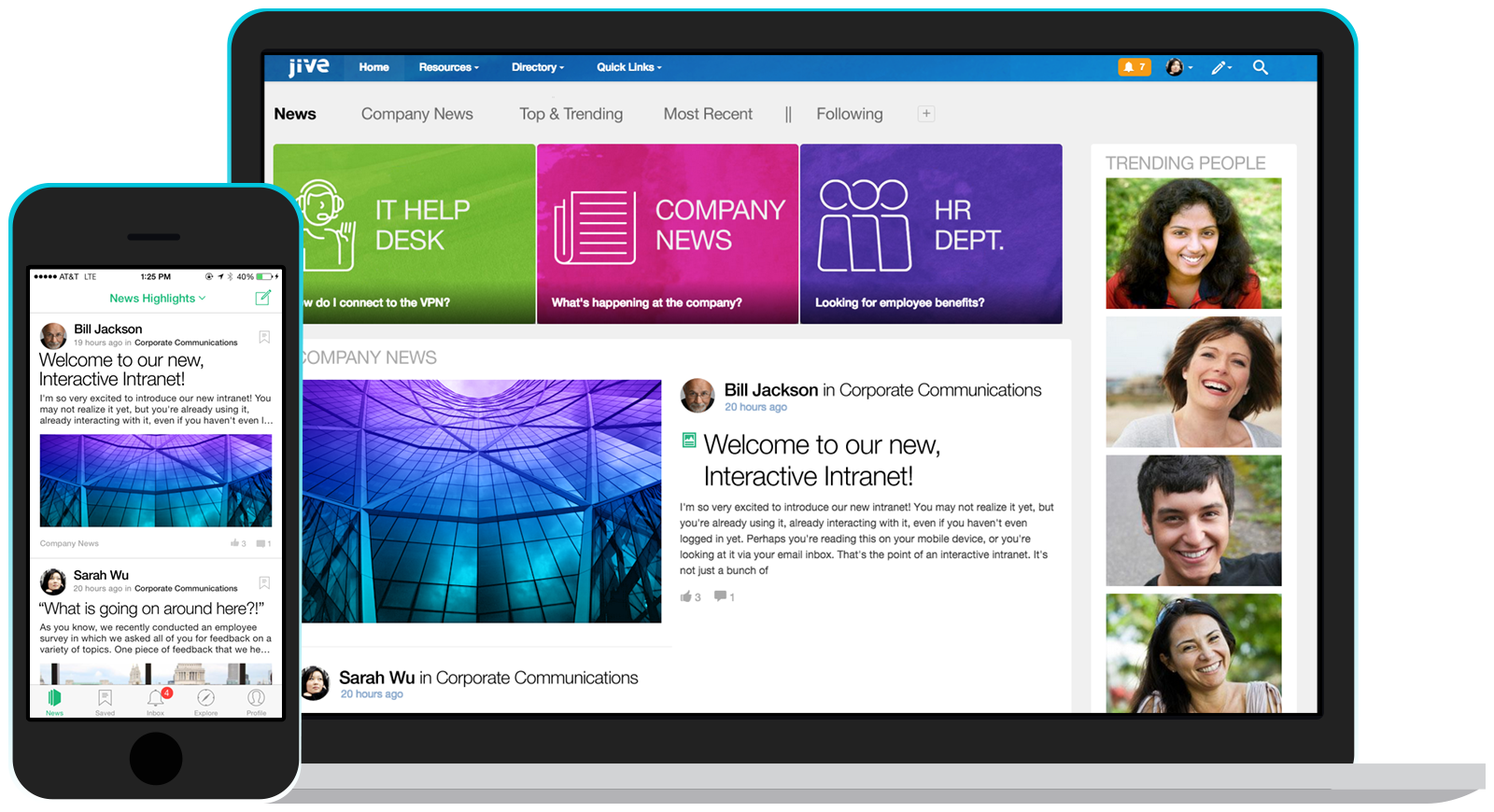
    Screenshot of Jive's Interactive Intranet software provides a single platform for employee collaboration without complication.

    Lightning Tools Social Squared Discussion Board Screenshots

    Screenshot of MODERN, RESPONSIVE SHAREPOINT DISCUSSION BOARD
Discussion Forums can be created for a variety of different reasons. This example is a Forum Group for the Microsoft 365 technologies such as Teams, Planner, and SharePoint. Forums are then created within the Forum Groups for more specific discussions. Under the SharePoint Forum Group, there is a Forum for SharePoint On-Premises and SharePoint Online. Anyone looking to ask a question regarding SharePoint 2019 for example would be able to post their question under SharePoint On-Premises rather than SharePoint Online. This also allows subject matter experts to focus more on the questions that they can respond to and provide value.Screenshot of SHAREPOINT DISCUSS BOARD – TOPICS VIEW
When navigating into a forum, the topics and discussions that are taking place are shown. Any new topics that not yet read will be highlighted. It also displays whether topics have been answered, their average ratings, how many views and posts are within the topic, and also provides the ability to subscribe to the forum to be notified of new posts within it.Screenshot of READING DISCUSSIONS AND PROVIDING FEEDBACK
Social Squared offers a threaded discussion view with the ability to provide feedback to other users.

Posts can be rated, voted upon, or liked by users in order to give feedback to the user creating or responding to a post. Additionally, replies can be marked as answered or marked as featured, which gives readers of forums assurance that the response they are reading is validated to be the correct answer.

Users also receive feedback through the earning of badges. The more users post or mark posts as answered, the more points are rewarded. This makes it easy to spot subject matter experts.Screenshot of SUGGESTED TAGS
Social Squared provides a rich text editor for creating and replying to topics. The Rich Text toolbar provides functionality such as inserting images, YouTube videos, Stream Videos, Formatted Code Inserts, as well as font formatting.

While typing, suggestions on how to tag a post appear. Selecting an existing tag will provide consistency in the tags used making it easier for other users to discover the post.Screenshot of SOCIAL SQUARED TAG CLOUD VIEW
The Social Squared Tag Cloud view makes it easy to navigate to posts within a specific category even if they span multiple forums. The more a tag appears in different posts, the more prominent it will be in the tag cloud. Users can navigate to posts with the tag in one click.Screenshot of DISCUSSION BOARD WITHIN MICROSOFT TEAMS TAB
Social Squared is a Discussion Board App for Microsoft Teams Tab’s and Microsoft Teams Personal Apps. Social Squared provides information workers the ability to post questions within relevant forums, and receive answers from their team. The Discussion Board layout for posts makes it easier to find answers to questions that may have already been asked before. Through features such as “Mark as Answered”, “Forum Moderation”, “Post Rating”, “Post Likes”, “Post Voting”, users will be assured that the answers they are reading are validated.