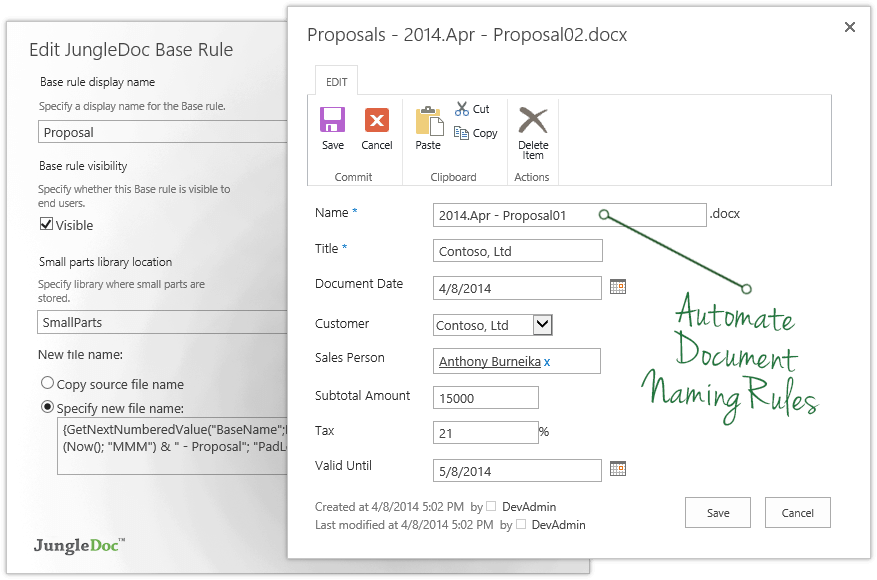
JungleDocs takes properties and parts of an existing document and puts them into a new one. The vendor’s value proposition is that this prevents possible mistakes and saves up to 90% of the user’s time that would be used on inputting and copy-pasting operations. Key features include: Word and PowerPoint document generation and automation Document mail merge from SharePoint lists Template processing engine uses Open XML technology for very fast and…
N/A
Planview ChangePoint
Score 7.0 out of 10
N/A
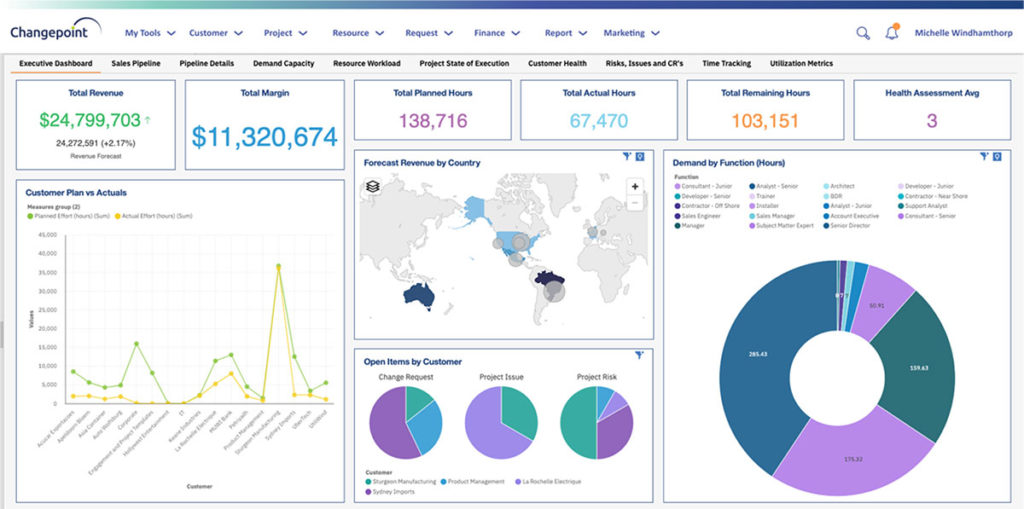
Planview Changepoint is a platform that marries professional services automation (PSA), project portfolio management (PPM) and business analytics to provide managers broad operational visibility and control over their strategic business portfolios.
Great for maintaining consistent language in proposals, contracts, RFI responses, and other legal documents. We can make sure our language passes our legal, regulatory and compliance departments without burdening each document with detailed reviews. This saves us time. When responding to RFIs, we have some standard language to several hundred questions and we can answer them by clicking the boxes. We put in an RFI response question # so they can easily be sorted to match the RFI document. Again, I can't count the labor hours saved. We use this to build plan documents and plan adoption agreements using building blocks that are added by selecting the sections and clicking some checkboxes to determine what gets added. JungleDocs is great for these use cases.
Changepoint is basic and would, therefore, work for businesses with uncomplicated requests, pretty straightforward workflows and willingness to work with an unsightly solution. It is basic, from the UI to the search option and the way the information is captured, which can be frustrating and counter-intuitive at times. It is relatively robust (i.e. I have been using it for almost 2 years and have not seen it crash once) but it does log me out when the system has been inactive for about 30 minutes - and I am only notified about being logged out upon clicking the Submit button, meaning many a line of text have been typed more than once!
Auto population of documents from files stored on SharePoint. Eliminates extra steps for more efficacy.
Can also set up automation for managing documents. Our department uses specific naming conventions for our documents and JungleDocs allows the naming conventions to be automated to help eliminate human error.
Changepoint has significant reporting capabilities, though of course, the data that comes out is only as good as the data that goes in. I enjoy being able to use the standard reports to understand exactly how much a project has cost us and to compare it to how much we are charging. This allows us to more accurately set our prices. Though we have not used the report designer capability, I understand that custom reports can be designed with relative ease.
Changepoint has a versioning capability for changes made to user profiles in the system manager, which I find particularly helpful. As a non-power user, it is valuable to be able to see what changes I have made to various profiles so that I can troubleshoot a problem down the line.
Changepoint has significant functionality well beyond the features that we are currently using, and for this reason, I think it is affordable and a good deal. Particularly if your organization is interested in dedicating the time and resources into using all of the features around project planning, resource allocation, etc., the price is well worth the value.
The ability to update fields in headers and footers, if they change after the document has been created
When content or metadata change, the document doesn't auto update the fields in the document, you have to manually go and click the update option (excludes fields in headers or footers footers)
We use Changepoint to manage the IS organization. I would like to see more advancement in order to do benefits management.
I would like to see a capability where a project manager can build a very detailed work breakdown structure, but only require project resources to charge time and provide a task status at a higher level.
Sometimes the decision to renew boils down to an old adage "if it isn't broken don't fix it". Previous to moving to Changepoint, it was obvious that we needed a better project management tool. Projects we completed on time but the time zone difference between the teams and several iterations of back and forth caused a number of communication issues with projects. The difference is night and day.
JungleDocs was intuitively easier to use than eFileCabinet and Sharepoint. JungleDocs works with Sharepoint to extend its feature set and make it easier to use. Our team didn't feel that eFileCabinet was suitable for all of our use cases, especially the RFI response documents. We used a scorecard to rank the products and JungleDocs proved to be the winner.
Planview Changepoint helps us to understand our key customers enabling us to capitalize on every financial opportunity and helps us to forecast demand against the capacities required for new opportunities, and also it automates and monitors contractual terms and conditions. It gives us visibility into our employees' skills and helps to optimize resource allocation.
Employee efficiency has decreased significantly within our Project MAnagement team. The main causes are lack of logical steps/not user-friendly and the slowness of the entire program.
Changepoint PSA has greatly improved being able to track budgets for all projects. Before this software, budgets were done manually by hand and cross-referenced with Accounting. Now, we can pull a report out of the system, as long as all parties entered their time and data correctly.