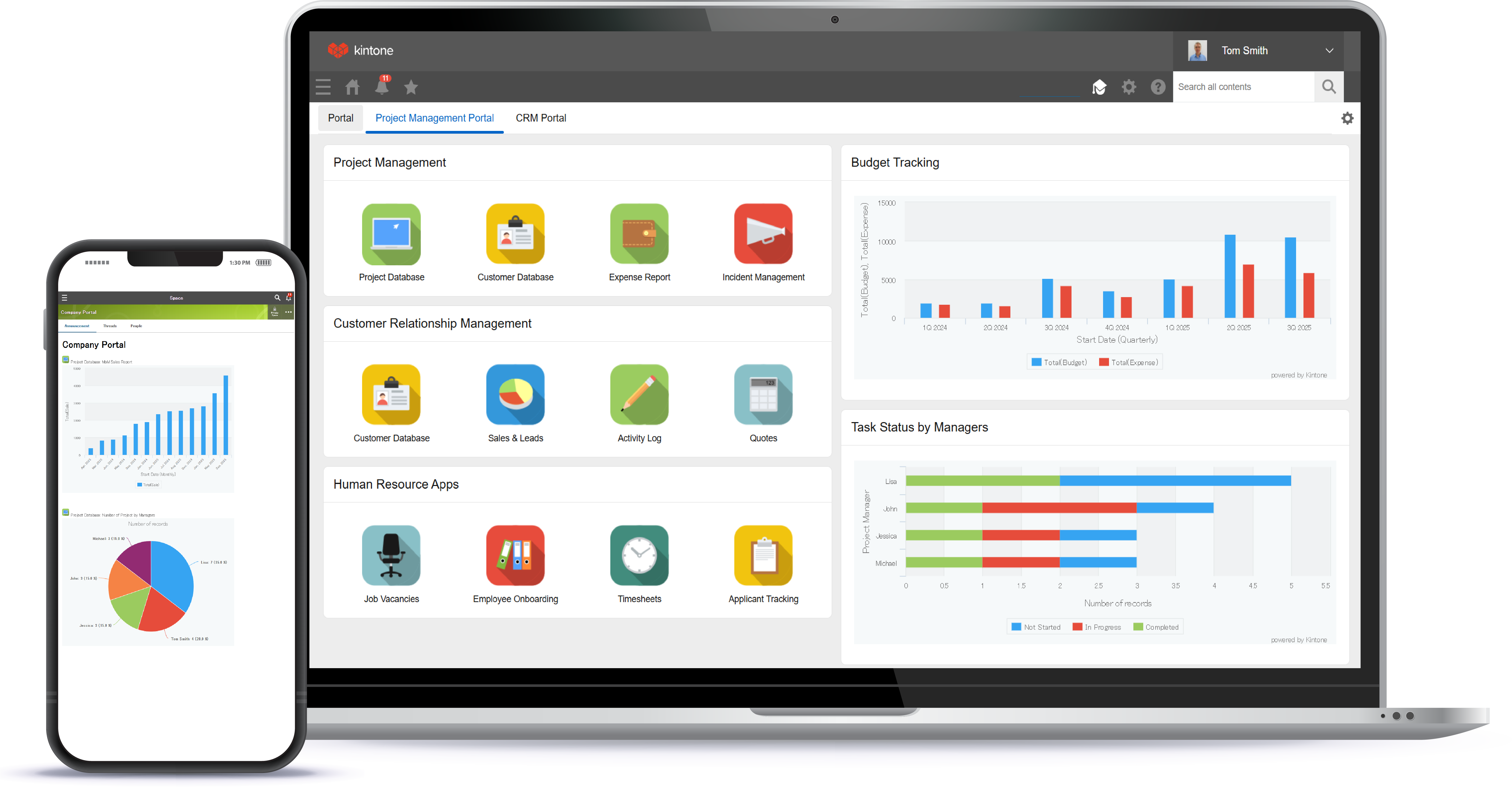
Kintone is a customizable digital workplace platform used to manage data, tasks, and communication. The no-code drag-and-drop interface can be used to create custom applications.
$24
per month per user
MeisterTask
Score 9.0 out of 10
Small Businesses (1-50 employees)
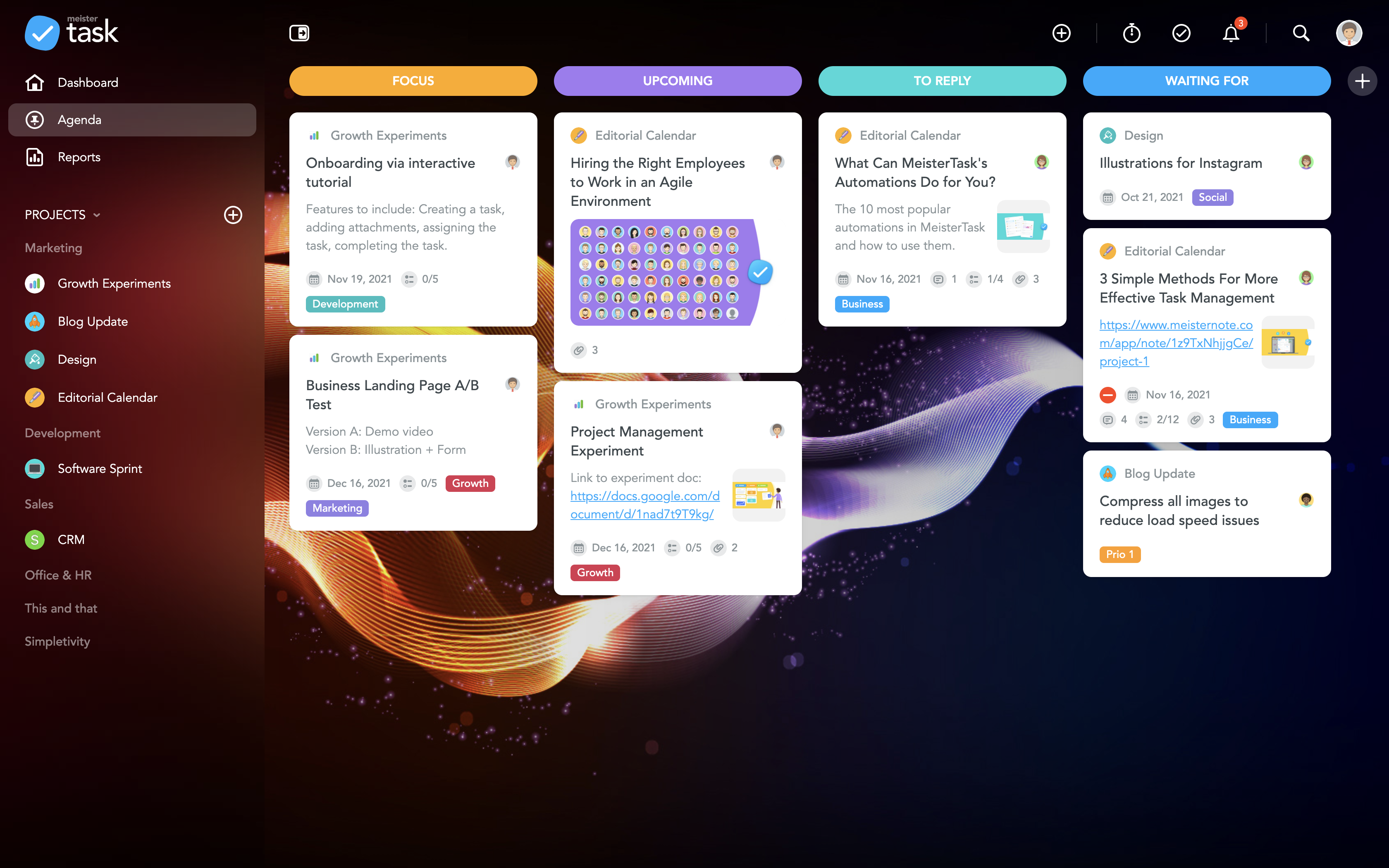
MeisterTask is a task management and collaboration tool that let teams manage tasks in a customizable environment. MeisterTask's project boards adapt to a team’s workflow, and is suitable for managing a variety of tasks from software sprints to editorial calendars. As opposed to only providing a tool that visualizes the work, MeisterTask automates recurring steps in users' workflows to help them work more efficiently and consistently.
MeisterTask is developed by…
$16
per month per user
Pricing
Kintone
MeisterTask
Editions & Modules
Professional Subscription
$24
per month per user
Pro
$16
per month per user
Business
$32
per month per user
Enterprise
Custom
Offerings
Pricing Offerings
Kintone
MeisterTask
Free Trial
Yes
No
Free/Freemium Version
No
Yes
Premium Consulting/Integration Services
No
No
Entry-level Setup Fee
Optional
No setup fee
Additional Details
Minimum requirement of 5 users. Kintone offers a free prototype to build with using existing process.
Discounts are available for education and non-profit organisations. 28% discount for annual pricing.
Kintone is more customizable, which allowed our small organization to create exactly what we needed. The other platforms we evaluated were really designed for larger organizations with more need for customer facing tools.
I don't know if this is the right Salesforce platform we used, but it was way too clunky and not built for the metrics we actually wanted to collect. Kintone doesn't have all the bells and whistles of Salesforce, but I don't really need them. For our small organization's needs, …
Kintone is more customisable. Platforms like Zendesk and Monday were much more than we needed, yet also lacked things we wanted. Access, which we used for years, was customisable, but also required us to maintain servers on site and tended to be slow. Kintone was the perfect …
We tested Pipedrive with the free 30-day trial. We did not like the standard layout. It was not customizable to our liking, and it could not perform the functions we were looking for in our daily business workflow.
We transferred our data records from google sheets to Kintone. While they aren't very comparable, the amount of tools and analysis that Kintone allowed us to do were far superior to Google Sheets.
Again, I came along after the implementation of Kintone. Kintone does provide plenty of customization and personalization within the program without the ability to code HTML.
Kintone is the easiest product to create from and the cost is the lowest I believe. In addition, reconfigurability and extendability are great. If you look for a low code tool, you can try Kintone. But as same as another low code tool, don't expect too much.
It's more flexible and better looking than its competitors. But the main reason is that after extensive searches for a product that would support our requirements, Kintone was the only one that claimed to be able to do so. After building the project, it works as expected. We …
Kintone is the best value for the dollar amount. It is also based on JavaScript (as far as the more in-depth customizations go) so you don’t have to learn a new language. Quickbase was extremely expensive for what it offered and FileMaker Pro required learning their custom …
We spent 6 months working with programmers and customer service representatives from ActiveCampaign to try to customize ActiveCampaign for our needs. ActiveCampaign employees finally told us that our use-case was too complicated for their system since it was not designed to do …
Kintone won out based on a few factors. MS Access can be a good alternative, but you can have trouble with sharing the data when needed. We like the mobile app that Kintone provides as well. Compared to Trello, the price of Kintone was better, considering the differences in …
These systems have always lacked customization which is really where Kintone shines. That being said, Salesforce did allow a certain level of customization on a more grand scale for a giant company I worked. for.
Salesforce was very difficult to navigate and I couldn't figure out how to use it. Their interface is not very user-friendly. I contacted someone for help and they gave me a very typical business presentation, which was not useful. I figured out how to use Kintone immediately, …
Monday.com — I used this in my previous job and loved it for tracking stages and tasks (and I color-code everything), but at the time it was more clunky on raw data. It may have improved in this since then? Kintone is strong on data and I still color-code everything! …
Kintone allowed me to test its product more fully than other platforms. Scalable pricing was an incentive, as was the ability to create apps to perform diverse functions, like scheduling and project management. Kintone's help documentation enabled me to really play around with …
We selected Kintone because it was the best combination of price and function. We needed something that could grow and scale with the organization, and that included looking at future prices. We didn't want to invest in something if we would be priced out five new users later. …
Easy to use for every user, because of its simple interface. Less cost and setup time relating to Trello. MeisterTask can help you to keep an eye on all of the diefferent task in your project.
MeisterTask has all the features which is a combination of all other tools. It also offers a basic plan which is good enough for personal use. Even for the Pro and Business plans, prices are affordable. It also offers an integration feature with other Applications. An overall …
I believe that this is a very user-friendly interface and easy to access and keep track of all tasks on E-mail; you can also `enable the notification on mobile. As a Team leader, you can track all tasks aligned with your team and check on the status of reported/
Meistertask seems like it was made for work, and it doesn’t hide its features amid complicated menus. The Mobile experience is one of the best I have used in task management. It integrates with other tools more widely via Zapier and various built-in ecosystem connections within …
Easy to use user interface, easy setup and probably the quickest setup of what I’ve tried. For what I need it to do it excels. The other platforms are more robust and feature packed, but that comes with more cost and setup time.
Meistertask is more visual and has a strong integration with mindmeister to create mindmaps first and from that to create tasks for your team. The reporting part is insightful to help monitor your team and see who needs additional help.
The difference between Trello and MeisterTask is that the Trello learning curve was very high compared to the other software mentioned above, in addition not many features met the requirements based on the needs that adapt to any company so in these cases we decide on this …
We have tried a lot of tools and we still use quite a lot, but only MeisterTask is the one we could not replace with any others. We use some other software for our personal planning, but when it comes to professional project management and collaboration, we simply choose …
I would rate MeisterTask as the second-best option here. Microsoft Project is easily the best project management software you can buy. It has every feature you could imagine and then some. Asana is inferior to both other programs, having the most limited functionality out of …
More user-friendly - the design and user experience is really something outstanding and you love it from the first moment. Easier learning curve - in few minutes you are ready to deploy a full project within MeisterTask. Better apps - both the web app and the mobile apps are …
MeisterTask is a great app for tracking your to-dos and manage your team. You can track the time you spent on each task and it's a nice design. Good mobile app too, that helps keep everyone informed about the event and the task that need to be done and who is taking care of …
More customization, easier learning curve, gorgeous interface, more user-friendly, just the right amount of features without offering so many that you practically have to set up the entire app yourself before you can use it, the most integrations with other services, lets you …
From my perspective, MeisterTask's unique value comes from its deep connection with MindMeister (mind mapping tool) starting with this and then being able instantly to sync the map into a Kanban/scrum type board.
I am a very heavy Trello user and most of my work is held in …
Asana: while MeisterTask is card-based, this one is list-based. This one is entirely matter of preference. I prefer cards.
Trello: I used Trello for a long time and liked it. And though it lacked certain features, there were plenty of developers trying to create add-ons to …
Simple with a great UI, are the simplest words I think we can use to describe MeisterTask. I have used Trello, FreedCamp, and Freshbooks but, the time tracking is the great feature that I am getting used to with this and it's Trello like UI. So, many of users are fine with this …
I recommend Kintone for companies that need the ability to customize standalone applications or to provide a 'hub' to employees as a jumping-off point. I also recommend Kintone for any company that is drowning in spreadsheets, or is using 10 apps for 10 different purposes - you can consolidate everything into one place. Kintone, I think, needs a larger team for customization as your company grows. If you are a small office of 20 people, using it out of the box will likely be just fine for your needs. If you're working with 200 people out of an office, it'd likely be good to have someone with a bit of CSS, Java, and API experience in order to maximize what you get out of it - though you won't need that if you're keeping it simple.
If you are doing simple tasks, and do not need to see Gantt dependencies, this can work for you. You likely know that other tools seem cumbersome already, and Meistertask is the opposite. If you like mind mapping, try combining this with Mindmeister by thhe same company to integrate your mind maps into actual project plans.
The learning curve is really short compared to other software that is related to this.
It is very easy to manage several projects at the same time, thus saving time in the work process.
Managing the elements of the list is very comfortable since its interface allows everything to work in an orderly manner based on what I want to put as important for me.
It has versions that are adapted to any type of company or if you want to give a personal use because it also has an option based on what you want to do with MeisterTask.
I feel that Kintone is not well enough known yet. This means that other apps/APIs are not necessarily easy to connect with Kintone. Yes, you can use Zapier though for interfacing with other apps.
It would be great if it could give more customized options to change the look and format of certain things. You can make price quote apps, for example, but have to rely on 3rd party apps or programming skills to customize the look and fields.
If you make a table as an input field, it cannot connect to other internal Kintone apps for lookups and such.
I think there is more potential to make more customized data graphs.
I really wish there was a tab to create a Gantt Chart on MeisterTask. This would be extremely helpful to track the progress of a project as a whole.
Some of the controls are not intuitive. For instance, you can select an individual person to see only their respective tasks, which is super helpful. But, to unselect that person and go back to the overview, you have to refresh the page and then hit the back button. This is super inconvenient to do every time.
One other feature I wish was included it a "percentage complete" tracker that showed what percentage is done with each task people are on.
We have been quite happy with our use of Kintone thus far. We looked at several options before choosing Kintone and believe it had the best value and best features, while allowing for complete customization, rather than being locked into preformatted apps that may not address exactly what we need or be more than what we need.
Kintone is extremely user friendly and self explanatory. Very little knowledge is needed to build or use the apps. Kintone has a very robust help section to guide you through anything you might need assistance with while building out apps. The process of building apps is basically drag and drop, making it easy for anyone to create what they need.
I am very happy with Kintone and support it fully. I think that it is a great place for any company that wants to create a platform for better management. It is easy to use and pretty affordable. It is straightforward and has many tools that can be used by anyone. There are many helpful tutorials available too to guide users
Everyone has their own tastes of things and way they want to work. Asking them to adapt to the changes with the new tools or apps is always difficult. We would want to start with a very small but best example within the organization, which in our case was that the employees will not be bothered by the bosses by being asked to find the documents, status of the progresses, or major things/requests/projects.
I don't know if this is the right Salesforce platform we used, but it was way too clunky and not built for the metrics we actually wanted to collect. Kintone doesn't have all the bells and whistles of Salesforce, but I don't really need them. For our small organization's needs, we needed something a little smaller and a little more versatile.
MeisterTask is a great app for tracking your to-dos and manage your team. You can track the time you spent on each task and it's a nice design. Good mobile app too, that helps keep everyone informed about the event and the task that need to be done and who is taking care of what task.