Lightning Tools DeliverPoint vs. Okta

Overview
ProductRatingMost Used ByProduct SummaryStarting Price
Lightning Tools DeliverPoint
Score 8.2 out of 10
Enterprise companies (1,001+ employees)
DeliverPoint supports reporting and managing SharePoint permissions. Site Owners, Site Collection Administrators, and SharePoint Administrators can run permission reports that reflect the permissions of every user. Site collections, Teams Channels, Hub Sites, SharePoint Sites, OneDrive, Lists, Folders and Items can all be reported on individually or in bulk. Permissions can be modified, transferred, copied or deleted between accounts as staff changes occur.
$2,500
per year per installation
Okta
Score 8.8 out of 10
N/A
Okta is an enterprise grade identity management service, built in the cloud. IT can manage access across any application, person or device. Whether the people are employees, partners or customers or whether the applications are in the cloud, on premises or on a mobile device, Okta helps IT become more secure and maintain compliance. The Okta service provides directory services, single sign-on, authentication, provisioning, workflow, and built in reporting. ment systems.
$2
Per User Per Month
Pricing
Lightning Tools DeliverPointOkta
Editions & Modules
DeliverPoint OnPrem
From $1950
per year per installation
DeliverPoint OnPrem Enterprise Edition
POA
per year per installation
DeliverPoint Online
From $2500
per year per installation
DeliverPoint Online Enterprise Edition (>10,000 users)
POA
per year per installation
Single Sign on
$2.00
Per User Per Month
Multi Factor Authentication
$3.00
Per User Per Month
Single Sign on Adaptive
$5.00
Per User Per Month
Multi Factor Authentication Adaptive
$6.00
Per User Per Month
Offerings
Pricing Offerings
Lightning Tools DeliverPointOkta
Free Trial
YesYes
Free/Freemium Version
NoYes
Premium Consulting/Integration Services
YesYes
Entry-level Setup FeeNo setup feeNo setup fee
Additional DetailsPrices listed are starting prices for "stock" product. $2.50 per user/year on top of base price Enterprise product is designed for 10,000+ users, and can be customised if required to meet business needs. Prices are based on 12 month contract from 1st purchase month. Installation included in price. Full technical support available. Online versions will have access to free product updates during contract period.Browse products and price points that make the most sense for your organization on the Okta website.
More Pricing Information
Community Pulse
Lightning Tools DeliverPointOkta
Features
Lightning Tools DeliverPointOkta
Identity Management
Comparison of Identity Management features of Product A and Product B
Lightning Tools DeliverPoint
7.7
1 Ratings
5% below category average
Okta
8.7
142 Ratings
7% above category average
ID-Management Access Control7.31 Ratings9.1131 Ratings
Account Provisioning and De-provisioning8.21 Ratings8.9117 Ratings
ID Management Single-Sign On (SSO)00 Ratings9.0141 Ratings
Multi-Factor Authentication00 Ratings8.7137 Ratings
Password Management00 Ratings8.0131 Ratings
ID Management Workflow Automation00 Ratings8.6110 Ratings
ID Risk Management00 Ratings8.7104 Ratings
Best Alternatives
Lightning Tools DeliverPointOkta
Small Businesses
Dashlane Password Manager
Score 9.1 out of 10
Dashlane Password Manager
Score 9.1 out of 10
Medium-sized Companies
OneLogin by One Identity
Score 9.6 out of 10
OneLogin by One Identity
Score 9.6 out of 10
Enterprises
OneLogin by One Identity
Score 9.6 out of 10
OneLogin by One Identity
Score 9.6 out of 10
All AlternativesView all alternativesView all alternatives
User Ratings
Lightning Tools DeliverPointOkta
Likelihood to Recommend
8.2
(1 ratings)
8.8
(182 ratings)
Likelihood to Renew
-
(0 ratings)
8.0
(18 ratings)
Usability
-
(0 ratings)
9.0
(1 ratings)
Availability
-
(0 ratings)
10.0
(4 ratings)
Performance
-
(0 ratings)
9.0
(2 ratings)
Support Rating
-
(0 ratings)
10.0
(12 ratings)
Online Training
-
(0 ratings)
1.0
(1 ratings)
Product Scalability
-
(0 ratings)
9.0
(2 ratings)
Vendor post-sale
-
(0 ratings)
6.4
(1 ratings)
Vendor pre-sale
-
(0 ratings)
6.4
(1 ratings)
User Testimonials
Lightning Tools DeliverPointOkta
Likelihood to Recommend
Lightning Tools
Copy user permissions through the whole sites of SharePoint farm
Read full review
Okta
It has extensive compatibility and rich feature set of integrating with a wide array of core systems and SaaS platforms. Daily I utilize Okta's user-friendly central hub to simplify access the numerous applications we utilize within my company (Google Workspace, Slack, Zoom, Salesforce, Microsoft Office 365, among many others.)
Read full review
Pros
Lightning Tools
  • Discover Site Permisions
  • Sheduled reports of required lists, libraries, sites...
  • Compact set of commands which works with user permissions
Read full review
Okta
  • Centralized control of enterprise passwords
  • Extensive customization of acceptable password criteria
  • One system for Identity and Access Management to learn
  • Scalable throughout the university for all central services
  • Uniform login experience for students, faculty, and staff
  • Single point of response to address termination of access
  • Ability to use FastPass for lower priority systems
  • Excellent support of multi-factor requirements
Read full review
Cons
Lightning Tools
  • Linking basic information to the object selected in the left panel (site structure view)
Read full review
Okta
  • I'm not sure it's really a room for improvement thing, but due to the granularity offered by Okta, sometimes it can be challenging to find exactly what you're looking for.
  • There was an instance in which we had issues getting SAML configured for an application. I feel this challenge was mostly user error (on our part) because we didn't realize the SAML instructions were SPECIFIC to each app integration and changed (codes) each time. We attempted to mirror the settings/configurations of an existing app (same app, but different domain). I think having a note somewhere that indicated that the instructions were unique to each integration would have saved us a bit of time. Again, I'm not sure this is really an issue with Okta though, more of a user learning curve thing.
  • Sometimes searching for things is a challenge (without the "Rockstar" add-in). For example, if you have a user group called "Okta_users_everyone", searching for "everyone" will not find it. You have to search for the beginning of the object name (not just any part of it). The ability to search partial or wildcard would greatly enhance search functionality.
Read full review
Likelihood to Renew
Lightning Tools
No answers on this topic
Okta
Okta has a passion to provide secure and scalable identity solution. Their passion has come across as advocacy in a way that has deepened my knowledge of the field of authentication. I took identity for granted before but after seeing features such as external authentication I know that Okta can enable my business to reach new heights
Read full review
Usability
Lightning Tools
No answers on this topic
Okta
Some of its features are great and some are slightly complex and not easy without vendor support.
Read full review
Reliability and Availability
Lightning Tools
No answers on this topic
Okta
The Okta Identity Cloud advertises 4 9's of reliability and I would go as far to say that it may even do better than that. As a true Global organization that operates in just about every region of the world, we have yet to have an issue with The Okta Identity Cloud that has impacted our business operations.
Read full review
Performance
Lightning Tools
No answers on this topic
Okta
From my perspective, for the things that my group uses it for, Okta is very fast. It is as least as fast as the local password database methods that it replaces on our campus enterprise services. I do not believe that it slows anything down at all. In fact, not having to think too much about the login, because they all look the same, probably speeds things up somewhat.
Read full review
Support Rating
Lightning Tools
No answers on this topic
Okta
We've had a few support cases over the years and every case has been handled by the Okta support team beautifully. We received clear answers to questions we had regarding setup and even were provided simple to follow guides on how to setup their product to use with custom applications.
Read full review
Alternatives Considered
Lightning Tools
No answers on this topic
Okta
With respective to user interface and license cost, we thought The Okta Identity Cloud was better than other tools for use. Their customization of license was another reason for us to go with The Okta Identity Cloud over other tools.
Read full review
Scalability
Lightning Tools
No answers on this topic
Okta
Being a cloud native application, The Okta Identity Cloud is extremely scalable and easy to setup. By integrating into existing directories and applications via standard techniques and protocols, it is very easy to both initially setup and add additional users as required. Once all the necessary integrations are setup, it's a simple rinse and repeat process to onboard additional users (which can be automated with imports as well)
Read full review
Return on Investment
Lightning Tools
  • Speeds up the management of user permissions
  • Provides a comprehensive overview of permissions and settings of individual security levels across areas of company informations
Read full review
Okta
  • Customer experience has been a big win for us. Extremely minimal issues reported.
  • We did not have a PAM in place at all until The Okta Identity Cloud
  • Relatively easy to deploy. No major downtimes to deploy was a nice bonus.
Read full review
ScreenShots

Lightning Tools DeliverPoint Screenshots
Screenshot of CONTEXTUAL SHAREPOINT PERMISSION REPORTING
SharePoint Permissions are not just the responsibility of IT. Business Users (Content Owners) can create sites, lists, libraries and of course list and library content. The business user is capable of sharing the content with internal users, but perhaps also external users. Sharing such content can result in users gaining permissions to sites or content not intended to be shared. For example, if a site is shared, the user who the site is shared with becomes a member of the members group by default. That members group may have Edit permissions to other sites or content elsewhere within the site collection. DeliverPoint gives visibility of such permissions to support better SharePoint permission decisions from within the Site, List or Library itself.Screenshot of GRANULAR SHAREPOINT CONTENT PERMISSION REPORTS
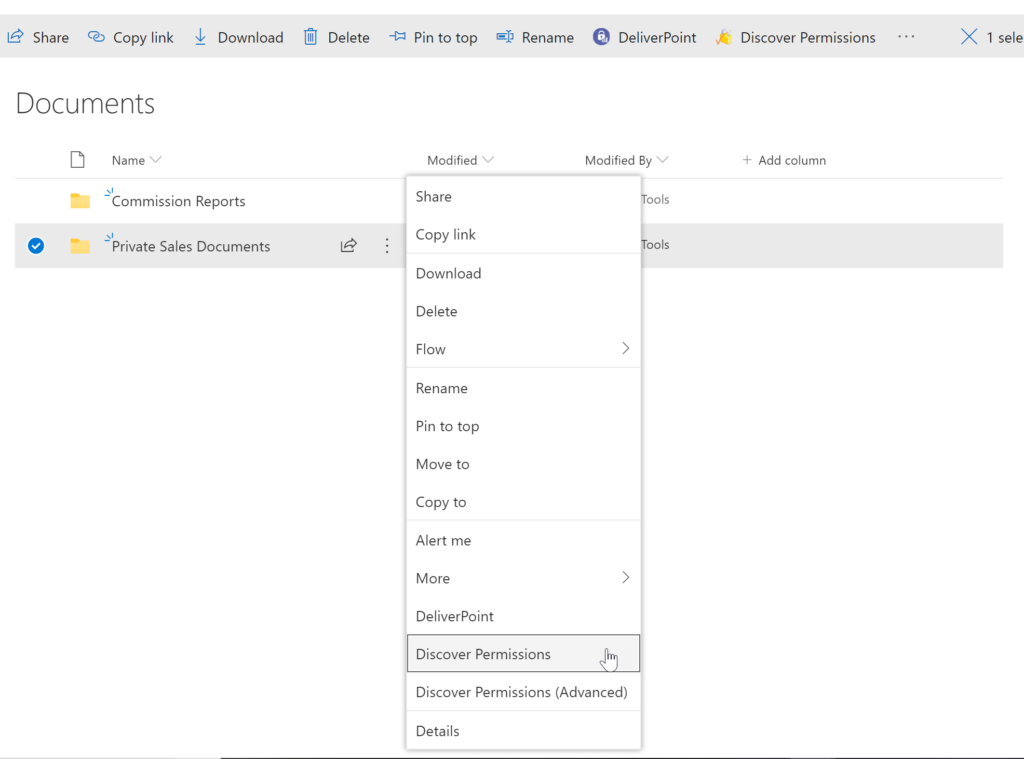
The DeliverPoint Discover Permissions report displays a full transparent report of all users that have permissions to the site, list/library or item. This displays what permissions each account has to the selected object, as well as how the permissions were assigned. Filter can be used for each user to check for duplicate permissions, filter by Permission Level to see which users are granted each permission level, and also filter by the ‘Permissioned Via’ column to see who has received permissions via a particular SharePoint, Microsoft 365 Group, or Azure AD Security group. The Discover Permissions report can be executed against multiple documents or items, lists and within the site or subsites.Screenshot of EXTERNAL SHARING LINKS REPORTING AND MANAGEMENT
Within SharePoint, users can share links with anyone, internal users and external users. DeliverPoint provides an External Sharing Links report that can be used within a site or across sites. The user can see who shared the link, when they shared the link, and optionally remove the link if it’s required.Screenshot of REPORT AND MANAGE PERMISSIONS FROM WITHIN MICROSOFT TEAMS
DeliverPoint is also available within Microsoft Teams. Team Owners can produce Microsoft Teams Permission reports within their Teams Channels and across Private Channels. The reports provide confidence and assurance that permissions are set correctly and that sharing isn’t out of control. Changes to permissions can be made contextually within a Team or centrally across multiple Teams should permissions need to be removed or managed.Screenshot of MANAGE SHAREPOINT PERMISSIONS
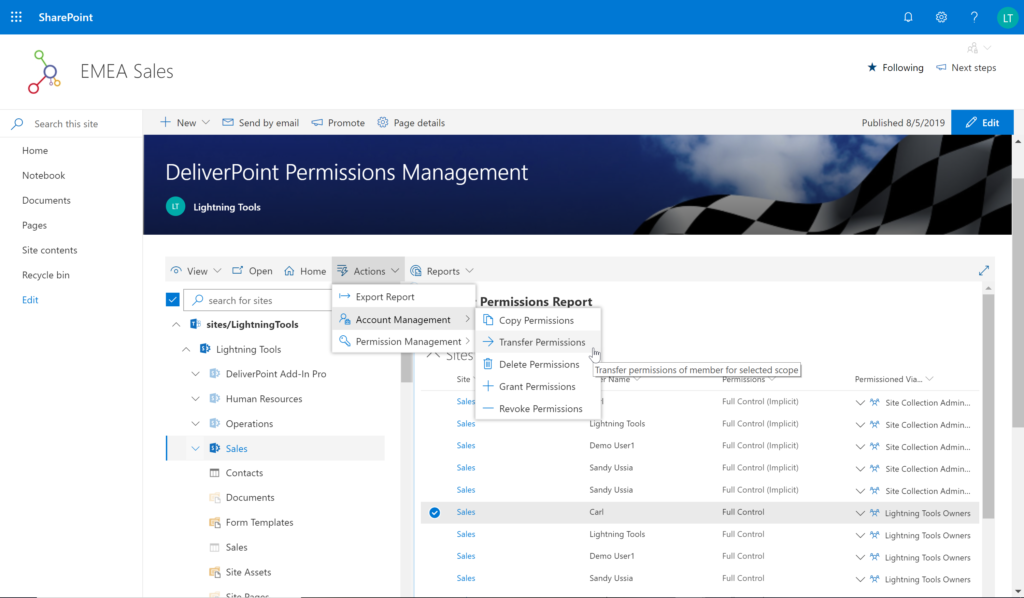
Using DeliverPoint, Site Owners, Site Collection Administrators and Tenant Administrators can manage permissions across the objects that they have Full Control to. Within organizations, users change roles, leave organizations, or join organizations. Making permission changes to accounts to reflect these changes is time consuming. DeliverPoint can be used to simply select the scope to change, and perform the change as one operation. The operations include Transfer, Delete, Copy or Revoke Permissions.Screenshot of UNIQUE PERMISSION REPORTING
The DeliverPoint Unique Permissions Report enables Site Collection Administrators or SharePoint Administrators to view the permissions assigned to a specific user account or group throughout site collections. The report includes all Microsoft 365 Groups, SharePoint Groups and Active Directory Security Groups that the user is a member of. A list of Site Permissions, List Permissions and Item Permissions that the user has been assigned permissions to are listed, allowing  the permissions to be removed or transferred if they are incorrect.