LinkPoint Connect vs. LiveChat

Overview
ProductRatingMost Used ByProduct SummaryStarting Price
LinkPoint Connect
Score 9.0 out of 10
N/A
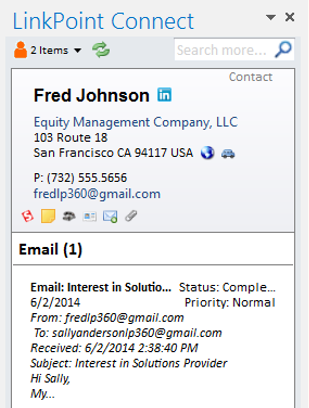
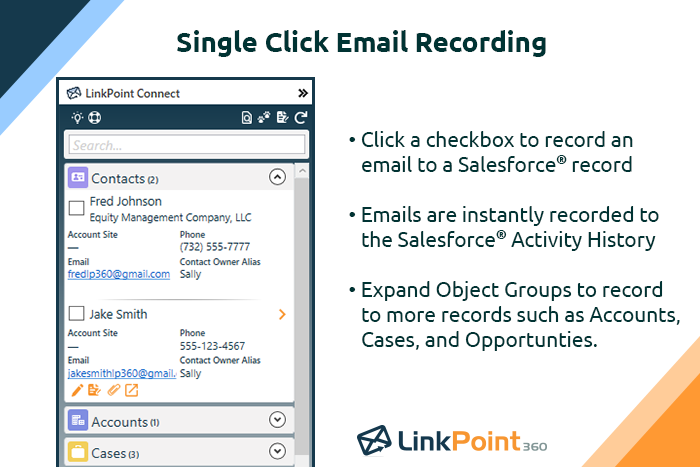
LinkPoint Connect promises to streamline data entry and access by enabling users to instantly view CRM data within their email client. This sales intelligence solution integrates Salesforce and Microsoft Dynamics CRM data in Outlook or IBM Notes. According to the vendor, key capabilities include: View real-time Salesforce data without ever leaving your email. Click on an email, and the LinkPoint Connect Side Panel instantly displays that contact’s information directly from…
$192
per user, per year
LiveChat
Score 6.8 out of 10
Mid-Size Companies (51-1,000 employees)
LiveChat serves as a customer service platform with live chat support, help desk and web analytics functionalities, with the goal of allowing users to provide 24/7 support to customers. The core feature of the software is its chat tool, where both service and sales team can answer customers' questions in real time. Online businesses can interact with customers on their website, to be more accessible. With LiveChat, users can identify people on the website and engage…
$25
per month per user
Pricing
LinkPoint ConnectLiveChat
Editions & Modules
LinkPoint Connect for Outlook + Salesforce
$192
per user, per year
LinkPoint Connect for Outlook + Microsoft Dynamics CRM
$192
per user, per year
LinkPoint Connect for IBM Notes + Salesforce
$228
per user, per year
LinkPoint Connect for IBM Notes + Microsoft Dynamics CRM
$228
per user, per year
Starter
$25
per month
Team
$59
per month per person
Business
$89
per month per person
Enterprise
Contact Sales
Offerings
Pricing Offerings
LinkPoint ConnectLiveChat
Free Trial
YesYes
Free/Freemium Version
NoNo
Premium Consulting/Integration Services
YesNo
Entry-level Setup Fee$16 per user per yearNo setup fee
Additional DetailsSubscriptions are billed annually. Discounts available for non-profits. Volume discounts available. LinkPoint Connect Solutions are available for Outlook and IBM Notes users. These include preconfigured implementations for Advologix, Apto, Apttus, FinancialForce.com, Jobscience, Navatar, Pardot, Salesforce Shield, and TaskRay.Discount available for annual billing.
More Pricing Information
Community Pulse
LinkPoint ConnectLiveChat
Best Alternatives
LinkPoint ConnectLiveChat
Small Businesses
Salesflare
Salesflare
Score 10.0 out of 10
Gist
Gist
Score 9.5 out of 10
Medium-sized Companies
Mailtrack
Mailtrack
Score 9.7 out of 10
Genesys DX (discontinued)
Score 10.0 out of 10
Enterprises
InsideSales Playbooks
Score 9.0 out of 10
Genesys DX (discontinued)
Score 10.0 out of 10
All AlternativesView all alternativesView all alternatives
User Ratings
LinkPoint ConnectLiveChat
Likelihood to Recommend
9.0
(3 ratings)
8.0
(44 ratings)
Likelihood to Renew
-
(0 ratings)
10.0
(1 ratings)
Support Rating
10.0
(1 ratings)
7.3
(3 ratings)
User Testimonials
LinkPoint ConnectLiveChat
Likelihood to Recommend
LinkPoint360
LinkPoint is well suited to any situation where Outlook is used for email correspondence and calendar items and there is need to have a record of those items and/or perform connected actions (schedule tasks, follow up reminders, etc.) in Salesforce. Automating this process and removing as much duplication of work as possible is the primary goal and the primary benefit that LinkPoint provides. In addition to efficiency, automating the process also provides a pretty substantial increase in accuracy, removing ca. 50% of the chance for human error. It's pretty simple functionality in concept, but extremely valuable in execution.
Read full review
Text
We needed a mechanism in place to make contact with visitors to our website easier. What we discovered is that it's an excellent tool for creating reports and dashboards that show how soon issues are handled. Our website can now be updated in real-time, and all of our internal teams are really excited to use this fantastic technology. I really recommend [LiveChat] to many friends and past colleagues.
Read full review
Pros
LinkPoint360
  • Adding emails is a breeze.
  • Creating contacts/leads from outlook is as simple as highlight, drag and drop.
  • Additional customization to allow you to bring in associates custom objects.
Read full review
Text
  • The most important factor of Livechat is their own chat support, I had many requirement from the Sales Head, Support Head to implement features that I was unsure if the product could do. However, as I did the implementation one by one I constantly used the chat support which helped me step by step all the way.
  • The UX of the product is pretty simple and intuitive to use. There are quite a few features that we could easily plug and play. We tried going to the market to find a solution that could help us but they did not have as many out of the box features and simple to use
  • Their integration between LiveChat and Chatbot is pretty seamless and since both of them are from the same company, it's works pretty well.
Read full review
Cons
LinkPoint360
  • The plug-in for Outlook needs to be reset every couple of months.
  • It does not tag e-mails sent from mobile devices (or we haven't figured out how to do that yet).
Read full review
Text
  • It has a limited amount of agents, so when you have many customer care employees during one shift it is hard to manage the quantity of active agents.
  • When system is overloaded and many customers are waiting in a queue it starts to works slowly (sometimes the program even lags) and you need to refresh the system to write a message.
  • Occasionally when you open a new tab, you might lose your current conversation.
Read full review
Support Rating
LinkPoint360
Never had to use the support team, which probably means the product works well!
Read full review
Text
The only issues I have had with LiveChat are the technical glitches within the program. These are not common as in everyday occurrences but when the glitches do happen they tend to have very negative repercussions. This is due to chats with customers being dropped, this may be an internal server issue though and may not happen for everyone.
Read full review
Alternatives Considered
LinkPoint360
Prior to our move to LinkPoint, we used the Salesforce add-in for Outlook. This required manual syncing of email and calendar items and no easy to use interface between the two programs. It was very cumbersome for me to use, to the point where I quit using it altogether some time ago. I found it far less frustrating to just switch back and forth between Outlook and Salesforce and manually perform the requisite actions, create tasks or other items, enter the required data, etc.
Read full review
Text
Overall very similar in design, but LiveChat had a better interface, better reporting and analytic tools, better mobile support, and just an easier overall feel. The two products are very much alike in the vast majority of ways, but I ended up preferring this product overall. Price points were similar as well, as well as the allowed number of users.
Read full review
Return on Investment
LinkPoint360
  • Activity history tracking. Our users send most of their emails from outlook.
  • Contact and lead creation.
  • Visibility of all associated records.
Read full review
Text
  • We have a small team so the overall impact is that it is easy for one or two employees to handle a large number of tickets without hiring more people. Plus, you can use this software remotely, save a ton on traveling to and from and office.
Read full review
ScreenShots

LinkPoint Connect Screenshots

Screenshot of Record emails to your CRM when sending messages via your email application. LinkPoint Connect makes it easy to associate emails with the right contacts and opportunities with just a few clicks in your email.Screenshot of View real-time CRM data without ever leaving your email. Click on an email, and the LinkPoint Connect Side Panel instantly displays that contact’s information directly from the CRM.Screenshot of Screenshot of Screenshot of Screenshot of

LiveChat Screenshots

Screenshot of Chat Widget and Agent AppScreenshot of Customer detailsScreenshot of Traffic sectionScreenshot of ReportsScreenshot of Team managementScreenshot of Chat Widget customization