ThreatDown, powered by Malwarebytes vs. Norton Small Business vs. SolarWinds Network Configuration Manager (NCM)

Overview
ProductRatingMost Used ByProduct SummaryStarting Price
ThreatDown, powered by Malwarebytes
Score 9.2 out of 10
N/A
ThreatDown (formerly Malwarebytes for Business), combines Malwarebytes' endpoint security capabilities in four bundles. The basic Core tier includes incident response, Next-gen AV, device control, vulnerability assessments, and the ability to block unwanted application.
$345
per year 5 endpoints (minimum)
Norton Small Business
Score 6.6 out of 10
N/A
Cybercriminals increasingly target small businesses because they expect it to be easy. Norton Small Business is an antivirus service available as a subscription for protecting a multitude of endpoints, from NortonLifeLock (formerly Symantec).
$99.99
per year
SolarWinds Network Configuration Manager (NCM)
Score 8.4 out of 10
N/A
SolarWinds Network Configuration Manager is network diagnostics and troubleshooting technology, from Austin-based SolarWinds.N/A
Pricing
ThreatDown, powered by MalwarebytesNorton Small BusinessSolarWinds Network Configuration Manager (NCM)
Editions & Modules
Core
$345
per year per endpoint (minimum 5)
Advanced
$395
per year per endpoint (minimum 5)
Elite
$495
per year per endpoint (minimum 5)
Ultimate
$595
per year per endpoint (minimum 5)
5 Devices
$99.99
per year
10 Devices
$149.99
per year
20 Devices
$249.99
per year
No answers on this topic
Offerings
Pricing Offerings
ThreatDown, powered by MalwarebytesNorton Small BusinessSolarWinds Network Configuration Manager (NCM)
Free Trial
YesNoYes
Free/Freemium Version
NoNoNo
Premium Consulting/Integration Services
NoNoNo
Entry-level Setup FeeNo setup feeNo setup feeOptional
Additional DetailsOptional Add-Ons include server and mobile device protection. Server protection ranges from $129 to $179 per annum depending on service tier. Mobile security is $10 per device, no matter the service tier. A 10% discount is offered for choosing a two-year billing plan.
More Pricing Information
Community Pulse
ThreatDown, powered by MalwarebytesNorton Small BusinessSolarWinds Network Configuration Manager (NCM)
Features
ThreatDown, powered by MalwarebytesNorton Small BusinessSolarWinds Network Configuration Manager (NCM)
Endpoint Security
Comparison of Endpoint Security features of Product A and Product B
ThreatDown, powered by Malwarebytes
8.6
15 Ratings
1% above category average
Norton Small Business
-
Ratings
SolarWinds Network Configuration Manager (NCM)
-
Ratings
Anti-Exploit Technology8.314 Ratings00 Ratings00 Ratings
Endpoint Detection and Response (EDR)9.015 Ratings00 Ratings00 Ratings
Centralized Management9.615 Ratings00 Ratings00 Ratings
Hybrid Deployment Support8.08 Ratings00 Ratings00 Ratings
Infection Remediation8.414 Ratings00 Ratings00 Ratings
Vulnerability Management8.413 Ratings00 Ratings00 Ratings
Malware Detection8.515 Ratings00 Ratings00 Ratings
Best Alternatives
ThreatDown, powered by MalwarebytesNorton Small BusinessSolarWinds Network Configuration Manager (NCM)
Small Businesses
ThreatLocker
ThreatLocker
Score 9.4 out of 10
Malwarebytes
Malwarebytes
Score 8.8 out of 10
Auvik
Auvik
Score 8.5 out of 10
Medium-sized Companies
BlackBerry Protect (CylancePROTECT)
Score 9.1 out of 10
BlackBerry Protect (CylancePROTECT)
Score 9.1 out of 10
PingPlotter
PingPlotter
Score 8.9 out of 10
Enterprises
BeyondTrust Endpoint Privilege Management
Score 10.0 out of 10
BlackBerry Protect (CylancePROTECT)
Score 9.1 out of 10
PingPlotter
PingPlotter
Score 8.9 out of 10
All AlternativesView all alternativesView all alternativesView all alternatives
User Ratings
ThreatDown, powered by MalwarebytesNorton Small BusinessSolarWinds Network Configuration Manager (NCM)
Likelihood to Recommend
8.1
(15 ratings)
7.0
(3 ratings)
9.4
(141 ratings)
Likelihood to Renew
10.0
(3 ratings)
-
(0 ratings)
8.1
(6 ratings)
Usability
10.0
(3 ratings)
9.0
(1 ratings)
7.1
(8 ratings)
Support Rating
10.0
(5 ratings)
-
(0 ratings)
7.7
(9 ratings)
Online Training
-
(0 ratings)
-
(0 ratings)
10.0
(1 ratings)
Implementation Rating
10.0
(1 ratings)
-
(0 ratings)
9.1
(2 ratings)
User Testimonials
ThreatDown, powered by MalwarebytesNorton Small BusinessSolarWinds Network Configuration Manager (NCM)
Likelihood to Recommend
Malwarebytes
I think Malwarebytes is the best anti-malware company. I think it is well-suited for any situation and any device. I think Malwarebytes does the best on Windows and on MacOS. Also, Malwarebytes is always improving, and you can tell they are a company that stays on top of cybersecurity trends. If you have a tight budget or looking for the cheapest solution, then Malwarebytes may not be the solution for you. To clarify, I don't think Malwarebytes is that much more expensive compared to its closest competitors.
Read full review
Gen (NortonLifeLock, Avast, Avira, AVG)
We are a small company; Norton Small Business gives us the freedom for our remote employees to work securely using their personal laptop /smartphone. Less appropriate: Someone with a few separate locations that require separate cybersecurity environment but would still benefit from centralized management.
Read full review
SolarWinds
Network Configuration Manager is well suited for backing up configurations of all your devices. It also has a great comparison tool for seeing only the differences in config. Another great feature is it's ability to push a script to any number of devices. This is very handy for pushing changes to one, 10 or multiple devices. There are also some great reports that you can run against the devices in inventory
Read full review
Pros
Malwarebytes
  • Protects against malware - No matter how much training you give end users on social hacking, there is always a breach at some point.
  • Protects against ransomware - Ransomware could spell disaster for a company...it could literally shut the doors for good.
  • Centralized administration - Without a terrific centralized method to manage all the systems being protected, it would require an extra position just to maintain all endpoints.
Read full review
Gen (NortonLifeLock, Avast, Avira, AVG)
  • Effective Outcomes
  • Transparent & Customised Pricing
  • Ease of Use
Read full review
SolarWinds
  • Integrates with Network Performance Management for Alerting and Reporting.
  • NetPath and detects issues due to Configuration Change.
  • Keeps a record of which user made the change.
  • Which devices are not being backed up, devices where backups are failing, dashboard and alerting available.
Read full review
Cons
Malwarebytes
  • poor customer service
  • dashboard says product is working EVEN THOUGH IT WAS NOT!
  • slow response to concerns that should be easy to remedy
  • creates baggage which caused certain computers and the network to run more slowly
  • caused 3 computers on our network top have windows errors and network issues
Read full review
Gen (NortonLifeLock, Avast, Avira, AVG)
  • perfectly works for us, nothing as of now
  • works as expected, found reasonable for us
Read full review
SolarWinds
  • For our use case, it does everything great and some of the features we underutilize but I would like to be able to set a configuration baseline when initially adding a node instead of after the configuration is pulled but it's not a particularly big deal to let it pull the configuration then set it as the baseline.
Read full review
Likelihood to Renew
Malwarebytes
When I first used the tool in my home systems MANY years ago, I wished for a Business version. I was once at a focus group for a major antivirus company, and one attendee’s feedback to “what could we do better?” was “buy out MalwareBytes and add it to your tool”. I’ve used the Business version since it first became available, and have continued to be a dedicated user through the many iterations and improvements
Read full review
Gen (NortonLifeLock, Avast, Avira, AVG)
No answers on this topic
SolarWinds
Medium complexity to set up in the beginning if using any non-standard devices or configurations, else fairly easy (e.g. Cisco Nexus or IOS-based devices). Reports are fairly straightforward to set up. Updates to the platform are fairly straightforward and don't take a major effort. Easy to add or remove devices.
Read full review
Usability
Malwarebytes
It simply works. It doesn't require the hand-holding and monitoring that some other solutions do. It's simple to deploy and maintain, and adding custom content such as Exceptions require minimal effort. I’ve had to add a few exceptions for internal-use, in-house-developed tools, but it’s quite simple to do so within the online interface
Read full review
Gen (NortonLifeLock, Avast, Avira, AVG)
It's good for a small business that needs cybersecurity without needing to spend a lot of money. Besides being affordable it seems to be extremely, reliable, and easy to use.
Read full review
SolarWinds
The user interface is lacking. It is difficult to navigate at times and things can be done multiple ways. Quite often I am confused by how their notification structure works. It is not very intuitive. They do offer a free Academy. They also offer a community of other technical folks. I have enjoyed both.
Read full review
Support Rating
Malwarebytes
As I mentioned, we have only email support. Their phone support was very expensive. If we ever have any issues, we have to email them and wait for their response. In most cases, I have figured out the issue on my own. The software is very stable so we haven't used their support much.
Read full review
Gen (NortonLifeLock, Avast, Avira, AVG)
No answers on this topic
SolarWinds
To be fair, I have not had to involve Support in a number of years, but when I did, I was greeted with enthusiastic engineers who wanted to understand and solve the issue. It was a fairly complex scenario and I have discovered in my most recent implementation that engineering included that option as a standard now.
Read full review
Online Training
Malwarebytes
No answers on this topic
Gen (NortonLifeLock, Avast, Avira, AVG)
No answers on this topic
SolarWinds
Solarwinds has actually produced new training since I last used it that is available on their site at any time. Their previous training was more than enough to get us started but now there is significantly more content. Since I'm comfortable with the Orion platform and the products we use I haven't checked the new training out yet but we have new staff go through portions of that training and they always come away with an understanding of the platform and ready to use it
Read full review
Implementation Rating
Malwarebytes
I first implemented this more than 10 years ago, when it required an in-site setup with SQL Server (or SQL Express), and even that was pretty easy. With the move to centralized web management some treats ago, it’s become even easier to deploy
Read full review
Gen (NortonLifeLock, Avast, Avira, AVG)
No answers on this topic
SolarWinds
it was a fairly easy implementation and everything was pretty straightforward. only challenge we had was getting all the snmp communities updated on the networking equipment
Read full review
Alternatives Considered
Malwarebytes
It's no contest. Cisco AMP, Umbrella and Endpoint use vast amounts of resources and provide little protection when compared with Malwarebytes. One client recently replaced Cisco with MWB and found over 7,300 vulnerabilities on 352 endpoints, including 120 listed as Critical and 7,180 listed as High, with CVE's dating back to 2008.
Read full review
Gen (NortonLifeLock, Avast, Avira, AVG)
We did not actively consider any other software. Overall we did do a basic understanding of a pricing & features and found that the offerings from Symantec were better than others even prima facie. At the current time for an organisation such as ours we do not believe that there is any other option worth active consideration
Read full review
SolarWinds
At the time SolarWinds was the biggest player in the space and their whole portfolio was very comprehensive. As time progressed and newer technologies came about (i.e. SDWAN) their products couldn't keep up with the consumer demands and changing market. Security became such a big focus that once Solarwinds got hacked we had to remove all their products from our environment
Read full review
Return on Investment
Malwarebytes
  • The ease of remediation has saved our IT team a number of hours manually installing, for example, the free version of Malwarebytes to remove infections, and then cleaning the machine up. Being able to centrally send commands to clean the device is much more efficient.
  • The centralised management has also alerted us to infections on machines that we might not otherwise have known about, as the existing AV had not detected them, saving us potential data loss, or system damage.
Read full review
Gen (NortonLifeLock, Avast, Avira, AVG)
  • Money saved on cybersecurity products
  • Time saved: ease of use
  • Reliable
Read full review
SolarWinds
  • Saves 100s of hours a year in man hours over manual configuration.
  • Saved easily 50k in lost revenue when a switch rebooted with months old unsaved configuration. NCM let us quickly restore a snapshot of the running config from the previous day.
  • Saves us several man hours per week of config auditing by reducing all changes to a summary email.
Read full review
ScreenShots

SolarWinds Network Configuration Manager (NCM) Screenshots
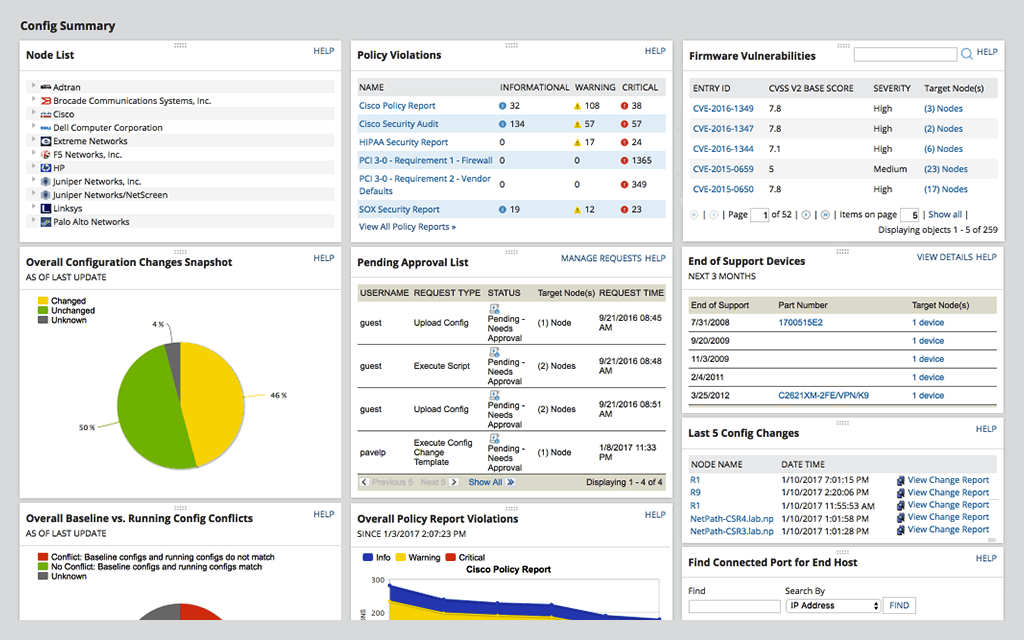
Screenshot of Network Automation -  manage rapid change across complex and multi-vendor networks, reduce time needed to complete repetitive tasks, and maintain standards and service levels for uninterrupted ITScreenshot of Config Backup - rest easy knowing you can locate the most current configuration and quickly apply it to a replacement spare, or to roll back a blown configuration.Screenshot of Vulnerability Scanning - Take the hassle out of vulnerability scanning using NCM's integration with the National Vulnerability Database and access to the most current CVE’s to identify vulnerabilities in your Cisco devices.Screenshot of Inventory Management - Be able to know what devices are connected to your network, their hardware and software configurations, and when they approach end-of-service and end-of-life, with NCM device configuration management tool.Screenshot of User Management - Use NCM's integrated console to lock down devices from unauthorized access, delegate who can view device details and make configuration changes, and determine when network changes can occur.Screenshot of Baselines and Diffs - IT professionals can get a more comprehensive view by leveraging baselines across multiple nodes. Diff view in NCM’s network configuration management tool is designed to highlight only those lines that changed.