Chose MATLAB
Mathematica provide more modern user interface, functionality wise, they are similar

| Product | Rating | Most Used By | Product Summary | Starting Price |
|---|---|---|---|---|
 MATLAB | N/A | MatLab is a predictive analytics and computing platform based on a proprietary programming language. MatLab is used across industry and academia. | $49 per student license | |
 Posit | N/A | Posit, formerly RStudio, is a modular data science platform, combining open source and commercial products. | N/A | |
 Mathematica | N/A | Wolfram's flagship product Mathematica is a modern technical computing application featuring a flexible symbolic coding language and a wide array of graphing and data visualization capabilities. | $1,520 per year |
| MATLAB | Posit | Wolfram Mathematica | ||||||||||||||||||||||
|---|---|---|---|---|---|---|---|---|---|---|---|---|---|---|---|---|---|---|---|---|---|---|---|---|
| Editions & Modules |
| No answers on this topic |
| |||||||||||||||||||||
| Offerings |
| |||||||||||||||||||||||
| Entry-level Setup Fee | No setup fee | Optional | No setup fee | |||||||||||||||||||||
| Additional Details | — | — | Discounts available for students and educational institutions. The Network Edition reduce per-user license costs through shared deployment across any number of machines on a local-area network. | |||||||||||||||||||||
| More Pricing Information | ||||||||||||||||||||||||
| MATLAB | Posit | Wolfram Mathematica | |
|---|---|---|---|
| Considered Multiple Products |  MATLAB  Morteza Banagar Research Assistant Chose MATLAB Apart from Matlab, I used Matematica for some of my integral evaluations. Mathematica is also a "clean" and easy-to-use software that solves symbolic math problems (even better than Matlab for symbolic math). I also used Anaconda and Spyder for my career so far.  Ryan McGarry Vice President of Research, Neuroscientist Chose MATLAB MATLAB's neurophysiological data pre-processing third-party packages are more scientifically validated compared to support for other software platforms. It also allows for writing code with a greater level of functionality and more capabilities than R-Studio, which is instead …  chamika gangul Student Chose MATLAB I like MATLAB better.  Juan Carlos Molina Castejón Research Team for the development of a CubeSAT Chose MATLAB How MATLAB compares to its competition or similar open access tools like R (programming language) or SciLab is that it's simply more powerful and capable. It embraces a wider spectrum of possibilities for far more fields than any other environment. R, for example, is intended …  Bin Cai Graduate Research Assistant Chose MATLAB MATLAB has a very large database of embedded functions and it is continually growing. Graphics processing is much easier than other similar product for beginners (such as Jupyter notebook and Python). Although it is not an open-source language, lots of learning materials and …  Maike Holthuijzen Graduate Research Assistant, Climate Modeling Chose MATLAB I like the user interface of MATLAB and find it most intuitive compared to any of the other three programs I listed. However, unlike RStudio and Oracle VM VirtualBox, MATLAB is not open source. I do prefer MATLAB over PyCharm, because I find MATLAB to be a bit more intuitive. I … | Posit  Gabriel Chiararia Marketing Manager, Category Management Chose Posit Pros: - Free - Huge repository of models and library, constantly updated  Jevgenijs Steinbuks Economist Chose Posit In our organization RStudio is the main competitor for STATA. STATA has a larger number of users as it is far more user-friendly and has a large number of canned routines that work really well. RStudio is a niche software ideally suited to work with larger datasets. | Mathematica  Shalinee Singh Software Engineer Chose Wolfram Mathematica  Robert J. Lang Artist/Consultant Chose Wolfram Mathematica The ability to manipulate algebraic expressions, nested lists, and data structures in Mathematica was unequalled when I first did the comparison. Since then, I've stuck with Mathematica mostly because it's "the tool I know." |
| MATLAB | Posit | Wolfram Mathematica | |||||||||||||||||||||||
|---|---|---|---|---|---|---|---|---|---|---|---|---|---|---|---|---|---|---|---|---|---|---|---|---|---|
| Platform Connectivity |
| ||||||||||||||||||||||||
| Data Exploration |
| ||||||||||||||||||||||||
| Data Preparation |
| ||||||||||||||||||||||||
| Platform Data Modeling |
| ||||||||||||||||||||||||
| Model Deployment |
| ||||||||||||||||||||||||
| BI Standard Reporting |
| ||||||||||||||||||||||||
| Ad-hoc Reporting |
| ||||||||||||||||||||||||
| Report Output and Scheduling |
| ||||||||||||||||||||||||
| Data Discovery and Visualization |
|
| MATLAB | Posit | Wolfram Mathematica | |
|---|---|---|---|
| Small Businesses |  IBM SPSS Statistics Score 8.1 out of 10 |  Jupyter Notebook Score 8.5 out of 10 |  Supermetrics Score 9.8 out of 10 |
| Medium-sized Companies |  Alteryx Platform Score 9.1 out of 10 | Mathematica Score 7.0 out of 10 | Supermetrics Score 9.8 out of 10 |
| Enterprises | Alteryx Platform Score 9.1 out of 10 |  Dataiku Score 8.5 out of 10 |  IBM Analytics Engine Score 7.2 out of 10 |
| All Alternatives | View all alternatives | View all alternatives | View all alternatives |
| MATLAB | Posit | Wolfram Mathematica | |
|---|---|---|---|
| Likelihood to Recommend | 8.1 (53 ratings) | 10.0 (123 ratings) | 9.9 (9 ratings) |
| Likelihood to Renew | - (0 ratings) | 9.7 (17 ratings) | - (0 ratings) |
| Usability | 9.9 (4 ratings) | 8.0 (4 ratings) | - (0 ratings) |
| Availability | - (0 ratings) | 9.4 (3 ratings) | - (0 ratings) |
| Support Rating | 9.5 (7 ratings) | 8.9 (9 ratings) | 9.5 (2 ratings) |
| Implementation Rating | - (0 ratings) | 9.3 (4 ratings) | - (0 ratings) |
| Configurability | - (0 ratings) | 10.0 (1 ratings) | - (0 ratings) |
| Product Scalability | - (0 ratings) | 8.2 (3 ratings) | - (0 ratings) |
| MATLAB | Posit | Wolfram Mathematica | |
|---|---|---|---|
| Likelihood to Recommend | MathWorks
| Posit (formerly RStudio)
| Wolfram
 Steffen Jäschke Projektspezialist bei Steffen Jäschke EinzUnt Physik, Berechnungen |
| Pros | MathWorks
 Saransh Dikshit Graduate Research Assistant | Posit (formerly RStudio)
 Chris Beeley Senior Analyst | Wolfram
Robert J. Lang Artist/Consultant |
| Cons | MathWorks
 Abdullah Umair Bajwa Graduate Researcher | Posit (formerly RStudio)
 B. Mark Ewing Digital Corporate Technology Manager – R&D | Wolfram
|
| Likelihood to Renew | MathWorks No answers on this topic | Posit (formerly RStudio)
| Wolfram No answers on this topic |
| Usability | MathWorks
| Posit (formerly RStudio)
| Wolfram No answers on this topic |
| Reliability and Availability | MathWorks No answers on this topic | Posit (formerly RStudio)
 Kenton Woods Graduate Research Assistant | Wolfram No answers on this topic |
| Support Rating | MathWorks
| Posit (formerly RStudio)
 Xiaotong Song Business Analyst | Wolfram
|
| Implementation Rating | MathWorks No answers on this topic | Posit (formerly RStudio)
| Wolfram No answers on this topic |
| Alternatives Considered | MathWorks
Juan Carlos Molina Castejón Research Team for the development of a CubeSAT | Posit (formerly RStudio)
| Wolfram
 George Danner Founder | President |
| Scalability | MathWorks No answers on this topic | Posit (formerly RStudio)
Chris Beeley Senior Analyst | Wolfram No answers on this topic |
| Return on Investment | MathWorks
 Tyler Grudowski Product Development Engineer | Posit (formerly RStudio)
 Flavio Leccese Group Data Scientist | Wolfram
Shalinee Singh Software Engineer |
| ScreenShots | Posit Screenshots  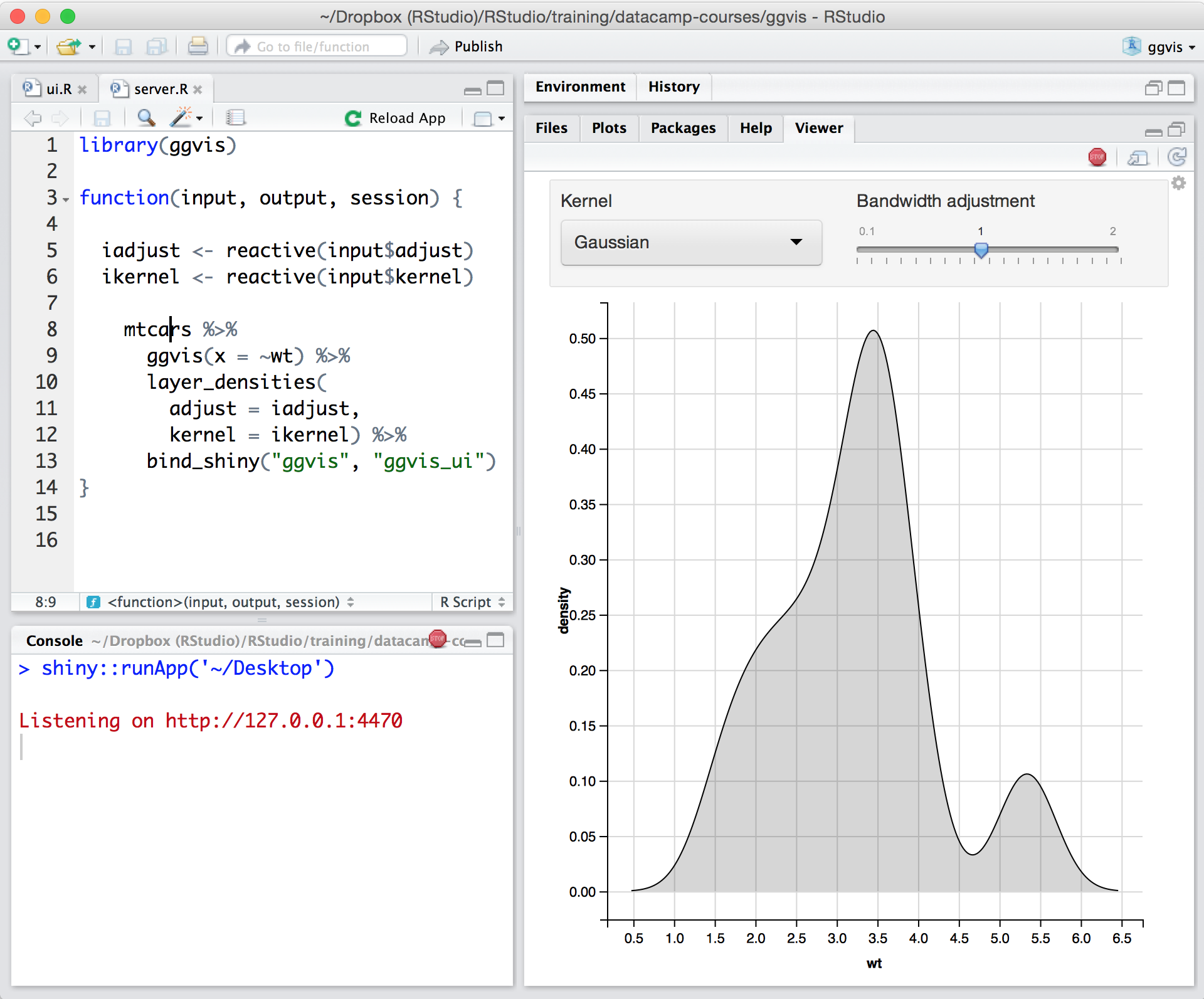    |