Microsoft BI is a business intelligence product used for data analysis and generating reports on server-based data. It features unlimited data analysis capacity with its reporting engine, SQL Server Reporting Services alongside ETL, master data management, and data cleansing.
$14
per month per user
Quantrix
Score 7.4 out of 10
N/A
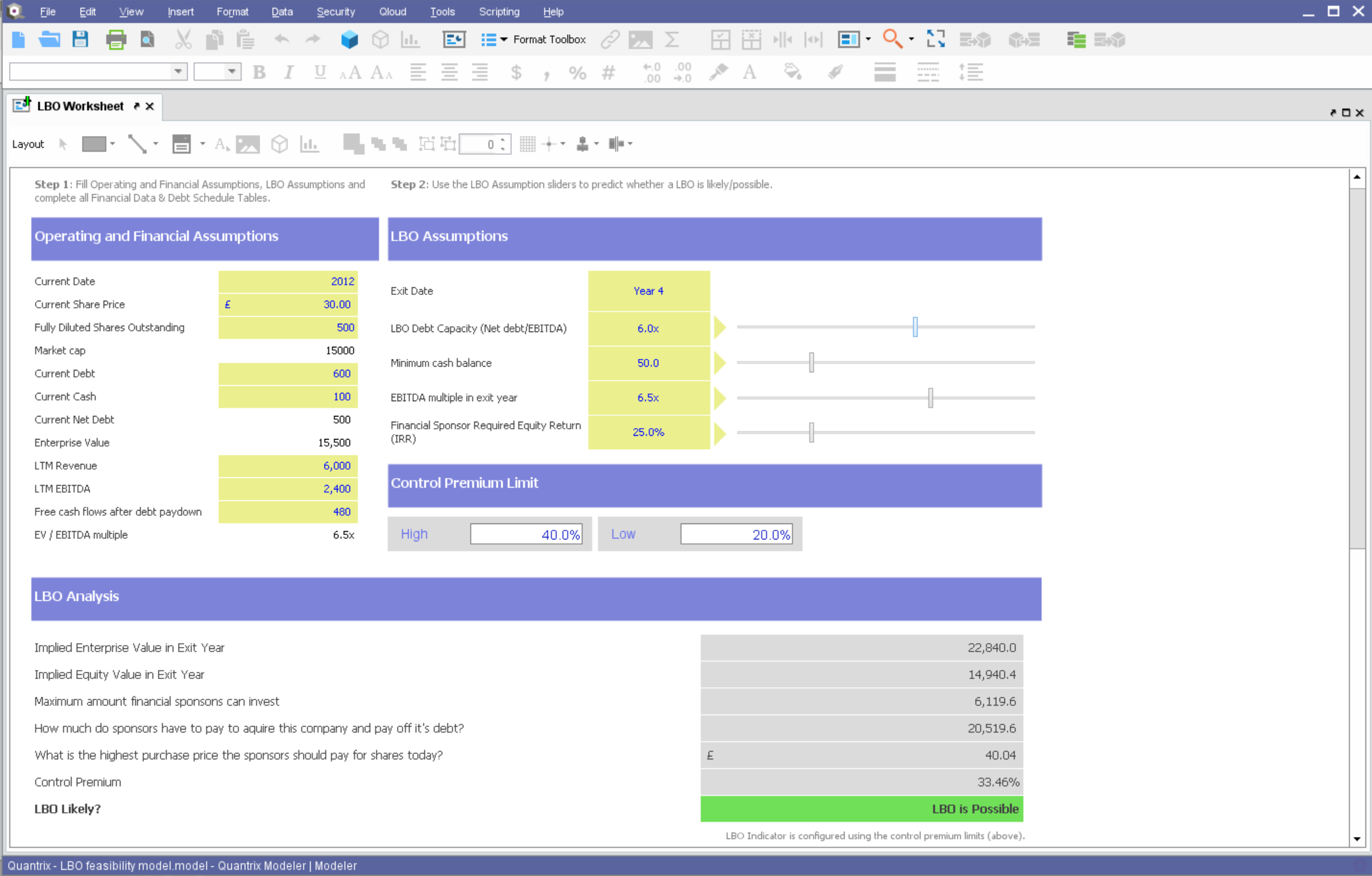
Quantrix is designed to allow users to address the limitations and risks inherent to spreadsheets when developing business-critical models. According to the vendor, this solution offers unmatched capability for forecasting, planning, budgeting, risk modeling and visual analytics, and also allows users to develop ‘what if’ scenarios and model the financial and operational impact of business decisions. Additionally, the vendor says sharing insight is made easier through the creation of interactive…
N/A
SAP BusinessObjects Business Intelligence
Score 7.1 out of 10
N/A
The SAP® BusinessObjects™ Business Intelligence Platform provides users with ad hoc queries, reporting, data visualizations, and analysis tools. Its integrated, unified infrastructure aims to offer scalability from one-to-many tools and interfaces on-premise, in the cloud, or as a hybrid approach.
N/A
Pricing
Microsoft BI (MSBI)
Quantrix
SAP BusinessObjects Business Intelligence
Editions & Modules
Power BI Pro
$14
per month per user
Power BI Premium
$24
per month per user
No answers on this topic
No answers on this topic
Offerings
Pricing Offerings
Microsoft BI (MSBI)
Quantrix
SAP BusinessObjects Business Intelligence
Free Trial
No
Yes
No
Free/Freemium Version
Yes
No
No
Premium Consulting/Integration Services
No
Yes
No
Entry-level Setup Fee
No setup fee
No setup fee
No setup fee
Additional Details
—
Quantrix Modeler is licensed on a per user subscription basis.
—
More Pricing Information
Community Pulse
Microsoft BI (MSBI)
Quantrix
SAP BusinessObjects Business Intelligence
Considered Multiple Products
Microsoft BI (MSBI)
Verified User
Employee
Chose Microsoft BI (MSBI)
Each of the solutions has their pros and cons, but Microsoft's BI offerings provide the best "bang for the buck." Few solutions available offer the breadth of feature functionality in a single package, with BI and database generally being sold as separate offerings. However, …
Specific data displays are some of the strongest aspects of Microsoft BI when compared to alternate programs. It also does a superior job in compatibility with many programs, especially those from Microsoft. Since my company primarily uses Office 365 and other Microsoft …
Our company's implementation of Business Warehouse was abhorrent. It was so clunky and unreliable we couldn't get any real reporting information from the warehouse itself. It wasn't sleek at all and everything had to be manually downloaded and plugged into an offline …
-Tableau is clearly more cutting edge when it comes to data visualization and connecting to multiple data sources (support for MongoDB, Hadoop, etc). -Assuming your data is not that sophisticated, Microsoft BI is a great product. I would say its a good "all around" BI tool. It …
Quantrix
No answer on this topic
SAP BusinessObjects Business Intelligence
Verified User
Analyst
Chose SAP BusinessObjects Business Intelligence
We currently have implementations of both Microsoft BI and SAP Business Objects so our enterprise has found reasons for both. Some users prefer BI over SAP and it depends on the department they are working for. SAP was chosen for the more complex tasks that require large data …
SAP BO BI is very similar to Microsoft Power BI. However, SAP BO BI is much stronger in terms of analytics and document management while Power bI is stronger in data visualization and big data integration. SAP BO BI is a great tool within its ally, which is performance analysis …
Analysis Services and Oracle Discoverer are more developer oriented than true self service tools and their development capabilities as well as their content delivery is limited. The Symantec layer sets BO apart in that regard. Heavy development is also possible and custom …
We selected SAP Business Objects in the previous instance because we were implementing SAP ERP and the choice of Business Objects was favorable from an integration and cost perspective. We did not choose SAP Business Objects most recently because of the predicted long …
Microsoft BI has a lot of features and is a very powerful tool, especially if you have folks on your team that know how to utilize all of its capabilities. To truly unlock all that it can do, it does require people to have a deep understanding of its capabilities. That's where the software really shines. If you are looking for a simpler, more basic reporting tool, there are other programs available that do not require such a steep learning curve.
If you find yourself in the ocean of traditional spreadsheets, overwhelmed by broken links, errors, model audit problems, hardwiring, etc. here is a lifebuoy for you. If you want to have full flexibility in your budgeting and forecasting in contrast to ERPs with rigid structures and one-size-fits-all concept. If you are small or medium size company and do not want to invest in costly enterprise solutions. If you need a fast implementation https://youtu.be/5W_q5Xhw5fg
As mentioned earlier reporting was a big headache for us and the tools we used didn't support large data sets and visualization Performing analytics with such data sets was cumbersome and later post using this SAP BusinessObjects Business Intelligence we were able to correlate different data sets and prepare the dashboard pretty easier which were helpful and easier to understand.
Building complex financial planning model availing of a multidimensional data structure coupled with a powerful formula language, with the immediacy and intuitiveness typical of spreadsheets
Implement quickly model modifications (new products, new scenarios, new time periods) simply adding new "items" to "categories" (corresponding to dimensions in a multidimensional data model)
Scale up models to very large datasets with very fast computation times
Easily import data from text files, other Quantrix models and external databases via DataLink and DataNAV
Save snapshots of tables computed in Quantrix to external databases via DataPush
This software is easy to initially learn, and very powerful in producing reusable reports.
It is much faster than my company's internal manual queries. The ability to build off of a saved query and share queries to other users is a great positive.
My favorite part is that you can run queries in the background and it does not interfere with your current work or slow your computer down.
Hard to be critical of the Quantrix team as I know they strive to produce the best product possible. I suppose the next thing on my wish list would be the application of the new Solver functionality to be available in the Qloud.
A big help for new users would be a good book on transitioning from Excel or other environment into Quantrix. I know first hand it can be difficult to transition when having to learn the program through a help guide, forums and tech support. I had a lot of trial and error in my journey to producing the desired models. On one hand it was a valuable method as it taught me a lot of what not to do, but I will admit it was not the most efficient way to do things.
Would also love to see local user groups being formed at some point in the future. Quantrix puts on a fantastic conference once a year in beautiful Maine, but it is a big journey for someone in Southern California (and limited to one or two days a year). I would like to see some local chapters formed in different areas of the country so local Quantrix users can get together more often and collaborate (maybe a quarterly or semi-annual meetup?). Our Quantrix community is still relatively small and may be a difficult task for some areas, but is also the very reason why this would be great idea.
The installation can be very complex and time-consuming, it requires a lot of planning and foresight as to what role the software will play in the organization.
The software has a relatively large learning curve that takes dedicated users months to get comfortable with, the UI is a bit intimidating for new users.
SAP could organize their help better, it can be difficult to find dependable solutions to issues via their website and support channels.
Microsoft BI is fundamental to our suite of BI applications. That being said, Northcraft Analytics is focused on delighting our customers, so if the underlying factors of our decision change, we would choose to re-write our BI applications on a different stack. Luckily, mathematics are the fundamental IP of our technology... and is portable across all BI platforms for the foreseeable future.
The institution has decided to move in a different direction, and will be using MSBI for reporting. I have been very happy with the Business Objects suite of tools, and will continue to use them heavily until we make the transition.
The Microsoft BI tools have great usability for both developers and end users alike. For developers familiar with Visual Studio, there is little learning curve. For those not, the single Visual Studio IDE means not having to learn separate tools for each component. For end-users, the web interface for SSRS is simple to navigate with intuitive controls. For ad-hoc analysis, Excel can connect directly to SSAS and provide a pivot table like experience which is familiar to many users. For database development, there is beginning to be some confusion, as there are now three tool choices (VS, SSMS, Azure Data Studio) for developers. I would like to see Azure Data Studio become the superset of SSMS and eventually supplant it.
From a server and client side perspective. the Business Intelligence Platform provides a foundation for all aspects of content development, distribution, analysis, collaboration and self service. Ease of use from targeted content delivery through controlled accessibility. Content exporting in the format of the users choice. Scheduling for internal or external delivery. Public and private folders for secure content access when requied. Web based for viewing on the users device of choice without the need to download additional applications.
SQL Server Reporting Services (SSRS) can drag at times. We created two report servers and placed them under an F5 load balancer. This configuration has worked well. We have seen sluggish performance at times due to the Windows Firewall.
Overall, the tool (Web Intelligence 4.2) is fast and solid. One issue is a dependability on JAVA for a full feature report creation/edit capabilities (as opposed to limited HTML option). Second, planned end of JAVA support by major browsers (Chrome is already not supporting JAVA applet).
MSBI natively has a site that allows you to vote on user enhancements and bug fixes. This allows the largest nagging issues to float to the top and the development team can prioritize accordingly. As mentioned earlier, the large community base of MSBI developers assist technical resources in handling technical questions.
SAP has released various versions of SAP BO BI. starting from 3.1 and going to 4.0,4.1,4.2 and latest being 4.3. SAP provides support to these new versions. As new versions keep on coming, support for the very old software goes out of scope from SAP. it is when the different organization plans to get their BO content migrated from a lower version to a newer version. The newer version had definitely added functionality and features which ease the work of users.
I have used on-line training from Microsoft and from Pragmatic Works. I would recommend Pragmatic Works as the best way to get up to speed quickly, and then use the Microsoft on-line training to deep dive into specific features that you need to get depth with.
We are a consulting firm and as such our best resources are always billing on client projects. Our internal implementation has weaknesses, but that's true for any company like ours. My rating is based on the product's ease of implementation.
Hire specialists and experienced staff. Mix some beginners so that everyone is not a leader but a learner too. Plan well; architect well; break down implementation in small steps and move towards larger steps. Create a centralized and authorized SAP Business Objects implementation team.
We have used the built in ConnectWise Manager reports and custom reports. The reports provide static data. PowerBI shows us live data we can drill down into and easily adjust parameters. It's much more useful than a static PDF report.
Overall, I was not part of the ultimate decision to purchase Quantrix. I terms of user-friendliess and robust reporting capabilities I do think Tableau has Quantrix outclassed. That being said, Quantrix does provide more in-depth analyses for our relevant data and provides better modeling for our forecasts out of the box. The accuracy of the tools output is also much better
We selected SAP BusinessObjects Business Intelligence (BI) based on price. It can stack up against others in terms of price and honestly, that's about it. Salesforce Commerce does a hell of a better job at handling it. However, in the space of Business Intelligence, SAP can do more, and that's why at the end we went with it
SAP BusinessObjects Business Intelligence (BI) Platform supports SOA Service Oriented Architecture. You can start/restart/enable/disable all the servers. You can seamless do load balancing and clustering. It supports all leading application and web server. Supports LDAP SSO integration. People who can work on excel with training they can work on SAP Business Objects Web Intelligence, dashboard, Lumira, Information design tool product suite. Tool is very user friendly and easy to learn and implement
As a SaaS provider we see being able to provide self-service BI to our client users as a competitive advantage. In fact the MSSQL enabled BI is a contributing factor to many winning RFPs we have done for prospective client organisations.
However MSSQL BI requires extensive knowledge and skills to design and develop data warehouses & data models as a foundation to support business analysts and users to interrogate data effectively and efficiently. Often times we find having strong in-house MSSQL expertise is a bless.
Capacity forecasting used to take hours to calculate with a ton of manual modifications. Quantrix has automated that so a model can be updated at any time with a click of a button
The accuracy of the models is incredible. It took some tweaking to add in data scubbers, but now it runs almost flawlessly
The confidence the management teams have in the output of the model is amazing. Before, people would question the output, have you rebuild it, and then compare. Now the report comes out and the output has high confidence.
By generating and distributing reports in a timely manner, we were able to save millions of dollars for the company which otherwise would not have been visible.
Almost realtime dashboard, saved the company a huge amount by showing the outages and kept the company from buying a tool to do just that.
It showed the customers who were not paying the bills and were missing in the system due to some loophole. This was visible by doing reporting on the theft usage of electricity.