TrustRadius: an HG Insights company

Save this comparison

Save this comparison

Add Product

Recommended Comparisons

    Overview
    ProductRatingMost Used ByProduct SummaryStarting Price

    Microsoft Planner

    Score7.7 out of 10
    N/AMicrosoft Planner is presented as a solution to organize teamwork with intuitive, collaborative, visual task management. With it, users can create Kanban boards using task cards with files, checklists, and labels. Users can collaborate in Planner and Microsoft Teams and check visual status charts—all in the Microsoft cloud.N/A

    Planview ProjectAdvantage

    Score8.9 out of 10
    N/APlanview ProjectAdvantage is a project and portfolio management (PPM) platform for mid-sized organizations and developing project management offices (PMOs). The platform centralizes project, program, resource, financial, and performance data through configurable workflows, dashboards, and AI-assisted planning tools. The vendor reports that organizations across IT, research and development, and product development use ProjectAdvantage to plan work, allocate…N/A
    Pricing
    Microsoft PlannerPlanview ProjectAdvantage
    Editions & Modules
    No answers on this topic
    No answers on this topic
    Offerings
    Pricing Offerings
    Microsoft PlannerPlanview ProjectAdvantage
    Free Trial
    NoYes
    Free/Freemium Version
    NoNo
    Premium Consulting/Integration Services
    NoYes
    Entry-level Setup FeeNo setup feeRequired
    Additional Details——
    More Pricing Information
    Community Pulse
    Microsoft PlannerPlanview ProjectAdvantage
    Considered Both Products
    Microsoft
    No answer on this topic
    Planview
    No answer on this topic
    Key User Insights
    Would buy again
    82%
    Would buy again
    23 Answers
    No answers on this topic
    Delivers good value for the price
    96%
    Delivers good value for the price
    24 Answers
    No answers on this topic
    Happy with the feature set
    75%
    Happy with the feature set
    21 Answers
    No answers on this topic
    Lived up to sales and marketing promises
    93%
    Lived up to sales and marketing promises
    13 Answers
    No answers on this topic
    Implementation went as expected
    95%
    Implementation went as expected
    21 Answers
    No answers on this topic
    Best Alternatives
    Microsoft PlannerPlanview ProjectAdvantage
    Small Businesses
    Todoist
    Score9.3 out of 10
    No answers on this topic
    Medium-sized Companies
    Google Tasks
    Score8.4 out of 10
    Microsoft Project Server
    Score5.1 out of 10
    Enterprises
    Google Tasks
    Score8.4 out of 10
    Planview PPM Pro
    Score8.9 out of 10
    All AlternativesView all alternativesView all alternatives
    User Ratings
    Microsoft PlannerPlanview ProjectAdvantage
    Likelihood to Recommend
    7.8
    (28 ratings)
    10.0
    (3 ratings)
    Likelihood to Renew
    10.0
    (2 ratings)
    -
    (0 ratings)
    Usability
    8.0
    (12 ratings)
    -
    (0 ratings)
    Support Rating
    -
    (0 ratings)
    10.0
    (1 ratings)
    User Testimonials
    Microsoft PlannerPlanview ProjectAdvantage
    Likelihood to Recommend
    Microsoft
    There are a few examples where MS Planner would be suitable for employees at a mature organization. In my opinion, if you have Outlook or Teams, you already have built-in calendars and to-do lists. If you need a project management tool, you have two options: either pay for MS Project or use an alternative tool like Monday, Asana, or Jira. Regardless, their free versions are much more sophisticated than Microsoft's (MS Planner). Any team wishing to put together a halfway-decent project management board will need to look elsewhere, as MS Planner is only suitable for a personal to-do list.
    Incentivized
    Read full review
    Planview
    Yes, definitely. We wanted a flexible but robust software and Sciforma seemed to be the best fit
    Read full review
    Pros
    Microsoft
    • I love the ability to tag and untag others as needed
    • I love the ability to customize the tag labels and that there are so many options
    • I love the ability to add comments and it notifies the others tagged in the task
    • I love that the task description can be changed as needed without notification to others assigned to the task
    Incentivized
    Read full review
    Planview
    • Scheduling tasks.
    • Assigning resources and cost items.
    • Managing a team.
    Incentivized
    Read full review
    Cons
    Microsoft
    • Would be nice to see a calendar view instead of a list view
    • Permissions aren't configurable, anyone can delete any task at any time and there is no recycle bin
    • Notifications aren't great, you have to be attached as an owner to a task to see comments and be notified of changes, and even then notifications aren't shown for a lot of things
    Incentivized
    Read full review
    Planview
    • The largest con for me is the clunky UI. It's not very intuitive, and has a larger learning curve to become a proficient user.
    • Reports are functional, but could use some improvements.
    • It can be slow at times, and you have to wait to make sure your changes are saved before moving on.
    Incentivized
    Read full review
    Likelihood to Renew
    Microsoft
    It is a very useful tool that brings teams in sync with one another. The integration with other Microsoft products makes it an obvious choice because you don't have to purchase a license for a completely different tool that doesn't have cross-functional capabilities with the software you already use on a daily basis.
    Incentivized
    Read full review
    Planview
    No answers on this topic
    Usability
    Microsoft
    The board-and-bucket layout makes it easy to organize tasks, track progress, and prioritize work at a glance, even for first-time users. I also appreciate how Planner seamlessly integrates with tools like Teams, Outlook, and SharePoint, enabling users to collaborate, schedule tasks, and access their plans without needing to switch platforms. I also like how it’s accessible not only on desktops, but also on mobile devices.
    Incentivized
    Read full review
    Planview
    No answers on this topic
    Support Rating
    Microsoft
    No answers on this topic
    Planview
    This software allows project and portfolio managers to analyze and prioritize projects based on resource allocation and available effort. It helps you compare the sorecast effort with resource availability. You can email, call or tweet them if you have concerns.
    Incentivized
    Read full review
    Alternatives Considered
    Microsoft
    Many areas of the company still use Trello to organize their activities and tasks, but gradually Microsoft Planner must replace the activities. Users are often "attached" to familiar technologies, but Office 365 takes advantage of the more organized use of the tools. This year we will not renew the Trello contract.
    Read full review
    Planview
    We were looking at vendors but they didn't meet our expectations and weren't flexible enough.
    Read full review
    Return on Investment
    Microsoft
    • In my experience, productivity is negatively impacted because assigning subtasks aren't clear on Microsoft Planner
    • Managers aren't able to track direct reports' tasks across multiple boards -- leading to poor visibility for us
    • Notifications aren't always sent to inbox, so you rely on people's own project management skills to follow the communication on tasks they're assigned to. In my experience, this leads to missed deadlines impacting customer relationships.
    Incentivized
    Read full review
    Planview
    • Before Sciforma we were running projects out of Excel and emails. Using a cloud based application means that everyone is viewing information in real time.
    • Our executive leadership knows that they have one place to go for a real time status on all of our strategic projects.
    Incentivized
    Read full review
    ScreenShots

    Planview ProjectAdvantage Screenshots

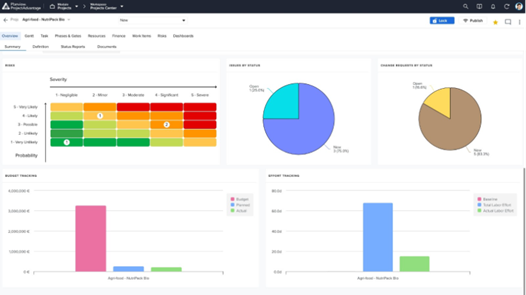
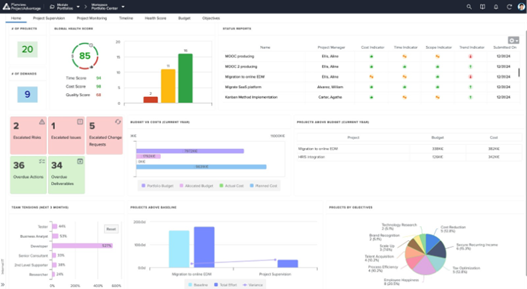
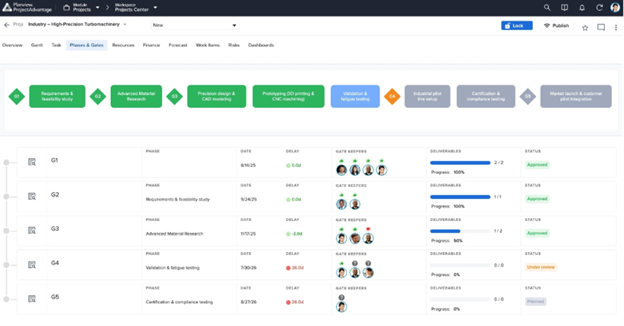
    Screenshot of Project Dashboard Summary View - A consolidated dashboard showing project health, status, and key metrics at a glance.Screenshot of Dashboard Summary View - A portfolio-level dashboard summarizing project performance, financials, and overall portfolio health.Screenshot of Resource Forecast and Capacity View - Visualize resource demand against available capacity to plan and allocate teams effectively.Screenshot of Phase Gate - Summary View Page - Track project progression through governance gates with clear milestone visibility.Screenshot of Demand / Idea Qualification - Capture, evaluate, and qualify incoming ideas and demands before they enter the pipeline.