TrustRadius: an HG Insights company

Save this comparison

Save this comparison

Add Product

Recommended Comparisons

    Overview
    ProductRatingMost Used ByProduct SummaryStarting Price

    Microsoft Viva Engage

    Score8.6 out of 10
    N/AMicrosoft Viva Engage, formerly Yammer, is used for private communication within organizations or between organizational members and pre-designated groups.

    $24

    per year per user

    OpenText Hightail

    Score9.3 out of 10
    N/AOpenText Hightail is a cloud-based collaboration software for creative content reviews and approvals. With one place for teams to share large, multimedia files, collect precise feedback and approve content, Hightail streamlines the creative process and helps teams keep projects on schedule.

    $0

    100MB per file upload

    Pricing
    Microsoft Viva EngageOpenText Hightail
    Editions & Modules
    Microsoft Viva Employee Communications and Communities
    $24
    per year per user
    Microsoft Viva Suite
    $144
    per year per user
    Lite
    $0
    100MB per file upload
    Pro
    $15
    per user, per month
    Teams
    $30
    per user/per month
    Business
    Custom
    per user, per month
    Offerings
    Pricing Offerings
    Microsoft Viva EngageOpenText Hightail
    Free Trial
    NoYes
    Free/Freemium Version
    NoYes
    Premium Consulting/Integration Services
    NoNo
    Entry-level Setup FeeNo setup feeNo setup fee
    Additional DetailsMicrosoft Viva Engage is also available in some Microsoft 365 packages.Lite: Send large files with anyone. Files are limited to 100MB for each file size uploaded, 2GB storage max. Files expire after 7 days. Pro: Send large files with anyone and set advanced security permissions such as expiration dates and access codes. Files are limited to 25GB for each file size uploaded, with unlimited storage. Teams: Send large files, collaborate in real-time and manage creative projects with your team. The Hightail Teams plan allows you to purchase multiple users online (from 1-30 users per organization) and allows users to send file sizes up to 50GB with unlimited storage. The Teams plan also includes features such as file previews, organization, annotations, version control, discussions, follow-ups, approval routing and more. Business: Create unlimited visual project folders (called a Space) with collaboration and project management features such as approval routing and assigning to-dos, upload unlimited files up to 100GB each, protect them with access codes and manage user permissions., plus intuitive admin controls , detailed activity analysis for your entire company, advanced organization options and priority support.
    More Pricing Information
    Community Pulse
    Microsoft Viva EngageOpenText Hightail
    Considered Both Products
    Microsoft
    No answer on this topic
    OpenText
    No answer on this topic
    Key User Insights
    Would buy again
    86%
    Would buy again
    19 Answers
    No answers on this topic
    Delivers good value for the price
    94%
    Delivers good value for the price
    17 Answers
    No answers on this topic
    Happy with the feature set
    95%
    Happy with the feature set
    21 Answers
    No answers on this topic
    Lived up to sales and marketing promises
    100%
    Lived up to sales and marketing promises
    10 Answers
    No answers on this topic
    Implementation went as expected
    100%
    Implementation went as expected
    13 Answers
    No answers on this topic
    Features
    Microsoft Viva EngageOpenText Hightail
    Project Management
    Comparison of Project Management features of Microsoft Viva Engage and OpenText Hightail
    Feature
    Microsoft Viva Engage
    8.7
    46 Ratings
    12% above category average
    OpenText Hightail
    -
    Ratings
    Task Management9.128 Ratings00 Ratings
    Gantt Charts8.815 Ratings00 Ratings
    Scheduling8.423 Ratings00 Ratings
    Workflow Automation8.723 Ratings00 Ratings
    Mobile Access8.843 Ratings00 Ratings
    Search8.343 Ratings00 Ratings
    Visual planning tools8.926 Ratings00 Ratings
    Communication
    Comparison of Communication features of Microsoft Viva Engage and OpenText Hightail
    Feature
    Microsoft Viva Engage
    8.6
    49 Ratings
    7% above category average
    OpenText Hightail
    -
    Ratings
    Chat9.444 Ratings00 Ratings
    Notifications8.349 Ratings00 Ratings
    Discussions9.748 Ratings00 Ratings
    Surveys9.638 Ratings00 Ratings
    Internal knowledgebase9.338 Ratings00 Ratings
    Integrates with GoToMeeting7.314 Ratings00 Ratings
    Integrates with Gmail and Google Hangouts6.713 Ratings00 Ratings
    Integrates with Outlook8.632 Ratings00 Ratings
    File Sharing & Management
    Comparison of File Sharing & Management features of Microsoft Viva Engage and OpenText Hightail
    Feature
    Microsoft Viva Engage
    9.1
    42 Ratings
    12% above category average
    OpenText Hightail
    -
    Ratings
    Versioning9.728 Ratings00 Ratings
    Video files9.436 Ratings00 Ratings
    Audio files9.434 Ratings00 Ratings
    Document collaboration9.135 Ratings00 Ratings
    Access control9.035 Ratings00 Ratings
    Advanced security features8.433 Ratings00 Ratings
    Integrates with Google Drive8.014 Ratings00 Ratings
    Device sync9.528 Ratings00 Ratings
    Best Alternatives
    Microsoft Viva EngageOpenText Hightail
    Small Businesses
    Flock
    Score9.5 out of 10
    Frame.io
    Score9 out of 10
    Medium-sized Companies
    Troop Messenger
    Score9.8 out of 10
    No answers on this topic
    Enterprises
    Cisco Business Edition 7000 (discontinued)
    Score9 out of 10
    No answers on this topic
    All AlternativesView all alternativesView all alternatives
    User Ratings
    Microsoft Viva EngageOpenText Hightail
    Likelihood to Recommend
    8.9
    (59 ratings)
    9.0
    (8 ratings)
    Likelihood to Renew
    9.0
    (11 ratings)
    -
    (0 ratings)
    Usability
    8.9
    (9 ratings)
    -
    (0 ratings)
    Availability
    8.0
    (1 ratings)
    -
    (0 ratings)
    Performance
    9.0
    (1 ratings)
    -
    (0 ratings)
    Support Rating
    7.0
    (12 ratings)
    -
    (0 ratings)
    Online Training
    7.0
    (2 ratings)
    -
    (0 ratings)
    Implementation Rating
    8.0
    (1 ratings)
    -
    (0 ratings)
    User Testimonials
    Microsoft Viva EngageOpenText Hightail
    Likelihood to Recommend
    Microsoft
    Yammer is great when you have a company culture that encourages friendly collaboration and communication. It can be a great supplement (but certainly not a substitute) for bonding and sharing ideas and thoughts. Certain channels can be really successful, too, like a channel where people can post dog pictures or something fun like that!
    Incentivized
    Read full review
    OpenText
    Hightail is my go-to source when I need to send large files that would never fit as regular attachments. That being said, sometimes there are files that would perfectly fit as attachments but I want the security that Hightail provides when sending sensitive or private material. It's very comforting knowing that the content I'm sending is only being received and viewed by the intended parties. It's also comforting for my clients when it's THEIR content that I'm sending for review.
    Incentivized
    Read full review
    Pros
    Microsoft
    • Providing a platform for social news in the company where "bottom up" topics can percolate freely across department
    • Social networking across the company where folks can divide their work into topics instead of teams
    • Basic collaboration within a group including document sharing with ability to pin documents to a team
    Incentivized
    Read full review
    OpenText
    • Management of content, communication, spaces, and projects in general.
    • Control of processes, tasks and activities between the different members of teams.
    • Collaborative work through different media and channels.
    Incentivized
    Read full review
    Cons
    Microsoft
    • Although the social enterprise network works very well, there is room for some slight improvement - such as the ability to attract users. By being part of the Microsoft Office Suite, it is offered as an "add-on" and many overlook it and see it as unnecessary at first. It would be smart for Microsoft to sell it as its own product so it could gather more popularity as a "social network".
    • Giving an option to filter results could be better as well as giving an option to turn off the "recent activity" bar on the home page.
    Incentivized
    Read full review
    OpenText
    • Some of our recipients are not very tech-savvy and can get confused with how to download a file. There is some room for improvement by making it clearer where the user should click to download the file.
    Incentivized
    Read full review
    Likelihood to Renew
    Microsoft
    Microsoft is dedicated to continual improvement on Yammer. They realize the value that Yammer brings to the table with their clients. In the short time that we have had Yammer implemented, we are just now beginning to see the strong impact it has on becoming more effective and efficient around collaboration.
    Read full review
    OpenText
    No answers on this topic
    Usability
    Microsoft
    Overall easy to use and intuitive, although limited in the possibility to personalize layout and look & feel of a site. Some functionalities are not easy to use, like document editing, but some others are quick and effective (posts and tagging above all). Performance and responsiveness of the Yammer site is typically acceptable, in my experience.
    Read full review
    OpenText
    No answers on this topic
    Reliability and Availability
    Microsoft
    Very available
    Read full review
    OpenText
    No answers on this topic
    Performance
    Microsoft
    It's a simple product but it does provide value.
    Read full review
    OpenText
    No answers on this topic
    Support Rating
    Microsoft
    We have never had to use the support for Yammer. The tool works well and we have not come across any bugs. User Interface is simple and easy to use, similar to other forum type products, thereby removing the need for any extensive training. Team members are invited in and immediately are able to start using the tool.
    Incentivized
    Read full review
    OpenText
    No answers on this topic
    Online Training
    Microsoft
    The training that Microsoft provides is very generic training for Yammer. I like the fact the training is short and easy to understand
    Read full review
    OpenText
    No answers on this topic
    Implementation Rating
    Microsoft
    We organically implemented the product
    Read full review
    OpenText
    No answers on this topic
    Alternatives Considered
    Microsoft
    Our team briefly used Salesforce.com's Chatter product before switching over to Yammer in 2012. While Chatter is essentially the same product as Yammer, it left much to be desired. Chatter's design was (and remains) clunky and difficult to navigate. Yammer is a simple, easy-to-use product that offers similar functionality as Salesforce's Chatter.
    Incentivized
    Read full review
    OpenText
    Honestly, once we started using Google Drive more efficiently and saw what improvements OpenText Hightail had made, it was hard to choose. But now that we more consistently use Google Drive, I use it probably 75% more than I use OpenText Hightail for the same tasks. I'm not sure how much longer I'll be a customer at OpenText but it's great to have both options.
    Incentivized
    Read full review
    Return on Investment
    Microsoft
    • My company is pleased with the positive impact Yammer has created departmentally and on an individual basis with work flow efficiency.
    • Adversely, most old and new employees are more familiar with SharePoint, causing the company to pay for training for all current and incoming employees.
    • As Yammer becomes more widely used, the need for training may diminish, which is where we will see our return on investment, as the product clearly provides a more effective form of file sharing and communication between employees and their department.
    Incentivized
    Read full review
    OpenText
    • Hightail simply saves time. We no longer struggle with trying to meet the requirements of OutLook. When we have a file that is too large to send via OutLook we just "hightail it".
    Incentivized
    Read full review
    ScreenShots

    OpenText Hightail Screenshots

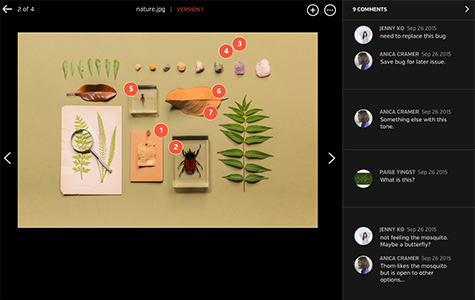
    Screenshot of Improve review process with inline commenting for visual files.Screenshot of Compare each update instantly with visual versions.Screenshot of Bring everyone and everything together in a Space.Screenshot of Improve the audio and video review process with time-stamped commenting.