MSPs
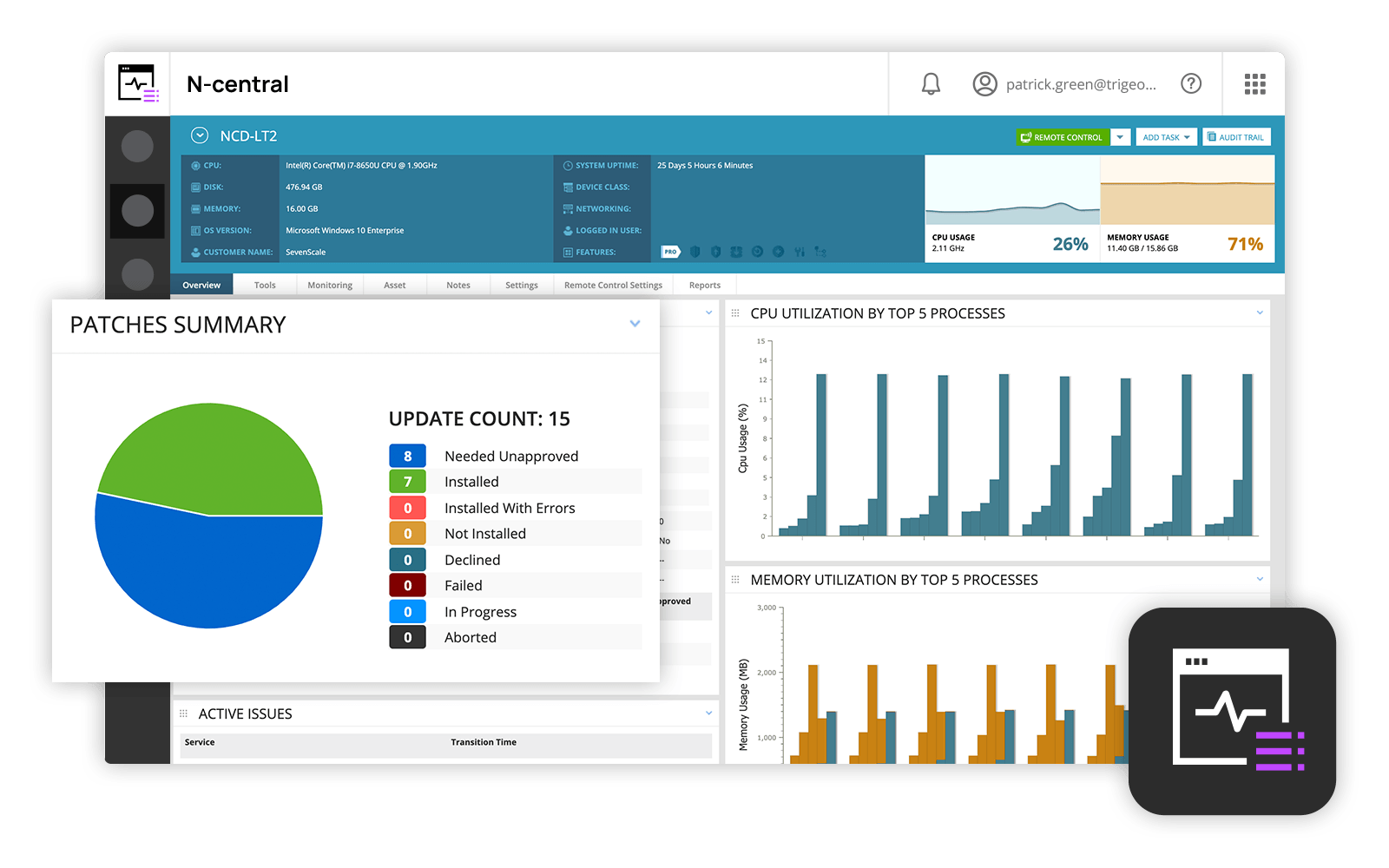
and IT professionals use N-able™ N-central® to monitor and manage devices and complex
networks remotely. N-central provides
visibility and efficiency as the user's needs scale. N-central can help users:
1. Proactively monitor everything on a customer network—not just servers
and workstations—and troubleshoot.
2. Stay on top of threats with features like MFA, antivirus, integrated endpoint
detection and response, data backup, disk encryption, email protection,…
N/A
SecureLink Enterprise Access
Score9.1 out of 10
N/A
SecureLink is a platform for remote support in regulated industries. Enterprise software vendors use SecureLink to deliver remote support and services. Hospitals, banks, casinos and other regulated entities use SecureLink to authenticate, control and audit remote access for their vendors, business associates and other 3rd parties.
N-Able is perfect for an MSP environment. It gives all the standard functionality an IT professional needs out of the box and can be configured to show almost anything required. For example, we have configured a dashboard to show when our backups need attention for each customer. This is achieved by running a small script on repeat via N-Central everyday/evening, and the result gives us information on the dashboard to help us identify exactly what is working and what needs looking into.
A de minimis incentive was given to thank the reviewer for their time. The incentive was not used to bias or drive a particular response, nor was the incentive contingent on a positive endorsement. More Info
It does exactly what it needs to. The only times I've had serious issues with rolling out to a vendor is when they have a "contractual agreement" to only use their solution. Almost every vendor that I've worked with and shown this product to has been skeptical for the first 5 minutes and fully converted to liking the ease of use of the product by 10 minutes
Remote tasks - entry-level techs can run basic tasks without physically touching a piece of equipment.
Remote support - remote controlling user devices is easy and saves a lot of time with having to initiate a remote session.
Management of devices, particularly patch management and anti-virus management - you can automatically approve and deploy patches and schedule automatic AV scans.
Customer support just points to online guides and I feel they aren't helpful.
During the trial they turn on a lot of features. In my experience, if you play around with the features, they charge you for them. Keep this in mind if you move forward with N-Able - they will charge for "trialed" services.
In my experience, some services that you're being charged for can't be disabled or monitored by you or your team. You only see them on the monthly invoice.
In my opinion, the "Scripting Automation" doesn't provide value. You're either going to be writing your own batch or Powershell to make scripting work.
In my opinion, monitoring software deployments is painful.
The default monitoring template can't be duplicated, edited, or referenced. You'll find that the default monitors in an unusual way and will throw needless recurring alerts into your ticketing system. To avoid this, you need to create a template from scratch which takes many hours to set up.
In my opinion, they're more concerned about a quick buck than customer service. "Buyer beware" company.
Java based. Always an issue. I know they are working on this and it will be Javaless if we need it. I know that Java can cause issues across the board and I understand the need of it, but it does not make it any better when there are Java issues.
Stronger integration with the Active Directory. Currently its only read-only, which is good and bad.
I would love to see an App. I know they are working on this as well.
Overall we have liked our solar winds experience, however, as our company has grown to support larger enterprises, this product does not have the functionality that our teams need in order to fully support them. The lack of granularity with backups and lack of ability to support nutanix environments is slowly drawing us into the use of other tools.
A de minimis incentive was given to thank the reviewer for their time. The incentive was not used to bias or drive a particular response, nor was the incentive contingent on a positive endorsement. More Info
The user interface is fairly straight forward, with logic groupings for objects. I did not deploy this software, but am one of the daily administrators. Once you get the correct agent package (Which can be a challenge) the integration into AD is not bad. The UI could be more customized, but that may have been a design choice.
A de minimis incentive was given to thank the reviewer for their time. The incentive was not used to bias or drive a particular response, nor was the incentive contingent on a positive endorsement. More Info
Every time we have reached out to SolarWinds they are quick to respond, even offering support chat 24/7. Their support team is great and works with you to find solutions to issues. They have taken items we had issues with before and used those to create updates so that the issue is handled better in the future.
A de minimis incentive was given to thank the reviewer for their time. The incentive was not used to bias or drive a particular response, nor was the incentive contingent on a positive endorsement. More Info
The employees at Securelink have always been responsive and seem to be invested in the success of my company. They truly understand what their product means to us so if there is a problem, they are always willing to help. In the rare event that something is found on their end, they will be proactive and reach out to someone to help and get something on calendar for a fix
A de minimis incentive was given to thank the reviewer for their time. The incentive was not used to bias or drive a particular response, nor was the incentive contingent on a positive endorsement. More Info
Our version of SolarWinds was old and running on old hardware, but it was way easier to setup and do things with. It did not do everything N-able does such as patch management, or at least we didn't have a module to do so if one existed. However it definitely seemed easier to use and possibly more stable.
Securelink seems to work better than LogMein for a large enterprise group. Our company has over 10,000 different connections and securelink manages them well.
I've found that Securelink allows me to get a vendor access to an application for support purposes much faster than a provisioned VPN account and the red tape around this. I can set up a vendor to access an application suite in a half hour and it will be more secure than regular provisioning.
The ROI is yet to be seen on this, but it certainly makes Compliance, Internal Audit, and Legal very happy, which helps everybody.
Internally, there is much more push back and it has been problematic. For a tech, to have to log in to a server and navigate to a system is considered cumbersome, when before all they had to do was open up Putty or RDP to a server to get in. The only way to combat this is to force them to use Securelink by removing rights. Near impossible for the domain admins.