TrustRadius: an HG Insights company

Save this comparison

Save this comparison

Add Product

Recommended Comparisons

    Overview
    ProductRatingMost Used ByProduct SummaryStarting Price

    Ontraport

    Score7.5 out of 10
    N/AONTRAPORT offers customer relations management services that help with content management (creating and hosting webpages), lead tracking, traditional marketing approaches (e-mail, SMS, social media, direct mail), managing online payments, and workflow automation.

    $29

    per month

    Planable

    Score8.5 out of 10
    N/APlanable is a social media management tool built around content collaboration and approvals. It covers planning, creation, feedback, approval, scheduling, publishing, community management, analytics, competitor benchmarking, and social listening in one workspace. Drafts render as exact previews of the finished post, feedback is left on the content itself rather than in a separate thread, and approval requirements are set per workspace. Planable was founded in 2016 and is used…

    $39

    per month per workspace

    Pricing
    OntraportPlanable
    Editions & Modules
    No answers on this topic
    Basic
    $39
    per month per workspace
    Pro
    $59
    per month per workspace
    Enterprise
    Custom
    Offerings
    Pricing Offerings
    OntraportPlanable
    Free Trial
    YesYes
    Free/Freemium Version
    NoYes
    Premium Consulting/Integration Services
    YesYes
    Entry-level Setup FeeOptionalNo setup fee
    Additional DetailsOntraport offers a variety of plans to choose from based on the features needed. Pricing adjusts with the number of contacts in the database and users in the account. Monthly or annual plans are available, and all plans start with a 14-day free trial. Ontraport offers a Done-With-You Setup and Training Package for getting set up in the account quickly. Users can also access a free video library with step-by-step instructions on getting started and using every feature of the platform.Planable is priced per workspace, not per seat. Each workspace holds one brand or client, and every plan includes unlimited users: collaborators, reviewers, and clients can be added without increasing cost. Organizations scale by adding workspaces rather than licenses. Annual billing includes two months free on all plans and add-ons. Free trial 50 posts, with no time limit and no credit card required. The allowance is a total, not a monthly reset, so the trial ends when the 50th post is created rather than on a fixed date. X (Twitter) publishing is not available during the trial. The Analytics, Social Inbox, and Social Listening add-ons carry separate 30-day free trials on paid plans. Basic — $39 per workspace per month Entry plan for small teams with straightforward review needs. 60 posts per workspace per month 4 social pages per workspace Unlimited users 2 approval types: none and optional Feed and Calendar views 3 campaigns per workspace 10GB media storage 13 months of published post storage MCP connector included Optional approval means a post can be approved but does not have to be before it publishes. Teams that need publishing blocked until sign-off require Pro. Pro — $59 per workspace per month Most common plan for agencies and in-house teams running client or stakeholder approval. Everything in Basic, plus: 150 posts per workspace per month 10 social pages per workspace Required approval, in addition to none and optional — content cannot be scheduled or published until at least one approver signs off Grid view, in addition to Feed and Calendar 10 campaigns per workspace 50GB media storage Public API access Chat support Enterprise — custom pricing For organizations with formal review chains, multiple brands, or procurement and security requirements. Everything in Pro, plus: Unlimited posts Multi-level approvals: sequential stages with designated approvers at each one List view, in addition to Feed, Calendar, and Grid Unlimited campaigns 100GB media storage 24 months of published post storage SSO Dedicated account manager and priority support Payment by bank or wire transfer Add-Ons Add-ons are priced per workspace and available on any plan, including Basic. They are enabled per workspace rather than account-wide, so an agency can run Analytics on client workspaces that pay for reporting without buying it across the board. Analytics — $14 per workspace per month, or $140 per year. Cross-channel performance data, audience insights, custom reports, and Competitor Analytics. 30-day free trial. Social Inbox — $9 per workspace per month, or $90 per year. Comments and direct messages from connected channels in one inbox, with AI reply drafting. 30-day free trial. Social Listening — $99 per workspace per month, or $990 per year. Brand, competitor, and topic monitoring across eight sources with sentiment analysis and alerts. Includes 1 brand keyword, 3 topic keywords, and 3 competitor keywords per workspace. 30-day free trial. What drives cost Three variables determine spend: the number of workspaces, the monthly post volume per workspace, and which add-ons are enabled per workspace. Team size does not affect price on any plan. Planable also offers bundled discounts with SE Ranking for SEO and SE Visible for AI search visibility.
    More Pricing Information
    Features
    OntraportPlanable
    Email & Online Marketing
    Comparison of Email & Online Marketing features of Ontraport and Planable
    Feature
    Ontraport
    9.0
    17 Ratings
    15% above category average
    Planable
    -
    Ratings
    WYSIWYG email editor8.216 Ratings00 Ratings
    Dynamic content10.014 Ratings00 Ratings
    Ability to test dynamic content8.37 Ratings00 Ratings
    Landing pages10.016 Ratings00 Ratings
    A/B testing9.912 Ratings00 Ratings
    Mobile optimization8.410 Ratings00 Ratings
    Email deliverability reporting6.016 Ratings00 Ratings
    List management10.016 Ratings00 Ratings
    Triggered drip sequences9.813 Ratings00 Ratings
    Lead Management
    Comparison of Lead Management features of Ontraport and Planable
    Feature
    Ontraport
    5.5
    17 Ratings
    36% below category average
    Planable
    -
    Ratings
    Lead nurturing automation7.115 Ratings00 Ratings
    Lead scoring and grading2.413 Ratings00 Ratings
    Data quality management2.614 Ratings00 Ratings
    Automated sales alerts and tasks10.016 Ratings00 Ratings
    Campaign Management
    Comparison of Campaign Management features of Ontraport and Planable
    Feature
    Ontraport
    7.7
    8 Ratings
    2% above category average
    Planable
    -
    Ratings
    Calendaring6.25 Ratings00 Ratings
    Event/webinar marketing9.38 Ratings00 Ratings
    Social Media Marketing
    Comparison of Social Media Marketing features of Ontraport and Planable
    Feature
    Ontraport
    7.1
    4 Ratings
    6% below category average
    Planable
    -
    Ratings
    Social sharing and campaigns7.13 Ratings00 Ratings
    Social profile integration7.24 Ratings00 Ratings
    Reporting & Analytics
    Comparison of Reporting & Analytics features of Ontraport and Planable
    Feature
    Ontraport
    9.3
    16 Ratings
    21% above category average
    Planable
    -
    Ratings
    Dashboards10.015 Ratings00 Ratings
    Standard reports8.012 Ratings00 Ratings
    Custom reports10.010 Ratings00 Ratings
    Platform & Infrastructure
    Comparison of Platform & Infrastructure features of Ontraport and Planable
    Feature
    Ontraport
    7.3
    15 Ratings
    4% below category average
    Planable
    -
    Ratings
    API3.011 Ratings00 Ratings
    Role-based workflow & approvals9.09 Ratings00 Ratings
    Customizability10.013 Ratings00 Ratings
    Integration with Salesforce.com7.31 Ratings00 Ratings
    Integration with Microsoft Dynamics CRM7.31 Ratings00 Ratings
    Integration with SugarCRM7.31 Ratings00 Ratings
    Publishing
    Comparison of Publishing features of Ontraport and Planable
    Feature
    Ontraport
    -
    Ratings
    Planable
    10.0
    1 Ratings
    20% above category average
    Content planning and scheduling00 Ratings10.01 Ratings
    Content optimization00 Ratings10.01 Ratings
    Workflow management00 Ratings10.01 Ratings
    Channel coverage/integration
    Comparison of Channel coverage/integration features of Ontraport and Planable
    Feature
    Ontraport
    -
    Ratings
    Planable
    10.0
    1 Ratings
    18% above category average
    Twitter00 Ratings10.01 Ratings
    Facebook00 Ratings10.01 Ratings
    LinkedIn00 Ratings10.01 Ratings
    Google+00 Ratings10.01 Ratings
    Instagram00 Ratings10.01 Ratings
    Pinterest00 Ratings10.01 Ratings
    Account management
    Comparison of Account management features of Ontraport and Planable
    Feature
    Ontraport
    -
    Ratings
    Planable
    10.0
    1 Ratings
    23% above category average
    Mobile access00 Ratings10.01 Ratings
    Best Alternatives
    OntraportPlanable
    Small Businesses
    Vbout
    Score9.9 out of 10
    Sendible
    Score7.2 out of 10
    Medium-sized Companies
    Bloomreach
    Score9.2 out of 10
    Emplifi
    Score8.9 out of 10
    Enterprises
    Iterable
    Score8.2 out of 10
    Salesforce Marketing Cloud Social Studio (discontinued)
    Score8.1 out of 10
    All AlternativesView all alternativesView all alternatives
    User Ratings
    OntraportPlanable
    Likelihood to Recommend
    10.0
    (20 ratings)
    8.0
    (1 ratings)
    Likelihood to Renew
    9.1
    (8 ratings)
    -
    (0 ratings)
    Usability
    7.8
    (3 ratings)
    8.0
    (1 ratings)
    Performance
    7.7
    (4 ratings)
    -
    (0 ratings)
    Support Rating
    9.0
    (3 ratings)
    1.0
    (1 ratings)
    In-Person Training
    9.1
    (1 ratings)
    -
    (0 ratings)
    Implementation Rating
    9.1
    (2 ratings)
    -
    (0 ratings)
    Product Scalability
    8.2
    (1 ratings)
    -
    (0 ratings)
    User Testimonials
    OntraportPlanable
    Likelihood to Recommend
    Ontraport
    Here are some cases where Ontraport is well suited : - When writing emails, you can easily access to preview, manage the changes and go back to what you did before - When using automations, if there's an error, you can go back to a previous version of it. There are also some super tools that allows to see where a clients is on an automation without having to go through the all automation. It is less appropriate when you are several colleague that are addressing an issue on an email/automation as it doesn't allows you to be multiple person on the item.
    Incentivized
    Read full review
    Planable
    It needs the ability to save hashtags. Some of the other tools offer this, so I emailed Planable and asked them to consider adding it.
    Read full review
    Pros
    Ontraport
    • Dashboards for our daily stats.
    • The email follows up and broadcasts are simple and easy.
    • Sales and marketing can now see the impact they have working together. Nobody can point finger anymore.
    • They have the best customer support. I can't tell you how many times they have walked me through the problems that I created.
    • Amazing email inboxing.
    Incentivized
    Read full review
    Planable
    • Plan posts on multiple platforms at once
    • Approval workflow
    Read full review
    Cons
    Ontraport
    • Wish they had more options for their forms. Would really like to use multi-step forms.
    • A lot of times their forms load slowly on the website. Would like to see them speed up their services.
    • Their broadcasting options are legacy. There are better options out there for sending broadcast messages.
    Incentivized
    Read full review
    Planable
    • Add hashtags in the tool so you can save them for future use
    Read full review
    Likelihood to Renew
    Ontraport
    My client was already using Ontraport and had a decent investment in the tool. As soon as we turn around the revenue situation with my client's products, we will be ditching OAP immediately, despite the significant re-implementation cost we are going to face moving to a new system. I am part of a high-end, professional marketing group, and the overwhelming sentiment with these other professionals is that one should run away from this as fast as humanly possible. I thought their words were just ungrounded opinion, and I deeply regret that I did not heed them more closely before sinking still more time and effort into OAP.
    Read full review
    Planable
    No answers on this topic
    Usability
    Ontraport
    The software is just easy to use. The UI is fairly intuitive. The help system is pretty good. I find it is pretty quick to get my work completed and if I don't document my things well, I can always figure out how I did something when I need to make changes. When I have a problem the tech support is easy to deal with and when things need to get escalated they are resolved quickly.
    Read full review
    Planable
    It does what you need, but could have a bit more features for the price. $30 a month just to post things on Facebook or Instagram is a bit steep, given that that's all you can do.
    Read full review
    Performance
    Ontraport
    Most of the time OP runs fine. But I've had to submit more support tickets this year do to messages, seq.'s or rules not running correctly. Also experienced slow response times moving in and around OP.
    Read full review
    Planable
    No answers on this topic
    Support Rating
    Ontraport
    The techs are reasonably savvy, highly courteous and want to do right by their customers. Unfortunately, the product they are supporting is so deeply flawed that there's only so much they can do when your legitimate business requirements are simply not supported.
    Read full review
    Planable
    Emailed them a month ago to add hashtags, but they didn't add the functionality yet. Given that the product has stayed exactly the same since, I'm guessing the developers don't want to add this feature so I give the support a rating of 1.
    Read full review
    In-Person Training
    Ontraport
    I went to their Ontrapalooza event, and it opened my mind as to how the software can be used.
    Read full review
    Planable
    No answers on this topic
    Implementation Rating
    Ontraport
    If you know your business, ONTRAPORT is easy
    Read full review
    Planable
    No answers on this topic
    Alternatives Considered
    Ontraport
    Task management was the main thing that separated ONTRAPORT for me. Keeping things accountable. As well, I felt the campaign builder was slicker, and that the contact management was more robust. Custom fields are very customizable.
    Read full review
    Planable
    Cheaper, however, Kontentino does have the ability to save hashtags.
    Read full review
    Scalability
    Ontraport
    With the new lower priced options, it's now easier for newer businesses to start with a more basic version and upgrade as they need more features.
    Read full review
    Planable
    No answers on this topic
    Return on Investment
    Ontraport
    • We are providing better customer service as a direct result of Ontraport. We can track where all of our customers are, what pages/sites/modules they are visiting with ease and tailor our communication accordingly.
    • Our marketing funnel has become vastly improved, meaning that our ROI for marketing has gone up. Sales this April are double what they were last year.
    • Our team works better together because we all have a better idea of what the other needs and when. The tasks that we can assign in Ontraport mean nothing gets missed, creating a better customer and employee experience.
    Read full review
    Planable
    • Ability to post on any social media platform with 1 click. It adjusts the layout for you, pictures, adding action buttons, etc.
    Read full review
    ScreenShots

    Ontraport Screenshots

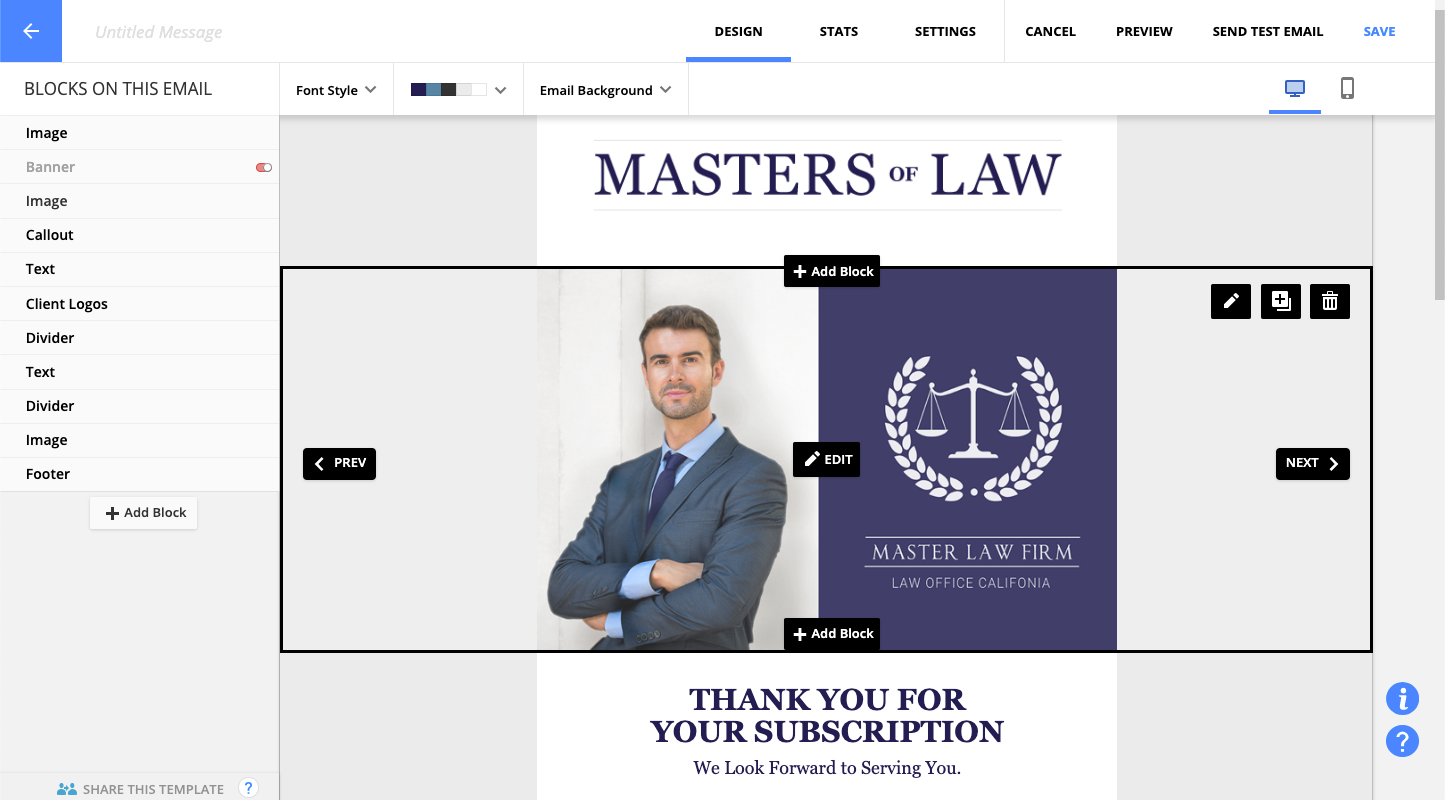
    Screenshot of Manage, track, sort and add to a contact listScreenshot of Design professional emails, forms and landing pages with block formatsScreenshot of Utilize the Support Center's in-depth advice on maximizing Ontraport's features

    Planable Screenshots

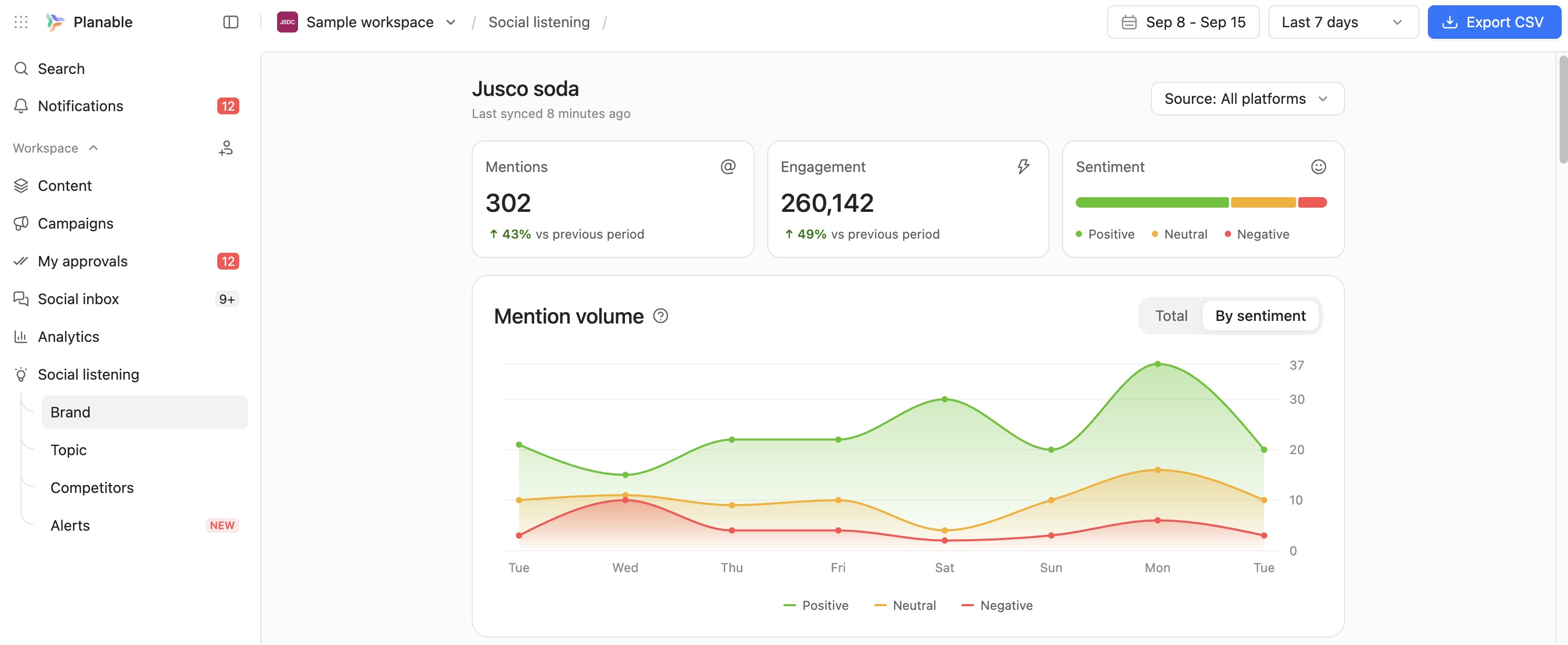
    Screenshot of Planable weekly content calendar in grid view showing scheduled posts with images, times, and platforms.Screenshot of Facebook analytics dashboard in Planable with follower growth, post count, impressions, and engagement trends.Screenshot of Planable interface showing comment thread with suggestions on a social media post draft for team collaboration.Screenshot of Approval settings panel in Planable showing user roles, toggle switches, and auto-scheduling option.Screenshot of Planable workspace permissions view showing team and client roles with customizable access for content collaboration.Screenshot of Track brand mentions and sentiment in one social listening dashboard.