PowerDMS by NEOGOV is a software platform designed to recruit, train, equip, and protect employees across their careers, used for policy management, community engagement, and staff scheduling.
N/A
Rencore Code (SPCAF)
Score8.8 out of 10
Enterprise companies (1,001+ employees)
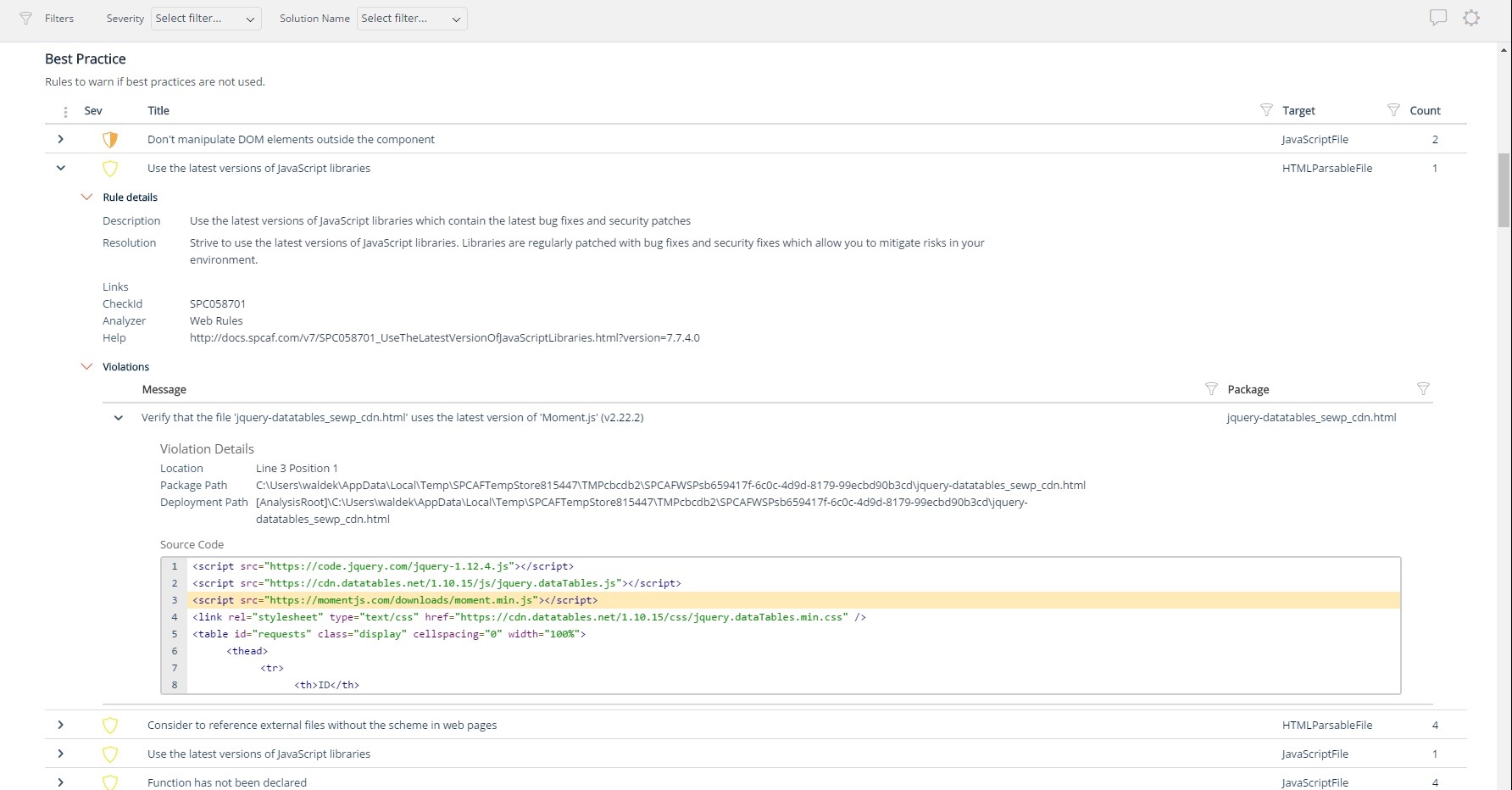
Many organizations that use Office 365 are exposed to security risks that they are unaware of. As they extend SharePoint to meet their business needs, they build applications using technologies that range from end-user Microsoft Flow to developer-focused SharePoint Framework. Unfortunately, all of these custom applications are capable of circumventing the security measures organizations have in place exposing the organization and its data to security…
This software is very well suited for law enforcement agencies of all sizes from 5 to 5000 officers. There is a mobile app that allows officers to quickly and easily search while out in the field or on a call. They can quickly review a policy, locate a form, pull up a map and much more using either the mobile app or the desktop application.
For Microsoft shops that are doing custom development on the Microsoft cloud platform in Office 365 and Azure, the Rencore toolset is an absolute must, especially if you are involved in converting farm solutions to cloud, or just moving into cloud development for the first time.
Policy management- [Users] sign for, and can take [tests] to prove understanding of policy right in the application. As [the] policy is updated, old versions are retained, so that we not only know what a policy contains, we can track changes and provide information on what a policy was at any given time in the past.
Training- Users receive notifications when training is due and are guided to complete the training. If the training requires recertification, PowerDMS can be configured to alert the user that re-training is needed, without a supervisor needing to keep track. All documents used in training, including presentations and videos, can be contained in the PowerDMS course, so we can prove not only that an employee was trained, but exactly what curriculum was use din any given training.
Accreditation Assessment- [Our] accreditation standards manual is uploaded directly into PowerDMS. Proofs are accomplished using the actual policy and procedure, as well as the documents created during the workday. There is absolutely no duplication of effort.
Communications accountability- Email [can] be read and forgotten. With PowerDMS, a document can be distributed for user signatures, insuring that the user took affirmative action to read and understand the document.
Unique expert knowledge of their target platforms. Not many companies have such a unique position in their target market. Their employees have a deep understanding of SharePoint, Office 365 and Azure and also regularly advise Microsoft on these matters.
Community involvement and contribution to open source projects. Key employees at Rencore are considered thought leaders in their area of expertise and contribute to high profile Microsoft open source initiatives.
Rencore's unique position when it comes to code quality analysis in the SharePoint space sets it apart. There's really no alternative.
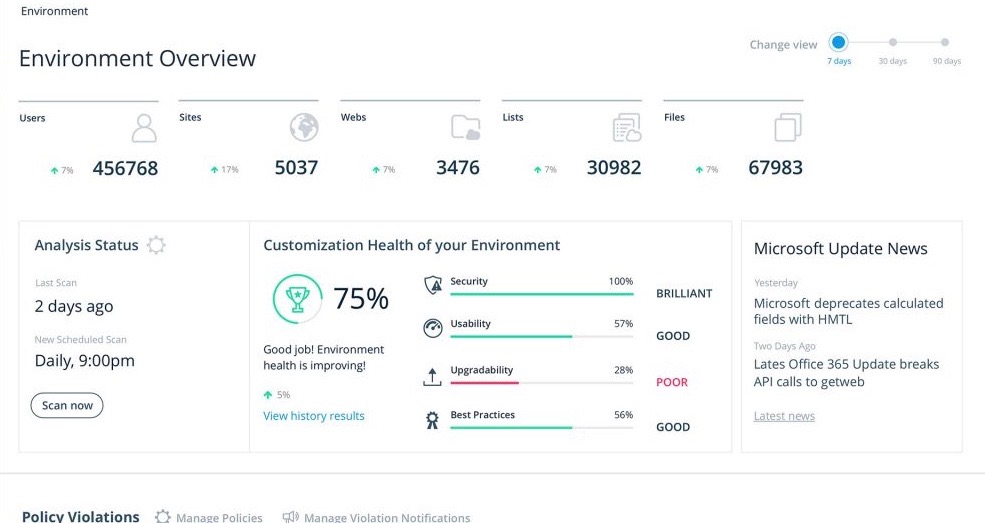
Platform governance is another Rencore strength. No other product provides the insights into your SharePoint Online environment with full auditing of not only configuration changes but also who changed which code where and when. Again no alternatives exist.
The Workflow process in PowerDMS is not as easy to grasp as some of the other concepts and requires a little more explaination, especially for non-administrative background users.
Users are unable to view the steps in a Workflow template in order to determine which Workflow would work best for their needs when routing documents.
It would be great to have multiple message options for past due inbox notifications in addition to the options for past due tasks to encourage users to go to their inbox to review their messages.
A de minimis incentive was given to thank the reviewer for their time. The incentive was not used to bias or drive a particular response, nor was the incentive contingent on a positive endorsement. More Info
Rencore's product line is of course still a bit of a niche: SharePoint code quality is not something every organization on the planet is concerned with - although Rencore does much more than that.
We feel Rencore's marketing efforts are mainly targeted at technologists. There's a lot of other potential, especially for their platform governance product.
I have had nothing but positive experiences with PowerDMS from day one. If we ever run into a situation we are unsure of, PowerDMS support has ALWAYS been able to answer us basically immediately. I really love that they are constantly seeking to improve and expand.
There is a learning curve as with any software system and I have found those users who consistently use the system more have a much higher success rate than those who only log in to sign off on documents. Now that most users have been in the system for over 2 years I consistently hear how much easier the processes are than they originally thought they would be
A de minimis incentive was given to thank the reviewer for their time. The incentive was not used to bias or drive a particular response, nor was the incentive contingent on a positive endorsement. More Info
We use PowerDMS in the cloud so our performance might be different from other users who use on-premise. The program has always been up with very minimal downtime and always seems responsive and snappy when navigating the UI and searching documents. We don't currently have any integrations with other software.
I just wish we had some in-state support. The contacts I have had with customer support have been great. Awesome communication, problem-solving, and support. I have talked to and met Stephanie Williams (CSA for Power DMS) at the most recent Entrust conference. She was professional and devoted time to addressing our agency needs.
Implementation of PowerDMS was near seamless. The product was able to input existing policies and procedures within a few hours, which helped to lay the foundation for future use. Having PowerDMS on-boarding readily available was also a huge benefit.
PowerDMS is a lot different than Linkedin Learnings. In PowerDMS you have to create your own courses versus in Linkedin Learnings they provide extensive content on a wide variety of subject matter. Linkedin Learnings is what we have used in our organization for Bias Training and Ethics Training. PowerDMS is the repository for documents and Trainings, so the systems work very differently
I don't know of any products that compete in the space and if there were any, they would not stand a chance against Rencore. Behind any good product is a team of highly skilled individuals, who all have the same goal, who are passionate what they do and lastly, are in it for the betterment of where they started; As Developers themselves. You can't buy that
Created efficient processes for approving document revision
Migrated what originally was a paper system to electronic
Accessible for any employee by logging in, employees do not have to seek out policy and procedure binders, and updated documents can be automatically sent to inboxes when updated.
A de minimis incentive was given to thank the reviewer for their time. The incentive was not used to bias or drive a particular response, nor was the incentive contingent on a positive endorsement. More Info
The clear impact was the amount of time saved code reviewing or going through lines of code marked off by other tools that are not relevant. We cannot put a number on it since the project started off with the tool in place but based on the rules applied it could be as high as 20% of the project time.