Process Street vs. WorkBright

Overview
ProductRatingMost Used ByProduct SummaryStarting Price
Process Street
Score 8.5 out of 10
N/A
Process Street in San Francisco offers their application which allows teams to create simple recurring checklists, collaborate around them and track as they’re completed.
$25
per month per user
WorkBright
Score 9.7 out of 10
Mid-Size Companies (51-1,000 employees)
For businesses that are rapidly, seasonally, or just plain constantly hiring, WorkBright aims to take the cumbersome and traditionally paper-heavy process of onboarding and puts it all online. They make it possible for new employees to fill out their W4s, upload photos of licenses and certifications, sign digitally, and complete any paperwork from their laptop, tablet, or smartphone before they show up for their first day on the job. Integrations and an open API…
$158
hires per year
Pricing
Process StreetWorkBright
Editions & Modules
Free
$0
per month per user
Pro
$25
per month per user
Enterprise
Custom
per month per user
Onboarding
Starting at $158/mo
hires per year
Offerings
Pricing Offerings
Process StreetWorkBright
Free Trial
YesYes
Free/Freemium Version
YesNo
Premium Consulting/Integration Services
YesNo
Entry-level Setup FeeNo setup feeRequired
Additional DetailsOur pricing is based off the number of hires in a given contract year. All contracts are annual but can be billed on a monthly basis.
More Pricing Information
Community Pulse
Process StreetWorkBright
Features
Process StreetWorkBright
Reporting & Analytics
Comparison of Reporting & Analytics features of Product A and Product B
Process Street
10.0
3 Ratings
24% above category average
WorkBright
-
Ratings
Dashboards10.03 Ratings00 Ratings
Standard reports10.03 Ratings00 Ratings
Custom reports10.03 Ratings00 Ratings
Process Engine
Comparison of Process Engine features of Product A and Product B
Process Street
9.7
4 Ratings
15% above category average
WorkBright
-
Ratings
Process designer9.24 Ratings00 Ratings
Form builder10.03 Ratings00 Ratings
Model execution10.03 Ratings00 Ratings
Collaboration
Comparison of Collaboration features of Product A and Product B
Process Street
8.9
3 Ratings
6% above category average
WorkBright
-
Ratings
Social collaboration tools8.93 Ratings00 Ratings
Content Management Capabilties
Comparison of Content Management Capabilties features of Product A and Product B
Process Street
10.0
3 Ratings
21% above category average
WorkBright
-
Ratings
Content management10.03 Ratings00 Ratings
Best Alternatives
Process StreetWorkBright
Small Businesses
Square 9 Softworks
Square 9 Softworks
Score 9.7 out of 10
PowerDMS by NEOGOV
PowerDMS by NEOGOV
Score 7.1 out of 10
Medium-sized Companies
Square 9 Softworks
Square 9 Softworks
Score 9.7 out of 10
PowerDMS by NEOGOV
PowerDMS by NEOGOV
Score 7.1 out of 10
Enterprises
CMW Platform
CMW Platform
Score 9.2 out of 10
Vibe HCM (discontinued)
Score 4.3 out of 10
All AlternativesView all alternativesView all alternatives
User Ratings
Process StreetWorkBright
Likelihood to Recommend
9.2
(11 ratings)
9.7
(6 ratings)
Support Rating
9.0
(7 ratings)
-
(0 ratings)
User Testimonials
Process StreetWorkBright
Likelihood to Recommend
Process Street
if you have standard processes that are often executed, it's worth to use. If you are a small company it is generally not worth to implement because you will need somebody who permanently works with it and maintains the processes.
Read full review
WorkBright
Workbright is well suited because of the following reasons: 1. Data transmission between browser and application is highly encrypted 2. Bank grade data encryption for maximum security 3. Data is backed up at various locations 4. Database security is maintained to the highest standards with Engineers 5. Automated reminders and user correction error flow system
Read full review
Pros
Process Street
  • Overview view is helpful to see a timeline of progress.
  • Checklists are easy to manipulate and customize to exactly what you need to see.
Read full review
WorkBright
  • Being able to share candidate information with other supervisors or team members and others involved in the hiring process.
  • The convenience of filling in new employee hiring forms.
  • Create groups, organize all paperwork and send to employees with just one click.
Read full review
Cons
Process Street
  • If you had the ability to drag tasks around in a nonlinear way, it could be a cool creative feature. An example is to have a subtask next to another that says N/A if the task wasn't executed because it wasn't applicable.
  • Inbox tab can be overwhelming but that may just be the style in which I built my checklists.
Read full review
WorkBright
  • Onboarding Paperwork - It would be great if there was only one website we had to log into. For example, I have to log into one to send paperwork, and then log into another domain to check the paperwork sent.
  • Note Timeline - Anytime any application is touched, viewed, etc. a note is made. We also utilize the note feature to communicate about each applicant. However, it gets quite messy when their are over 40 notes and you are not able to sort or organize them.
  • Attachments - Can't attach items in notes, would be nice feature for attaching images, snippets, pdfs, etc.
Read full review
Support Rating
Process Street
Since my last login into the platform, the latest update made the app much easier to use and learn. It's incredibly clean, and everything is exactly where it should be location-wise. You can tell they listen to their user base for features.
Read full review
WorkBright
No answers on this topic
Alternatives Considered
Process Street
I've tried other checklist tools like Google Keep, but it was too simple. I've tried Flowster, which is very similar to Process Street, but I like Process Street better. The interface is a lot more balanced and pleasant to look at. I found Flowster to be a less appealing interface even though the features were similar. I also briefly tried systemHUB but it is very expensive for what it offers compared to Process Street.
Read full review
WorkBright
WorkBright was selected as the primary HR software within our company. One of the main reasons it was selected is the intuitive user interface and dashboard. Additionally, the software had excellent features for the cost such as custom reporting, notifications, enhanced security, and training. WorkBright offered many features that other HR software in the same price range did not.
Read full review
Return on Investment
Process Street
  • Because of Process Street I am no longer losing money when having to redo things
  • It helps me eliminate those nasty "egg on the face" situations with clients because now nothing slips through the cracks. The team is able to be on top of it!
Read full review
WorkBright
  • Huge return on investment in terms of time needed to circulate new openings nationally.
  • Very positive impact on speed with which interviewer can contact prospective employees.
  • Outstanding onboarding for new employees. Tick 5 boxes and all info is emailed directly to the new employee.
  • Very challenging build process that took many weeks to fully integrate.
Read full review
ScreenShots

Process Street Screenshots

Screenshot of Create procedure documents in seconds. Our simple interface lets you create structured documents in seconds.  Intuitive keyboard shortcuts and drag and drop make it easy for anyone to use.Screenshot of Document your team knowledge. Use Pages to capture, organize and share your established team knowledge.  Pages is free forever for everyone in your company.Screenshot of Run processes as collaborative workflows. Quickly create and assign workflows to your team.  Track activity from the dashboard and get notified when tasks are done.Screenshot of Powered by an intuitive, no-code workflow builder. Build powerful workflows and corresponding automations with ease.

WorkBright Screenshots

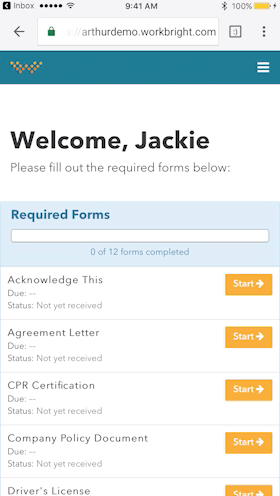
Screenshot of Works on any Device - Not just ‘mobile friendly’ but mobile FIRST! Designed to complete all forms quickly and efficiently from any smart enabled device.Screenshot of Automatic Reminders - Reminders are automatically sent out to employees who have not completed their forms with increasing urgency and frequency.Screenshot of Fingertip Signature - Best in class eSignatures allows employees to sign forms with their fingers on mobile devices including timestamp and IP address.