TrustRadius: an HG Insights company

Save this comparison

Save this comparison

Add Product

Recommended Comparisons

    Overview
    ProductRatingMost Used ByProduct SummaryStarting Price

    Proliant

    Score8.9 out of 10
    N/AProliant provides a cloud-based human capital management solution designed to simplify payroll and HR processes, improves accuracy, and ensures industry compliance. Proliant is an all-in-one solution for workforce and talent management across the entire employment life cycle. Specializing in payroll, Proliant helps users pay people accurately, on time, and without risk from the IRS, supporting tax filings, contractor payments, and unlimited payroll runs. Proliant also streamlines…N/A

    QuickBooks Time

    Score8.8 out of 10
    N/AQuickBooks Time (formerly TSheets) is a cloud-based time tracking and scheduling app that allows employees to clock in and out from the job site with the devices they’ve already got in their pockets. The vendor aims to help companies replace paper timesheets with accurate, electronic time data as well as make payroll and invoicing faster and less costly. QuickBooks Time also accurately tracks time and GPS points (even without cell or internet service) then automatically syncs when back…

    $0

    1 user, unlimited projects

    Pricing
    ProliantQuickBooks Time
    Editions & Modules
    No answers on this topic
    Free
    $0
    1 user, unlimited projects
    Premium
    $8
    per user/month + $20 base fee/month (paid annually)
    Elite
    $10
    per user/month + $40 base fee/month (paid annually)
    Offerings
    Pricing Offerings
    ProliantQuickBooks Time
    Free Trial
    NoYes
    Free/Freemium Version
    NoYes
    Premium Consulting/Integration Services
    NoNo
    Entry-level Setup FeeNo setup feeNo setup fee
    Additional Details——
    More Pricing Information
    Community Pulse
    ProliantQuickBooks Time
    Considered Both Products
    Proliant
    No answer on this topic
    Intuit
    No answer on this topic
    Key User Insights
    Would buy again
    79%
    Would buy again
    19 Answers
    75%
    Would buy again
    15 Answers
    Delivers good value for the price
    86%
    Delivers good value for the price
    18 Answers
    83%
    Delivers good value for the price
    15 Answers
    Happy with the feature set
    88%
    Happy with the feature set
    21 Answers
    80%
    Happy with the feature set
    16 Answers
    Lived up to sales and marketing promises
    80%
    Lived up to sales and marketing promises
    12 Answers
    69%
    Lived up to sales and marketing promises
    9 Answers
    Implementation went as expected
    81%
    Implementation went as expected
    13 Answers
    69%
    Implementation went as expected
    11 Answers
    Features
    ProliantQuickBooks Time
    Human Resource Management
    Comparison of Human Resource Management features of Proliant and QuickBooks Time
    Feature
    Proliant
    7.7
    23 Ratings
    6% below category average
    QuickBooks Time
    -
    Ratings
    Employee demographic data9.721 Ratings00 Ratings
    Employment history8.822 Ratings00 Ratings
    Job profiles and administration6.620 Ratings00 Ratings
    Workflow for transfers, promotions, pay raises, etc.8.822 Ratings00 Ratings
    Organizational charting5.916 Ratings00 Ratings
    Organization and location management7.117 Ratings00 Ratings
    Compliance data (COBRA, OSHA, etc.)7.217 Ratings00 Ratings
    Payroll Management
    Comparison of Payroll Management features of Proliant and QuickBooks Time
    Feature
    Proliant
    9.0
    22 Ratings
    9% above category average
    QuickBooks Time
    -
    Ratings
    Pay calculation9.822 Ratings00 Ratings
    Support for external payroll vendors7.411 Ratings00 Ratings
    Off-cycle/On-Demand payment9.820 Ratings00 Ratings
    Benefit plan administration8.115 Ratings00 Ratings
    Direct deposit files9.921 Ratings00 Ratings
    Salary revision and increment management9.720 Ratings00 Ratings
    Reimbursement management7.914 Ratings00 Ratings
    Leave and Attendance Management
    Comparison of Leave and Attendance Management features of Proliant and QuickBooks Time
    Feature
    Proliant
    6.6
    21 Ratings
    22% below category average
    QuickBooks Time
    -
    Ratings
    Approval workflow4.419 Ratings00 Ratings
    Balance details7.920 Ratings00 Ratings
    Annual carry-forward and encashment7.516 Ratings00 Ratings
    Employee Self Service
    Comparison of Employee Self Service features of Proliant and QuickBooks Time
    Feature
    Proliant
    8.7
    22 Ratings
    5% above category average
    QuickBooks Time
    -
    Ratings
    View and generate pay and benefit information9.822 Ratings00 Ratings
    Update personal information9.822 Ratings00 Ratings
    View company policy documentation8.317 Ratings00 Ratings
    Employee recognition7.513 Ratings00 Ratings
    View job history7.915 Ratings00 Ratings
    Asset Management
    Comparison of Asset Management features of Proliant and QuickBooks Time
    Feature
    Proliant
    7.4
    12 Ratings
    8% below category average
    QuickBooks Time
    -
    Ratings
    Tracking of all physical assets7.412 Ratings00 Ratings
    HR Reporting
    Comparison of HR Reporting features of Proliant and QuickBooks Time
    Feature
    Proliant
    9.0
    22 Ratings
    17% above category average
    QuickBooks Time
    -
    Ratings
    Report builder9.721 Ratings00 Ratings
    Pre-built reports9.822 Ratings00 Ratings
    Ability to combine HR data with external data7.612 Ratings00 Ratings
    Onboarding
    Comparison of Onboarding features of Proliant and QuickBooks Time
    Feature
    Proliant
    8.6
    20 Ratings
    7% above category average
    QuickBooks Time
    -
    Ratings
    New hire portal7.719 Ratings00 Ratings
    Manager tracking tools9.618 Ratings00 Ratings
    Performance and Goals
    Comparison of Performance and Goals features of Proliant and QuickBooks Time
    Feature
    Proliant
    7.2
    10 Ratings
    12% below category average
    QuickBooks Time
    -
    Ratings
    Corporate goal setting7.09 Ratings00 Ratings
    Individual goal setting7.010 Ratings00 Ratings
    Line-of sight-visibility7.19 Ratings00 Ratings
    Performance tracking7.69 Ratings00 Ratings
    Performance Management
    Comparison of Performance Management features of Proliant and QuickBooks Time
    Feature
    Proliant
    8.2
    13 Ratings
    3% above category average
    QuickBooks Time
    -
    Ratings
    Performance plans8.113 Ratings00 Ratings
    Performance improvement plans8.412 Ratings00 Ratings
    Review status tracking8.313 Ratings00 Ratings
    Review reminders8.113 Ratings00 Ratings
    Multiple review frequency8.211 Ratings00 Ratings
    Succession Planning
    Comparison of Succession Planning features of Proliant and QuickBooks Time
    Feature
    Proliant
    7.2
    9 Ratings
    9% below category average
    QuickBooks Time
    -
    Ratings
    Create succession plans/pools7.59 Ratings00 Ratings
    Candidate ranking7.09 Ratings00 Ratings
    Candidate search7.09 Ratings00 Ratings
    Candidate development7.59 Ratings00 Ratings
    Recruiting / ATS
    Comparison of Recruiting / ATS features of Proliant and QuickBooks Time
    Feature
    Proliant
    7.0
    14 Ratings
    12% below category average
    QuickBooks Time
    -
    Ratings
    Job Requisition Management6.612 Ratings00 Ratings
    Company Website Posting6.912 Ratings00 Ratings
    Publish to Social Media6.99 Ratings00 Ratings
    Job Search Site Posting6.912 Ratings00 Ratings
    Duplicate Candidate Prevention6.712 Ratings00 Ratings
    Applicant Tracking7.013 Ratings00 Ratings
    Notifications and Alerts7.613 Ratings00 Ratings
    Best Alternatives
    ProliantQuickBooks Time
    Small Businesses
    UZIO
    Score9.4 out of 10
    Time Doctor
    Score8 out of 10
    Medium-sized Companies
    Zoho People
    Score8.6 out of 10
    Toggl Track
    Score9 out of 10
    Enterprises
    PeopleStrong
    Score10 out of 10
    TimeCamp
    Score7.3 out of 10
    All AlternativesView all alternativesView all alternatives
    User Ratings
    ProliantQuickBooks Time
    Likelihood to Recommend
    9.2
    (24 ratings)
    8.6
    (195 ratings)
    Likelihood to Renew
    -
    (0 ratings)
    10.0
    (3 ratings)
    Usability
    7.1
    (19 ratings)
    9.5
    (6 ratings)
    Support Rating
    -
    (0 ratings)
    2.1
    (31 ratings)
    Implementation Rating
    -
    (0 ratings)
    6.0
    (1 ratings)
    User Testimonials
    ProliantQuickBooks Time
    Likelihood to Recommend
    Proliant
    Overall, I would generally recommend Proliant to a colleague as I think the system and structure has great bones and is generally very easy to use. However, if a colleague was needing a system with a robust reporting system or access to immediate support, I would be less likely to recommend the system.
    Incentivized
    Read full review
    Intuit
    It would be very useful for certain remote jobs that require a high level of presence, as in the case of web development, or remote maintenance sessions, so that when reviewing the work data it is possible to ensure that there will be no failures. By being able to include files in the management, from the equipment tab, it is possible to fully control the hours in which each change in these files were made.
    Incentivized
    Read full review
    Pros
    Proliant
    • Some of the help for the training modules, [...] has been fantastic
    • [...] has also been really helpful
    • Adding a new employee to the system has been relatively easy and simple to do
    Incentivized
    Read full review
    Intuit
    • Support (their help desk team is incredibly helpful and always quick to respond).
    • Ease of access and use (the app is user-friendly an intuitive, and the desktop version is equally as approachable).
    • Manager functionality (it's useful to be able to clock employees in and out at multiple events on the same day by sorting them into different groups by manager/event).
    Incentivized
    Read full review
    Cons
    Proliant
    • Reporting is limited to data that is pulled by pay period--not by date worked, so if trying to determine how much an employee earned during a quarter--you have to calculate this manually
    • Employee records are limited to admin only viewing--so managers can not see payrates, upload documents to employee files or update expiration dates to licenses, etc
    • User guides in the knowledge base are out of date and don't cover the recent updates to the system--or outline processes that are no defunct
    • Limited integrations with other HR platforms are available. Ex--outside ATS, candidate assessment tools
    Read full review
    Intuit
    • The desktop version of the TSheets schedule does not have a search feature. This makes it challenging to find things you are looking for without extra work
    • The app can be a bit buggy. Though it is a great app, there are many reasons that the app will stop syncing and can cause problems with staff scheduling
    Incentivized
    Read full review
    Likelihood to Renew
    Proliant
    No answers on this topic
    Intuit
    TSheets tech support people, like Shawn Sommer, from Tsheets. She has been instrumental, after terminating the person in charge of TSheets I was left with a learning curve too high to climb but after 10 mins of her instructions I was able to make payroll in no time. She cleared all errors that nobody had fixed before.
    TSheets is not a vendor for me, TSheets is my partner in business. Thank you TSheets.
    Read full review
    Usability
    Proliant
    Proliant is pretty easy to maneuver and get used to. There are some things than can be tedious but nothing too difficult where you have to spend hours to get it to work. The payroll processing is pretty straightforward and that's the core reason why we use their software.
    Incentivized
    Read full review
    Intuit
    Our employees find TSheets easy to use and spend minimal time at reporting hours using it. As an administrator and user of the TSheets "data and information" I am extremely positive on the functionality and reporting that it has provided me. From its ease of set-up to training to reporting, TSheets has made us so much more efficient from an administration standpoint
    Incentivized
    Read full review
    Support Rating
    Proliant
    No answers on this topic
    Intuit
    I have never failed to have an issue resolved within minutes of contacting Support. Jen D recently assisted my with an export issue and I was back on track in less the 10 minutes. She was knowledgable and thought about the current and future contexts of the issue and assured there would be no recurrence next payroll.
    Read full review
    Implementation Rating
    Proliant
    No answers on this topic
    Intuit
    I wasn't originally helping with the implementation so not sure.
    Incentivized
    Read full review
    Alternatives Considered
    Proliant
    Proliant is the only payroll software I have used, and I don't plan on changing that anytime soon. It gives me everything I need in simple, easy-to-use software. If I have questions they have quality customer service. I get calls weekly to change to other payroll services, and I don't consider changing because there is no need to change - I have everything I need here. Proliant does exactly the job I am looking for it to do.
    Incentivized
    Read full review
    Intuit
    Besides Intuit Payroll (Sage), the only program I've used is WorkBrain through Menards, and it's more as a scheduling guideline for management, employees don't use it to punch in or out or record hours. However, WorkBrain does show scheduling and it matches with a punch clock to record those hours. Every other place I've used has used either punch clocks or handwritten time cards. I think the TSheets is modern, user-friendly, convenient, accessible, and cost-effective for the owners. It also streamlines payroll for the Accountant instead of manually entering all hours for multiple employees by hand into a software program like Sage.
    Incentivized
    Read full review
    Return on Investment
    Proliant
    • i am not able to give this information because I don't believe our firm fully uses Proliant
    • I was just made aware of some of the benefits Proliant can offer through this survey
    • The only negative is that when the "pre-wire" requirement was activated this year, we were not told ahead of time and it caused a lot of confusion and delay when we tried to process the first partner payroll in January.
    Read full review
    Intuit
    • As a Microsoft Access software development shop, Help4Access could have built ourselves a time tracking system, but why reinvent the wheel?
    • tSheets got us out of spreadsheets and into the cloud in days not months.
    • The ROI the first year is over $5,000.
    Incentivized
    Read full review
    ScreenShots

    QuickBooks Time Screenshots

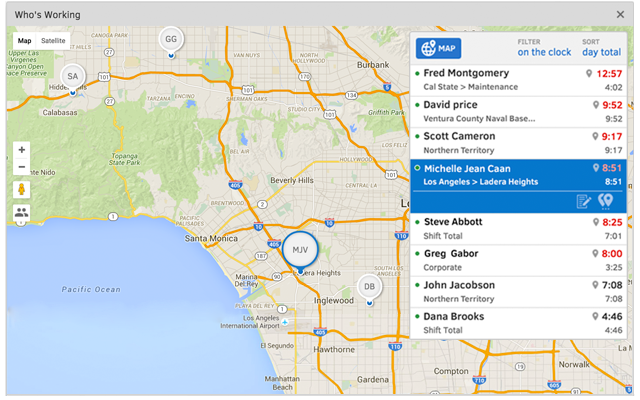
    Screenshot of TSheets is the only time tracking app embedded inside QuickBooks. You can easily review and approve employee time cards to run payroll, do job costing, or create invoices--without ever leaving QuickBooks!Screenshot of With accurate employee hours from TSheets at your fingertips, you're always ready to run payroll--without the tedious manual entry!Screenshot of TSheets is more than just a time tracker. It keeps a timestamp for each clock in/out, job code change & GPS location. See who’s on the clock, where, and their assigned schedule—in real-time.Screenshot of Creating a schedule with Excel is costing you more than you think. TSheets employee scheduling software makes it faster & easier than ever to build & share schedules with employees, assign jobs & shifts, & keep your workforce in sync.Screenshot of Track time using devices your employees already use; any computer, mobile phone or landline, iPhone or Android app, smartphone browser, text message or Twitter.Screenshot of Really friendly free, unlimited support by phone, chat, or email. We guarantee you'll be impressed.