Quickbooks Desktop for Mac is an accounting software designed for Mac users. It is designed to integrate with Apple iCloud. It provides core accounting features in line with the rest of the Quickbooks Desktop product line.
N/A
Sage 100cloud
Score7.2 out of 10
Small Businesses (1-50 employees)
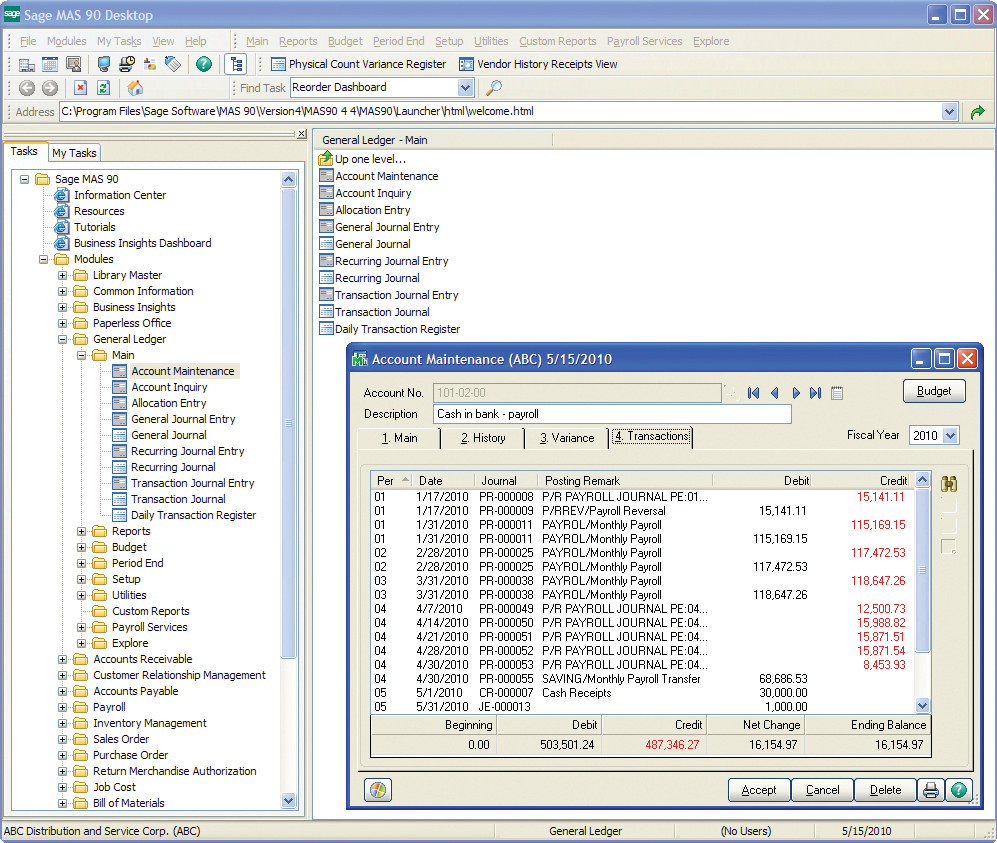
Sage 100 (or Sage 100cloud is a business management software offering a broad range of modules designed to meet the many needs of virtually any business. It encompasses financial operations and accounting, payroll, business intelligence, CRM, eBusiness, manufacturing and distribution.
Graduate Research Assistant in Research & Development at Western Kentucky University (Higher Education, 1001-5000 employees)
Chose QuickBooks Desktop for Mac
QuickBooks for Mac definitely outshines other competitors mainly due to its ability to sync seamlessly with all mac products, which other programs have continual problems with. Although the Mac version isn't quite as powerful as the Microsoft counterpart, it is still one of the …
A de minimis incentive was given to thank the reviewer for their time. The incentive was not used to bias or drive a particular response, nor was the incentive contingent on a positive endorsement. More Info
If you're a freelancer or running a very small business where you do your own bookkeeping I think this is a great option, especially if you're familiar with accounting and bookkeeping in general. If you're not so familiar with bookkeeping, I would say that the learning curve is too steep and you might want to look elsewhere for a more intuitive solution
A de minimis incentive was given to thank the reviewer for their time. The incentive was not used to bias or drive a particular response, nor was the incentive contingent on a positive endorsement. More Info
Sage 100 has been well suited for running the monthly accounts receivable and accounts payable aging reports. This helps us track our accounts that need to be collected and payments that need to be made. Our field operations team has been slow and unwanting to adopt the Sage Field Ops just because they're resistant to change and technology. It's less appropriate for really detailed accounting reports spanning for long periods of time with all accounts because it takes a very long time to run and process.
A de minimis incentive was given to thank the reviewer for their time. The incentive was not used to bias or drive a particular response, nor was the incentive contingent on a positive endorsement. More Info
A de minimis incentive was given to thank the reviewer for their time. The incentive was not used to bias or drive a particular response, nor was the incentive contingent on a positive endorsement. More Info
A de minimis incentive was given to thank the reviewer for their time. The incentive was not used to bias or drive a particular response, nor was the incentive contingent on a positive endorsement. More Info
The #1 complaint is that setting it up right is a challenge. People waste time trying to figure it out only to realize that they don't know accounting so of course they don't know how an accounting program should be set up. Like any time you are in over your head, reach out to your network and find someone who can log onto your computer and walk you through it.
If you need to track the cost of wages to jobs you can't do it with the online payroll, but check for yourself because it's a function that landscaping companies and construction businesses usually need, so maybe they have added it by now. That would really help!
It's premise-based software and that means you take on the role of hardware admin, and it's a lot of work for what is increasingly becoming a smaller gap in the functionality between QuickBooks for Mac and QuickBooks Online.
QuickBooks for Mac 2015 has been updated consistently over the last 3 years and continues to provide for the bookkeeping needs of small companies using Macs in their offices. However, it has limited job costing functionality. It is similar in functionality to the 2010 version of QuickBooksPro which runs on Windows.
A de minimis incentive was given to thank the reviewer for their time. The incentive was not used to bias or drive a particular response, nor was the incentive contingent on a positive endorsement. More Info
Intuit Accounting Professionals Trainer/Writer specializing in QuickBooks for Mac, Meetup Groups Organizer/Founder, Adjunct Instructor at Bellevue College
Sage 100 at times will simply not connect to our server, we get remote support & all is well but, that issue tends to happen 2-3X a year.
Other than the above, I really can't complain. Coming from a more custom U.V. type database that used a whole bunch of codes to navigate, I think Sage 100 is 10x easier to use.
A de minimis incentive was given to thank the reviewer for their time. The incentive was not used to bias or drive a particular response, nor was the incentive contingent on a positive endorsement. More Info
I haven't spent that much time with the newer versions of QuickBooks for Mac, but I think I'm seeing it make the much-needed improvements. For example, something as simple as undoing the previous reconciliation was a terrible chore, and I'm glad that feature has been included in the newer versions of QuickBooks for Mac
A de minimis incentive was given to thank the reviewer for their time. The incentive was not used to bias or drive a particular response, nor was the incentive contingent on a positive endorsement. More Info
I would put this out to bid, if I were at the same organization. There have been a lot of improvements and changes in enterprise software and my preference would be to find a good web-based or cloud-based tool. Lower overall cost of ownership and improved efficiency would be my target criteria for a rebid of this.
A de minimis incentive was given to thank the reviewer for their time. The incentive was not used to bias or drive a particular response, nor was the incentive contingent on a positive endorsement. More Info
The Mac version is OK overall. I find the Windows versions to be much more robust but Mac is quite good for Mac users. Though I think die hard Mac users should consider QuickBooks Online instead as there is a new QB for Mac app that makes using QBO much better!
A de minimis incentive was given to thank the reviewer for their time. The incentive was not used to bias or drive a particular response, nor was the incentive contingent on a positive endorsement. More Info
Overall Sage 100 has been pretty user friendly. If we have a question on anything, we are able to contact our implementation rep who helps us right away. Some of the Sage Field Operations may not be as intuitive for our field personnel to use. I wish the reports ran faster so that we could run and put together many reports quickly at once.
A de minimis incentive was given to thank the reviewer for their time. The incentive was not used to bias or drive a particular response, nor was the incentive contingent on a positive endorsement. More Info
I've been using the QuickBooks online version for a little over 6 months now (upgraded from Mac desktop) and I haven't had any access issues. There have been times when it was down for service/upgrade however there is always plenty of notification time given by the Quick Books Online Support team. These upgrade maintenance time frames are always over night hours and on the weekends so everything can be worked around very easily.
A de minimis incentive was given to thank the reviewer for their time. The incentive was not used to bias or drive a particular response, nor was the incentive contingent on a positive endorsement. More Info
A de minimis incentive was given to thank the reviewer for their time. The incentive was not used to bias or drive a particular response, nor was the incentive contingent on a positive endorsement. More Info
We had an advantage in implementing the tool in that our director of Ops had been part of the team implementing the ERP for other users so we knew what to expect and were able to avoid a lot of the challenges people sometimes face with implementations. However, the process still took far longer than desired.
A de minimis incentive was given to thank the reviewer for their time. The incentive was not used to bias or drive a particular response, nor was the incentive contingent on a positive endorsement. More Info
I love using Quickbooks compared to other software we've tried. QuickBooks Online and TSheets interface. Customer service and problem resolution are generally excellent, with well-trained and proficient agents taking calls or on chat. Ease of use and accessibility via the mobile app. Great courses were available to help with learning the basics and some advanced accounting background. I love learning! Online accessibility - it can work anywhere with an internet connection. Linking to bank and credit card accounts is handy.
I didn't choose Sage 100 ERP -- it was already in use when I started at the organization over five years ago. It has the same types of pros and cons as other big hulking software suites meant to power the infrastructure of corporations. It's slow, tough to customize, and doesn't connect well with other software. It does bring all the information into one place, which is great
A de minimis incentive was given to thank the reviewer for their time. The incentive was not used to bias or drive a particular response, nor was the incentive contingent on a positive endorsement. More Info
A de minimis incentive was given to thank the reviewer for their time. The incentive was not used to bias or drive a particular response, nor was the incentive contingent on a positive endorsement. More Info
Sage 100 overall had a very positive overall ROI for the business. All users were making decisions based on the same information and valuable time was no longer spent trying to analyze data from a number of sources.
Moving the warehouses to using Sage 100 reduced the operating expense of the distribution side of the business by 5% on an annual basis (~$100K).
A de minimis incentive was given to thank the reviewer for their time. The incentive was not used to bias or drive a particular response, nor was the incentive contingent on a positive endorsement. More Info