Sage CRM vs. Salesforce Starter

Overview
ProductRatingMost Used ByProduct SummaryStarting Price
Sage CRM
Score 8.9 out of 10
Mid-Size Companies (51-1,000 employees)
Sage CRM is an SMB-oriented CRM platform offered in both SaaS and on-premise editions. Unlike the Sage SalesLogix product, the SaaS version is a true multi-tenant offering. The platform offers excellent integration with Sage ERP and accounting products. It is also a good global solution and is available in many languages and is used by over 12,000 customers worldwide, with many customers in Europe.
$45
Per User per Month
Salesforce Starter
Score 9.0 out of 10
Small Businesses (1-50 employees)
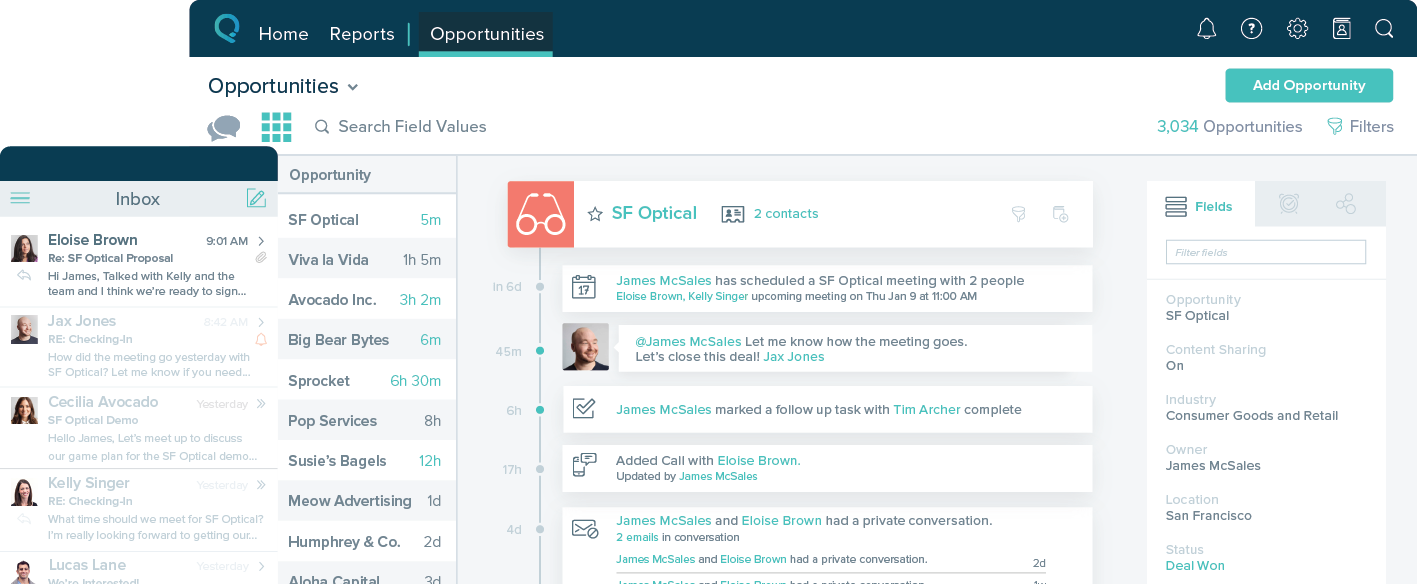
Salesforce Starter (formerly Salesforce Essentials) is a small business CRM that replaces the former SalesforceIQ product. It is priced at $35 per user, on a monthly basis, or at $25 per month for if billed annually ($300) and can be tried free for 14 days on a trial.N/A
Pricing
Sage CRMSalesforce Starter
Editions & Modules
Sage CRM (cloud)
$45
Per User per Month
Sage CRM (on premise)
$0
Lifetime License per Seat
No answers on this topic
Offerings
Pricing Offerings
Sage CRMSalesforce Starter
Free Trial
YesYes
Free/Freemium Version
NoNo
Premium Consulting/Integration Services
NoNo
Entry-level Setup FeeNo setup feeNo setup fee
Additional DetailsTiered pricing is available for multiple users.
More Pricing Information
Community Pulse
Sage CRMSalesforce Starter
Considered Both Products
Sage CRM
Chose Sage CRM
We evaluated many other CRM but selected Sage CRM because it is one of the most cost effective CRM's available in the market. I would say this is the best platform to manage leads, though they have not a great customer support team still it solves the basic problem of lead …
Chose Sage CRM
Price-wise this product is more affordable so we choose the Sage CRM.
Chose Sage CRM
Sage is an awesome CRM and has several functionalities that several small business can take advantage of however for a small start up business that is trying to get its legs, Hubspot has affordable pricing and complete customization of the backend, meaning that you can create …
Chose Sage CRM
Salesforce didn't have the integration we needed in Sage CRM. The number of dollars spent on hiring developers or buying a product, in addition to the licensing for Salesforce itself put it out of reach.
Chose Sage CRM
I used Salesforce in the past which does almost everything as Sage CRM, but typically it's a bit expensive. It also lacks the advanced web interface and did not suit well with other software.
Chose Sage CRM
I have looked at and used both Salesforce and Maximizer in the past. Salesforce offer similar functionality to Sage CRM at much higher price typically. Maximer has less funtionality and because of its on premise background lacks the advanced web interface of Sage CRM.
Chose Sage CRM
I like that it is web based and it can be used remotely but the reporting of data needs some work.
Chose Sage CRM
I have a preference for Salesforce.com because of the app exchange that they have. Sage CRM is more on par with Oracle CRM and Netsuite CRM. Oracle CRM is the most similar with the dual options of on-premise and cloud based solutions. I am mostly working with Salesforce.com …
Chose Sage CRM
Since we have since left Sage CRM, due to not matching up to our current needs, I would not be able to answer this question.
Chose Sage CRM
Salesforce and Maximizer CRM. In my personal opinion, I prefer both of these products over Sage CRM. They are both more user friendly and easier to maintain. Also Sage has shot their prices up over the years and the price just does not match the product, in my opinion. Sage CRM …
Chose Sage CRM
Whilst SAGE CRM was selected around 10 years ago and we became a partner, the main contenders would have been at the time Sales Logix and MS CRM 4.0. However, we had extensive experience of the mid-market CRM's and decided on SAGE CRM since it had a clean, easy to understand …
Chose Sage CRM
I believe that Sage CRM is superior to Salesforce, having worked with both I found Salesforce tedious to work with, not very logical set up and key information was hard to find. I know that people that have not had the pleasure of working with Sage CRM were satisfied with …
Chose Sage CRM
I've not evaluated any other products and this system was in place long before I came on board. I will say I've used other systems in the past and this system is user friendly, easy to learn, well laid out, functional, and very rarely goes down or experiences technical issues. …
Chose Sage CRM
We are a partner that implements most of the mainstream CRM products in the marketplace and Sage CRM is a great fit because of the low cost to deploy, the ease of setting up and rolling out the technology, and the continued improvements and enhancements through Sage Software to …
Chose Sage CRM
Microsoft CRM has much better integration with MS Office (as expected). Salesforce has much better remote access and mobile device access.
Chose Sage CRM
Cannot comment on this because I have not used any other CRM program.
Chose Sage CRM
I have evaluated and implemented MS Dynamics CRM from a business perspective, and more recently Salesforce.com CRM as an administarator. Sage was more intuitive than Salesforce, and also less expensice than both of them. At that time, I used Sage CRM because the company I was …
Chose Sage CRM
The CRM integrates better but all talk to ERP systems in some way. Depends on customer needs here.
Chose Sage CRM
GoldMine, ACT!, MSCRM, Saleslogix, Sugar CRM, Salesforce.com
Sage CRM is stronger or equal to each. The depth that is available out of the box is excellent, and though configuration is almost necessary, it makes the product extremely powerful. Many clients rely on the …
Chose Sage CRM
Because of the better pipeline resolution
Chose Sage CRM
The ease of use for our many different types of users makes it an easy choice for me and hopefully for the other employees I have recommended it to. I have seen the results as compared to other platforms and in my experience, it is far superior and easier to work with.
Salesforce Starter
Chose Salesforce Starter
The Zoho system is free and gives a long trial product. The salesforce brand is well known, and I wanted to try a good European crm product. The account manager was South African and very friendly. The system was trained on a demo, whereas Zoho did not offer an account …
Chose Salesforce Starter
more expensive but as an industry leader and go, the learning curve pays for itself in ROI in lost time in onboarding
Chose Salesforce Starter
Salesforce Starter is exactly what it says. It's specific to getting a small business up and running effectively, without unnecessary development or internal overhead required. It doesn't allow for a ton of customization, but it provides more than most other providers across …
Chose Salesforce Starter
We selected SalesforceIQ over insightly because of the email automation they offered. Their app also seemed to be a little more robust. I highly recommend a trial before you make a decision. The trial with SalesforceIQ is what sold us on the product.
Features
Sage CRMSalesforce Starter
Sales Force Automation
Comparison of Sales Force Automation features of Product A and Product B
Sage CRM
8.8
Ratings
11% above category average
Salesforce Starter
8.7
Ratings
10% above category average
Customer data management / contact management9.00 Ratings7.40 Ratings
Workflow management8.60 Ratings00 Ratings
Territory management8.50 Ratings7.50 Ratings
Opportunity management8.90 Ratings9.00 Ratings
Integration with email client (e.g., Outlook or Gmail)9.00 Ratings9.50 Ratings
Contract management8.60 Ratings00 Ratings
Quote & order management9.00 Ratings9.50 Ratings
Interaction tracking9.20 Ratings8.40 Ratings
Channel / partner relationship management8.70 Ratings9.70 Ratings
Customer Service & Support
Comparison of Customer Service & Support features of Product A and Product B
Sage CRM
8.1
Ratings
5% above category average
Salesforce Starter
-
Ratings
Case management8.00 Ratings00 Ratings
Call center management8.20 Ratings00 Ratings
Help desk management8.20 Ratings00 Ratings
Marketing Automation
Comparison of Marketing Automation features of Product A and Product B
Sage CRM
8.7
Ratings
11% above category average
Salesforce Starter
7.4
Ratings
5% below category average
Lead management8.80 Ratings7.40 Ratings
Email marketing8.70 Ratings00 Ratings
CRM Project Management
Comparison of CRM Project Management features of Product A and Product B
Sage CRM
9.0
Ratings
15% above category average
Salesforce Starter
8.2
Ratings
6% above category average
Task management9.00 Ratings9.50 Ratings
Billing and invoicing management9.00 Ratings6.50 Ratings
Reporting9.10 Ratings8.70 Ratings
CRM Reporting & Analytics
Comparison of CRM Reporting & Analytics features of Product A and Product B
Sage CRM
8.6
Ratings
10% above category average
Salesforce Starter
9.0
Ratings
15% above category average
Forecasting8.70 Ratings9.00 Ratings
Pipeline visualization8.40 Ratings8.80 Ratings
Customizable reports8.70 Ratings9.20 Ratings
Customization
Comparison of Customization features of Product A and Product B
Sage CRM
8.6
Ratings
11% above category average
Salesforce Starter
7.0
Ratings
10% below category average
Custom fields8.50 Ratings7.30 Ratings
Custom objects8.50 Ratings7.30 Ratings
Scripting environment9.00 Ratings6.00 Ratings
API for custom integration8.30 Ratings7.50 Ratings
Security
Comparison of Security features of Product A and Product B
Sage CRM
8.7
Ratings
3% above category average
Salesforce Starter
8.7
Ratings
3% above category average
Single sign-on capability8.70 Ratings8.70 Ratings
Role-based user permissions8.80 Ratings8.70 Ratings
Social CRM
Comparison of Social CRM features of Product A and Product B
Sage CRM
9.4
Ratings
22% above category average
Salesforce Starter
8.5
Ratings
12% above category average
Social data9.50 Ratings00 Ratings
Social engagement9.30 Ratings8.50 Ratings
Integrations with 3rd-party Software
Comparison of Integrations with 3rd-party Software features of Product A and Product B
Sage CRM
9.0
Ratings
18% above category average
Salesforce Starter
8.2
Ratings
8% above category average
Marketing automation9.10 Ratings8.30 Ratings
Compensation management8.90 Ratings8.00 Ratings
Platform
Comparison of Platform features of Product A and Product B
Sage CRM
7.8
Ratings
2% above category average
Salesforce Starter
8.3
Ratings
8% above category average
Mobile access7.80 Ratings8.30 Ratings
Best Alternatives
Sage CRMSalesforce Starter
Small Businesses
Salesmate
Salesmate
Score 10.0 out of 10
Salesmate
Salesmate
Score 10.0 out of 10
Medium-sized Companies
Creatio
Creatio
Score 9.3 out of 10
Creatio
Creatio
Score 9.3 out of 10
Enterprises
Creatio
Creatio
Score 9.3 out of 10
Creatio
Creatio
Score 9.3 out of 10
All AlternativesView all alternativesView all alternatives
User Ratings
Sage CRMSalesforce Starter
Likelihood to Recommend
8.9
(0 ratings)
9.0
(0 ratings)
Likelihood to Renew
5.1
(0 ratings)
4.0
(0 ratings)
Usability
8.9
(0 ratings)
8.5
(0 ratings)
Performance
8.2
(0 ratings)
-
(0 ratings)
Support Rating
7.9
(0 ratings)
-
(0 ratings)
In-Person Training
7.0
(0 ratings)
-
(0 ratings)
Implementation Rating
8.0
(0 ratings)
-
(0 ratings)
User Testimonials
Sage CRMSalesforce Starter
Likelihood to Recommend
as it is a very flexible software that can be adapted to any business model, other functions human resource management, manufacturing and supply chain planning, all these functions are housed in a highly technological interface. I liked this system because it made automating accounts payable so much easier.the control of the basic accounting of any type of company
Read full review
SalesforceIQ is a perfect CRM to start with and get your organization used to tracking customer contact. It was an easy setup and well adopted. It allowed us to rollout completely in just 30 days. We have seen a large increase in our ability to communicate. It may be lacking in some items if you already have a tracking method but was the perfect starting point for us.
Read full review
Pros
  • Sage CRM is very intuitive and easy to use. The benefit to organizations using this system is that users will find executing daily tasks seamless and accessing historical information easily while selling or servicing customers and prospects.
  • The dashboards and reporting are extensive at both a global and a client level. In addition, these reports and dashboards are available through any interface (smartphone, tablet, browser). This makes accessing real time information in a meaningful way available to users easy through any device wherever the user is located.
  • Escalations and workflow are also very powerful. Sage CRM uniquely provides the ability for users to execute workflow from within the context of the dashboards. What this means is that every day tasks can be executed quickly without lots of time searching through client records.
Read full review
  • Sales CRM with built-in guidance and reminders to manage and track opportunities.
  • Self-service for customers and internal employee needs. Integrates forms and chatbots very easily into your existing website.
  • Guided setup with inherent flows to make transitioning from legacy systems to new age cloud-based technologies
  • Integrates with Outlook and Gmail extremely well. Includes the Salesforce Inbox mobile app to link records with calendar and email. Email reminders included automatically.
  • The Salesforce Mobile App comes with Starter, making it super easy to work on the go, even in remote areas.
Read full review
Cons
  • Reliance on Apache Tomcat causes a lot of headaches. There are common issues trying to start up the server, resulting from Apache Tomcat misconfigurations, or Java. Some forum posts on Sage City address common issues, but digging into server logs seems to be an often occurrence.
  • Support is somewhat lacking, less user install base means error messages are sometimes hard to find quick answers for. Most of the knowledge found on the internet is in the Sage City forum.
  • Integration with Microsoft 365 causes you to have to turn off some security features. This will result in your 365 tenants running lower security standards than recommended, it may put you at risk for targeted attacks.
Read full review
  • Table views can be sorted by column. Filters can be applied, but only to one column. Multi-column filtering like Excel allows would be extremely useful and a big improvement.
  • The ability to quick copy data in a table view would also be helpful, like (ctrl ') in excel.
Read full review
Likelihood to Renew
There are really no other words to say, it is a very easy to use application that is more straightforward and has provided better results with the bulk of features that appeal to a very broad amount of users. There may be other CRM platforms out there that are more prevalent, but I have found them to be much more clunky and less intuitive than Sage CRM.
Read full review
No answers on this topic
Usability
Excellent integration with the most important social networks (LinkedIn, Facebook and Twitter) to get leads. The mobile app is quite useful for speeding up the tasks at hand and not relying on the computer or being in the office to get them done.
Read full review
easy to use, training is intuitive and can be peer taught if needed. Not overly complex so that users can get started within a very short period of time.
Read full review
Performance
Sage works very quickly based on the network you are using it on. It is internet based so if your network is slow, it will perform slowly. Reports seem to run reasonably fast, if there is too much information it is trying to populate that could slow it down a little. When Sage CRM is integrated with a Sage ERP product it doesn't tend to slow down either system at all
Read full review
No answers on this topic
Support Rating
Support team is really slow and they need to work on this really. Sometimes it takes days to resolve a simple query and there is no way to get it expedited. Rest the product is is amazing but the team should look into the costumer support and get it working
Read full review
No answers on this topic
In-Person Training
Most training would come after a upgrade. Otherwise we would self teach new employees. Training was with a Sage Software partner SWK technologies.
Read full review
No answers on this topic
Implementation Rating
The implementation and upgrades were rather quick and straight forward. Attempting to link Sage CRM with Sage 100 ERP however was a nightmare and will be avoided by us in the future due to numerous issues.
Read full review
No answers on this topic
Alternatives Considered
Sage is an awesome CRM and has several functionalities that several small business can take advantage of however for a small start up business that is trying to get its legs, Hubspot has affordable pricing and complete customization of the backend, meaning that you can create the perfect CRM for your own unique business
Read full review
Salesforce Starter is exactly what it says. It's specific to getting a small business up and running effectively, without unnecessary development or internal overhead required. It doesn't allow for a ton of customization, but it provides more than most other providers across sales, service, and integration/automating business processes. Some tools are more specific to organizations that want to focus on a specific area to grow or manage their business. That's where the other package types and integrations with specific tools come in
Read full review
Return on Investment
  • It is very affordable in pricing, compared to competitors
  • Lead management and convertion into prospects is also a very easy process
  • Lead capture from web pages should be available, and better ways to capture leads from tradeshows by uploading directly from scanned business cards
Read full review
  • It made the job more efficient for staff so they can spend time doing other tasks rather than configuring and maintaining Salesforce Starter.
Read full review
ScreenShots

Salesforce Starter Screenshots

Screenshot of Screenshot of Screenshot of Screenshot of