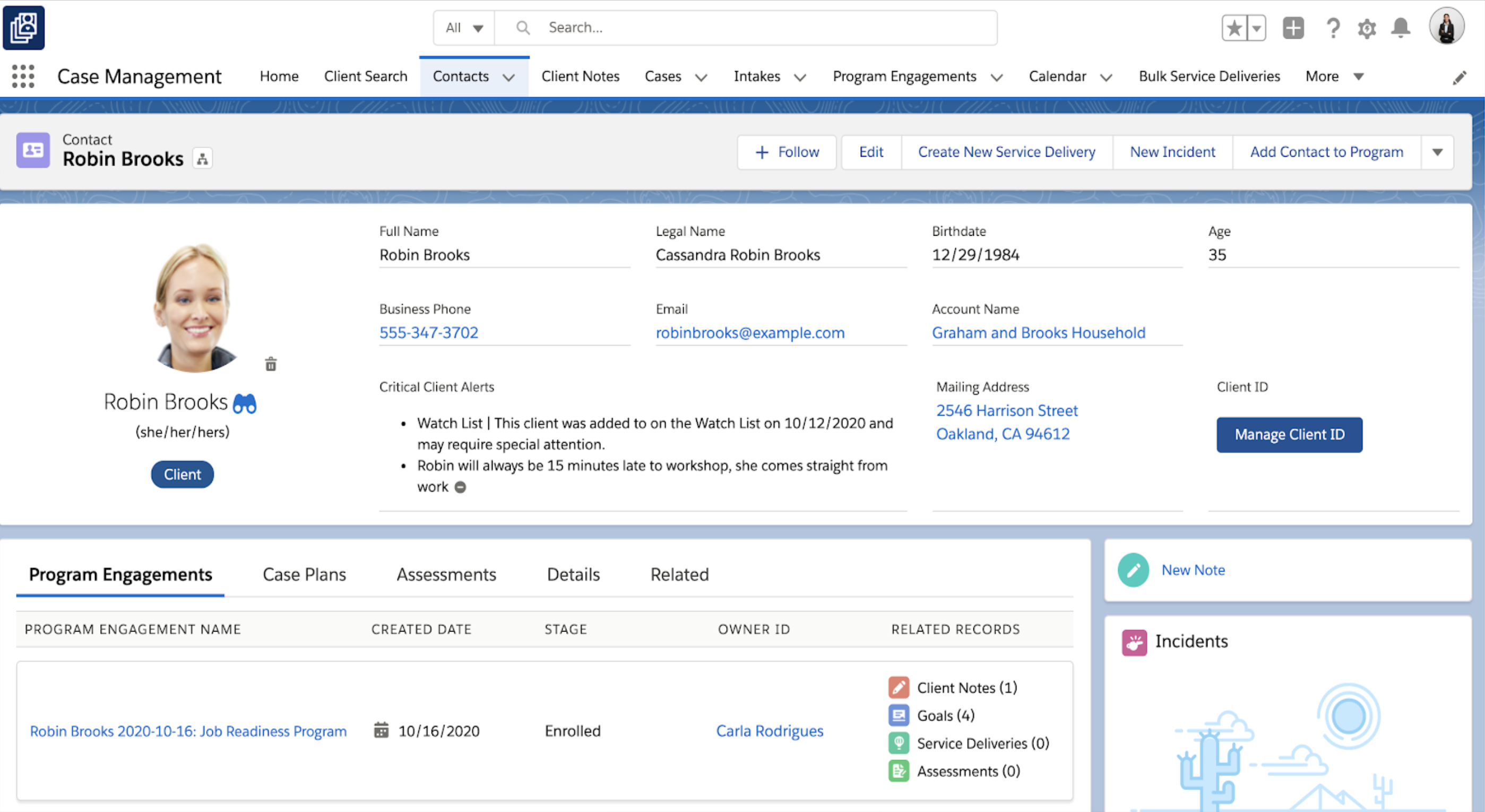
Salesforce for Nonprofits, the Salesforce.org Nonprofit Cloud, is a nonprofit constituent relationship management platform from Salesforce, which supports constituent engagement, fundraising, and grants. Nonprofit editions contain Salesforce Lightning Edition along with the former Nonprofit Success Pack (NPSP) combined.
I’d say it’s very well suited for organizations looking to move toward AI integrations and make more data-driven decisions. As I mentioned, I’ve also used the competing product from Blackbaud, which is a very closed system — you can’t really pull out the data. Salesforce, on the other hand, has a big advantage with its APIs, allowing you to extract data, store it in Data Cloud, and do much more with it. However, if your requirements aren’t clearly defined or if there’s heavy customization involved, the implementation can get messy. So I wouldn’t recommend using Salesforce Nonprofit Cloud in cases where the requirements and structure aren’t clearly laid out.
A de minimis incentive was given to thank the reviewer for their time. The incentive was not used to bias or drive a particular response, nor was the incentive contingent on a positive endorsement. More Info
Microsoft SQL is ubiquitous, while MySQL runs under the hood all over the place. Microsoft SQL is the platform taught in colleges and certification courses and is the one most likely to be used by businesses because it is backed by Microsoft. Its interface is friendly (well, as pleasant as SQL can be) and has been used by so many for so long that resources are freely available if you encounter any issues.
A de minimis incentive was given to thank the reviewer for their time. The incentive was not used to bias or drive a particular response, nor was the incentive contingent on a positive endorsement. More Info
A de minimis incentive was given to thank the reviewer for their time. The incentive was not used to bias or drive a particular response, nor was the incentive contingent on a positive endorsement. TR verified that a representative sample of customers was invited. More Info
A de minimis incentive was given to thank the reviewer for their time. The incentive was not used to bias or drive a particular response, nor was the incentive contingent on a positive endorsement. More Info
Organizations that are new to Salesforce need to be prepared for report building and other configurations. Customization is a great feature, but it can be overwhelming if not impossible for a brand new user.
Salesforce Trailhead is robust but can be confusing and overwhelming.
I'm currently comfortable with only using Salesforce CMS or any iteration on a desktop.
A de minimis incentive was given to thank the reviewer for their time. The incentive was not used to bias or drive a particular response, nor was the incentive contingent on a positive endorsement. More Info
Microsoft SQL Server Enterprise edition has a high cost but is the only edition which supports SQL Always On Availability Groups. It would be nice to include this feature in the Standard version.
Licensing of Microsoft SQL Server is a quite complex matter, it would be good to simplify licensing in the future. For example, per core vs per user CAL licensing, as well as complex licensing scenarios in the Cloud and on Edge locations.
It would be good to include native tools for converting Oracle, DB2, Postgresql and MySQL/MariaDB databases (schema and data) for import into Microsoft SQL Server.
A de minimis incentive was given to thank the reviewer for their time. The incentive was not used to bias or drive a particular response, nor was the incentive contingent on a positive endorsement. More Info
A de minimis incentive was given to thank the reviewer for their time. The incentive was not used to bias or drive a particular response, nor was the incentive contingent on a positive endorsement. More Info
We understand that the Microsoft SQL Server will continue to advance, offering the same robust and reliable platform while adding new features that enable us, as a software center, to create a superior product. That provides excellent performance while reducing the hardware requirements and the total cost of ownership of our solution.
A de minimis incentive was given to thank the reviewer for their time. The incentive was not used to bias or drive a particular response, nor was the incentive contingent on a positive endorsement. More Info
Salesforce CMS is very intuitive and easy to use. I have not found where it glitches or crashes out. You can tell where data is "supposed to live" and it you aren't sure, there is an easy search function. Support is made readily available.
A de minimis incentive was given to thank the reviewer for their time. The incentive was not used to bias or drive a particular response, nor was the incentive contingent on a positive endorsement. More Info
SQL Server mostly 'just works' or generates error messages to help you sort out the trouble. You can usually count on the product to get the job done and keep an eye on your potential mistakes. Interaction with other Microsoft products makes operating as a Windows user pretty straight forward. Digging through the multitude of dialogs and wizards can be a pain, but the answer is usually there somewhere.
A de minimis incentive was given to thank the reviewer for their time. The incentive was not used to bias or drive a particular response, nor was the incentive contingent on a positive endorsement. More Info
A de minimis incentive was given to thank the reviewer for their time. The incentive was not used to bias or drive a particular response, nor was the incentive contingent on a positive endorsement. More Info
A de minimis incentive was given to thank the reviewer for their time. The incentive was not used to bias or drive a particular response, nor was the incentive contingent on a positive endorsement. More Info
I have never had bad conversations with any support people with Salesforce but we also have not used them very much. I put it a little less because we are struggling to switch to lightning (some of our custom features do not migrate well) and it feels like the help and support for a little organization is not incredibly helpful unless we want to spend a lot of money.
A de minimis incentive was given to thank the reviewer for their time. The incentive was not used to bias or drive a particular response, nor was the incentive contingent on a positive endorsement. More Info
We managed to handle most of our problems by looking into Microsoft's official documentation that has everything explained and almost every function has an example that illustrates in detail how a particular functionality works. Just like PowerShell has the ability to show you an example of how some cmdlet works, that is the case also here, and in my opinion, it is a very good practice and I like it.
A de minimis incentive was given to thank the reviewer for their time. The incentive was not used to bias or drive a particular response, nor was the incentive contingent on a positive endorsement. More Info
A de minimis incentive was given to thank the reviewer for their time. The incentive was not used to bias or drive a particular response, nor was the incentive contingent on a positive endorsement. More Info
A de minimis incentive was given to thank the reviewer for their time. The incentive was not used to bias or drive a particular response, nor was the incentive contingent on a positive endorsement. More Info
Other than SQL taking quite a bit of time to actually install there are no problems with installation. Even on hardware that has good performance SQL can still take close to an hour to install a typical server with management and reporting services.
A de minimis incentive was given to thank the reviewer for their time. The incentive was not used to bias or drive a particular response, nor was the incentive contingent on a positive endorsement. More Info
As a cloud native organization with no previous Microsoft infrastructure, Salesforce was a more logical and effective option for us. The suite of products was also far more comprehensive and required less customization. We were able to adopt a "configure not code" approach to our development of systems to support our mission that lowered the cost of upgrades.
A de minimis incentive was given to thank the reviewer for their time. The incentive was not used to bias or drive a particular response, nor was the incentive contingent on a positive endorsement. More Info
[Microsoft] SQL Server has a much better community and professional support and is overall just a more reliable system with Microsoft behind it. I've used MySQL in the past and SQL Server has just become more comfortable for me and is my go to RDBMS.
A de minimis incentive was given to thank the reviewer for their time. The incentive was not used to bias or drive a particular response, nor was the incentive contingent on a positive endorsement. More Info
A de minimis incentive was given to thank the reviewer for their time. The incentive was not used to bias or drive a particular response, nor was the incentive contingent on a positive endorsement. More Info
A de minimis incentive was given to thank the reviewer for their time. The incentive was not used to bias or drive a particular response, nor was the incentive contingent on a positive endorsement. More Info
Increased accuracy - We went from multiple users having different versions of an Excel spreadsheet to a single source of truth for our reporting.
Increased Efficiency - We can now generate reports at any time from a single source rather than multiple users spending their time collating data and generating reports.
Improved Security - Enterprise level security on a dedicated server rather than financial files on multiple laptop hard drives.
A de minimis incentive was given to thank the reviewer for their time. The incentive was not used to bias or drive a particular response, nor was the incentive contingent on a positive endorsement. More Info