Salesforce Marketing Cloud Engagement (formerly Salesforce Experience Cloud or Salesforce Community Cloud) is an online forum powered by Salesforce that enables businesses to connect with their employees, customers, partner organizations, and prospects. Designed to help facilitate communication and information sharing, customers can ask questions and request help, administrators can integrate data from third-party apps, and employees can collaborate across projects and…
N/A
Zendesk Chat
Score8.3 out of 10
N/A
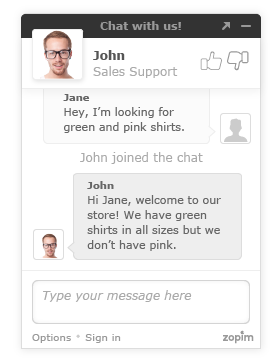
Zendesk Chat (formerly Zopim) is a live chat tool developed by the Singaporean company also called Zopim, acquired by Zendesk in April 2014.
$11.20
per month
Pricing
Salesforce Experience Cloud
Zendesk Chat
Editions & Modules
No answers on this topic
Lite
$0
per user
Basic
$14
per user
Advanced
$25
per user
Premium
$55
per user
Offerings
Pricing Offerings
Salesforce Experience Cloud
Zendesk Chat
Free Trial
No
Yes
Free/Freemium Version
No
Yes
Premium Consulting/Integration Services
No
No
Entry-level Setup Fee
No setup fee
Optional
Additional Details
—
The pricing above is price per user per month. You will get a discount when you opt for annual payment.
More Pricing Information
Community Pulse
Salesforce Experience Cloud
Zendesk Chat
Considered Both Products
Salesforce
Verified User
Chose Salesforce Experience Cloud
I have used Oracle Fusion and it was super slow if compared to Salesforce. The loading time was longer and information was not organized in a simple way like Salesforce. Even though I haven't participated in the decision process of subscribing to Salesforce, as an employee I …
A de minimis incentive was given to thank the reviewer for their time. The incentive was not used to bias or drive a particular response, nor was the incentive contingent on a positive endorsement. More Info
For well-suited, this product is great for your external clientele groups that you would not necessarily want to have a high user fee rate for. So basically general public or a group that will be authorized to come in and just do a few things here and there, but you don't necessarily want them access to all of your systems and your data points for groups that it would not be a great use for. I'd say probably your high level internal staff, they're going to be using a lot of the backend functionality automations, evaluating data, managing data, and doing custom inputs. That's just not what's intended for.
A de minimis incentive was given to thank the reviewer for their time. The incentive was not used to bias or drive a particular response, nor was the incentive contingent on a positive endorsement. More Info
Zendesk Chat is suited for all the support teams that provide real-time assistance. Like if someone wants to block the debit/credit card, it is a high-priority case that needs real-time assistance. Whereas issues like close my account, and invoice request doesn't need real-time assistance, where Zendesk tickets support will be perfect.
Easy to use, just like Salesforce's other products. Many users can sit down and figure it out in no time, and with a little training become power users.
Fast and secure - Salesforce is a leader in the cloud world so you get consistently fast results and security that is top notch in the industry.
Accessible from anywhere - if you use cloud CMS already this is a no-brainer, but for those that do in-house CMS still, this is a major difference. Mobile access from anywhere on the planet without a VPN is something you just can't do without the cloud.
A de minimis incentive was given to thank the reviewer for their time. The incentive was not used to bias or drive a particular response, nor was the incentive contingent on a positive endorsement. More Info
Unlike other CMS platforms like Wordpress and Adobe Experience Manager, Salesforce does not provide a fully featured editor with a drag-and-drop design tool.
Our content creators and marketing team often struggle with permissions and how to distribute content across different experience cloud sites.
Also, there is no side-to-side comparison view for content editors to update the content easily.
A de minimis incentive was given to thank the reviewer for their time. The incentive was not used to bias or drive a particular response, nor was the incentive contingent on a positive endorsement. More Info
A de minimis incentive was given to thank the reviewer for their time. The incentive was not used to bias or drive a particular response, nor was the incentive contingent on a positive endorsement. More Info
Due to staffing issues, we have temporarily stopped offering chat as an available channel. We're also interested in the best ways to integrate chat with our FAQs and AI to provide quick responses, either during off-hours or prior to speaking with a live agent. I've also found that reporting is rather limited where some of the interesting and useful data made available and visible during the chat cannot be pulled post-chat; it would be great to pull a high-level report so we can analyze this data.
Strengths: - Intuitive for Salesforce Users – If you’re already working within the Salesforce ecosystem, the Salesforce CMS is easy to navigate, with a clean UI, drag-and-drop content management, and reusable assets for quick updates. - Seamless Integration – Since it connects natively with Experience Cloud, Marketing Cloud, and CRM, it allows for efficient multi-channel content distribution without needing extra third-party tools. - AI-Powered Personalization – The ability to deliver dynamic content based on user profiles and engagement data is a huge plus, making content delivery more relevant and impactful. Challenges: - Learning Curve for New Users – If you're not already familiar with Salesforce, the interface can feel overwhelming, requiring training to fully leverage all features. - Limited Customization & Workflow Automation – While it works well for structured content, advanced approval workflows and deep editorial customization are limited compared to enterprise CMS platforms like Adobe Experience Manager. - Media & Design Limitations – Salesforce CMS is not as robust for managing rich media-heavy content, which can be frustrating for teams needing more flexibility in multimedia presentation.
A de minimis incentive was given to thank the reviewer for their time. The incentive was not used to bias or drive a particular response, nor was the incentive contingent on a positive endorsement. More Info
As mentioned previously, it's a clunky product that lacks user-friendliness. It feels old and behind the times compared to other products we have used. The inability to have a wrap-up time before a new chat comes in is also a big issue for our team.
A de minimis incentive was given to thank the reviewer for their time. The incentive was not used to bias or drive a particular response, nor was the incentive contingent on a positive endorsement. More Info
Again, since we provide and recommend solutions, I can't speak to every client's individual experience, but can offer general reflections as to keep their collaborations private, that they are satisfied with the experience. We hear a lot about how this system helps to encourage collaborations between their own business partners, customers, and internal members, and enables quality integrations with other products that help drive revenue.
A de minimis incentive was given to thank the reviewer for their time. The incentive was not used to bias or drive a particular response, nor was the incentive contingent on a positive endorsement. More Info
Although support from Salesforce itself can be quite unresponsive sometimes, the community hub is incredibly helpful. The large user base of Salesforce products contribute to troubleshooting and the forums are a powerful tool for finding solutions and possible bugs and response times can be quite fast compared to your regular support channels.
A de minimis incentive was given to thank the reviewer for their time. The incentive was not used to bias or drive a particular response, nor was the incentive contingent on a positive endorsement. More Info
Getting assistance and/or troubleshooting anything with Zendesk can be quite frustrating. In my years of experience with Zednesk, I have almost never found the answer to my question without going through multiple articles, ultimately getting frustrated and reaching out to our contact for more assistance. So for a consumer, the support is not as relieving as Zendesk Chat is to our customers in getting the questions answered by us.
A de minimis incentive was given to thank the reviewer for their time. The incentive was not used to bias or drive a particular response, nor was the incentive contingent on a positive endorsement. More Info
Salesforce Experience Cloud was selected due to its tight integration with our existing Salesforce CRM platform. Customization of the portal was much, much simpler compared to Sharepoint - especially with role-based security parameters that are ultimately inherited based on attributes within the Salesforce CRM platform. Salesforce Experience Cloud was a natural fit for this customer-facing purpose.
A de minimis incentive was given to thank the reviewer for their time. The incentive was not used to bias or drive a particular response, nor was the incentive contingent on a positive endorsement. More Info
Zendesk Chat is far more user friendly than some of the other competitors on the market. It has a very all the features that you require to ensure your customers are contacted in 'real time'. Its main tools include a live chat interface for quick communication, customisable chat widgets to fit your brand, mobile responsiveness for all devices, and canned responses for common questions. The platform can also start chats based on visitor actions, like time on a page or exit intent. A real must for any leading company
A de minimis incentive was given to thank the reviewer for their time. The incentive was not used to bias or drive a particular response, nor was the incentive contingent on a positive endorsement. More Info
A de minimis incentive was given to thank the reviewer for their time. The incentive was not used to bias or drive a particular response, nor was the incentive contingent on a positive endorsement. More Info
Positive impact - Compared to our old system, this newly updated system provides features and functionality that has increased our agent productivity and provided customer insight like we've never had before. This has resulted in fewer hold times and higher customer satisfaction.
Negative impact - Our reporting team still struggles with obtaining the right information from time to time with the chats. This leads to loss of productivity and more resources dedicated to reporting.
Positive impact - Due to Zopim's embed, we are able to more successfully place them on the appropriate self-service portals and pages, reaching a larger audience, and being more readily available to answer our client's questions. This has resulted in an increase in our self-service portal usage, driving down the phone and email support channels, which in turn reduces support costs.
A de minimis incentive was given to thank the reviewer for their time. The incentive was not used to bias or drive a particular response, nor was the incentive contingent on a positive endorsement. More Info