Overview
ProductRatingMost Used ByProduct SummaryStarting Price
SolarWinds Network Configuration Manager (NCM)
Score 8.4 out of 10
N/A
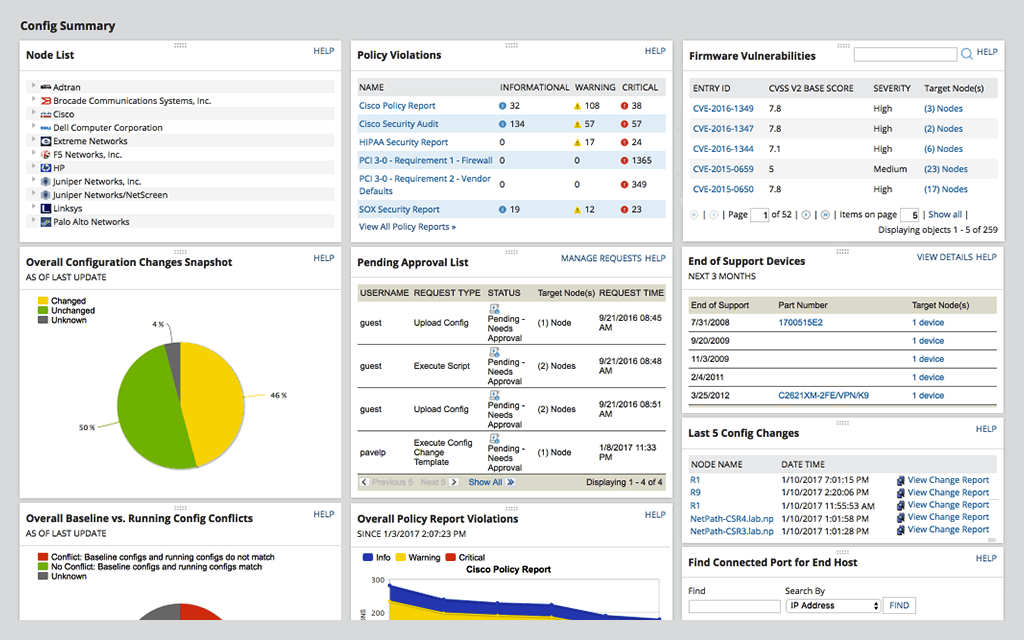
SolarWinds Network Configuration Manager is network diagnostics and troubleshooting technology, from Austin-based SolarWinds.N/A
Splunk Cloud Platform
Score 7.9 out of 10
N/A
Splunk Cloud Platform is a data platform service thats help users search, analyze, visualize and act on data. The service can go live in as little as two days, and with an IT backend managed by Splunk experts.N/A
Splunk Enterprise
Score 8.6 out of 10
N/A
Splunk is software for searching, monitoring, and analyzing machine-generated big data, via a web-style interface. It captures, indexes and correlates real-time data in a searchable repository from which it can generate graphs, reports, alerts, dashboards and visualizations.N/A
Pricing
SolarWinds Network Configuration Manager (NCM)Splunk Cloud PlatformSplunk Enterprise
Editions & Modules
No answers on this topic
Offerings
Pricing Offerings
SolarWinds Network Configuration Manager (NCM)Splunk Cloud PlatformSplunk Enterprise
Free Trial
YesNoYes
Free/Freemium Version
NoNoYes
Premium Consulting/Integration Services
NoNoNo
Entry-level Setup FeeOptionalNo setup feeNo setup fee
Additional Details
More Pricing Information
Community Pulse
SolarWinds Network Configuration Manager (NCM)Splunk Cloud PlatformSplunk Enterprise
Considered Multiple Products
SolarWinds Network Configuration Manager (NCM)
Chose SolarWinds Network Configuration Manager (NCM)
SolarWinds NCM solution is more flexible and GUI is from my point of view more intuitive, from the other hand Manage Engine solution is [a] cheaper solution which has almost [the] same functionality but suffers of luck of deeper integration with other Manage Engine modules.
Chose SolarWinds Network Configuration Manager (NCM)
All of the SolarWinds solutions stack up against their competition. The customer support is excellent, KB articles are details, and the community (Thwack) is the best when it comes to working through complex configurations/monitors. These are the things that make them the right …
Chose SolarWinds Network Configuration Manager (NCM)
I actually prefer the ManageEngine Network Configuration Management engine product but switched to SolarWinds Network Configuration Manager to standardize to our Orion deployment.
Chose SolarWinds Network Configuration Manager (NCM)
SolarWinds Network Configuration Manager (NCM) automates our Network Configuration task and provides reliable Configuration backup option. Integrates with the SolarWinds Network Performance platform for alerting and reporting. Provides meaningful dashboards to manage network …
Chose SolarWinds Network Configuration Manager (NCM)
The primary benefit when compared to the three listed are:
  • Rancid: Commercial support, plus pre-built remediation templates. Config auto-deploy as well
  • Prime and Panorama: These two products have strengths, but only when in a network compromised only of the vendor's gear
Splunk Cloud Platform
Chose Splunk Cloud Platform
I believe there is no existing competitor of Splunk and the way Splunk Cloud provides support is way better than all the other competitors. No one can beat Splunk Cloud!!
Chose Splunk Cloud Platform
Depends on company org and structure, but it's a good solution.
Chose Splunk Cloud Platform
I have used several Solar Winds tools in the past to monitor and track similar things. Both tools are comparable in their performance. Each one has it's own set of challenges when getting set up for the first time as well as a learning curve to get comfortable with usage.
Splunk Enterprise
Chose Splunk Enterprise
Data remains On-Prem and doesn't need encryption as in case of Cloud
Chose Splunk Enterprise
We originally used Kiwi Syslog but this was not able to keep up with the level of logs that were being sent to it. Also Kiwi does not allow you to search through logs, create alerts, etc. or any of the other features Splunk has. It is purely just a web GUI for syslog.
Features
SolarWinds Network Configuration Manager (NCM)Splunk Cloud PlatformSplunk Enterprise
Security Information and Event Management (SIEM)
Comparison of Security Information and Event Management (SIEM) features of Product A and Product B
SolarWinds Network Configuration Manager (NCM)
-
Ratings
Splunk Cloud Platform
8.2
20 Ratings
4% above category average
Splunk Enterprise
8.1
85 Ratings
3% above category average
Centralized event and log data collection00 Ratings9.019 Ratings9.081 Ratings
Correlation00 Ratings8.419 Ratings8.383 Ratings
Event and log normalization/management00 Ratings9.220 Ratings8.482 Ratings
Deployment flexibility00 Ratings7.320 Ratings7.975 Ratings
Integration with Identity and Access Management Tools00 Ratings7.818 Ratings8.176 Ratings
Custom dashboards and workspaces00 Ratings9.020 Ratings8.682 Ratings
Host and network-based intrusion detection00 Ratings8.217 Ratings7.661 Ratings
Data integration/API management00 Ratings7.510 Ratings8.229 Ratings
Behavioral analytics and baselining00 Ratings7.28 Ratings7.527 Ratings
Rules-based and algorithmic detection thresholds00 Ratings8.210 Ratings7.728 Ratings
Response orchestration and automation00 Ratings7.58 Ratings7.324 Ratings
Reporting and compliance management00 Ratings8.810 Ratings8.529 Ratings
Incident indexing/searching00 Ratings8.811 Ratings8.632 Ratings
Best Alternatives
SolarWinds Network Configuration Manager (NCM)Splunk Cloud PlatformSplunk Enterprise
Small Businesses
Auvik
Auvik
Score 8.5 out of 10
LevelBlue USM Anywhere
Score 7.7 out of 10
LevelBlue USM Anywhere
Score 7.7 out of 10
Medium-sized Companies
PingPlotter
PingPlotter
Score 8.9 out of 10
Sumo Logic
Sumo Logic
Score 8.8 out of 10
Sumo Logic
Sumo Logic
Score 8.8 out of 10
Enterprises
PingPlotter
PingPlotter
Score 8.9 out of 10
Sumo Logic
Sumo Logic
Score 8.8 out of 10
Sumo Logic
Sumo Logic
Score 8.8 out of 10
All AlternativesView all alternativesView all alternativesView all alternatives
User Ratings
SolarWinds Network Configuration Manager (NCM)Splunk Cloud PlatformSplunk Enterprise
Likelihood to Recommend
9.4
(141 ratings)
9.2
(18 ratings)
8.6
(86 ratings)
Likelihood to Renew
8.1
(6 ratings)
9.1
(1 ratings)
7.0
(18 ratings)
Usability
7.1
(8 ratings)
9.0
(5 ratings)
8.3
(19 ratings)
Availability
-
(0 ratings)
-
(0 ratings)
10.0
(1 ratings)
Support Rating
7.7
(9 ratings)
7.2
(4 ratings)
8.0
(18 ratings)
Online Training
10.0
(1 ratings)
-
(0 ratings)
8.0
(1 ratings)
Implementation Rating
9.1
(2 ratings)
-
(0 ratings)
7.0
(3 ratings)
Product Scalability
-
(0 ratings)
-
(0 ratings)
9.1
(1 ratings)
User Testimonials
SolarWinds Network Configuration Manager (NCM)Splunk Cloud PlatformSplunk Enterprise
Likelihood to Recommend
SolarWinds
Network Configuration Manager is well suited for backing up configurations of all your devices. It also has a great comparison tool for seeing only the differences in config. Another great feature is it's ability to push a script to any number of devices. This is very handy for pushing changes to one, 10 or multiple devices. There are also some great reports that you can run against the devices in inventory
Read full review
Cisco
Splunk is excellent when all your data is in one location. Its ability to correlate all that data is intuitive (once the hurdle of learning the query language is overcome). It is also easy to standardize the presentation of information to the company. When data is siloed/standalone, other systems can be cheaper and faster to implement.
Read full review
Cisco
It's well suited for what I do, which is network security operations. And that's for anything from troubleshooting incidents, troubleshooting performance, troubleshooting for the purpose of a compliance and auditing. It's not best suited for users who are new in terms of they're new to the product and they have expectations that probably Splunk cannot meet.
Read full review
Pros
SolarWinds
  • Integrates with Network Performance Management for Alerting and Reporting.
  • NetPath and detects issues due to Configuration Change.
  • Keeps a record of which user made the change.
  • Which devices are not being backed up, devices where backups are failing, dashboard and alerting available.
Read full review
Cisco
  • This SIEM consolidates multiple data points and offers several features and benefits, creating custom dashboards and managing alert workflows.
  • Splunk Cloud provides a simple way to have a central monitoring and security solution. Though it does not have a huge learning curve, you should spend some time learning the basics.
  • Splunk Cloud enables me to create and schedule statistical reports on network use for Management.
Read full review
Cisco
  • It is very useful in creating custom rules for analyzing system logs and display relevant information. The query language is very easy to learn.
  • We can create custom UI to visualize the output of our data. The interface is very flexible. It also allows the sharing of rules among users.
  • There is an open online community to help others. Stackoverflow also has a splunk community. These resources make it more convenient to learn.
Read full review
Cons
SolarWinds
  • For our use case, it does everything great and some of the features we underutilize but I would like to be able to set a configuration baseline when initially adding a node instead of after the configuration is pulled but it's not a particularly big deal to let it pull the configuration then set it as the baseline.
Read full review
Cisco
  • The SPL programming language that the queries are built in is not very intuitive.
  • There should be a better repository of pre-built queries for what I would think of as common Active Directory usage monitoring.
  • I would like to see more free training/familiarization information made available.
Read full review
Cisco
  • Splunk light limits number of users to 5. Wish there was a flexible license, where one could add more users.
  • Splunk light does not let you add > few realtime alerts. Wish there was a flexible license, where one could add as many realtime alerts as wanted.
  • Better insight into daily ingestion values
Read full review
Likelihood to Renew
SolarWinds
Medium complexity to set up in the beginning if using any non-standard devices or configurations, else fairly easy (e.g. Cisco Nexus or IOS-based devices). Reports are fairly straightforward to set up. Updates to the platform are fairly straightforward and don't take a major effort. Easy to add or remove devices.
Read full review
Cisco
Ease of use and have all the features we need
Read full review
Cisco
We are using Splunk extensively in our projects and we have recently upgraded to Splunk version 6.0 which is quite efficient and giving expected results. We keep track of updates and new features Splunk introduces periodically and try to introduce those features in our day to day activities for improvement in our reporting system and other tasks.
Read full review
Usability
SolarWinds
The user interface is lacking. It is difficult to navigate at times and things can be done multiple ways. Quite often I am confused by how their notification structure works. It is not very intuitive. They do offer a free Academy. They also offer a community of other technical folks. I have enjoyed both.
Read full review
Cisco
What it does well:
- Powerful SPL query language for advanced users
- Excellent visualization dashboards
- Comprehensive documentation and community support
Where it needs work:
- Steep learning curve for SPL syntax
- Non-Intuitive UI for beginners
- Complex administration and data model configuration
- Search performance degrades with poor query optimization
Bottom line: Enterprise-grade tool requiring dedicated training investment. Best for teams with experienced analysts.
Read full review
Cisco
You can literally throw in a single word into Splunk and it will pull back all instances of that word across all of your logs for the time span you select (provided you have permission to see that data). We have several users who have taken a few of the free courses from Splunk that are able to pull data out of it everyday with little help at all.
Read full review
Reliability and Availability
SolarWinds
No answers on this topic
Cisco
No answers on this topic
Cisco
When properly setup and configured, Splunk is extremely reliable.
Read full review
Support Rating
SolarWinds
To be fair, I have not had to involve Support in a number of years, but when I did, I was greeted with enthusiastic engineers who wanted to understand and solve the issue. It was a fairly complex scenario and I have discovered in my most recent implementation that engineering included that option as a standard now.
Read full review
Cisco
Splunk Cloud support is sorely lacking unfortunately. The portal where you submit tickets is not very good and is lacking polish. Tickets are left for days without any updates and when chased it is only sometimes you get a reply back. I get the feeling the support team are very understaffed and have far too much going on. From what I know, Splunk is aware of this and seem to be trying to remedy it.
Read full review
Cisco
Splunk maintains a well resourced support system that has been consistent since we purchased the product. They help out in a timely manner and provide expert level information as needed. We typically open cases online and communicate when possible via e-mail and are able to resolve most issues with that method.
Read full review
Online Training
SolarWinds
Solarwinds has actually produced new training since I last used it that is available on their site at any time. Their previous training was more than enough to get us started but now there is significantly more content. Since I'm comfortable with the Orion platform and the products we use I haven't checked the new training out yet but we have new staff go through portions of that training and they always come away with an understanding of the platform and ready to use it
Read full review
Cisco
No answers on this topic
Cisco
The online course was simple clear and described the main capabilities of the solution. There is also an initial module that can be done for free so anyone can familiarize themselves with the functionality of this solution. On the other hand, however, there could be more free online courses. Maybe even with a certificate, this would broaden the group of people who are familiar with the platform while increasing familiarity with the solution itself.
Read full review
Implementation Rating
SolarWinds
it was a fairly easy implementation and everything was pretty straightforward. only challenge we had was getting all the snmp communities updated on the networking equipment
Read full review
Cisco
No answers on this topic
Cisco
Smooth without too many major issues.
Read full review
Alternatives Considered
SolarWinds
At the time SolarWinds was the biggest player in the space and their whole portfolio was very comprehensive. As time progressed and newer technologies came about (i.e. SDWAN) their products couldn't keep up with the consumer demands and changing market. Security became such a big focus that once Solarwinds got hacked we had to remove all their products from our environment
Read full review
Cisco
Search Processing Language really is a game changer for writing easy-to-understand and maintainable queries on your data base logs. Once understood, setting up and validating a query can be done in no time- which leaves us the option to focus on more monitoring and improved services. We have no other tools that utilizes data this efficiently
Read full review
Cisco
I didn't get to fully evaluate Logstash as our corporation was already using Logstash, but both seemed like viable solutions to the problem that we were having. I wanted to evaluate Logstash some more, both did seem like they would work for the business needs that we had, we went with splunk as many teams were already using it.
Read full review
Scalability
SolarWinds
No answers on this topic
Cisco
No answers on this topic
Cisco
Splunk can scale in to the petabyte per day range which of course is awesome
Read full review
Return on Investment
SolarWinds
  • Saves 100s of hours a year in man hours over manual configuration.
  • Saved easily 50k in lost revenue when a switch rebooted with months old unsaved configuration. NCM let us quickly restore a snapshot of the running config from the previous day.
  • Saves us several man hours per week of config auditing by reducing all changes to a summary email.
Read full review
Cisco
  • End-end visibility across your departmental silos
  • Strengthen the overall global monitoring posture
  • Move from Reactive to Proactive Monitoring
  • Highly secure environment at your finger-tips
  • Takes you away from managing infrastructure/administration, allows saving time & money. Reduce the overall TCO (Total Cost of Ownership)
Read full review
Cisco
  • I don't have any numbers to share but Splunk has positively served as a 24/7 monitoring tool that has saved hours of work by self-detecting, saving statistics and alerting problems in the system or from external interfaces as soon as they happen.
  • Splunk dashboards does a solid job in collecting, analyzing data and creating reports that contain an entire day's activity and then automatically sent out to the business.
  • Splunk is very easy to learn and very useful to any program or business application.
Read full review
ScreenShots

SolarWinds Network Configuration Manager (NCM) Screenshots

Screenshot of Network Automation -  manage rapid change across complex and multi-vendor networks, reduce time needed to complete repetitive tasks, and maintain standards and service levels for uninterrupted ITScreenshot of Config Backup - rest easy knowing you can locate the most current configuration and quickly apply it to a replacement spare, or to roll back a blown configuration.Screenshot of Vulnerability Scanning - Take the hassle out of vulnerability scanning using NCM's integration with the National Vulnerability Database and access to the most current CVE’s to identify vulnerabilities in your Cisco devices.Screenshot of Inventory Management - Be able to know what devices are connected to your network, their hardware and software configurations, and when they approach end-of-service and end-of-life, with NCM device configuration management tool.Screenshot of User Management - Use NCM's integrated console to lock down devices from unauthorized access, delegate who can view device details and make configuration changes, and determine when network changes can occur.Screenshot of Baselines and Diffs - IT professionals can get a more comprehensive view by leveraging baselines across multiple nodes. Diff view in NCM’s network configuration management tool is designed to highlight only those lines that changed.