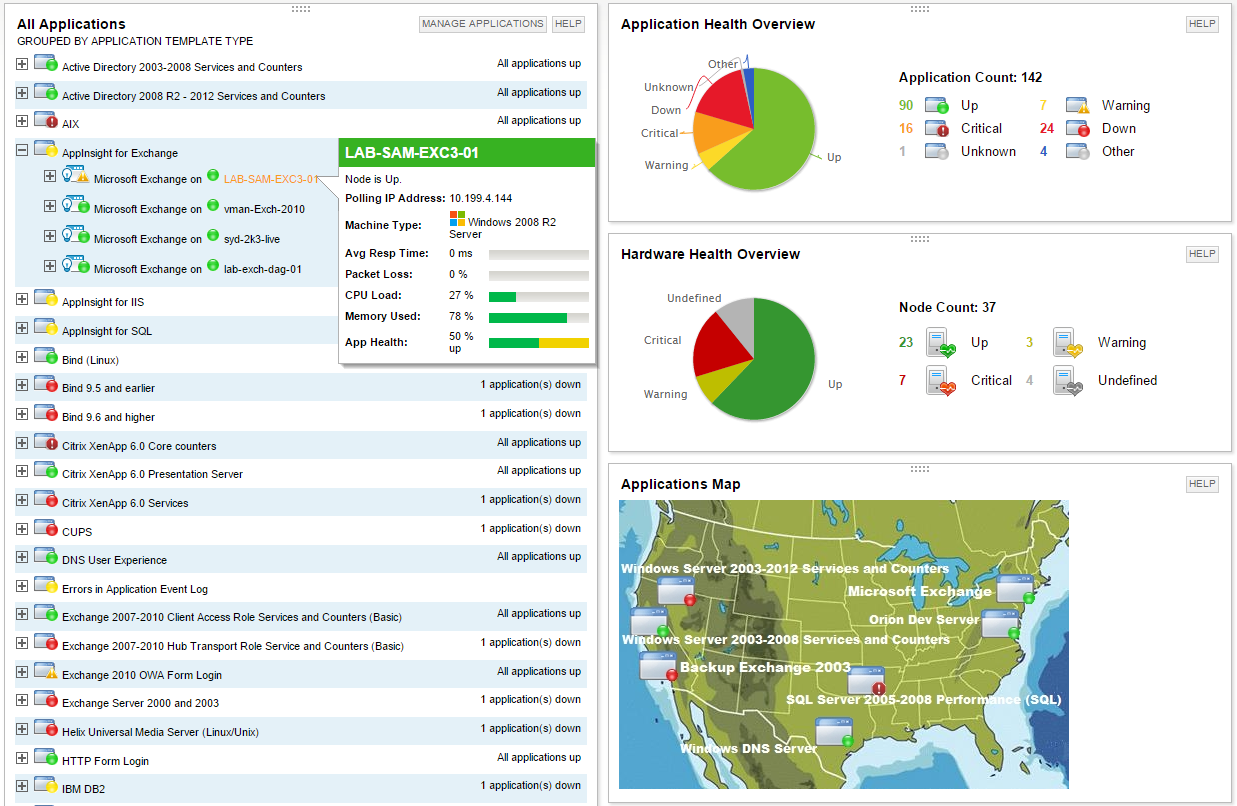
SolarWinds Server & Application Monitor (SAM) delivers application and server monitoring capabilities. SAM allows for self-service for easy setup, 1200+ monitoring templates, and customization options, as well as integrate with other SolarWinds products.
N/A
Zoho Desk
Score 8.4 out of 10
N/A
Zoho Support is a Saas help desk / ticketing system aimed at SMBs. I competes most often with Zendesk, and Desk.com.
$9
per month per user
Pricing
SolarWinds Server & Application Monitor
Zoho Desk
Editions & Modules
No answers on this topic
Free
$0
Express
$9
per month per user
Standard
$20
per month per user
Professional
$35
per month per user
Enterprise
$50
per month per user
Offerings
Pricing Offerings
SolarWinds Server & Application Monitor
Zoho Desk
Free Trial
Yes
Yes
Free/Freemium Version
No
Yes
Premium Consulting/Integration Services
No
Yes
Entry-level Setup Fee
No setup fee
Required
Additional Details
SAM pricing starts at $2,995.
A discount is offered for yearly billing.
More Pricing Information
Community Pulse
SolarWinds Server & Application Monitor
Zoho Desk
Features
SolarWinds Server & Application Monitor
Zoho Desk
Application Performance Management
Comparison of Application Performance Management features of Product A and Product B
SolarWinds Server & Application Monitor
6.5
280 Ratings
17% below category average
Zoho Desk
-
Ratings
Application monitoring
7.0270 Ratings
00 Ratings
Database monitoring
7.0234 Ratings
00 Ratings
Threshold alerts
6.8275 Ratings
00 Ratings
Predictive capabilities
6.0219 Ratings
00 Ratings
Application performance management console
7.3243 Ratings
00 Ratings
Collaboration tools
5.7151 Ratings
00 Ratings
Out-of-the box templates to monitor applications
6.5260 Ratings
00 Ratings
Application dependency mapping and thresholding
5.5220 Ratings
00 Ratings
Virtualization monitoring
7.3238 Ratings
00 Ratings
Server availability and performance monitoring
7.0273 Ratings
00 Ratings
Server usage monitoring and capacity forecasting
6.8254 Ratings
00 Ratings
IT Asset Discovery
5.7202 Ratings
00 Ratings
Incident and problem management
Comparison of Incident and problem management features of Product A and Product B
SolarWinds Server & Application Monitor
-
Ratings
Zoho Desk
8.5
5 Ratings
4% above category average
Organize and prioritize service tickets
00 Ratings
9.05 Ratings
Expert directory
00 Ratings
7.24 Ratings
Subscription-based notifications
00 Ratings
7.24 Ratings
ITSM collaboration and documentation
00 Ratings
10.01 Ratings
Ticket creation and submission
00 Ratings
8.85 Ratings
Ticket response
00 Ratings
8.85 Ratings
Self Help Community
Comparison of Self Help Community features of Product A and Product B
SolarWinds Server & Application Monitor
-
Ratings
Zoho Desk
9.5
5 Ratings
17% above category average
External knowledge base
00 Ratings
9.55 Ratings
Internal knowledge base
00 Ratings
9.55 Ratings
Multi-Channel Help
Comparison of Multi-Channel Help features of Product A and Product B
It is a well-suited software for monitoring and surveillance of your deployed nodes. The error-readability and filter options for filtering out logs and errors could be improved. But overall, it has a good UI design, is user-friendly, and is very easy to learn and access for new users.
Zoho Desk is a great customer service tool. It is very easy to track the ability to receive tickets and send responses in Zoho Desk. There are lots of options for customization. The knowledge base feature is very extensive and powerful. It makes creating internal and external FAQs easy.
The biggest drawback that I am facing while using the platform is that their ticketing system is not that great [in my opinion]. It does not give us the option to add sales tax and other charges in the invoices which leads to a big problem for us.
We are heavily invested in Solarwinds products for a reason. They are generally easy to setup and run with, requiring only some interfacing with support or help articles on rare occasions. They do what we bought them to do and we can't ask for more.
SolarWinds Server & Application Monitor is quite easy to use and super versatile. It allows you to do just about anything you can through premade templates or through scripting. You can use an agent on the servers if you want to, or you can monitor through WMI or SNMP credentials. You can customize thresholds for alerting quickly, and you can configure alerts to be as complex or as simple as you want.
I give [Zoho Desk] [an] overall usability score of 9. This is partly due to the search functionality needs improvement. There are several times where I am left unable to find a ticket and have to generate a new one. I am hoping in the future that they will make some changes!
The graphical interface and the performance of the database leave a little to be desired, they could be better explored.Some functionality and screens do not work well depending on the browser used. The integrations never had any problems or caused crashes in other systems.
I think there was only a couple times I had to open a support case for SAM and one time they got multiple engineers on the phone to get a better idea what I was trying to monitor and was able to point me in the best direction to monitor that system.
As Zoho Support is based in a different timezone to ours it can be an issue that we cannot get an immediate response to an issue. But I will say that once their Support is in the office they are fairly good to respond. they have resolved almost all issues I have told them about, but Zoho have also made system changes and not communicated these beforehand which means we are faced with something new and cannot get support on this until their support team is in the office
Nagios requires far more manual work to configure than SolarWinds does, though that also encourages customization and perfect-fit solutions. Nagios also requires far, far fewer resources to run than SolarWinds: SolarWinds wants great gobs of memory and disk, while Nagios is refreshingly humble. Nagios starts working from the first minute, too, whereas SolarWinds needs lots of set-up time.
We selected Zoho Desk as we needed a platform that was going to allow the business to grow through both usage and staffing numbers. We wanted something cost-effective but still offered standard features in an effective cloud-delivered solution but would still allow customization by our internal dev team, to derive better value from the service where it natively didn't do what we needed it to. FreeAgent was okay for a while, but Zoho Desk has allowed a vast improvement in our service offering to end customers.
Zoho Desk has created an organised sytem of support which alows me to help my customers more efficiently.
By saving resolutions as articles, Zoho Desk has provided a training resource for current customers and support staff as part of solving problems.
All new customers become part of a database of customers who continue to receive support and education from forums created by the articles and customer questions.