Sprinklr Service vs. ZoomSphere

Overview
ProductRatingMost Used ByProduct SummaryStarting Price
Sprinklr Service
Score 8.0 out of 10
N/A
Sprinklr Service is a cloud-native unified customer service platform powered by AI that enables customer and agent experience across 30+ digital, social and voice channels, and delivers real-time insights. Enables customers to interact with a brand on their preferred channel for consistent brand experience. Empowers agents with unified/360 customer view and recommends the most relevant responses with AI to improve agent productivity and experience.…
$249
per month per seat
ZoomSphere
Score 9.1 out of 10
N/A
ZoomSphere is a social media scheduling and management solution designed for teams to plan, schedule, auto-publish, and analyze their social media content across multiple platforms. ZoomSphere is primarily used by social media managers, marketing teams, and agencies to streamline content workflows, improve collaboration, and track performance across various social media platforms, including Instagram, Facebook, TikTok, LinkedIn, YouTube, and X. The software helps users automate…
$29
per month
Pricing
Sprinklr ServiceZoomSphere
Editions & Modules
Self-Serve Customer Service Solution
$249
per month per seat
Leads Manager
$29
per month
ZoomSphere
$199
per month
Offerings
Pricing Offerings
Sprinklr ServiceZoomSphere
Free Trial
NoYes
Free/Freemium Version
NoNo
Premium Consulting/Integration Services
YesNo
Entry-level Setup FeeOptionalNo setup fee
Additional DetailsOmnichannel Automation, AI and Insights ReportingTwo month discount available for annual billing.
More Pricing Information
Community Pulse
Sprinklr ServiceZoomSphere
Features
Sprinklr ServiceZoomSphere
Contact Center Software
Comparison of Contact Center Software features of Product A and Product B
Sprinklr Service
7.1
2 Ratings
17% below category average
ZoomSphere
-
Ratings
Agent dashboard8.02 Ratings00 Ratings
Validate callers6.02 Ratings00 Ratings
Outbound response6.02 Ratings00 Ratings
Call forwarding7.02 Ratings00 Ratings
Click-to-call (CTC)8.01 Ratings00 Ratings
Warm transfer8.02 Ratings00 Ratings
Predictive dialing5.02 Ratings00 Ratings
Interactive voice response8.02 Ratings00 Ratings
REST APIs8.02 Ratings00 Ratings
Call scripts7.02 Ratings00 Ratings
Call tracking7.02 Ratings00 Ratings
Multichannel integration8.02 Ratings00 Ratings
CRM software integration6.02 Ratings00 Ratings
Workforce Optimization (WFO)
Comparison of Workforce Optimization (WFO) features of Product A and Product B
Sprinklr Service
8.1
2 Ratings
2% below category average
ZoomSphere
-
Ratings
Inbound call routing7.02 Ratings00 Ratings
Omnichannel inbound routing10.01 Ratings00 Ratings
Recording7.02 Ratings00 Ratings
Quality management7.02 Ratings00 Ratings
Call analytics8.02 Ratings00 Ratings
Historical reporting10.01 Ratings00 Ratings
Live reporting8.02 Ratings00 Ratings
Customer surveys8.02 Ratings00 Ratings
Customer interaction analytics8.02 Ratings00 Ratings
Publishing
Comparison of Publishing features of Product A and Product B
Sprinklr Service
-
Ratings
ZoomSphere
8.0
1 Ratings
1% below category average
Content planning and scheduling00 Ratings8.01 Ratings
Audience targeting00 Ratings7.01 Ratings
Workflow management00 Ratings9.01 Ratings
Marketing
Comparison of Marketing features of Product A and Product B
Sprinklr Service
-
Ratings
ZoomSphere
9.0
1 Ratings
16% above category average
Content marketing00 Ratings9.01 Ratings
Channel coverage/integration
Comparison of Channel coverage/integration features of Product A and Product B
Sprinklr Service
-
Ratings
ZoomSphere
8.4
1 Ratings
0% above category average
Twitter00 Ratings10.01 Ratings
Facebook00 Ratings10.01 Ratings
LinkedIn00 Ratings8.01 Ratings
Instagram00 Ratings7.01 Ratings
YouTube00 Ratings7.01 Ratings
Reporting/analytics
Comparison of Reporting/analytics features of Product A and Product B
Sprinklr Service
-
Ratings
ZoomSphere
8.3
1 Ratings
7% above category average
Campaign success analytics00 Ratings8.01 Ratings
Real-time tracking00 Ratings7.01 Ratings
Competitor analysis00 Ratings10.01 Ratings
Account management
Comparison of Account management features of Product A and Product B
Sprinklr Service
-
Ratings
ZoomSphere
8.5
1 Ratings
7% above category average
Role-based user permissions & privileges00 Ratings10.01 Ratings
Mobile access00 Ratings7.01 Ratings
Best Alternatives
Sprinklr ServiceZoomSphere
Small Businesses
CloudTalk
CloudTalk
Score 7.5 out of 10
CoSchedule Marketing Suite
Score 10.0 out of 10
Medium-sized Companies
CloudTalk
CloudTalk
Score 7.5 out of 10
CoSchedule Marketing Suite
Score 10.0 out of 10
Enterprises
Google Cloud Contact Center AI
Score 5.4 out of 10
Social Suite by Reputation.com
Score 9.4 out of 10
All AlternativesView all alternativesView all alternatives
User Ratings
Sprinklr ServiceZoomSphere
Likelihood to Recommend
9.0
(26 ratings)
8.0
(1 ratings)
Likelihood to Renew
7.5
(7 ratings)
-
(0 ratings)
Usability
9.0
(4 ratings)
9.0
(1 ratings)
Availability
9.9
(3 ratings)
-
(0 ratings)
Performance
9.9
(3 ratings)
-
(0 ratings)
Support Rating
9.1
(10 ratings)
9.0
(1 ratings)
In-Person Training
10.0
(1 ratings)
-
(0 ratings)
Implementation Rating
9.0
(2 ratings)
-
(0 ratings)
User Testimonials
Sprinklr ServiceZoomSphere
Likelihood to Recommend
Sprinklr
Sprinklr Service has always been well-suited for all of the work we do. As it's all social media content, and most require responses or escalations, Sprinklr Service covers all of that. The only time I think we wouldn't need it is if we were working with a much smaller client who didn't need us to have eyes on so many platforms at once.
Read full review
ZoomSphere
ZoomSphere is suited for all companies - from small to big, for one brand or more brands within company. With ZoomSphere you can leverage your social media presence - but you need to use lot of apps ZoomSphere has. I think that ZoomSphere is not suited for company that want to use ZoomSphere for only one purpose, for example content creation and publishing. There are plenty of ways how to use ZoomSphere more complex.
Read full review
Pros
Sprinklr
  • Automated routing to appropriate teams
  • Automated notifications for certain types of content or posts from certain users
  • The reporting options are fantastic.
  • We've integrated a chatbot seamlessly with Sprinklr modern care so our team members can pick up a conversation if our bot isn't able to provide an answer.
Read full review
ZoomSphere
  • Content Creation and Publishing
  • Analytics and Reporting
  • Workflow management
Read full review
Cons
Sprinklr
  • I find it difficult to dive into analytics for each social post. The reporting tool gives me an overview of the channels but I would love to look at a breakdown of each post performance.
  • You currently can't add closed caption subtitles to videos uploaded through Sprinklr so this results in having to revert to the native platform.
  • I would love to be able to set up a newsfeed that includes posts from a number of our partner accounts, so I can keep up to date with what they're posting.
Read full review
ZoomSphere
  • Community Management
  • Viewable backlog or product roadmap
Read full review
Likelihood to Renew
Sprinklr
The biggest reason we renewed, and kept up with Sprinklr Modern Care is because it is an active community and there is customer buy-in already. They continue to update and improve the product, but more importantly, the customers are using it. It's easy to switch products when it's not an active component in your daily structure, but switching and migrating the data or providing alternatives becomes difficult when customers have grown accustomed to a specific experience. As long as they continue to improve the available features and the community stays active, renewed use will continue.
Read full review
ZoomSphere
No answers on this topic
Usability
Sprinklr
I've spent year designing products so I'm a tough judge when it comes to other solutions. It's clear that Sprinklr Modern Care was designed for the average online consumer with a very user friendly interface. They have made improvements to the admin tools to make that area of the product easier to use as well.
Read full review
ZoomSphere
There is always a space for improvement, but overall I see ZoomSphere as a valuable partner and tool for our business on social media. Maybe in a future rest of the apps in tool (community management, social media listening,...) will be on a same level as competitors and we will use only one tool for whole social media management. But if not, ZoomSphere is still awesome for the most of it
Read full review
Reliability and Availability
Sprinklr
No issues with system availability. They manage updates in off-peak hours and I usually don't notice the changes until I log into the system the next day.
Read full review
ZoomSphere
No answers on this topic
Performance
Sprinklr
Performance is great and is not negatively effecting our processes. We have to make sure it doesn't effect out load times. Not currently seeing any issues with widgets affecting page load times.
Read full review
ZoomSphere
No answers on this topic
Support Rating
Sprinklr
I know the Sprinklr conference calls have been helpful, but sometimes submitting a ticket can be a little daunting. In the past, we've included information in screenshots that are then asked for by a member of the support staff. The turnaround time has been between 3 days, which isn't horrible.
Read full review
ZoomSphere
Whenever I contacted customer service, I had a great response within minutes. Sometimes was not easy to solve, but somehow we figured it out. I would like to reccommend more proactive communication with clients regarding product roadmap, for example "In 1Q we will launch XY,..." Client should know that before implementation - client can prepare for news, client can test something,...
Read full review
In-Person Training
Sprinklr
Our customer support team went through in-person training. I am not unable to rate.
Read full review
ZoomSphere
No answers on this topic
Implementation Rating
Sprinklr
Basic setup took me less than 30 minutes. This includes initial configuration, putting in the initial content, and getting the look-and-feel customized. The domain routing took the normal lag time any other website or blogging service. The really important thing was to get the user accounts setup and begin seeding the system with content before a public launch.
Read full review
ZoomSphere
No answers on this topic
Alternatives Considered
Sprinklr
First, we had a social studio which was good in terms of functionalities but slow. After that, we had the chance to use Talkwalker & social bakers which were good tools yet not enough compares to Sprinklr
Read full review
ZoomSphere
We see ZoomSphere as a better option than Kontentino. They are almost the same in way you can use the tool, but ZoomSphere has better UI and UX and also customer service. We also know that pricing levels are better with ZoomSphere than Kontentino. But both tools are quite awesome for social media management. Just book a demo, have a trial and you will see by yourself.
Read full review
Return on Investment
Sprinklr
  • Increased employee efficiency: Having a clear, one-stop "shop" where users can leave feedback, ask questions, and find bug fixes or workarounds has saved me (and other community managers at my company) loads of time that was once spent responding to numerous emails on an individual basis.
  • Better customer service: Since everyone in the company is alerted of what's being written on our forum, it's easy to spot a high-priority issue, delegate to the person in charge, resolve it, and respond as soon as possible.
Read full review
ZoomSphere
  • Possitive effect into measure all awareness effects on social channels
  • Time effectiveness
  • Faster workflow management and realtime communication
Read full review
ScreenShots

ZoomSphere Screenshots

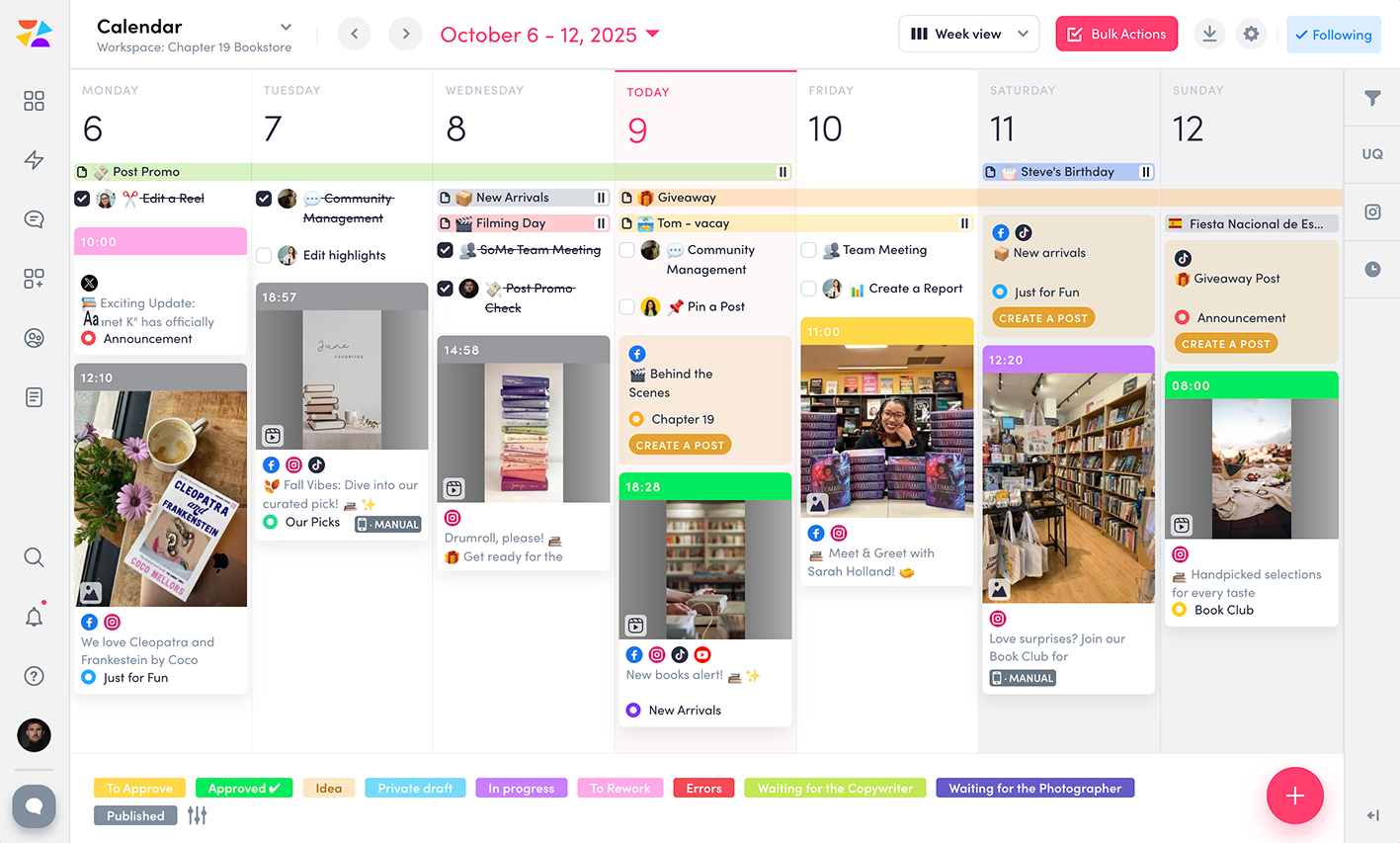
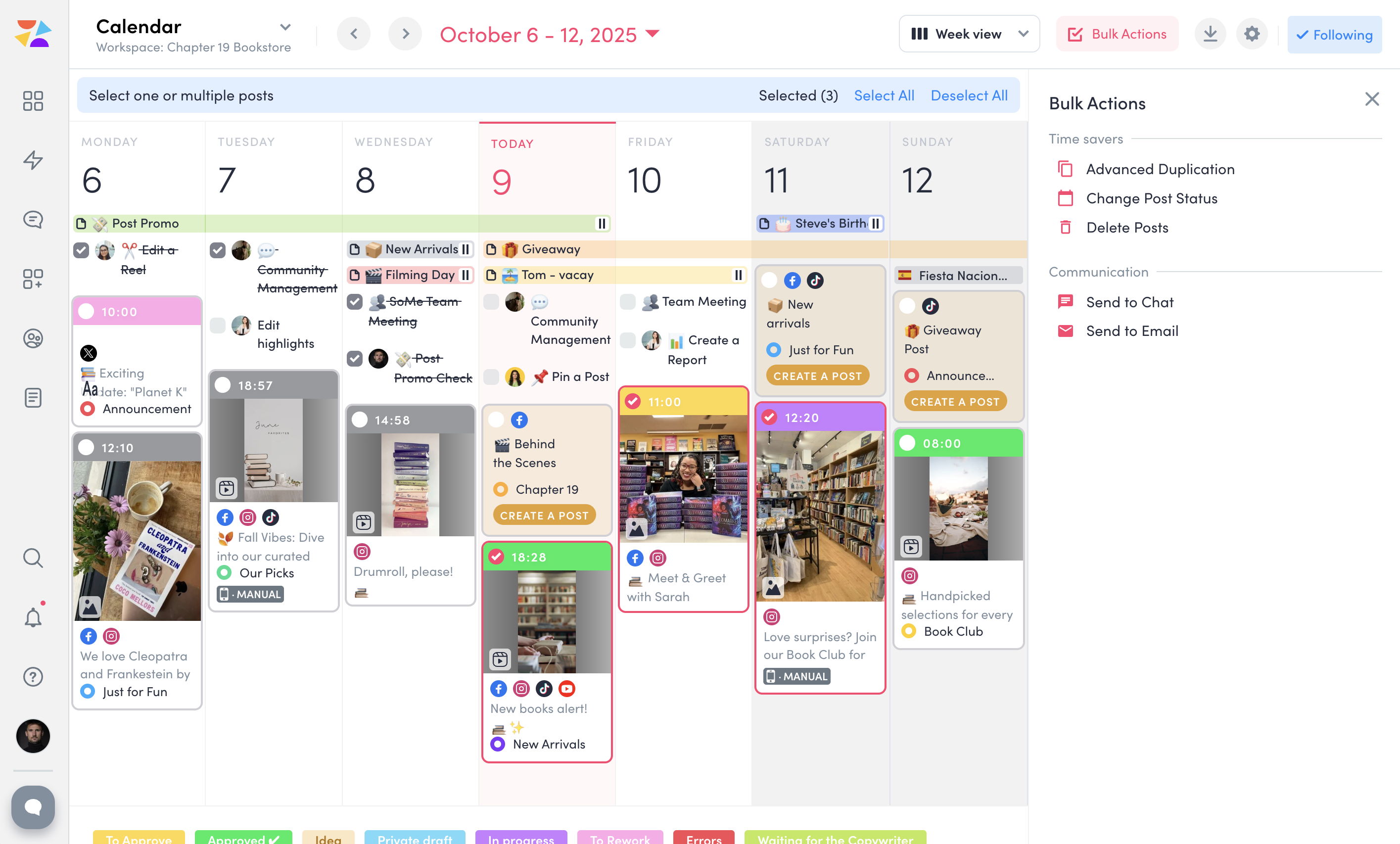
Screenshot of ZoomSphere Workspaces, which lets the user keep clients and projects organized. A separate workspace can be set up for each client with only needed apps—no extra clutter. Each workspace comes with a built-in Chat for easy communication and a Files section to store everything from images and videos to presentations and reports, keeping work in one place.Screenshot of ZoomSphere Scheduler, which simplifies social media planning and publishing across platforms like Instagram, Facebook, TikTok, LinkedIn, YouTube, and X. Users can manage formats like stories, carousels, and short videos, or set up a custom approval flow for fast approval from a manager or client, and enjoy features like Instagram grid preview, post performance panel, and bulk actions.Screenshot of a Kanban-style interface to streamline task management. Here, users can create tasks, set deadlines, attach files, and discuss each task card with a team to keep everything on track. With clear task organization, ZoomSphere Workflow Manager helps teams stay on top of their projects and ensures smooth collaboration from start to finish.Screenshot of ZoomSphere Notes, which makes organizing ideas and plans easy.Screenshot of ZoomSphere Analytics, which offers in-depth insights into social media performance. Content performance can be analyzed with over 100 available metrics, and reports can be generated for any time period.Screenshot of the tool to send multiple posts for approval to client at once. Bulk Actions lets users send entire batches of posts via email or built-in chat, as well as duplicate, update statuses, or delete multiple posts.