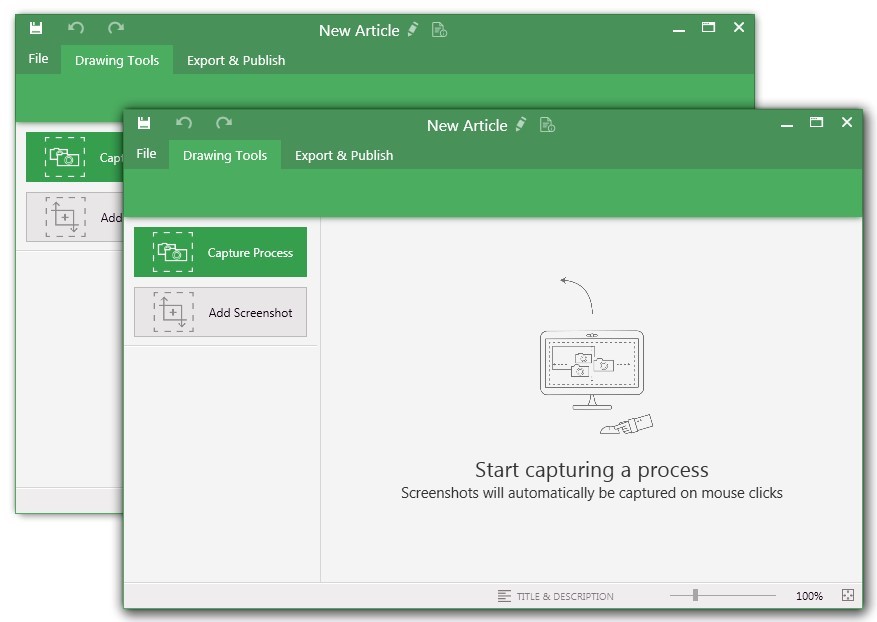
UiPath Task Capture (formerly StepShot, acquired October 2019) is a tool designed for quick and easy step-by-step documentation. During a recording mode, the software creates a separate screenshot on every click, groups them into a manual with automatically added metadata. Users can annotate captured images and structure documents in the way they want them to look.
N/A
Zoho Desk
Score8.3 out of 10
N/A
Zoho Support is a Saas help desk / ticketing system aimed at SMBs. I competes most often with Zendesk, and Desk.com.
$9
per month per user
Pricing
UiPath Task Capture
Zoho Desk
Editions & Modules
No answers on this topic
Free
$0
Express
$9
per month per user
Standard
$20
per month per user
Professional
$35
per month per user
Enterprise
$50
per month per user
Offerings
Pricing Offerings
UiPath Task Capture
Zoho Desk
Free Trial
Yes
Yes
Free/Freemium Version
Yes
Yes
Premium Consulting/Integration Services
Yes
Yes
Entry-level Setup Fee
No setup fee
Required
Additional Details
We have some discounts available all the time depending on the amount of ordered licenses.
StepShot is perfect for showing your audience how they are supposed to navigate a new system you have implemented. You can take them from a login screen all the way through any technical process you want them to follow. The product is not ideal, however, for documenting a process that does not have tangible steps. For example, a process we have created includes some reflective thinking about alignment or outcomes in order to work, this can be articulated in the text area of the screen captures but doesn't really capture our message.
A de minimis incentive was given to thank the reviewer for their time. The incentive was not used to bias or drive a particular response, nor was the incentive contingent on a positive endorsement. More Info
Zoho Desk is a great customer service tool. It is very easy to track the ability to receive tickets and send responses in Zoho Desk. There are lots of options for customization. The knowledge base feature is very extensive and powerful. It makes creating internal and external FAQs easy.
A de minimis incentive was given to thank the reviewer for their time. The incentive was not used to bias or drive a particular response, nor was the incentive contingent on a positive endorsement. More Info
A de minimis incentive was given to thank the reviewer for their time. The incentive was not used to bias or drive a particular response, nor was the incentive contingent on a positive endorsement. More Info
A de minimis incentive was given to thank the reviewer for their time. The incentive was not used to bias or drive a particular response, nor was the incentive contingent on a positive endorsement. More Info
The "export & publish" button is kind of tiny and tucked away. It should be more prominent. After not using it for a couple weeks, I always forget where it is.
Updates aren't as frequent. Which is fine, since I haven't come across many bugs, it would just be cool to see some added features/functionality a bit more often.
The blur looks fine in the preview mode, but when exported, it's not the best.
A de minimis incentive was given to thank the reviewer for their time. The incentive was not used to bias or drive a particular response, nor was the incentive contingent on a positive endorsement. More Info
The biggest drawback that I am facing while using the platform is that their ticketing system is not that great [in my opinion]. It does not give us the option to add sales tax and other charges in the invoices which leads to a big problem for us.
A de minimis incentive was given to thank the reviewer for their time. The incentive was not used to bias or drive a particular response, nor was the incentive contingent on a positive endorsement. More Info
I give [Zoho Desk] [an] overall usability score of 9. This is partly due to the search functionality needs improvement. There are several times where I am left unable to find a ticket and have to generate a new one. I am hoping in the future that they will make some changes!
A de minimis incentive was given to thank the reviewer for their time. The incentive was not used to bias or drive a particular response, nor was the incentive contingent on a positive endorsement. More Info
I have only run into an issue once, which I believe was due to a newly released feature (cloud storage). I was running into issues with the functionality on my Mac. The team was incredibly helpful in both troubleshooting the issue by jumping on screen sharing sessions, as well as providing multiple releases for me to test to fix the problem!
A de minimis incentive was given to thank the reviewer for their time. The incentive was not used to bias or drive a particular response, nor was the incentive contingent on a positive endorsement. More Info
As Zoho Support is based in a different timezone to ours it can be an issue that we cannot get an immediate response to an issue. But I will say that once their Support is in the office they are fairly good to respond. they have resolved almost all issues I have told them about, but Zoho have also made system changes and not communicated these beforehand which means we are faced with something new and cannot get support on this until their support team is in the office
A de minimis incentive was given to thank the reviewer for their time. The incentive was not used to bias or drive a particular response, nor was the incentive contingent on a positive endorsement. More Info
A de minimis incentive was given to thank the reviewer for their time. The incentive was not used to bias or drive a particular response, nor was the incentive contingent on a positive endorsement. More Info
We selected Zoho Desk as we needed a platform that was going to allow the business to grow through both usage and staffing numbers. We wanted something cost-effective but still offered standard features in an effective cloud-delivered solution but would still allow customization by our internal dev team, to derive better value from the service where it natively didn't do what we needed it to. FreeAgent was okay for a while, but Zoho Desk has allowed a vast improvement in our service offering to end customers.
A de minimis incentive was given to thank the reviewer for their time. The incentive was not used to bias or drive a particular response, nor was the incentive contingent on a positive endorsement. More Info
This has saved us MANY HOURS in either walking clients through processes in person or having to create a one-off guide through taking screenshots and creating our own documents with the screenshots hand placed.
Client satisfaction is high when they receive these guides. It is documentation that they can refer to at anytime that is personalized to their use or individual needs.
A de minimis incentive was given to thank the reviewer for their time. The incentive was not used to bias or drive a particular response, nor was the incentive contingent on a positive endorsement. More Info
Zoho Desk has created an organised sytem of support which alows me to help my customers more efficiently.
By saving resolutions as articles, Zoho Desk has provided a training resource for current customers and support staff as part of solving problems.
All new customers become part of a database of customers who continue to receive support and education from forums created by the articles and customer questions.
A de minimis incentive was given to thank the reviewer for their time. The incentive was not used to bias or drive a particular response, nor was the incentive contingent on a positive endorsement. More Info