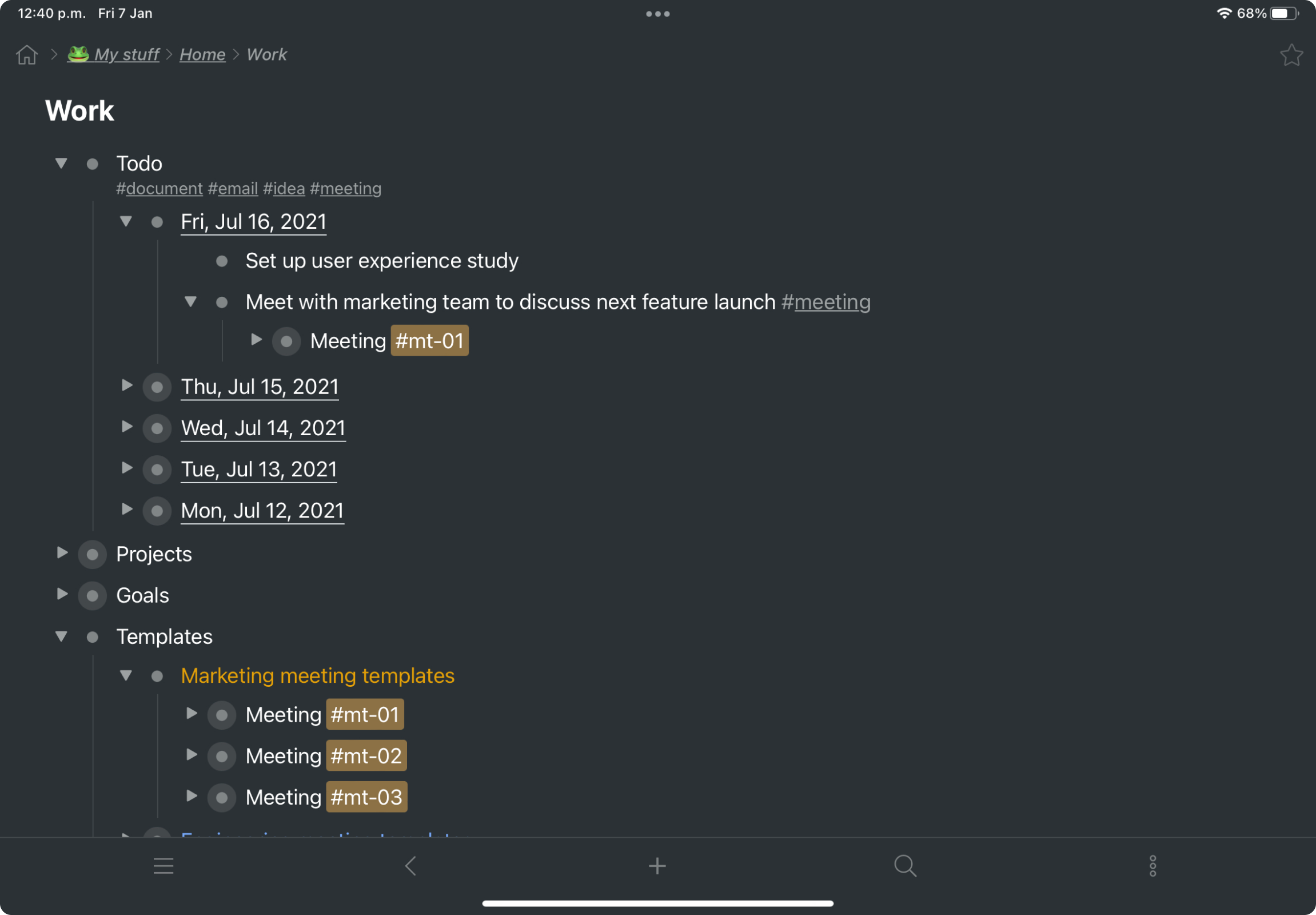
Workflowy is a note-taking and organizational tool designed to help users manage their tasks, notes, and projects. Its simplicity and features make it a choice for individuals and teams looking to streamline their workflow. Infinite Nesting Structure: Workflowy allows users to create lists within lists to an infinite degree, enabling a detailed and structured way to organize information Global Search: Its search function is used to search through all their…
$8.99
per month per user
Zoho Cliq
Score8.9 out of 10
N/A
Zoho Chat is a live chat tool, from Zoho Corporation.
For my money, it is best to use Workflowy for all areas of focus in my daily life. When I start to separate information, notes, convo's that's when I run into trouble. By using Workflowy for everything, I keep my sanity and my effectiveness. I cannot think of any environment where the Workflowy app would not work out extremely well!
It is very well suited as a messaging tool, where one needs to communicate quickly to a colleague the status of a particular task or an update to the work. This is especially useful for field work where the field team can report the work done and any additional resources required. We have faced issues when virtual meetings are held for a team of 10+ members with a lot of drop-offs and poor quality of reception (audio & video). While some may be attributed to poor internet connection, we do not face the same issue when using Zoom meetings. This area requires strengthening.
A de minimis incentive was given to thank the reviewer for their time. The incentive was not used to bias or drive a particular response, nor was the incentive contingent on a positive endorsement. More Info
Initial set up can be a little daunting if you aren't a tech-savvy person. For large organizations, this might not matter since you would have a dedicated IT team that will handle it (as we did) but if you are a small business owner looking to set this up yourself, I imagine it would take some trial and error to get working.
A de minimis incentive was given to thank the reviewer for their time. The incentive was not used to bias or drive a particular response, nor was the incentive contingent on a positive endorsement. More Info
Zoho Cliq has become an integral part of our daily business. Every single member of our team who has a job involving a computer has an active Zoho Cliq license and uses the tool continuously throughout the day. It cuts down on meetings and allows the team to feel very connected to one-another even though we are distributed geographically.
A de minimis incentive was given to thank the reviewer for their time. The incentive was not used to bias or drive a particular response, nor was the incentive contingent on a positive endorsement. More Info
I now have 12+ years of notes stored in Workflowy - everything from song lyrics to book outlines to classroom notes. It makes it VERY easy to find, VERY easy to sort, and VERY easy to organize.
Easy to use Larger File sharing like videos, audios, even zip files Make internal group calls Multiple channel creation sharing development scripts is also easy
A de minimis incentive was given to thank the reviewer for their time. The incentive was not used to bias or drive a particular response, nor was the incentive contingent on a positive endorsement. More Info
It's available 24X7. We have never faced any serious issues with the connectivity. Whenever we faced issues, it has been traced to a browser issue or Windows app issue or a mobile issue.
A de minimis incentive was given to thank the reviewer for their time. The incentive was not used to bias or drive a particular response, nor was the incentive contingent on a positive endorsement. More Info
A de minimis incentive was given to thank the reviewer for their time. The incentive was not used to bias or drive a particular response, nor was the incentive contingent on a positive endorsement. More Info
A de minimis incentive was given to thank the reviewer for their time. The incentive was not used to bias or drive a particular response, nor was the incentive contingent on a positive endorsement. More Info
Excellent support. Online training and supporting videos, and resources are more than sufficient to get started. Moreover, their support channel, especially the chat window, is very helpful and provides an instant solution to all our queries. For any complicated issue, they always get back by email with the solution and on occasions even call back.
A de minimis incentive was given to thank the reviewer for their time. The incentive was not used to bias or drive a particular response, nor was the incentive contingent on a positive endorsement. More Info
Implementation is very simple and easy. Create a Zoho account (free or paid), send/ receive an invite, log in, verify your credentials and get started. Admin would have created the channels for you, and you start contributing. The entire process is smooth, and you can get started within minutes. The Admin has to work at the backend, initially, and decide on the permissions for the individual and the team and set up permissions for access to other applications too. This needs to be planned out, tested and implemented.
A de minimis incentive was given to thank the reviewer for their time. The incentive was not used to bias or drive a particular response, nor was the incentive contingent on a positive endorsement. More Info
Functionality wise Zoho Chat fairs pretty well against the other options. I still use all the other options as I need to be flexible in how I communicate with clients. It is the integration into the ZohoCRM & Cliq that puts Zoho Chat above the others and is why I try to encourage clients to move across to the app
A de minimis incentive was given to thank the reviewer for their time. The incentive was not used to bias or drive a particular response, nor was the incentive contingent on a positive endorsement. TR verified that a representative sample of customers was invited. More Info
A de minimis incentive was given to thank the reviewer for their time. The incentive was not used to bias or drive a particular response, nor was the incentive contingent on a positive endorsement. More Info
The system works perfectly well. At times, we have faced issues with the desktop application - it doesn't start, or takes time to start, or even logs off on its own. However, the browser as well as the mobile application work perfectly well, and we have never faced issues with them
A de minimis incentive was given to thank the reviewer for their time. The incentive was not used to bias or drive a particular response, nor was the incentive contingent on a positive endorsement. More Info
I estimate that Workflowy easily saves me 1.5 - 2 hours each day in streamlined productivity. That calculates, for my organization approximaely $500.00 a month!
our business save time and improve communication. We noticed a 20% faster response time to customer issues because team members can communicate instantly.
reduced our internal email clutter, saving about 10 hours a week for staff who used to spend time sorting through emails.
A de minimis incentive was given to thank the reviewer for their time. The incentive was not used to bias or drive a particular response, nor was the incentive contingent on a positive endorsement. More Info