TrustRadius: an HG Insights company

Paligo

Score10 out of 10

40 Reviews and Ratings

What is Paligo?

Paligo is a component content management system (CCMS) that helps teams manage complex technical documentation through structured authoring, content reuse, and controlled publishing.

Read more details.

Media

Screenshot of branching in Paligo
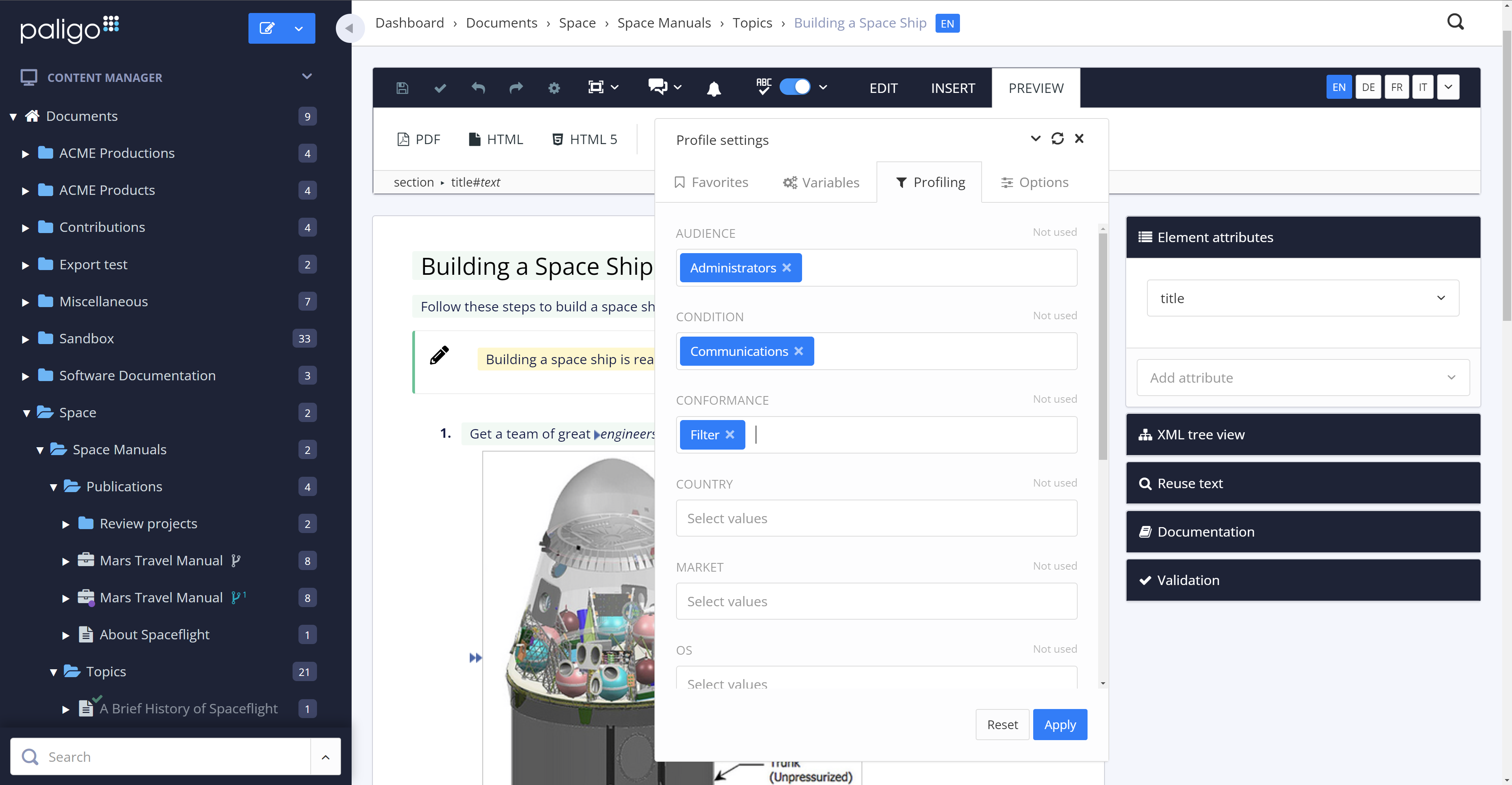
Screenshot of conditional filters in Paligo
Screenshot of the contributor editor in Paligo
Screenshot of some of the integration options in Paligo
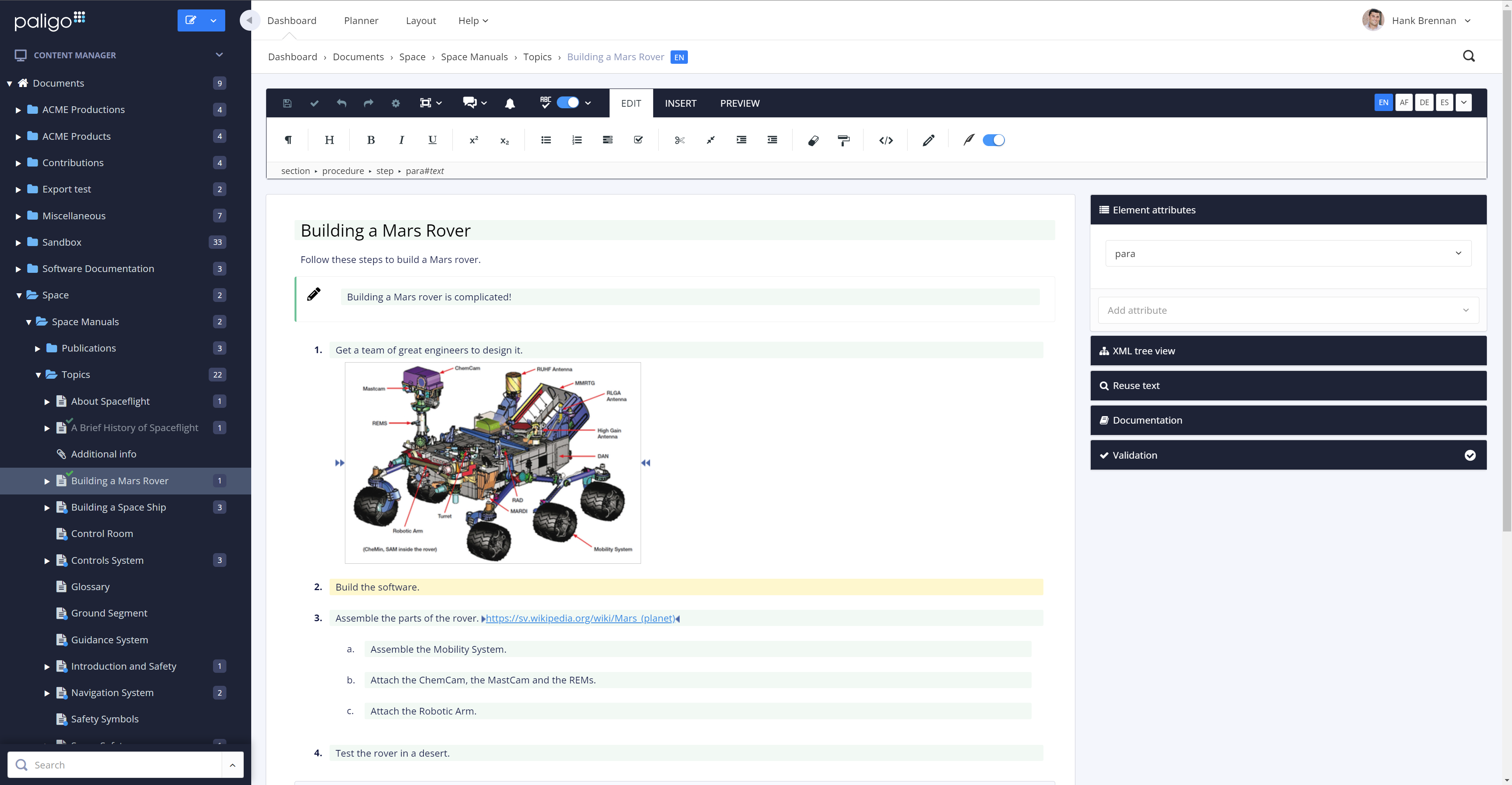
Screenshot of the main editor in Paligo
Screenshot of multi-channel publishing options in Paligo
Screenshot of the assignment planner in Paligo
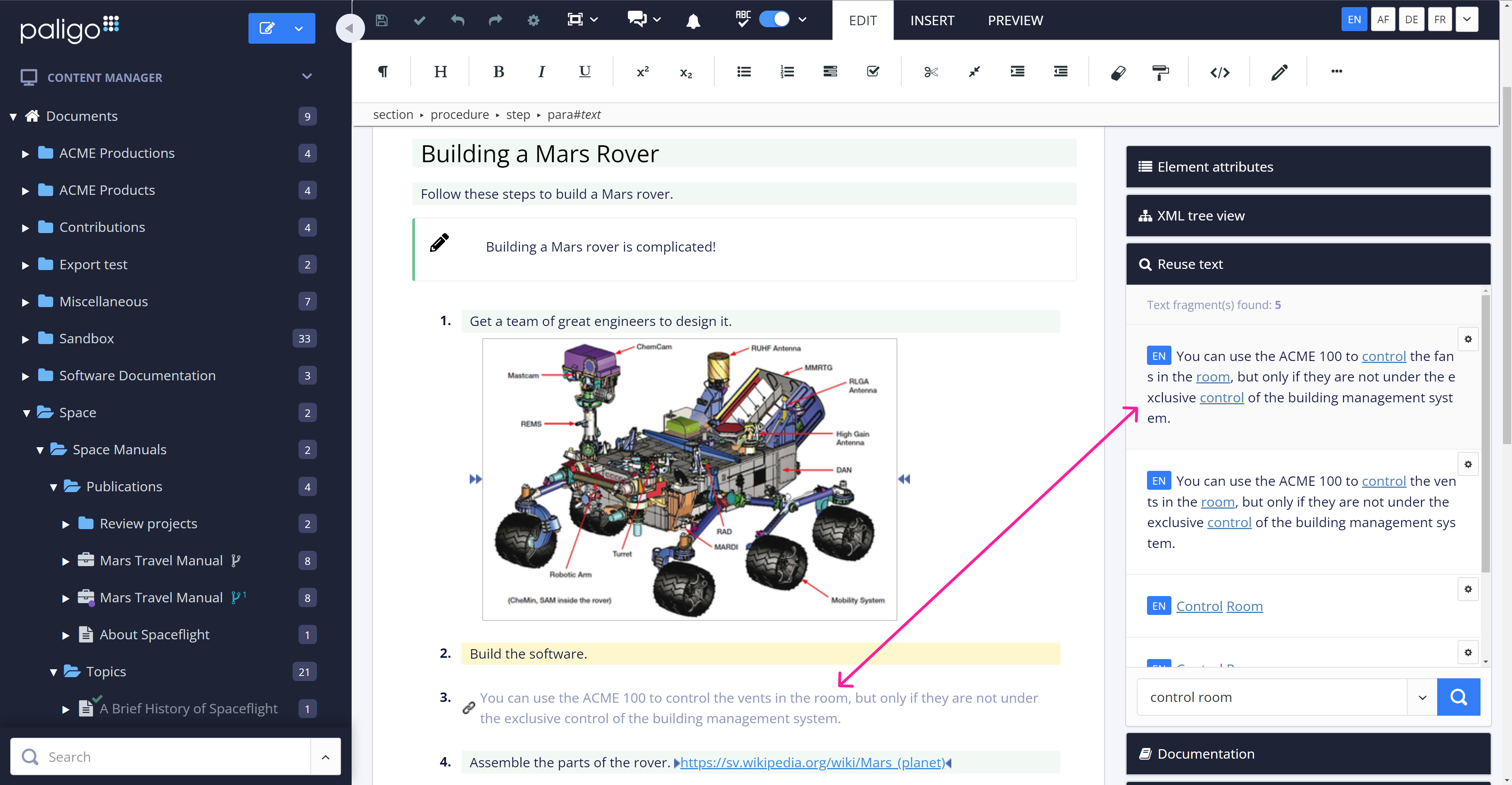
Screenshot of content reuse in Paligo
Screenshot of SME reviewing in Paligo
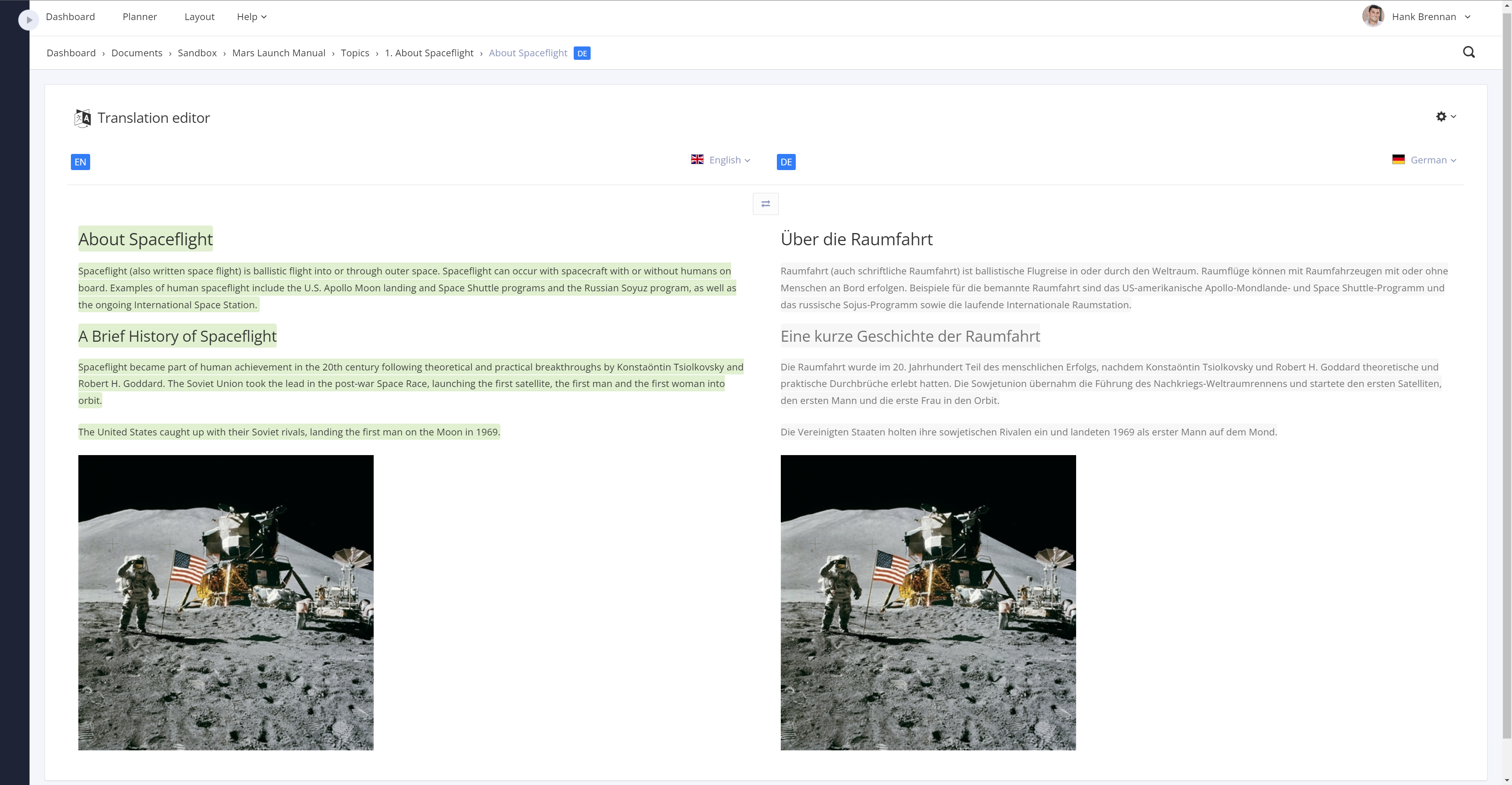
Screenshot of translations in Paligo
Screenshot of versioning in Paligo

1 / 11

Screenshot of branching in Paligo

98% reduction in document development and publishing time using Paligo

Use Cases and Deployment Scope

We use Paligo to publish all our catalogs and manuals for engineered pump products. I was the key decision maker on selecting Paligo and love it.

Business Problems: Data inconsistency and manual repetitive work were our biggest issues. We had same content used in 100 manuals, All the manuals were created in InDesign and there was no way to link the content. If we had to change/update the content, we had to open 100 manuals individually, update the content, save and publish the InDesign document. We also ran into issues where we would forget to update the content in document exposing the company to significant liabilities as the content was related to installation and maintenance procedures of critical pumps. We used Paligo to address the content duplication and inconsistency. With the reuse feature from Paligo, now we have only one source for each content and that is reused across all documents. This makes tracking the content, revising it very easy, saves lot of time for the team and customer is happy as they get good quality content


Pros

  • Reuse feature
  • Revision tracking
  • Publishing in various formats
  • user friendly design
  • mistake proof - there are only certain things one can do in a certain section. This makes it mistake proof.
  • Easy validation

Cons

  • Publishing as pdf and html with the same content
  • better support with coding for webpage HTML publishing.
  • better dashboards for project progress

Most Important Features

  • reuse
  • user friendly software
  • quick publishing for easy updates
  • revision tracking
  • content review by contributors

Return on Investment

  • 98% reduction in document development and publishing
  • Eliminated content inconsistencies completely
  • User friendly interface. Was able to train new people within weeks
  • Customer satisfaction - our customers were very happy with the document quality and functionality we provided through HTML publishing

Usability

Alternatives Considered

Adobe InDesign and Adobe Illustrator CC

Other Software Used

HubSpot Marketing Hub, Adobe Illustrator CC, Constant Contact, Adobe InDesign

Paligo does what it says it can do and more.

Use Cases and Deployment Scope

Content management to develop, and publish regulatory compliance documentation. Addresses the turn-around time needed to publish documentation to provide to the customers. Needed the ability to reuse content, a method to organize content, and an easy method to have content reviewed.

Pros

  • Ability to re-use content.
  • Ability to filter content to specific needs.
  • Ability to tag content using variables.

Cons

  • Better table functionality.
  • Move variable table buttons to prevent scrolling to add new variables.
  • Ability to locate profiles when a change is needed.

Most Important Features

  • Re-use content.
  • Filtering (profiling).
  • Easily publish manuals in multiple formats.

Return on Investment

  • Reduced time in publishing content and number of personnel needed.
  • Excellent collaboration when SMEs need to provide content, review, and approve documentation.
  • Easily managed by one person while allowing multiple users access to perform their job tasks.

Usability

Other Software Used

Microsoft 365, Egnyte, Adobe Acrobat

Single sourcing should also be fun!

Use Cases and Deployment Scope

We use Paligo mainly for making instructions for use at the moment. Translation administration included.

Pros

  • GUI
  • Filtering
  • Taxonomies
  • Image handling

Cons

  • Want have a more hard version handling; workflow via a baseline
  • Possibility to export and save all preferences made for PDF rendering

Most Important Features

  • Re-use of objects with simplicity
  • Support for unlimited languages
  • Easy to learn and understand in a relatively short time

Return on Investment

  • We are quicker to produce a very complex user manual and we believe our products are quite complex to describe
  • Re-use to a very high extent, almost 60% more or less guarantees that we reduce the risks by reusing already approved content to a large extent
  • Check-in and check-out of objects is done easily and there is no or very low risk of mistakes due to several people working at the same time

Usability

Alternatives Considered

MadCap Software, PTC Arbortext and Adobe FrameMaker

Other Software Used

Adobe Acrobat, Adobe Illustrator CC, Adobe PhotoShop, Adobe InDesign

Hard time choosing? Go with Paligo

Use Cases and Deployment Scope

As a software company that creates software for all kinds of businesses, we want our documentation to be easily available to customers. This documentation consists of product-related content; how to use and set up TOPdesk. We use Paligo to manage the content of this documentation and to publish it to a help center.

Pros

  • Good editor
  • Great support
  • Easy to manage the application
  • No performance issues
  • Good templates to quickly make your content publishable

Cons

  • Our HTML5 publication needed some accessibility improvements
  • More options to grant specific permissions to users
  • Would like a way to easily create a translation file with only the changed topics

Most Important Features

  • Content reuse
  • Translation Management
  • HTML5 publication

Return on Investment

  • Much less resources and time needed for application management
  • Public documentation

Usability

Other Software Used

Crowdin

Paligo is not only improving all our ways of working with technical documentation, it is also fun to work in!

Use Cases and Deployment Scope

Creating technical documentation for our customers has dramatically improved since we started working in Paligo. Using topics, and the possibility of reusing content, is a great advantage compared to before.

Pros

  • Reuse
  • Structure content
  • Intuitive interface
  • Great online support

Cons

  • Difficult to identify which text to reuse if the text is used in many places
  • Filter columns in a table

Most Important Features

  • Reuse
  • Easy to use
  • Publishing content

Return on Investment

  • I am sure we will discover other positive impacts along the way, but all the steps in creating technical documentation are so much easier and more fun now. We will be able to save a lot of time when we are up and running 100%.

Usability