

Planable
8 Reviews and Ratings
What is Planable?
Planable is a social media management tool built around content collaboration and approvals. It covers planning, creation, feedback, approval, scheduling, publishing, community management, analytics, competitor benchmarking, and social listening in one workspace.
Drafts render as exact previews of the finished post, feedback is left on the content itself rather than in a separate thread, and approval requirements are set per workspace. Planable was founded in 2016 and is used by 7,500+ teams.
Who it is for
Social media agencies managing content for multiple clients, multi-brand and multi-location companies, in-house marketing teams, and freelancers running several accounts, primarily where content requires sign-off before publication.
A Company contains Workspaces; each Workspace holds one brand or client, with its own connected pages, approval settings, labels, templates, and brand context. Billing consolidates at company level. Team Members see drafts and internal discussion; Client Members see only externally shared content. Six workspace roles: Owner, Administrator, Contributor, Writer, Approver, Guest, control who can create, edit, and approve.
Planning and creation
Four views: Feed (native previews per platform), Calendar (weekly and monthly, across channels), Grid (Instagram grid planning), and List (bulk actions across many posts).
Campaigns group content behind one initiative with a brief, dates, to-do lists, assets, and campaign-level analytics. Also included: labels, saved Custom Views, filters by approval and post status, post templates, recurring and grouped posts, version history, and a Media Library with nested folders and built-in editing. Universal Content puts blogs, newsletters, ads, and press releases on the same calendar as social posts.
Collaboration and approvals
Feedback tools: threaded comments with reactions and attachments, @mentions, annotations tied to highlighted text, and suggestions that propose exact replacement copy for the owner to accept or reject individually. Internal comments and internal posts stay hidden from client members.
Four approval types: none, optional, required, and multi-level with sequential stages and designated approvers. Supporting controls: automatic reminders on pending approvals, automatic scheduling on approval, content locking after approval, and a My Approvals queue aggregating pending items across all workspaces.
External stakeholders review via public post links (guest view links), or calendar, week, and campaign view links, without an account.
Publishing
Nine social channels: Facebook, Instagram, LinkedIn, X, TikTok, YouTube, Pinterest, Threads, and Google Business Profile.
Native formats include Instagram carousels, Reels, Stories, first comments, and collab tags; Facebook Stories and Reels; LinkedIn PDF carousels; YouTube videos and Shorts; and Google Business Profile posts and video.
Best Time to Post is on all plans and refreshes daily in the scheduling picker. Where platform APIs restrict third-party publishing, mobile-assisted publishing via the iOS and Android apps sends a push notification so scheduled content can be published natively.
Analytics and reporting
Add-on. Covers Facebook, Instagram, LinkedIn, TikTok, YouTube, and Google Business Profile, with up to 12 months of historical data and synchronization of posts published natively outside Planable.
Performance splits into organic, boosted, and paid on Facebook, Instagram, LinkedIn, and TikTok, down to individual posts, with cost metrics when an ad account is connected. Audience insights cover location, age, and gender on Instagram, LinkedIn, and TikTok, plus industry, seniority, and job function on LinkedIn.
Reports combine multiple platforms, selected sections and date ranges, a custom logo, and written notes. Shareable by link, exportable to PDF and CSV.
Competitor analytics
Included with the Analytics add-on. Tracks up to five competitors per page across Instagram, Facebook, LinkedIn, TikTok, and YouTube, synced daily.
It opens with a positioning matrix plotting accounts by posting volume against engagement in four quadrants, followed by growth tracking, engagement benchmarks, format performance (average engagement by post type, relative to competitors), and each competitor's top posts. Competitor charts can sit alongside first-party performance in the same customizable reports.
Social listening
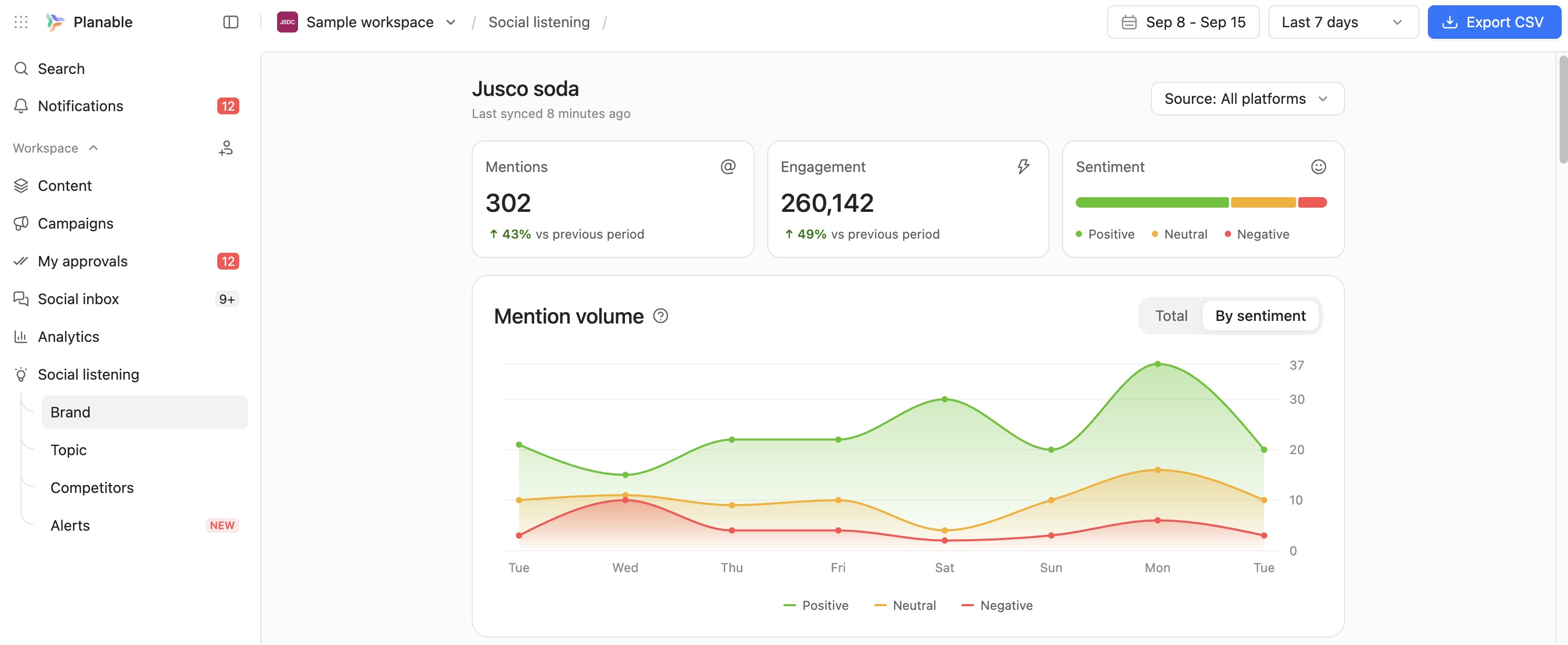
Add-on. Monitors brand, competitor, and topic keywords across Facebook, Instagram, LinkedIn, TikTok, X, YouTube, Reddit, and the wider web including blogs, news sites, forums, and newsletters. Keyword-based detection surfaces mentions where the brand was not tagged.
Mentions are classified positive, neutral, or negative, with volume and sentiment trends across 7-, 14-, and 30-day ranges. Alerts arrive in-app, by email, or in Slack. Full mention text exports to CSV.
Social inbox
Add-on. Consolidates comments from Facebook, Instagram, LinkedIn, and TikTok (including comments on paid Facebook and Instagram content) plus Instagram and Facebook direct messages.
Comments sort automatically into Negative, Questions, and Positive; conversations move through Open, Later, and Done. Engage permissions are assigned per team member, independently of other permissions.
AI capabilities
Brand Context is a per-workspace setting storing tone of voice, brand values, approved terminology, and audience. Every AI action reads it automatically, so organizations managing multiple brands keep a distinct voice per workspace.
Capabilities: caption generation from a prompt or from an uploaded image or video; rewriting to shorten, expand, or adjust tone; hashtag and post idea generation; and voice matching against previously published content. AI-generated ALT text set once in the Media Library applies to every post using that asset. Optional AI content labeling marks Instagram posts, reels, and stories created or altered with AI. In the Social Inbox, Answer with AI drafts a reply for review before sending. Brand Context also filters the Social Listening feed for relevance.
Integrations and AI workflows
An MCP connector, available on all plans including the free trial, connects Claude, ChatGPT, and Gemini to live account data. Connected assistants can browse workspaces, read posts and comments, create and edit drafts across one or multiple platforms, manage media, approve or reject where permitted, retrieve page and post metrics, and build reports. The connector inherits each user's role permissions, creates drafts rather than published posts, and cannot alter account settings or bypass approval controls.
A Public API on Pro and Enterprise plans covers workspaces, pages, posts, media, labels, stories, campaigns, custom views, and analytics. Other integrations: Slack for notifications and listening alerts, Canva for two-way asset transfer, Zapier for 6,000+ applications, and iOS and Android apps. Planable offers bundled pricing with SE Ranking for SEO and SE Visible for AI search visibility.
Plans
Basic, Pro, and Enterprise, priced per workspace, with a free trial for the first 50 posts, that requires no credit card. Analytics, Social Inbox, and Social Listening are add-ons available on any plan. Enterprise adds multi-level approvals, List view, unlimited campaigns, SSO, and a dedicated account manager.
Categories & Use Cases
Videos
Screenshots




1 / 8
Screenshot of Planable weekly content calendar in grid view showing scheduled posts with images, times, and platforms.
Product Demos
Technical Details
| Deployment Types | On-Premise, SaaS |
|---|---|
| Operating Systems | Windows, Mac |
| Mobile Application | Apple iOS, Android |