TrustRadius: an HG Insights company

Veeam Data Cloud for Microsoft 365

Score8.7 out of 10

582 Reviews and Ratings

What is Veeam Data Cloud for Microsoft 365?

Veeam Data Cloud for Microsoft 365 is a BaaS (Backup as a Service) solution used to back up and restore Microsoft 365 data, including Microsoft Exchange, Microsoft SharePoint, Microsoft OneDrive for Business and Microsoft Teams data.

Read more details.

Categories & Use Cases

Media

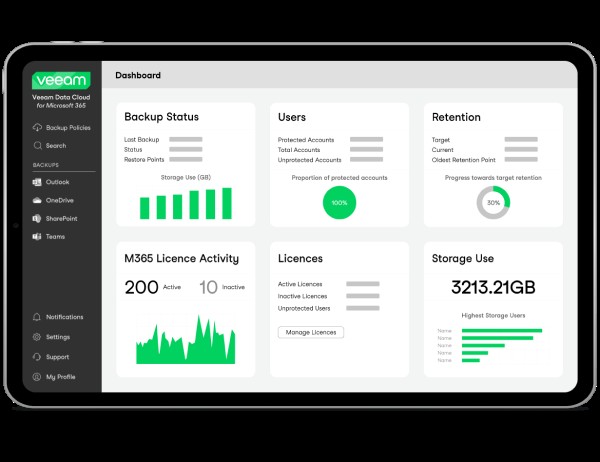
Veeam Data Cloud for Microsoft 365

Top Performing Features

  • SaaS Product Integration

    Integration with and backup capabilities for one or more SaaS products

    Category average: 8.9

  • Retention options

    Provision of best-practice and customizable retention policies with reporting

    Category average: 8.8

  • Multiple Data Restoration Options

    Multiple options for recovering all of your stored data or individual objects

    Category average: 8.4

Areas for Improvement

  • Ransomware Recovery

    The ability to recovery data in a timely manner after a ransomware attack

    Category average: 7.9

  • Malware protection

    Data is protected in the event of a malware attack

    Category average: 8

  • Data Auditing and Search

    eDiscovery capabilities for searching and managing stored data

    Category average: 7.7

Who Buys & Uses Veeam Data Cloud for Microsoft 365

Pros

  • Granular and rapid data restoration for individual items like emails, files, and SharePoint content.
  • Comprehensive backup coverage across Exchange, SharePoint, OneDrive, Teams, and Entra ID.
  • Straightforward setup and intuitive interface simplifying daily backup management.

Cons

  • Limitations in backup scheduling options, restricting user control over timing.
  • User interface and overall usability could be improved, presenting a learning curve for some.
  • Cost and licensing structure, specifically regarding shared mailboxes, is a point of contention.

Veeam Data Cloud for Microsoft 365 is it.

Use Cases and Deployment Scope

Well, we use Veeam Data Cloud to back up all of our users' profiles on the cloud, as well as OneDrive backup. We are definitely looking to expand the 365 area with the announced features and updates. We also use it for cloud backup and use our Pure Storage to back up to. We are currently happy with the efficiency and speed at which it works.

Pros

  • OneDrive backups.
  • User data or 365 user backups.
  • Exchange mailbox backup and restore.

Cons

  • Maybe on pre or hybrid backup for on prem users.
  • Functionality with maybe a user local profile backup.

Return on Investment

  • It has saved 365 user mailbox restores.

Usability

Veeam Data Cloud for Microsoft 365 Review.

Use Cases and Deployment Scope

Currently using the product to back up my Office 365 environment. Emails, SharePoint, Teams, etc. The product addresses the need to back up my data, because Microsoft does not back up your data.

Pros

  • Email backups.
  • SharePoint backups.

Cons

  • I would like the option to remove users from the backup and set them to an alternate storage location/ archive location. Currently, my backups are at 7 TB, and I would like to segment out data with lower data retention requirements.

Return on Investment

  • Positive impact on the amount of time it takes me to reference emails from the backups. Users ask for the email addresses of former employees. I can find it quickly and export the media to the users.

Usability

Good Software

Use Cases and Deployment Scope

Outstanding product, easy to use and setup. The intergration into my 365 domain was very simple with step by step tips on screen to follow, made the intergration very simple and the ability to store the data in prem is very useful. The ability to recover the data is outstanding

Pros

  • adding users
  • recovery
  • easy of set up

Cons

  • interface could be better
  • more intergration in other produces

Return on Investment

  • In the long run, on prem works well

Usability

Other Software Used

Adobe LLM Optimizer, Imagine Anything, Notepad++

Veeam Data Cloud for Microsoft 365

Use Cases and Deployment Scope

we are required, for many reasons to keep a local copy of any data sent to the cloud, we use Veeam Data Cloud for Microsoft 365 backup to store that local copy.

Pros

  • its very straight forward
  • self contained
  • one of the few products that does what it does

Cons

  • error messages are ambiguous
  • backup targets need more verity SMB/NFS
  • throughput and the reasons usually Microsoft, but hunting who's at fault takes time

Return on Investment

  • no real reason to recover, but ISO requirements and peace of mind

Usability

Second to None.

Use Cases and Deployment Scope

We use the Veeam Data Cloud for new employees to enter their personal data, such as dob, address, email, etc.

Pros

  • Check and verify the email address.
  • Create a personal profile for login purposes to their VDI profile remotely.
  • Collaborate with Office 365 like Outlook, PowerPoint, and Edge.
  • Provide data security like password creation.

Cons

  • Better online support.
  • PDF file type manual format for detailed training.
  • PowerPoint presentations of Veeam features.

Return on Investment

  • Since the company pays for the software license, it must be a positive ROI.

Usability

Alternatives Considered

Veeam Backup for Google Cloud Platform

Other Software Used

Adobe Acrobat