AccessPatrol by CurrentWare vs. Keepit

Overview
ProductRatingMost Used ByProduct SummaryStarting Price
AccessPatrol by CurrentWare
Score 6.0 out of 10
N/A
AccessPatrol by CurrentWare provides a solution for securing company endpoints against data breaches caused by illicit data transfers and rogue USB devices. AccessPatrol can be used to block flash drives, cell phones, tablets, Bluetooth, and more. File operations alerts and permissions can be configured to alert IT administrators to suspicious file operations and proactively prevent data transfers by unauthorized users.
$72
per year per user
Keepit
Score 9.4 out of 10
N/A
The Keepit platform, from the company of the same name in Copenhagen, is a solution that protects cloud data, boasting simple deployment and restore options that enable users to recover historic data. The Keepit platform supports any Cloud Workload and offers full retention on the user's terms from one year to eternity. It features indexing and search to ensure users have a complete view of data. The solution features supports Microsoft Office 365, Dynamics 365, Google Workspace, and…N/A
Pricing
AccessPatrol by CurrentWareKeepit
Editions & Modules
10-99 Users
$6
per month (billed annually) per user
100+ Users
Volume & prepurchase discounts available. Please contact sales for info.
Per User Per Month
No answers on this topic
Offerings
Pricing Offerings
AccessPatrol by CurrentWareKeepit
Free Trial
YesYes
Free/Freemium Version
NoNo
Premium Consulting/Integration Services
NoNo
Entry-level Setup FeeNo setup feeNo setup fee
Additional DetailsPricing is based on the volume of licenses purchased. There are additional discounts available for educational organizations, non-profits, managed services providers, and businesses that pre-purchase multiple-year plans.
More Pricing Information
Community Pulse
AccessPatrol by CurrentWareKeepit
Features
AccessPatrol by CurrentWareKeepit
Data Center Backup
Comparison of Data Center Backup features of Product A and Product B
AccessPatrol by CurrentWare
-
Ratings
Keepit
8.3
41 Ratings
3% below category average
Management dashboard00 Ratings8.241 Ratings
Retention options00 Ratings8.440 Ratings
Encryption00 Ratings8.238 Ratings
Enterprise Backup
Comparison of Enterprise Backup features of Product A and Product B
AccessPatrol by CurrentWare
-
Ratings
Keepit
8.0
35 Ratings
1% above category average
Operational reporting and analytics00 Ratings7.332 Ratings
Malware protection00 Ratings8.321 Ratings
Ransomware Recovery00 Ratings8.223 Ratings
SaaS Backup
Comparison of SaaS Backup features of Product A and Product B
AccessPatrol by CurrentWare
-
Ratings
Keepit
8.3
47 Ratings
4% below category average
SaaS Product Integration00 Ratings8.343 Ratings
Multiple Data Restoration Options00 Ratings8.247 Ratings
Data Auditing and Search00 Ratings8.245 Ratings
Data Storage in the Cloud or On-Premises00 Ratings8.338 Ratings
Best Alternatives
AccessPatrol by CurrentWareKeepit
Small Businesses
Paubox Email Suite
Paubox Email Suite
Score 9.0 out of 10
Cove Data Protection
Score 9.7 out of 10
Medium-sized Companies
Druva Security Cloud
Score 9.5 out of 10
Druva Security Cloud
Score 9.5 out of 10
Enterprises
Druva Security Cloud
Score 9.5 out of 10
Druva Security Cloud
Score 9.5 out of 10
All AlternativesView all alternativesView all alternatives
User Ratings
AccessPatrol by CurrentWareKeepit
Likelihood to Recommend
-
(0 ratings)
8.8
(54 ratings)
Likelihood to Renew
-
(0 ratings)
8.8
(6 ratings)
Usability
-
(0 ratings)
8.6
(5 ratings)
Support Rating
-
(0 ratings)
9.2
(4 ratings)
Implementation Rating
-
(0 ratings)
8.6
(4 ratings)
User Testimonials
AccessPatrol by CurrentWareKeepit
Likelihood to Recommend
CurrentWare Inc.
No answers on this topic
Keepit
We originally purchased Keepit for Microsoft 365 backups, but quickly added the Entra ID Advanced license to extend protection to our cloud identities. We soon found the product very effective, especially with cross-tenant restores, which makes M&A work much easier. We also used it to recover deleted users and Intune policies after an admin error, restoring access and settings quickly without data loss.
Read full review
Pros
CurrentWare Inc.
No answers on this topic
Keepit
  • Cross tenant restores, allows you to migrate mailboxes from one tenant to another.
  • Being able to backup multiple tenants/platforms from a single interface is awesome.
  • The setup and ongoing maintenance is great, articles on how to setup security and gain access to data in a secure way is also a great feature
  • The interface is very intuitive and easy to navigate, it hides an awful lot of power
Read full review
Cons
CurrentWare Inc.
No answers on this topic
Keepit
  • Providing more information on an ongoing restore job. Once you begin a restore or a data import, it seems to be impossible to see which user account that job is tied to.
  • Its job percentages seem to be drastically inaccurate. It will say a job is 76% complete even though it has only restored 484MB of 8GB - but this is just a little annoying and not a real problem.
Read full review
Likelihood to Renew
CurrentWare Inc.
No answers on this topic
Keepit
Keepit is an awesome product that garantees a result with a simple interface, and a quick configuration integration. Nowadays the service is really good and all requests have been replied to very quickly, and that´s important for our satisfaction. The possibility of multiple points recovery is a plus as well.
Read full review
Usability
CurrentWare Inc.
No answers on this topic
Keepit
Such a simple solution to use. User friendly, intuitive, processes can be completed in minutes instead of hours with restoring from tape, and requesting the return of tapes from the off site location, thus saving many hours and cost of storage. Also gives the end user a better experience as files can be restored almost immediately.
Read full review
Reliability and Availability
CurrentWare Inc.
No answers on this topic
Keepit
Never had a single issue with availability, what you would expect from this type of provider, it is perfect.
Read full review
Performance
CurrentWare Inc.
No answers on this topic
Keepit
No issues to report at all, pages are responsive, we have no other integrations, it is all good.
Read full review
Support Rating
CurrentWare Inc.
No answers on this topic
Keepit
Support helped us to set up SSO and MFA with our Azure AD Accounts. Once when the backup was failing, they could help us to investigate the reason and find a stale account that was preventing the backup. They are really concerned that the backup works and not only want to close the ticket like other support hotlines.
Read full review
Implementation Rating
CurrentWare Inc.
No answers on this topic
Keepit
The communication from KeepIT was on point, we did the implementation based on very little information as it was so easy to deploy, yet super powerful, it is a great tool.
Read full review
Alternatives Considered
CurrentWare Inc.
No answers on this topic
Keepit
We previously used Veeam to backup data from O365 to local servers. We had other SaaS platforms we needed to include and move from local to cloud backups. While Veeam does have multiple cloud options but compared with Keepit it was overly complicated and less cost effective. Keepit was a no-brainer in terms of simplicity and having a single 360 dashboard.
Read full review
Scalability
CurrentWare Inc.
No answers on this topic
Keepit
It has been fantastic, never mised a beat and restore test are always perfect.
Read full review
Return on Investment
CurrentWare Inc.
No answers on this topic
Keepit
  • User productivity increase when the users didn't need to manually recreate data when it was lost. Estimation of past cases: 100,000 $ per year
  • Company blackout on disasters: pricelessly :-)
  • Admin cost reduction, no more tape changes and storage costs: 10,000 $ per year
Read full review
ScreenShots

AccessPatrol by CurrentWare Screenshots
Screenshot of AccessPatrol's web console. This password-protected console is accessible to designated operators using a desktop or laptop that is connected to the LAN that the CurrentWare console is installed on.

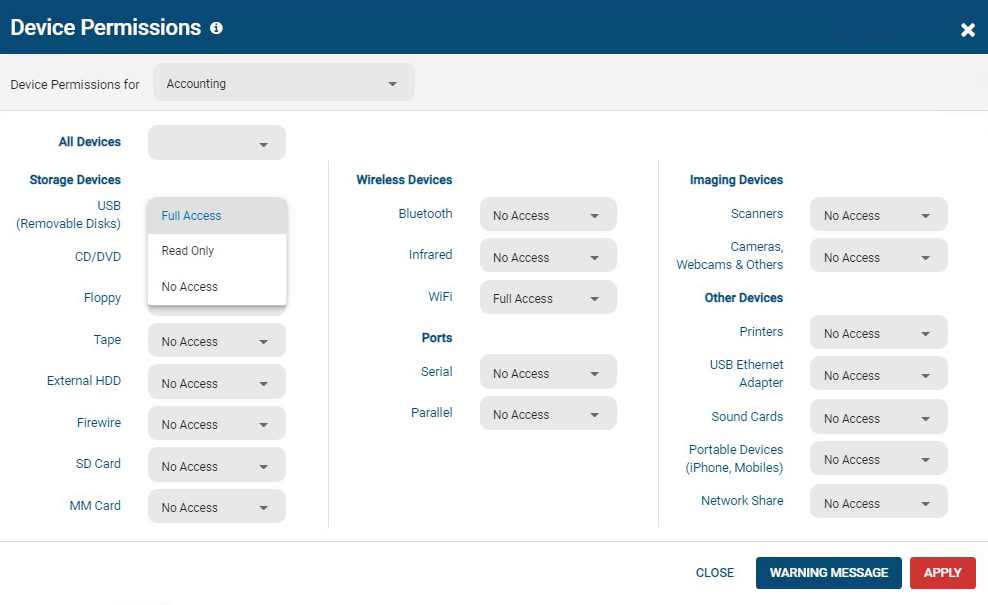
All users and computers with CurrentWare Clients installed can be managed from the console, including offsite/remote workers.Screenshot of AccessPatrol's device permissions window. This is the list of devices that can be blocked with AccessPatrol, including removable storage devices such as USB flash drives, optical media, and floppy disks. AccessPatrol can also block WiFi, Printers/Scanners, and other peripheral devices.

If specific USB devices need to be allowed that can be whitelisted using the Allowed List. By design AccessPatrol does not block USB-based HID devices such as keyboards and mice; blocking USBs will still allow these devices to function as normal.Screenshot of AccessPatrol's USB activity dashboards provide aggregated and granular USB activity data at a glance including file operations and blocked vs allowed devicesScreenshot of AccessPatrol's Block File Transfers window.  File transfers can be blocked based on extensions or specific file names.Screenshot of Screenshot of

Keepit Screenshots

Screenshot of Login screenScreenshot of Connectors PageScreenshot of Configuration Pop Up for MicrosoftScreenshot of Job MonitorScreenshot of Restore Pop Up