Amazon Tensor Flow vs. Dragon Speech Recognition vs. OpenText Magellan

Overview
ProductRatingMost Used ByProduct SummaryStarting Price
Amazon Tensor Flow
Score 8.0 out of 10
N/A
Amazon TensorFlow enables developers to quickly and easily get started with deep learning in the cloud.N/A
Dragon Speech Recognition
Score 7.2 out of 10
N/A
Dragon is a suite of AI-powered speech recognition solutions designed for professional dictation, document creation, and workflow automation. The platform utilizes Deep Learning technology to convert spoken language into text with high precision, allowing users to control their workstations and author complex documents through natural language.
$14.99
per month
OpenText Magellan
Score 9.0 out of 10
N/A
OpenText Magellan Analytics Suite leverages a comprehensive set of data analytics software to identify patterns, relationships and trends through data visualizations and interactive dashboards.N/A
Pricing
Amazon Tensor FlowDragon Speech RecognitionOpenText Magellan
Editions & Modules
No answers on this topic
Dragon Anywhere
$14.99
per month
Dragon Professional Individual, v15
$500
per license
Dragon Legal Individual, v15
$500
per license
Dragon Professional Anywhere
Contact sales team
Dragon Legal Anywhere
Contact sales team
Dragon Law Enforcement
Contact sales team
No answers on this topic
Offerings
Pricing Offerings
Amazon Tensor FlowDragon Speech RecognitionOpenText Magellan
Free Trial
NoNoNo
Free/Freemium Version
NoNoNo
Premium Consulting/Integration Services
NoNoNo
Entry-level Setup FeeNo setup feeNo setup feeNo setup fee
Additional Details
More Pricing Information
Community Pulse
Amazon Tensor FlowDragon Speech RecognitionOpenText Magellan
Considered Multiple Products
Amazon Tensor Flow
Chose Amazon Tensor Flow
Microsoft Azure is better than Amazon Tensor Flow because it provides easier and pre-built capabilities such as Anomaly Detection, Recommendation, and Ranking.

AWS is better than IBM Watson ML Studio because it has direct and prebuilt clustering capabilities
Dragon Speech Recognition
Chose Dragon Speech Recognition
You can train in unknown words and use autotext. It learns my writing style and uses AI algorithms to understand context of dictation. Dragon works on all applications instead of googles service that will work online only. Can program Dragon commands to complete repetitive …
Chose Dragon Speech Recognition
With Nuance Dragon Speech Recognition, I don't have to be online to make it effective, where VoiceTyper requires you to be connected. Nuance Dragon Speech Recognition is a more comprehensive program for punctuation and commands.
Chose Dragon Speech Recognition
Nuance Dragon Speech Recognition is far behind all of the built-in and free speech AI assistants--this includes Cortana, Google Assistant, Alexa, and Siri. The other AIs automatically do many things that Nuance Dragon Speech Recognition does not (e.g., commas, periods, and …
Chose Dragon Speech Recognition
I have previously used Adobe Acrobat Reader in other organisations and I found it to be very good. However, as I purchased Nuance Dragon Speech Recognition for home use, there was a considerable difference in the price between the two products. For both work and home use,I …
Chose Dragon Speech Recognition
Other than the more recent speech recognition tools from Microsoft, Google, etc., I have always used Nuance Dragon Speech Recognition. I was introduced to AI technology on an appraisal assignment. During the engagement, I had an opportunity to learn about the technology, and …
Chose Dragon Speech Recognition
Nuance Dragon uses recognition models based on the analysis of thousands of voice and text samples when users set and train their user profile. The created user profiles are then modified based on their sound (acoustic model) as well as the words and expressions used …
Chose Dragon Speech Recognition
Apple dictation is free and already integrated into the OS. It works very fast, and accuracy can be improved over time, depending on what OS version you have.
OpenText Magellan
Chose OpenText Magellan
There is multiple software available in the market to do the reporting and text analytics. Generally, analysts prefer using Python or R. Or we try to use any API available. This software can fulfill almost 80% of those needs without writing the codes. It has the integration …
Chose OpenText Magellan
OpenText Magellan can produce reports that are much more elaborate than PowerBI, which is ideal for users that just need to see a report. On the other hand, PowerBI seems to be better at allowing users to interact with data.
Chose OpenText Magellan
It is vastly superior to these in many ways, for complex reporting it is a much more sophisticated solution. Visualizations are very good. Javascript extensibility is very powerful, others don't support this or as well. Pentaho and MS are both OLAP oriented. Pentaho is moving …
Chose OpenText Magellan
Actuate has been in the industry a while and the open source community make going with Actuate's BIRT a stable decision. Changing report engines can be expensive, so going with a company with a good reputation helps long-term.
Chose OpenText Magellan
I've used JReports and Actuate is very similar but seems to have a lot more customization features for the end user of BIRT reports.
Chose OpenText Magellan
Actuate has a HUGE number of features that can tie nicely into almost any ERP but it takes some time to learn and the development community was relatively small compared to the Crystal Reports alternative. Crystal was far easier to learn and had a massive support base. Probably …
Chose OpenText Magellan
We looked at a few other competitor's products but based on value for features chose Actuate for its total cost of ownership.
Features
Amazon Tensor FlowDragon Speech RecognitionOpenText Magellan
BI Standard Reporting
Comparison of BI Standard Reporting features of Product A and Product B
Amazon Tensor Flow
-
Ratings
Dragon Speech Recognition
-
Ratings
OpenText Magellan
7.0
Ratings
16% below category average
Customizable dashboards00 Ratings00 Ratings7.00 Ratings
Report Formatting Templates00 Ratings00 Ratings7.00 Ratings
Ad-hoc Reporting
Comparison of Ad-hoc Reporting features of Product A and Product B
Amazon Tensor Flow
-
Ratings
Dragon Speech Recognition
-
Ratings
OpenText Magellan
8.3
Ratings
3% above category average
Drill-down analysis00 Ratings00 Ratings8.00 Ratings
Formatting capabilities00 Ratings00 Ratings8.00 Ratings
Integration with R or other statistical packages00 Ratings00 Ratings9.00 Ratings
Report sharing and collaboration00 Ratings00 Ratings8.00 Ratings
Report Output and Scheduling
Comparison of Report Output and Scheduling features of Product A and Product B
Amazon Tensor Flow
-
Ratings
Dragon Speech Recognition
-
Ratings
OpenText Magellan
8.3
Ratings
2% above category average
Publish to Web00 Ratings00 Ratings8.00 Ratings
Publish to PDF00 Ratings00 Ratings8.00 Ratings
Report Versioning00 Ratings00 Ratings9.00 Ratings
Report Delivery Scheduling00 Ratings00 Ratings8.00 Ratings
Data Discovery and Visualization
Comparison of Data Discovery and Visualization features of Product A and Product B
Amazon Tensor Flow
-
Ratings
Dragon Speech Recognition
-
Ratings
OpenText Magellan
8.0
Ratings
0% above category average
Pre-built visualization formats (heatmaps, scatter plots etc.)00 Ratings00 Ratings9.00 Ratings
Predictive Analytics00 Ratings00 Ratings7.00 Ratings
Access Control and Security
Comparison of Access Control and Security features of Product A and Product B
Amazon Tensor Flow
-
Ratings
Dragon Speech Recognition
-
Ratings
OpenText Magellan
9.0
Ratings
6% above category average
Role-Based Security Model00 Ratings00 Ratings9.00 Ratings
Multiple Access Permission Levels (Create, Read, Delete)00 Ratings00 Ratings9.00 Ratings
Single Sign-On (SSO)00 Ratings00 Ratings9.00 Ratings
Mobile Capabilities
Comparison of Mobile Capabilities features of Product A and Product B
Amazon Tensor Flow
-
Ratings
Dragon Speech Recognition
-
Ratings
OpenText Magellan
7.0
Ratings
11% below category average
Responsive Design for Web Access00 Ratings00 Ratings7.00 Ratings
Dashboard / Report / Visualization Interactivity on Mobile00 Ratings00 Ratings7.00 Ratings
Application Program Interfaces (APIs) / Embedding
Comparison of Application Program Interfaces (APIs) / Embedding features of Product A and Product B
Amazon Tensor Flow
-
Ratings
Dragon Speech Recognition
-
Ratings
OpenText Magellan
6.2
Ratings
22% below category average
REST API00 Ratings00 Ratings5.00 Ratings
Javascript API00 Ratings00 Ratings9.00 Ratings
Java API00 Ratings00 Ratings5.00 Ratings
Themeable User Interface (UI)00 Ratings00 Ratings7.00 Ratings
Customizable Platform (Open Source)00 Ratings00 Ratings5.00 Ratings
Best Alternatives
Amazon Tensor FlowDragon Speech RecognitionOpenText Magellan
Small Businesses
InterSystems IRIS
InterSystems IRIS
Score 8.1 out of 10
RingCentral Contact Center
Score 8.5 out of 10
Yellowfin
Yellowfin
Score 8.6 out of 10
Medium-sized Companies
Posit
Posit
Score 10.0 out of 10
Zoom Contact Center
Zoom Contact Center
Score 8.7 out of 10
Reveal
Reveal
Score 10.0 out of 10
Enterprises
Posit
Posit
Score 10.0 out of 10
Verint Speech and Text Analytics
Score 8.4 out of 10
Kyvos Semantic Layer
Score 9.5 out of 10
All AlternativesView all alternativesView all alternativesView all alternatives
User Ratings
Amazon Tensor FlowDragon Speech RecognitionOpenText Magellan
Likelihood to Recommend
9.0
(0 ratings)
9.0
(0 ratings)
9.0
(0 ratings)
Likelihood to Renew
-
(0 ratings)
-
(0 ratings)
3.9
(0 ratings)
Usability
-
(0 ratings)
8.0
(0 ratings)
9.0
(0 ratings)
Support Rating
-
(0 ratings)
5.0
(0 ratings)
9.0
(0 ratings)
User Testimonials
Amazon Tensor FlowDragon Speech RecognitionOpenText Magellan
Likelihood to Recommend
A well-suited scenario for using AWS Tensor Flow is when having a project with a geographically dispersed team, a client overseas and large data to use for training. AWS Tensor Flow is less appropriate when working for clients in regions where it hasn't been allowed yet for use. Since smaller clients are in regions where AWS Tensor Flow hasn't been allowed for use, and those clients traditionally don't have enough hardware, this situation deters a wider use of the tool.
Read full review
Dragon is well suited for occasional dictation whereas for short tasks it may be less appropriate. Step by step commands can take a lot of time to program however these would be worthwhile long term if it is a repetitive task. Dragon is a new language to learn and this can be overwhelming. By following the guide this will support you for future use and it is possible to learn by using the "click" command which replicates the mouse click. With this scenario you can say what you see for example in Word, say click home then click centre which will centre the document
Read full review
It depends on extensibility, set-up, access & style. Actuate performs fairly well, but has performance issues because it sits on top of eclipse, which sits on top of Java. Extensibility usually comes at that price. Set-up is fairly straightforward and it can be secured.
Read full review
Pros
  • Amazon Elastic Compute Cloud (EC2) allows resizable compute capacity in the cloud, providing the necessary elasticity to provide services for both, small and medium-sized businesses.
  • Tensor Flow allows us to train our models much faster than in our on-premise equipment.
  • Most of the pre-trained models are easy to adapt to our clients' needs.
Read full review
  • The main advantage is that it calibrates itself around your tone and accent.
  • Integration with many apps and operative system is good.
  • Integrating custom words and acronyms is very easy, so, over time, recognition becomes very precise and customized.
Read full review
  • Ability to connect to different kinds of sources, including web services, and customize those queries to the extend needed
  • Provide tools to customize the look & feel of the reports as much as needed, even being able to choose different appearances for different outputs
  • Allowing scripting in the reports extends the functionality available
  • Allowing to embed reports without further licensing and maintaining all the functionality
Read full review
Cons
  • SageMaker isn't available in all regions. This is complicated for some clients overseas.
  • For larger instances, when using a GPU, it takes a while to talk to a customer service representative to ask for a limit increase. Given this, it's recommendable to ask in advance for a limit increase in more expensive and larger cases; otherwise, SageMaker will set the limit to zero by default.
  • Since the data has to be stored in S3 and copied to training, it doesn't allow to test and debug locally. Therefore, we have to wait a lot to check everything after every trail.
Read full review
  • Word recognition can always improve.
  • Sometimes puts stray words or characters on the page if you forget to tell the microphone to go to sleep.
  • Adds non-spoken words for no reason if there is a delay in speaking.
Read full review
  • Report rendering can take a long time for large reports (250,000+ pages) - we run these in batch over night
  • The deployment of production code from development to test to production enviroments can be complex due to the number of components that must compile
Read full review
Likelihood to Renew
No answers on this topic
  • Nuance Dragon Speech Recognition is not up to par with any of the other AI voice recognition technologies currently available
  • The software is also very buggy and crashes frequently
  • Punctuation also seems like an afterthought for Nuance Dragon Speech Recognition software--requiring the user to speak out each comma, period, etc.
Read full review
I am no longer working for the company that was using Actuate but I believe they would continue to use it because the stitching costs would be to high. It would require a complete rewrite of the reports and the never version of Actuate (BIRT) even required an almost complete report rewrite
Read full review
Usability
No answers on this topic
Overall, its gives the functionality that I need in my role and can support with automating tasks. I mainly use it for autotext, to add blocks of text and it works universally across all applications. It saves time and works well in Windows 11. It works very well navigating the web.
Read full review
It is quite intuitive to use. It is fit specifically for doing sentiment, emotion, and intention analysis as well as text classification and text summarization. I would have given 10 if it is fit for the purpose of doing image processing and analysis as well. There is a huge market to analyze video and image data.
Read full review
Support Rating
No answers on this topic
One of the worst companies in terms of customer service getting the download file because of a laptop upgrade took me months of work. No jokes.
Read full review
Always there on the front and backend for us and the client.
Read full review
Alternatives Considered
Microsoft Azure is better than Amazon Tensor Flow because it provides easier and pre-built capabilities such as Anomaly Detection, Recommendation, and Ranking. AWS is better than IBM Watson ML Studio because it has direct and prebuilt clustering capabilities AWS, like IBM Watson ML Studio, has powerful built-in algorithms, providing a stronger platform when comparing it with MS Azure ML Services and Google ML Engine.
Read full review
I have previously used Adobe Acrobat Reader in other organisations and I found it to be very good. However, as I purchased Nuance Dragon Speech Recognition for home use, there was a considerable difference in the price between the two products. For both work and home use,I found that Nuance Dragon Speech Recognition meets all my requirements.
Read full review
It is vastly superior to these in many ways, for complex reporting it is a much more sophisticated solution. Visualizations are very good. Javascript extensibility is very powerful, others don't support this or as well. Pentaho and MS are both OLAP oriented. Pentaho is moving more toward big data, which was not our primary focus. Others are stuck in the Crystal Reports Band metaphor.
Read full review
Return on Investment
  • Positive: It has allowed us to work with our overseas teams without any large hardware investing.
  • Positive: Pre-trained models significantly reduce the time to develop solutions for our clients.
  • Negative: Since it's a relatively new tool, you have to be careful about not paying for large errors while learning to use the tool.
Read full review
  • Nuance Dragon Speech Recognition has made it easier to dictate progress notes
  • Nuance Dragon Speech Recognition has made seeing patients more efficient
  • Nuance Dragon Speech Recognition was a little expensive for our smaller practice
Read full review
  • Actuate can handle 50 to 60 sub reports inside a report very well.
  • Dynamically creating the datasource, chart, graph, reports are the main advantages. We can do any level of drilling, and can create a performance matrix dashboard efficiently.
Read full review
ScreenShots

OpenText Magellan Screenshots

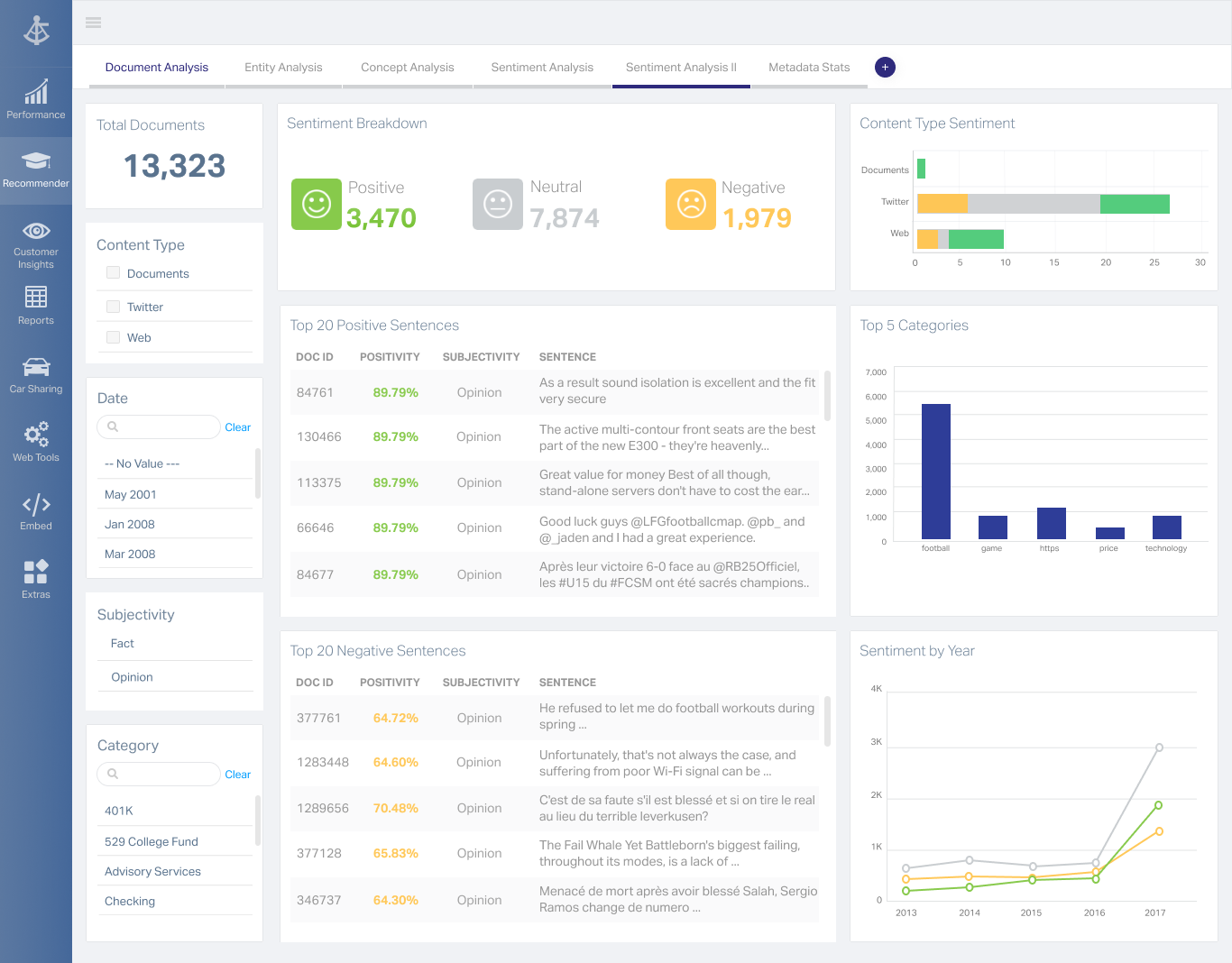
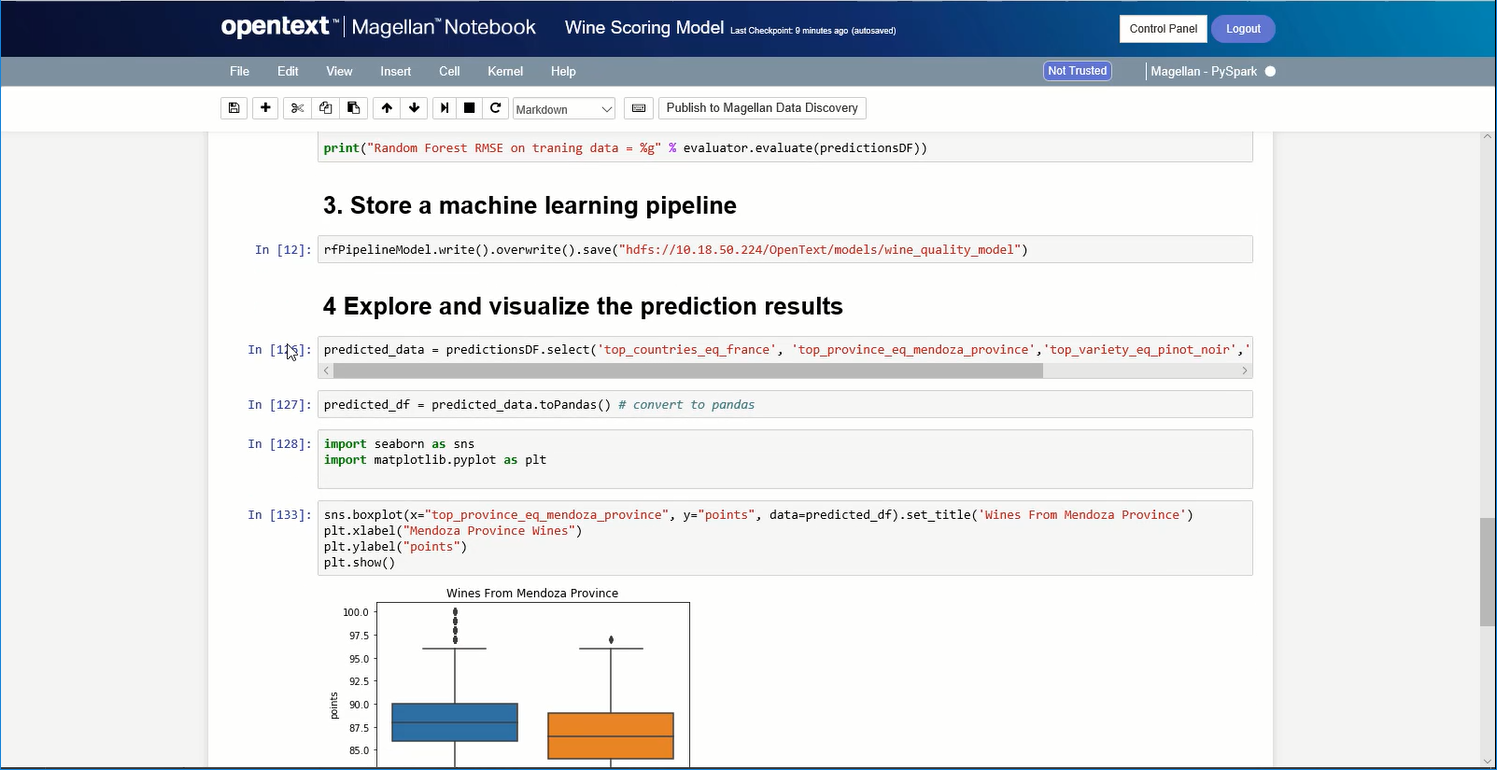
Screenshot of A Magellan BI & Reporting dashboard that an individual can interact with and personalize to their needs, such as changing chart types or computations.Screenshot of Magellan Data Discovery provides a Smart User Interface, designed to equip new users and users seeking a more streamlined set of features for insightsScreenshot of Magellan Data Discovery provides an Advanced User Interface that allows data analytics pros to leverage its breadth of sophisticated capabilities for insightsScreenshot of Magellan Text Mining insights can be displayed within easy-to-use dashboards.Screenshot of Data scientists can create visualizations within the Magellan Notebook and see it dynamically update as they write changes to it.