Overview
ProductRatingMost Used ByProduct SummaryStarting Price
Anaconda
Score 8.6 out of 10
N/A
Anaconda is an enterprise Python platform that provides access to open-source Python and R packages used in AI, data science, and machine learning. These enterprise-grade solutions are used by corporate, research, and academic institutions for competitive advantage and research.
$0
per month
Posit
Score 10.0 out of 10
N/A
Posit, formerly RStudio, is a modular data science platform, combining open source and commercial products.N/A
Tableau Public
Score 9.8 out of 10
N/A
Tableau Public is a free edition of the Desktop product. With this edition, data can only be published to the Tableau public website and does not allow work to be saved or exported locally.
$0
per month
Pricing
AnacondaPositTableau Public
Editions & Modules
Free Tier
$0
per month
Starter Tier
$15
per month per user
Business
$50
per month per user
Custom
Contact Sales
No answers on this topic
Offerings
Pricing Offerings
AnacondaPositTableau Public
Free Trial
NoYesNo
Free/Freemium Version
YesYesYes
Premium Consulting/Integration Services
YesNoNo
Entry-level Setup FeeNo setup feeOptionalNo setup fee
Additional DetailsUsers within organizations with 200+ employees/contractors (including Affiliates) require a paid Business license. Academic and non-profit research institutions may qualify for exemptions.
More Pricing Information
Community Pulse
AnacondaPositTableau Public
Considered Multiple Products
Anaconda
Chose Anaconda
Anaconda is way easier to set-up. On Anaconda we have users working on Machine Learning in minutes, where on PyCharm is takes a lot longer to set-up and often involves getting help from IT. PyCharm is easier to integrate with Code repositories (such as GitHub), so if that's …
Chose Anaconda
Suitable for Python development where there’s internal supporting for Python; otherwise, other platform offers similar capabilities with lower cost.
Chose Anaconda
Anaconda is very strong in the environment and version control that make data science work much easier. The only thing that might be comparable to Anaconda would be using Kubernetes to control Docker. Another potential improvement would be replacing spyder with PyCharm and Atom
Chose Anaconda
I have experience using RStudio oustide of Anaconda. RStudio can be installed via anaconda, but I like to use RStudio separate from Anaconda when I am worin in R. I tend to use Anaconda for python and RStudio for working in R. Although installing libraries and packages can …
Posit
Chose Posit
RStudio stacks up pretty well against Anaconda. However, Anaconda might be the first choice for someone who likes Python for their analytics and machine learning needs. In the past, I have found it seamless to connect Jupyter Notebook (in Anaconda suite) to integrate with other …
Chose Posit
RStudio was provided as the most customizable. It was also strictly the most feature-rich as far as enabling our organization to script, run, and make use of R open-source packages in our data analysis workstreams. It also provided some support for python, which was useful …
Chose Posit
For R and Python users, it’s one of the best tool available for developing, testing and deploying products.

Cost-wise, it's a bigger bang for the buck than other platforms that were evaluated.
Chose Posit
With RStudio I can easily deploy insightful information and I can update it. Moreover, it takes minutes normally to resolve most of the new requests or to scale if needed. I have the control of my code and I can translate it into digestible reporting.
Chose Posit
These all work synergistically and fulfill slightly different roles. In general this is determined by complexity of task and the degree of training and expertise of the end user. RStudio works well for organisations looking to move into doing more complex analytics. In general …
Chose Posit
I like the simplicity of Rstudio, and besides the obvious point that PyCharm is an IDE for python, I find Rstudio much more intuitive. Plotting is better, Rstudio is much easier to customize, and PyCharm tends to take a long time to load. However, I have not experienced as much …
Chose Posit
For R programming, it's the de-facto because it's designed specifically for it, but other language support is getting stronger.
Chose Posit
Python is free, RStudio requires commercial license for internal use.
Python is widely integrated with internal AWS tools, but RStudio is not.
Python is a more popular tool for ML models compared to RStudio.
Chose Posit
Spyder allows auto-write and recommendations in code, RStudio could potentially offer such integrations easily.
Chose Posit
Rstudio itself is very close to PyCharm but due to the R language and the package building system. What is more, object-oriented programming is more widely adopted in python rather than R, and deep learning packages are more available in python. The language is losing …
Chose Posit
Slower to reach ROI since it is more expensive. Rstudio also provides full text editor which is very powerful to play around with data. Also, cross platform feature which lets user to work in any operating system whether windows or mac gives Rstudio huge advantage over other …
Chose Posit
RStudio works similarly to PyCharm (and PyCharm can support R code) insofar as it's a development environment meant to improve the coding experience and easily provide commonly used resources (packages). They both provide a navigable dev environment with some learning curve. …
Tableau Public
Chose Tableau Public
Tableau Public allows users to upload their work to a designated place online, where others can view and download it. This feature does not available in OriginLab, which is also a useful and popular program to do data analysis.
Features
AnacondaPositTableau Public
Platform Connectivity
Comparison of Platform Connectivity features of Product A and Product B
Anaconda
9.3
25 Ratings
11% above category average
Posit
9.3
27 Ratings
11% above category average
Tableau Public
-
Ratings
Connect to Multiple Data Sources9.822 Ratings8.026 Ratings00 Ratings
Extend Existing Data Sources8.024 Ratings9.927 Ratings00 Ratings
Automatic Data Format Detection9.721 Ratings9.926 Ratings00 Ratings
MDM Integration9.614 Ratings00 Ratings00 Ratings
Data Exploration
Comparison of Data Exploration features of Product A and Product B
Anaconda
8.5
25 Ratings
1% above category average
Posit
9.0
27 Ratings
6% above category average
Tableau Public
-
Ratings
Visualization9.025 Ratings8.027 Ratings00 Ratings
Interactive Data Analysis8.024 Ratings10.024 Ratings00 Ratings
Data Preparation
Comparison of Data Preparation features of Product A and Product B
Anaconda
9.0
26 Ratings
10% above category average
Posit
10.0
26 Ratings
20% above category average
Tableau Public
-
Ratings
Interactive Data Cleaning and Enrichment8.823 Ratings10.024 Ratings00 Ratings
Data Transformations8.026 Ratings10.026 Ratings00 Ratings
Data Encryption9.719 Ratings00 Ratings00 Ratings
Built-in Processors9.620 Ratings00 Ratings00 Ratings
Platform Data Modeling
Comparison of Platform Data Modeling features of Product A and Product B
Anaconda
9.2
24 Ratings
9% above category average
Posit
10.0
22 Ratings
17% above category average
Tableau Public
-
Ratings
Multiple Model Development Languages and Tools9.023 Ratings10.022 Ratings00 Ratings
Automated Machine Learning8.921 Ratings00 Ratings00 Ratings
Single platform for multiple model development10.024 Ratings10.022 Ratings00 Ratings
Self-Service Model Delivery9.019 Ratings10.019 Ratings00 Ratings
Model Deployment
Comparison of Model Deployment features of Product A and Product B
Anaconda
9.5
21 Ratings
11% above category average
Posit
9.9
18 Ratings
15% above category average
Tableau Public
-
Ratings
Flexible Model Publishing Options10.021 Ratings10.018 Ratings00 Ratings
Security, Governance, and Cost Controls9.020 Ratings9.915 Ratings00 Ratings
BI Standard Reporting
Comparison of BI Standard Reporting features of Product A and Product B
Anaconda
-
Ratings
Posit
-
Ratings
Tableau Public
9.8
12 Ratings
19% above category average
Pixel Perfect reports00 Ratings00 Ratings9.710 Ratings
Customizable dashboards00 Ratings00 Ratings10.012 Ratings
Report Formatting Templates00 Ratings00 Ratings9.712 Ratings
Ad-hoc Reporting
Comparison of Ad-hoc Reporting features of Product A and Product B
Anaconda
-
Ratings
Posit
-
Ratings
Tableau Public
9.7
12 Ratings
22% above category average
Drill-down analysis00 Ratings00 Ratings9.812 Ratings
Formatting capabilities00 Ratings00 Ratings9.712 Ratings
Integration with R or other statistical packages00 Ratings00 Ratings9.59 Ratings
Report sharing and collaboration00 Ratings00 Ratings9.811 Ratings
Report Output and Scheduling
Comparison of Report Output and Scheduling features of Product A and Product B
Anaconda
-
Ratings
Posit
-
Ratings
Tableau Public
9.5
11 Ratings
15% above category average
Publish to Web00 Ratings00 Ratings10.011 Ratings
Publish to PDF00 Ratings00 Ratings10.09 Ratings
Report Versioning00 Ratings00 Ratings9.89 Ratings
Report Delivery Scheduling00 Ratings00 Ratings9.69 Ratings
Delivery to Remote Servers00 Ratings00 Ratings8.17 Ratings
Data Discovery and Visualization
Comparison of Data Discovery and Visualization features of Product A and Product B
Anaconda
-
Ratings
Posit
-
Ratings
Tableau Public
9.8
11 Ratings
23% above category average
Pre-built visualization formats (heatmaps, scatter plots etc.)00 Ratings00 Ratings9.811 Ratings
Location Analytics / Geographic Visualization00 Ratings00 Ratings9.811 Ratings
Predictive Analytics00 Ratings00 Ratings9.79 Ratings
Best Alternatives
AnacondaPositTableau Public
Small Businesses
Jupyter Notebook
Jupyter Notebook
Score 8.5 out of 10
Jupyter Notebook
Jupyter Notebook
Score 8.5 out of 10
Supermetrics
Supermetrics
Score 9.8 out of 10
Medium-sized Companies
Posit
Posit
Score 10.0 out of 10
Mathematica
Mathematica
Score 7.0 out of 10
Supermetrics
Supermetrics
Score 9.8 out of 10
Enterprises
Posit
Posit
Score 10.0 out of 10
Dataiku
Dataiku
Score 8.5 out of 10
IBM Analytics Engine
Score 7.2 out of 10
All AlternativesView all alternativesView all alternativesView all alternatives
User Ratings
AnacondaPositTableau Public
Likelihood to Recommend
10.0
(38 ratings)
10.0
(123 ratings)
8.5
(14 ratings)
Likelihood to Renew
7.0
(1 ratings)
9.7
(17 ratings)
9.1
(2 ratings)
Usability
9.0
(3 ratings)
8.0
(4 ratings)
10.0
(5 ratings)
Availability
-
(0 ratings)
9.4
(3 ratings)
-
(0 ratings)
Support Rating
8.9
(9 ratings)
8.9
(9 ratings)
9.6
(6 ratings)
Online Training
-
(0 ratings)
-
(0 ratings)
9.0
(1 ratings)
Implementation Rating
-
(0 ratings)
9.3
(4 ratings)
9.1
(2 ratings)
Configurability
-
(0 ratings)
10.0
(1 ratings)
-
(0 ratings)
Product Scalability
-
(0 ratings)
8.2
(3 ratings)
-
(0 ratings)
User Testimonials
AnacondaPositTableau Public
Likelihood to Recommend
Anaconda
I have asked all my juniors to work with Anaconda and Pycharm only, as this is the best combination for now. Coming to use cases: 1. When you have multiple applications using multiple Python variants, it is a really good tool instead of Venv (I never like it). 2. If you have to work on multiple tools and you are someone who needs to work on data analytics, development, and machine learning, this is good. 3. If you have to work with both R and Python, then also this is a good tool, and it provides support for both.
Read full review
Posit (formerly RStudio)
In my humble opinion, if you are working on something related to Statistics, RStudio is your go-to tool. But if you are looking for something in Machine Learning, look out for Python. The beauty is that there are packages now by which you can write Python/SQL in R. Cross-platform functionality like such makes RStudio way ahead of its competition. A couple of chinks in RStudio armor are very small and can be considered as nagging just for the sake of argument. Other than completely based on programming language, I couldn't find significant drawbacks to using RStudio. It is one of the best free software available in the market at present.
Read full review
Tableau
Tableau public is the best platform to build dashboards for your personal profile and share with recruiters. It's always good to keep ourselves updated on the latest features, create sample dashboards and save them to a personal profile. Tableau public is free and doesn't need any subscription. anyone can create an account and start building reports.
Read full review
Pros
Anaconda
  • Anaconda is a one-stop destination for important data science and programming tools such as Jupyter, Spider, R etc.
  • Anaconda command prompt gave flexibility to use and install multiple libraries in Python easily.
  • Jupyter Notebook, a famous Anaconda product is still one of the best and easy to use product for students like me out there who want to practice coding without spending too much money.
Read full review
Posit (formerly RStudio)
  • The support is incredibly professional and helpful, and they often go out of their way to help me when something doesn't work.
  • The one-click publishing from RStudio Connect is absolutely amazing, and I really like the way that it deploys your exact package versions, because otherwise, you can get in a terrible mess.
  • Python doesn't feel quite as native as R at the moment but I have definitely deployed stuff in R and Python that works beautifully which is really nice indeed.
Read full review
Tableau
  • Data visualization: lots of different options, including bar, scatter, pie, waterfall charts to explore relationships between variables, and to present findings/trends to different teams
  • Integrates readily with limited, though different data sources: TXT, CSV, TDE, Access
  • Exports reports for review of different dashboards: client-ready/team-ready, with a clean and tidy presentation in PDF format (or hardcopy)
Read full review
Cons
Anaconda
  • It can have a cloud interface to store the work.
  • Compatible for large size files.
  • I used R Studio for building Machine Learning models, Many times when I tried to run the entire code together the software would crash. It would lead to loss of data and changes I made.
Read full review
Posit (formerly RStudio)
  • Python integration is newer and still can be rough, especially with when using virtual environments.
  • RStudio Connect pricing feels very department focused, not quite an enterprise perspective.
  • Some of the RStudio packages don't follow conventional development guidelines (API breaking changes with minor version numbers) which can make supporting larger projects over longer timeframes difficult.
Read full review
Tableau
  • Tableau Public (both Desktop and Server) like their "for a fee" counterparts offer very easy to learn and use tools to transform data into pictures and gain insights into your data. Most organizations report a reduction in development time of 10x vs. other similar tools, due to the intuitive user interface. That said, with Tableau Public, published workbooks are "disconnected" from the underlying data sources and require periodic updates when the data changes. Users are limited to 1 Gb of storage space per user ID and password as well.
  • I would like to see better options for public sharing of visualizations and data from within the "for a fee" products as more and more organizations are moving in the direction of data sharing with partners and their communities.
Read full review
Likelihood to Renew
Anaconda
It's really good at data processing, but needs to grow more in publishing in a way that a non-programmer can interact with. It also introduces confusion for programmers that are familiar with normal Python processes which are slightly different in Anaconda such as virtualenvs.
Read full review
Posit (formerly RStudio)
There is no viable alternative right now. The toolset is good and the functionality is increasing with every release. It is backed by regular releases and ongoing development by the RStudio team. There is good engagement with RStudio directly when support is required. Also there's a strong and growing community of developers who provide additional support and sample code.
Read full review
Tableau
It's free, right? I'll keep using the free version. So the real question to ask is this? Will I pay $999 for the Personal version or $1,999 for the Professional? Yikes! That is a big stretch. I'm not sure about that. The product comparison chart is at: http://www.tableausoftware.com/public/comparison
Read full review
Usability
Anaconda
I am giving this rating because I have been using this tool since 2017, and I was in college at that time. Initially, I hesitated to use it as I was not very aware of the workings of Python and how difficult it is to manage its dependency from project to project. Anaconda really helped me with that. The first machine-learning model that I deployed on the Live server was with Anaconda only. It was so managed that I only installed libraries from the requirement.txt file, and it started working. There was no need to manually install cuda or tensor flow as it was a very difficult job at that time. Graphical data modeling also provides tools for it, and they can be easily saved to the system and used anywhere.
Read full review
Posit (formerly RStudio)
For someone who learns how to use the software and picks up on the "language" of R, it's very easy to use. For beginners, it can be hard and might require a course, as well as the appropriate statistical training to understand what packages to use and when
Read full review
Tableau
Tableau public is a great training tool to understand the basics of Tableau before buying it. A great tool to extend Excel's visualization and to publish data for others. Not useful for anything you need secure. No ability to access databases. Static information only.
Read full review
Reliability and Availability
Anaconda
No answers on this topic
Posit (formerly RStudio)
RStudio is very available and cheap to use. It needs to be updated every once in a while, but the updates tend to be quick and they do not hinder my ability to make progress. I have not experienced any RStudio outages, and I have used the application quite a bit for a variety of statistical analyses
Read full review
Tableau
No answers on this topic
Support Rating
Anaconda
Anaconda provides fast support, and a large number of users moderate its online community. This enables any questions you may have to be answered in a timely fashion, regardless of the topic. The fact that it is based in a Python environment only adds to the size of the online community.
Read full review
Posit (formerly RStudio)
Since R is trendy among statisticians, you can find lots of help from the data science/ stats communities. If you need help with anything related to RStudio or R, google it or search on StackOverflow, you might easily find the solution that you are looking for.
Read full review
Tableau
I have not yet required to contact support as the documentation and help i found online has always worked so far
Read full review
Online Training
Anaconda
No answers on this topic
Posit (formerly RStudio)
No answers on this topic
Tableau
I found it sufficient, and fast. I could easily "kick the tires" with Tableau on my data so I got up and running fast.
Read full review
Implementation Rating
Anaconda
No answers on this topic
Posit (formerly RStudio)
We did it at the individual level: anyone willing to code in R can use it. No real deployment involved.
Read full review
Tableau
Start at the end and work backward. Identify the business case / issue and questions the end users have, then identify the data needed, and where to get it.
Read full review
Alternatives Considered
Anaconda
I have experience using RStudio oustide of Anaconda. RStudio can be installed via anaconda, but I like to use RStudio separate from Anaconda when I am worin in R. I tend to use Anaconda for python and RStudio for working in R. Although installing libraries and packages can sometimes be tricky with both RStudio and Anaconda, I like installing R packages via RStudio. However, for anything python-related, Anaconda is my go to!
Read full review
Posit (formerly RStudio)
RStudio was provided as the most customizable. It was also strictly the most feature-rich as far as enabling our organization to script, run, and make use of R open-source packages in our data analysis workstreams. It also provided some support for python, which was useful when we had R heavy code with some python threaded in. Overall we picked Rstudio for the features it provided for our data analysis needs and the ability to interface with our existing resources.
Read full review
Tableau
Google Charts/Drive is sufficient for simpler data sets, but it does not integrate with other web platforms and the visualization does not look as professional. I'm not aware of any other competitors that offer the same package as Microsoft.
Read full review
Scalability
Anaconda
No answers on this topic
Posit (formerly RStudio)
RStudio is very scalable as a product. The issue I have is that it doesn't necessarily fit in nicely with the mainly Microsoft environment that everybody else is using. Having RStudio for us means dedicated servers and recruiting staff who know how to manage the environment. This isn't a fault of the product at all, it's just part of the data science landscape that we all have to put up with. Having said that RStudio is absolutely great for running on low spec servers and there are loads of options to handle concurrency, memory use, etc.
Read full review
Tableau
No answers on this topic
Return on Investment
Anaconda
  • It has helped our organization to work collectively faster by using Anaconda's collaborative capabilities and adding other collaboration tools over.
  • By having an easy access and immediate use of libraries, developing times has decreased more than 20 %
  • There's an enormous data scientist shortage. Since Anaconda is very easy to use, we have to be able to convert several professionals into the data scientist. This is especially true for an economist, and this my case. I convert myself to Data Scientist thanks to my econometrics knowledge applied with Anaconda.
Read full review
Posit (formerly RStudio)
  • Using it for data science in a very big and old company, the most positive impact, from my point of view, has been the ability of spreading data culture across the group. Shortening the path from data to value.
  • Still it's hard to quantify economic benefits, we are struggling and it's a great point of attention, since splitting out the contribution of the single aspects of a project (and getting the RStudio pie) is complicated.
  • What is sure is that, in the long run, RStudio is boosting productivity and making the process in which is embedded more efficient (cost reduction).
Read full review
Tableau
  • Tableau Public visualizations have helped drive traffic to our content and sites
  • The lack of cost means it's easy to demonstrate our experience to attract paying clients
Read full review
ScreenShots

Posit Screenshots

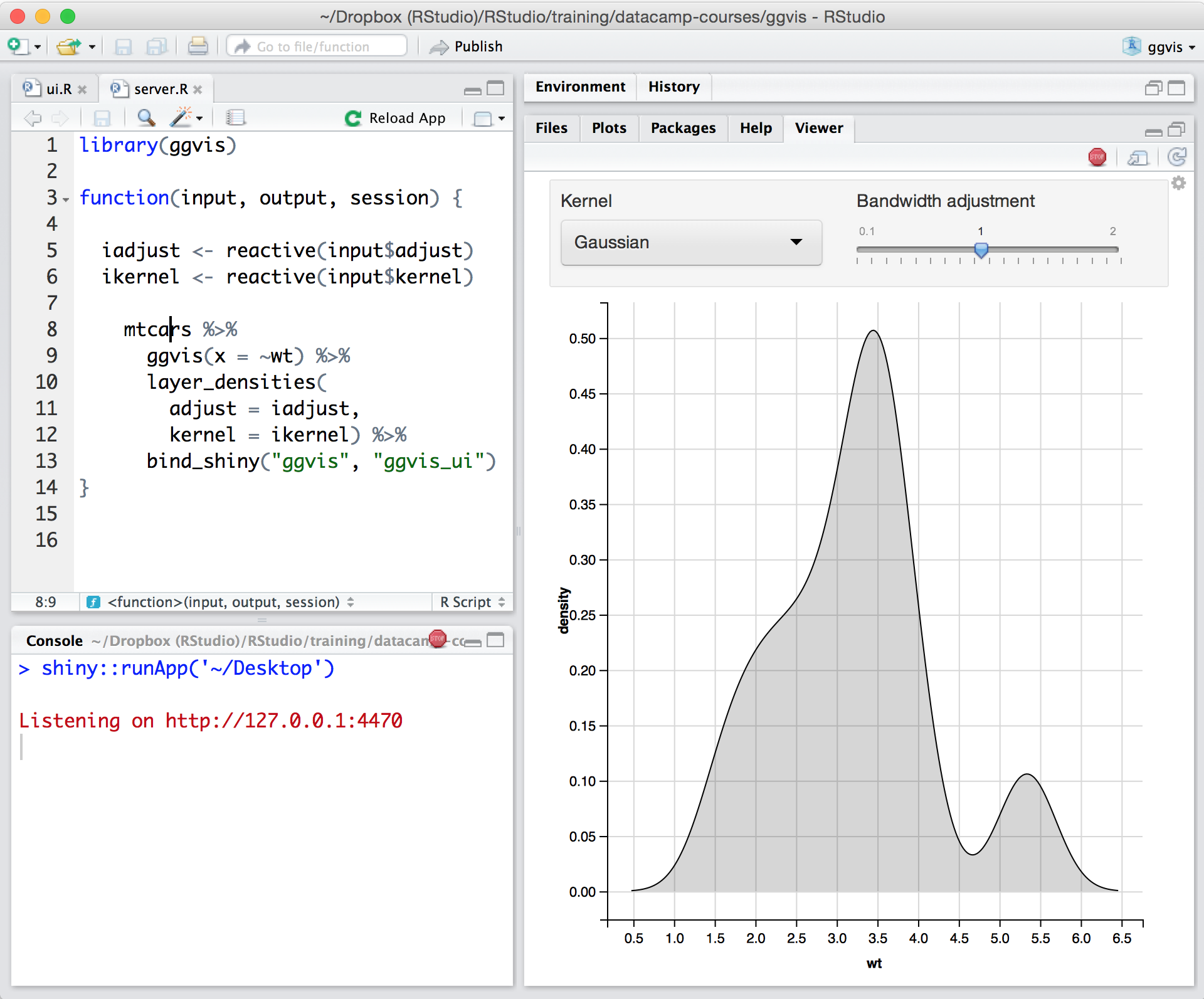
Screenshot of Posit runs on most desktops or on a server and accessed over the webScreenshot of Posit supports authoring HTML, PDF, Word Documents, and slide showsScreenshot of Posit supports interactive graphics with Shiny and ggvisScreenshot of Shiny combines the computational power of R with the interactivity of the modern webScreenshot of Remote Interactive Sessions: Start R and Python processes from Posit Workbench within various systems such as Kubernetes and SLURM with Launcher.Screenshot of Jupyter: Author and edit Python code with Jupyter using the same Posit Workbench infrastructure.