ApprovalMax vs. Yooz

Overview
ProductRatingMost Used ByProduct SummaryStarting Price
ApprovalMax
Score 8.2 out of 10
N/A
ApprovalMax provides approval workflow automation for cloud accounting platforms such as Xero and QuickBooks Online. It replaces paper- and email-based approval processes with multi-step and multi-role automated approval workflows that enable automated notifications to approvers, automated audit trails, and mobile approvals. Approval workflows include: Invoice approvals / bill review and bill approval Purchase order approval, including the functionality to create…
$54
per month
Yooz
Score 8.7 out of 10
Small Businesses (1-50 employees)
Yooz delivers intelligent financial operations automation that aims to reduce waste, mitigate risk, prevent fraud, and eliminate errors from the AP process. Yooz provides Lean Financial Operations™ for companies of all sizes, offering clarity and control in the most complex environments. The Yooz platform combines a workflow engine, real-time applied AI, and transparency, with advanced fraud detection. Boasting over 7,000 customers worldwide and processing more than 300 million…N/A
Pricing
ApprovalMaxYooz
Editions & Modules
ApprovalMax Standard
$54
per month per organization
ApprovalMax Advanced
$83
per month per organization
ApprovalMax Premium
$121
per month per organization
No answers on this topic
Offerings
Pricing Offerings
ApprovalMaxYooz
Free Trial
YesYes
Free/Freemium Version
NoNo
Premium Consulting/Integration Services
YesNo
Entry-level Setup FeeOptionalNo setup fee
Additional DetailsDiscount available for annual pricing and for management of multiple organizations.Subscription price based on the volume of documents processed. Unlimited number of users. 4 hours of complimentary service to start.
More Pricing Information
Features
ApprovalMaxYooz
Payment Management
Comparison of Payment Management features of Product A and Product B
ApprovalMax
8.0
1 Ratings
7% above category average
Yooz
8.5
39 Ratings
13% above category average
Customizable Approval Policies9.01 Ratings8.829 Ratings
Financial Document Management9.01 Ratings8.029 Ratings
Payment Status Tracking9.01 Ratings8.218 Ratings
Payment Audit Trail9.01 Ratings8.520 Ratings
Duplicate Bill Detection4.01 Ratings8.637 Ratings
Advanced OCR00 Ratings8.729 Ratings
Electronic Funds Transfer00 Ratings8.611 Ratings
Accounts Payable
Comparison of Accounts Payable features of Product A and Product B
ApprovalMax
8.5
1 Ratings
21% above category average
Yooz
8.4
40 Ratings
20% above category average
Automated Accounts Payable Processes9.01 Ratings8.840 Ratings
Vendor Management8.01 Ratings8.033 Ratings
Best Alternatives
ApprovalMaxYooz
Small Businesses
Square 9 Softworks
Square 9 Softworks
Score 9.5 out of 10
Square 9 Softworks
Square 9 Softworks
Score 9.5 out of 10
Medium-sized Companies
Square 9 Softworks
Square 9 Softworks
Score 9.5 out of 10
Square 9 Softworks
Square 9 Softworks
Score 9.5 out of 10
Enterprises
Webexpenses
Webexpenses
Score 8.7 out of 10
Webexpenses
Webexpenses
Score 8.7 out of 10
All AlternativesView all alternativesView all alternatives
User Ratings
ApprovalMaxYooz
Likelihood to Recommend
9.0
(1 ratings)
8.5
(45 ratings)
Likelihood to Renew
-
(0 ratings)
8.7
(3 ratings)
Usability
-
(0 ratings)
8.7
(18 ratings)
User Testimonials
ApprovalMaxYooz
Likelihood to Recommend
ApprovalMax
As mentioned previously - able to send invoice based on amount , program code and division code ,supplier is very useful feature ; If an invoice does not fit into approval process than it is rejected and an email is received mentioning the reason
Read full review
Yooz
Yooz is perfect for reoccurring invoices, such as utilities, as you can search by account# to show a list of entries allowing consistency across the board. Color coding can be used to differentiate between utilities or responsibilities. This also helps when exporting specific items. I can select one by one or by group.
Read full review
Pros
ApprovalMax
  • choice based on Program codes / division codes - we use Xero accounting system and we have 22 program codes and 11 divison codes ; once invoice is entered in Xero depending on relevant program code and divison code, Approval max automatically send invoice to relevant person depending on approval workflow process . One manager could be handling multiple divison and program codes; if our approval work flow process is properly designed - it is accurate in sending invoice to relevant manager.
  • invoice can also send to various managers based on General ledger codes ; this flexibility makes useful when manager is handling only certain nature of expenses regardless of program codes / divisionl.
  • Approval process can also be designed based on level of amount ; and level of amount is derived from our Delegation policy. it makes audit of application of delegation policy easy ; we give copy of delegation policy and print of approval work flow process to auditor.
Read full review
Yooz
  • Yooz allowed for the uploading of purchase orders and the matching of purchase orders to invoices for smooth processing of invoices.
  • Yooz performed three way matching in a stream lined manner.
  • Yooz was a user friendly software that integrated well with Oracle NetSuite.
Read full review
Cons
ApprovalMax
  • date and time of change in approval process ; for example if Mr. A was responsible for all expenses above $1000 in Oct 23 and from Nov 23 it is changed to $5000 . in Dec 23 if it is checked - it will show approval limit of $5000 ; but will not show from which date limit was changed. Auditor always asks this question when the limit was changed in approval max - we cannot prove it.
  • If there is audit trail of who made the changes , when and what changes were made ; will be good.
  • when we are in main page of seeing invoices awaiting approval - there are hundreds of invoices - searching for one invoice from particular supplier is very cumbersome job - we have to go by each and every invoice in order to find that invoice ; it will be good if we have search function on main page itself ; in current scenario we have to go to report section - input all filters and than search for that particular invoice.
Read full review
Yooz
  • when exporting we have to change the total column's to numbers or it will export with the incorrect totals.
  • Yooz needs to not allow itself to add a line to the total and change what you are posting. instead it needs to freeze you from moving on.
Read full review
Likelihood to Renew
ApprovalMax
No answers on this topic
Yooz
I love Yooz and everything it has brought to our organization!
Read full review
Usability
ApprovalMax
No answers on this topic
Yooz
It has helped me with invoices and able to see if i have a duplicate and to see how many times vendor has been processed in the system and also to see who is late if it has been in yooz and it needs to get paid soon and also how many coding i have used
Read full review
Alternatives Considered
ApprovalMax
Read full review
Yooz
Chrome River is slow and full of inconsistencies. Capturing invoices is confusing, as you have to assign approvers and coding at that time. No time to save it and research those details. It has multiple screens labeled inbox but are for different stages in the approval process that aren't specified unless you go into the invoice and review. When you go to exit the invoice, it takes you back to the main menu instead of the inbox you were currently working in. It is live, but the updates are every 10-15 minutes as opposed to immediately.
Read full review
Return on Investment
ApprovalMax
  • It has certainly made a positive impact ; it is definately worth its value ; when we are processing hundreds of invoices every fortnight ; getting approval of invoices in timely manner for all invoices is of paramount importance . as approval max has its own app - approval can be done on mobile phone also ; this is particularly helpful when staff is travelling .
Read full review
Yooz
  • Helps the invoicing process be much more organized & easier to follow
  • Able to get through invoices much quicker
  • Ease of contacting the person who it needs to go to or posting a question. This way everyone involved can see things in one area.
Read full review
ScreenShots

ApprovalMax Screenshots

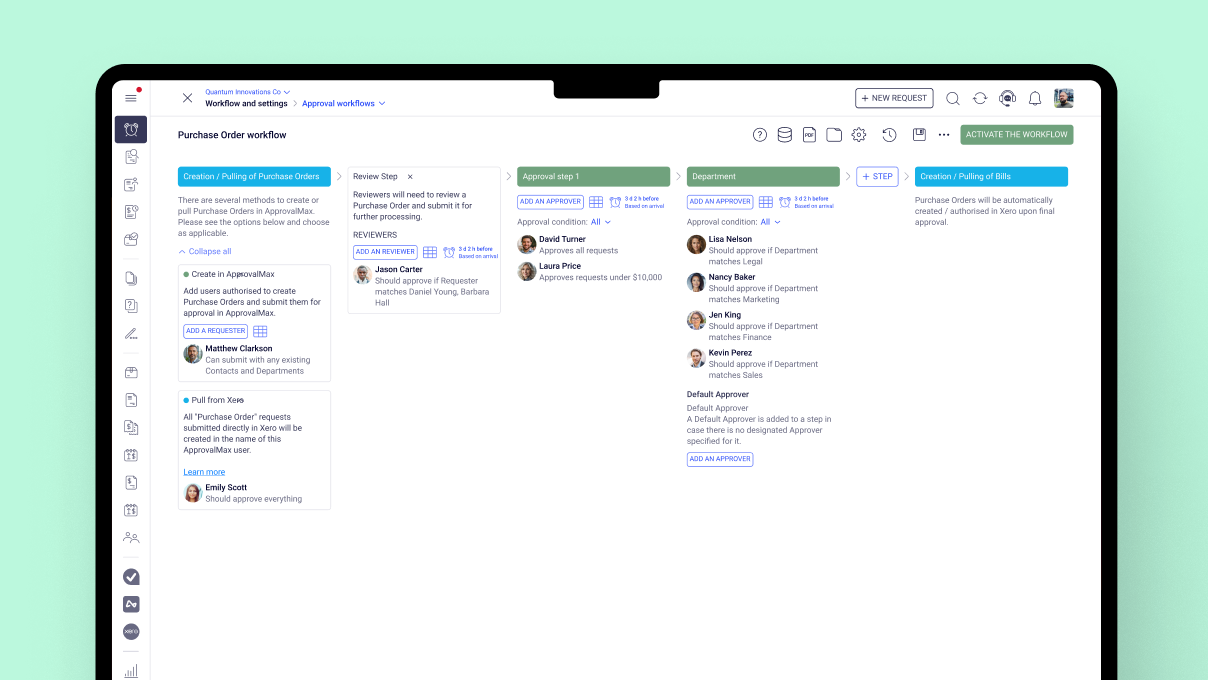
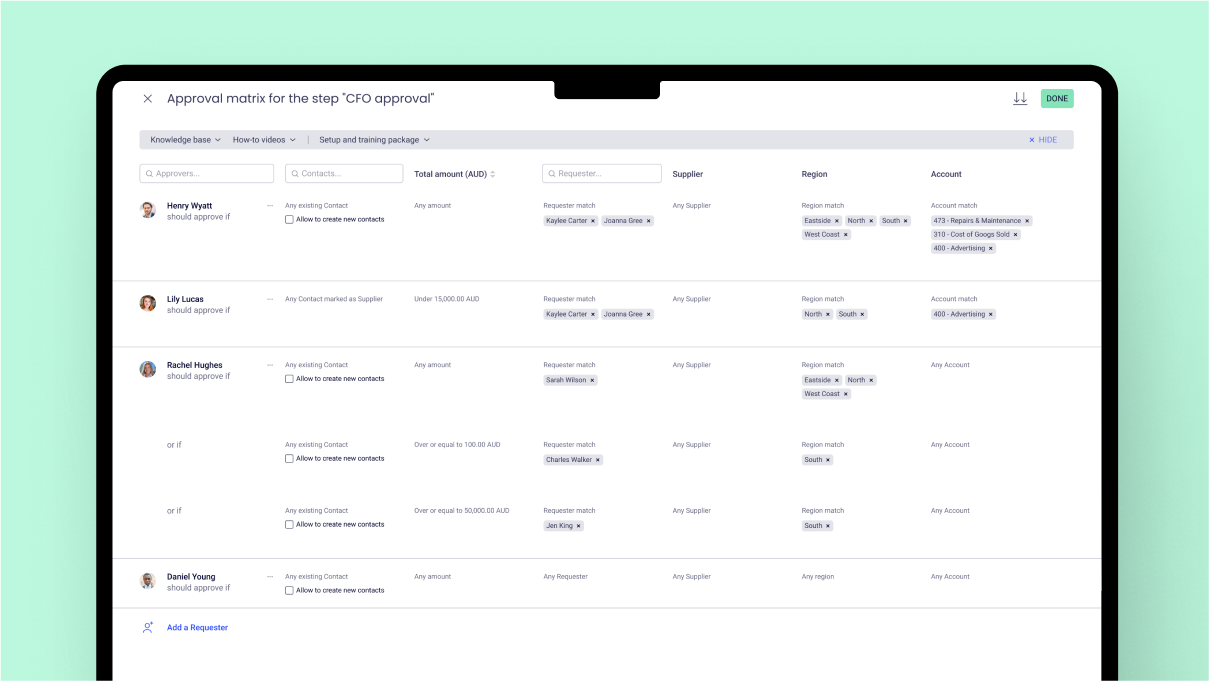
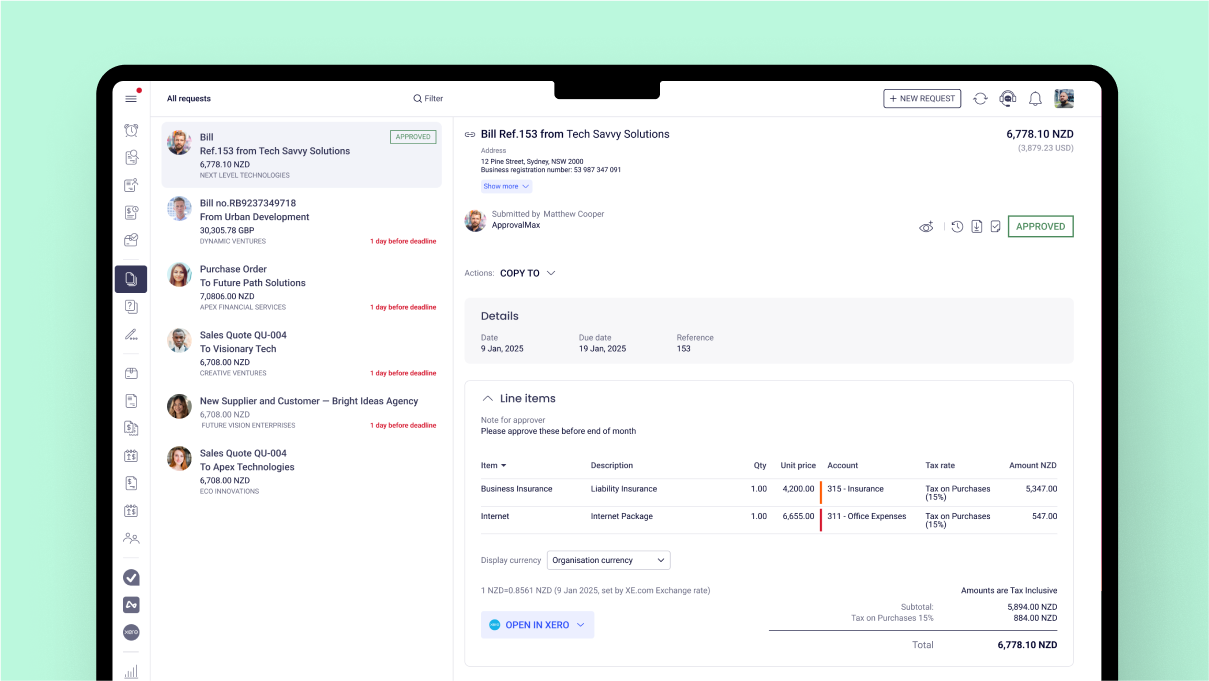
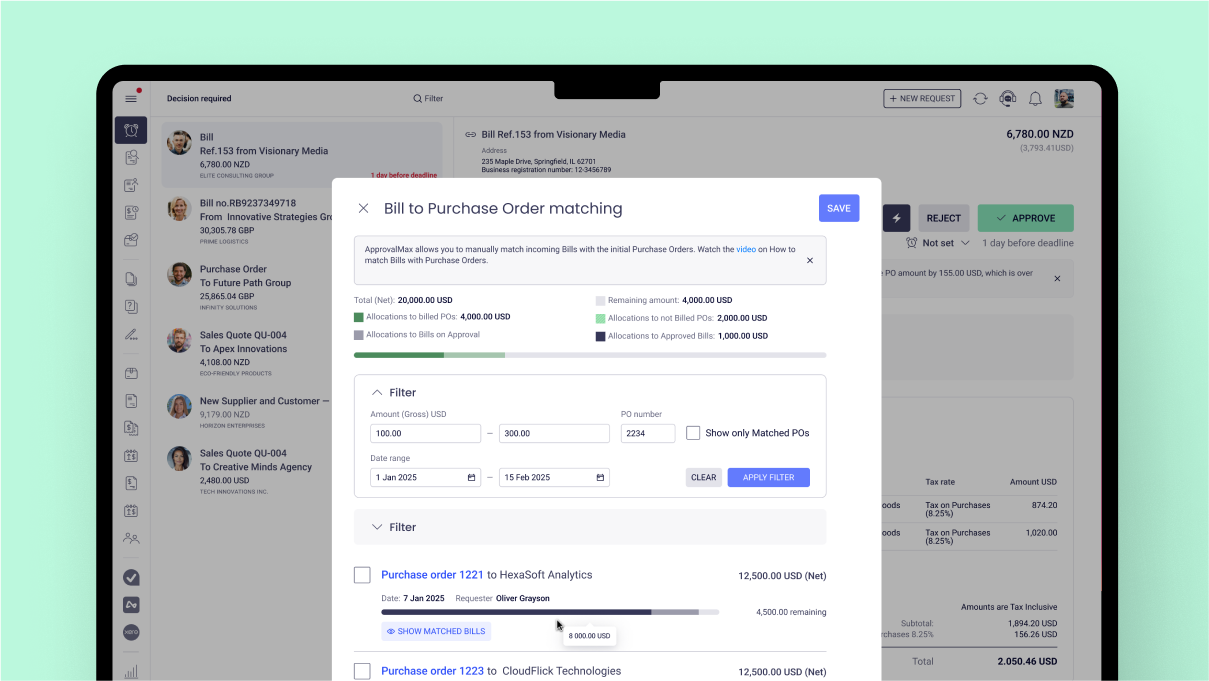
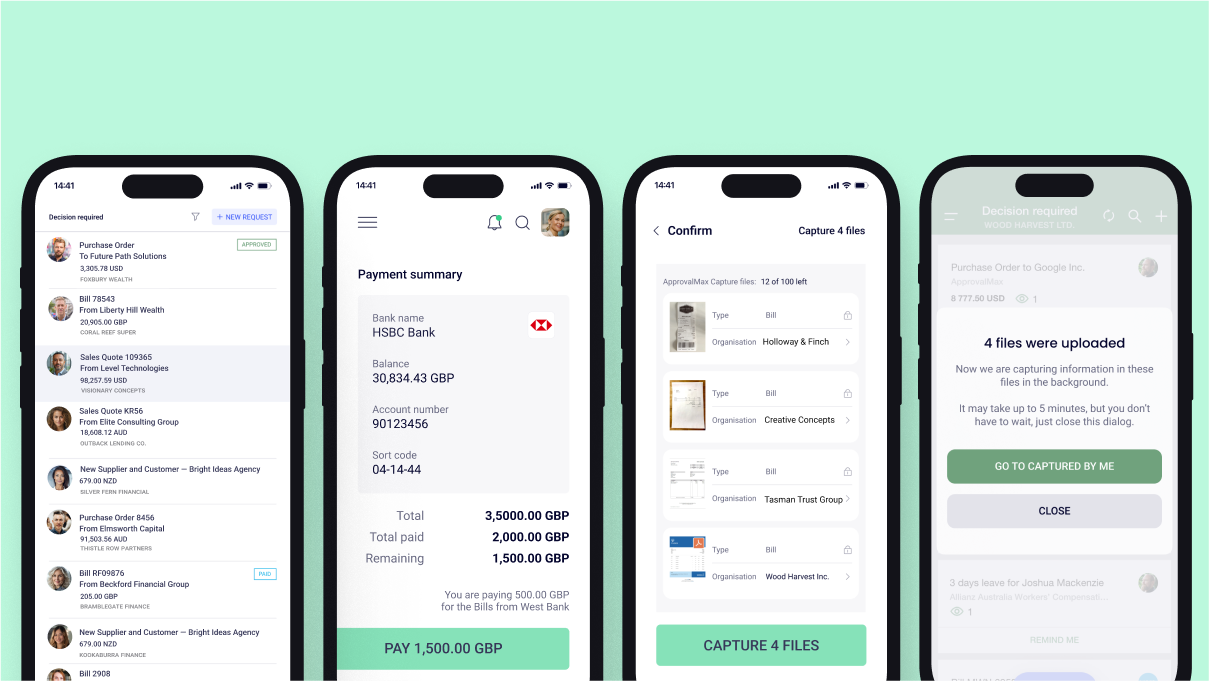
Screenshot of where approval processes are set up  – no matter how simple or complex.Screenshot of the interface to build approval steps that follow any business rules – whether approvals happen one after another, all at once, or only in certain cases. The user can also control who approves based on things like amount, supplier, account code, or category.Screenshot of where to approve bills and purchase orders the way that works best.Screenshot of the interface that matches bills to approved purchase orders from the same supplier to keep coding accurate and control spending. Unmatched bills can also be stopped from being approved.Screenshot of where to mention others in comments to bring them in or get their input – even if they’re not part of the original approval. If they don’t have access, a prompt to add them as a Watcher is sent. Mentions work on web and mobile, sending notifications as soon as access is granted.Screenshot of where to raise purchase orders, approve requests, and extract key details from bills and purchase orders – all on the go with the ApprovalMax mobile app for iOS and Android.

Yooz Screenshots

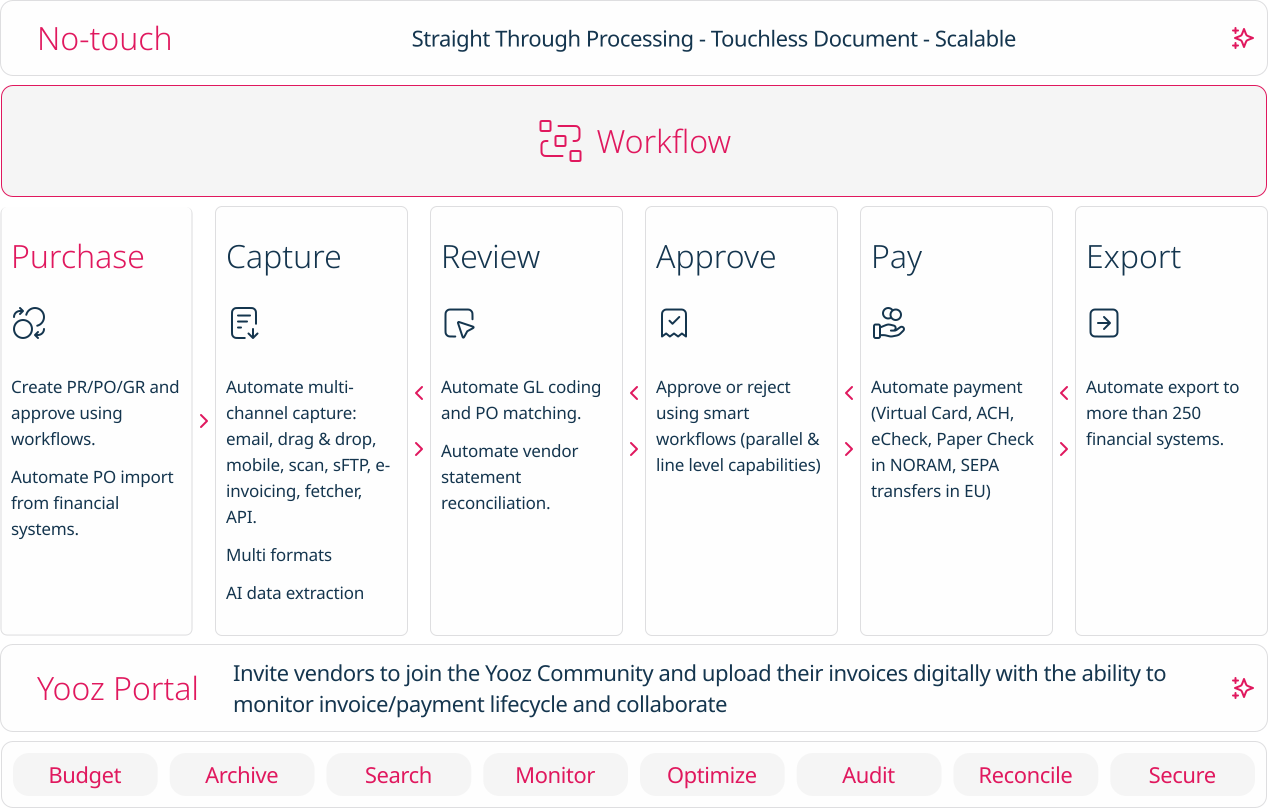
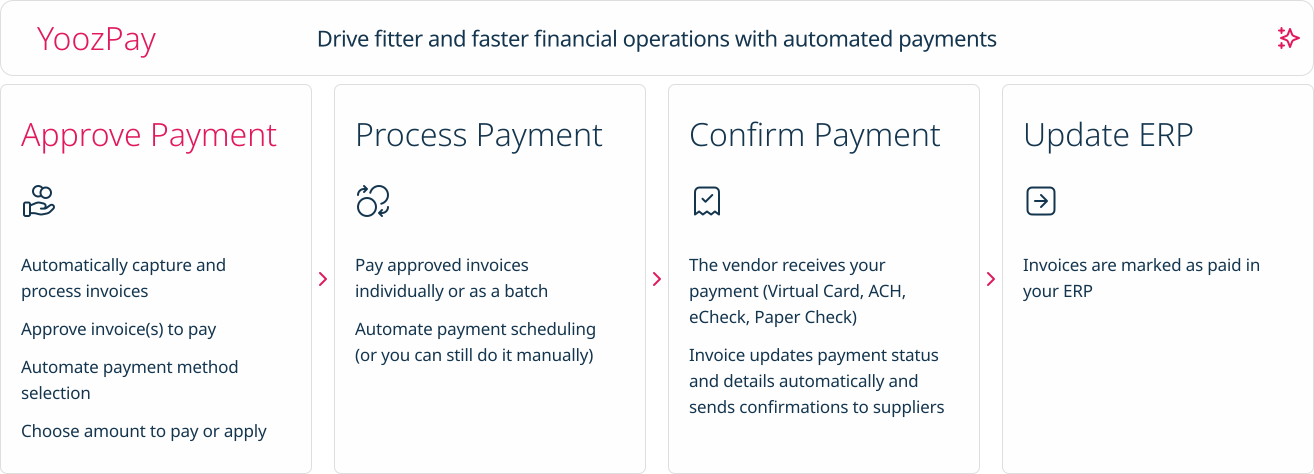
Screenshot of how Yooz works - The solution provides artificial intelligence (AI) and machine learning technologies to help AP teams with invoice automation.Screenshot of Purchase: Automates PR/PO and approvals using workflows. Additionally users can create purchase requests, automate approval workflows, automatically generate purchase orders, manage deliveries and monitor the budget.Screenshot of Capture: AI based data extraction to extract invoices. Works for almost any format (PDF, Factur-X, UBL, CII, EDIFACT, etc.)Screenshot of No touch: Intelligent workflows to automate approvals and paymentsScreenshot of Pay: A Digital Invoice Payment Workflow. Invoices can be paid individually or as a batch,  and vendors receive payment through Virtual Card, ACH, eCheck, or Paper Check.Screenshot of Export: Invoice capture and automation that integrates with accounting software, or with more than 200 ERPs worldwide.