The Autodesk Construction Cloud provides a bundle of construction management products to suite various use cases. Current bundles include Construction Operations, Preconstruction, as well as Virtual Design and Construction.
N/A
HCSS
Score8.5 out of 10
Mid-Size Companies (51-1,000 employees)
HCSS is a construction software suite. It includes functionality for bidding, time card and project management, safety, planning, scheduling, equipment management, and data warehousing and reporting. Each module can be purchased separately. The suite can be hosted in the cloud.
Well Suited: Autodesk Construction Cloud is cost effective, user friendly, and robust. They aren't nickel and diming you for use of each module. Once users are on-board with the system it creates an ecosystem that all users "go to first" for an answer. Less Appropriate: As a Developer, there are some hiccups as it is designed more for the GC (general contractor). A template option that is Developer forward would an improvement.
A de minimis incentive was given to thank the reviewer for their time. The incentive was not used to bias or drive a particular response, nor was the incentive contingent on a positive endorsement. More Info
Our operation uses several pieces of what we call specialty equipment (not used every day on every job). The foreman when finished will give a location of where this equipment is left, this many times can be very vague and lead to a lowboy driver trying to block around to find the piece or driving down a street he cannot get turned around in. With the GPS devices, the driver can pinpoint exactly where the unit is and if he has room to turn around at that location.
A de minimis incentive was given to thank the reviewer for their time. The incentive was not used to bias or drive a particular response, nor was the incentive contingent on a positive endorsement. More Info
Meeting Minutes: Simple to use and adapt from Agenda to Minutes, attach reference documents efficiently, and assign accountability to attendees.
Budget/Cost Reporting: There is a learning curve, but the visibility of budgets and costs from inception to closeout is beneficial for the user and makes reporting to investors simple and consistent.
Document Management: The version history on drawings "sheets" is very helpful when managing a project through design and construction. Issuing addenda, drawings, or tracking down a change in design is simple.
Pay Applications/Change Order Workflow: the customizable workflows along with time stamps of reviews and response makes tracking down status and bottlenecks very easy.
A de minimis incentive was given to thank the reviewer for their time. The incentive was not used to bias or drive a particular response, nor was the incentive contingent on a positive endorsement. More Info
#1 is support! HCSS is by far the best software support of any product we have ever used. Unlike most software companies HCSS utilizes their support calls to help upgrade their software. When you here them tell you that they will write down a particular issue you come across during a support call if they can't help you then and there they will research and get an answer to you extremely fast. If the software will not do it, you can bet there is a good chance it will be on the list of enhancements you will see come out in the near future.
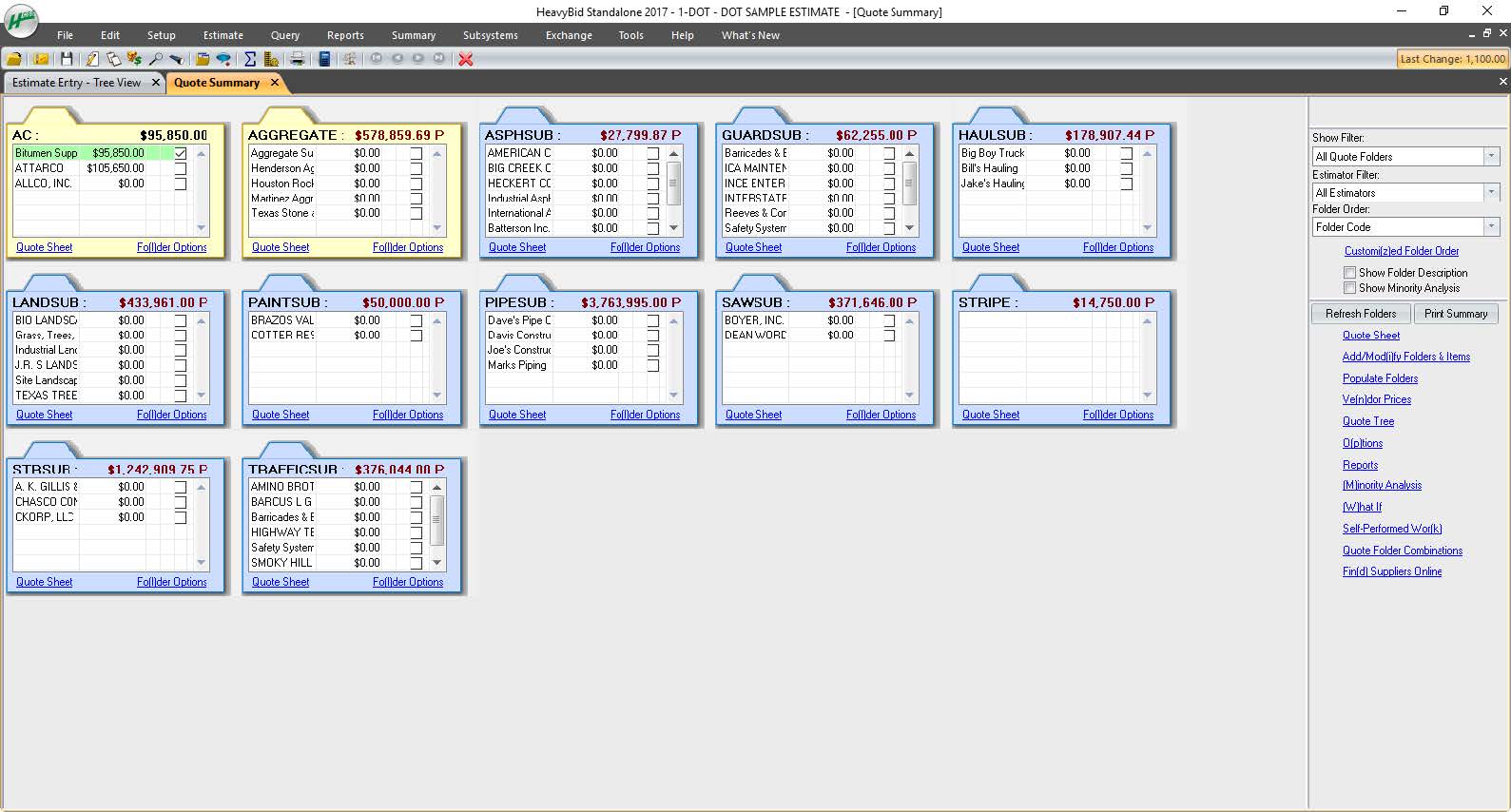
Estimating software is very extensive. Their software is capable of handling the smallest estimate all the way to the largest joint venture estimate. It has advanced features that make it extremely useful for analyzing job materials, subcontractors etc.
HeavyJob is an extremely useful tool for the field to keep the office up to date with job costs. Everything is at the Foreman's fingertips on Tablets to allow the information from the field to get uploaded to HeavyJob manager which then can export to accounting. We are also able to give our Foreman the ability to deal with the Daily and weekly safety needs (Tailgate Meetings, incident Investigation, observations etc.) right on the Tablets thru HeavyJob.
The footprint large projects leave within Desktop Connector and Mitigating that data
REMOVE "add up to 80 projects" from the Desktop Connector Select Projects Screen! It is better to cycle the project data in/out for syncing latest greatest rather than have users load up their desktop connector full of projects and let data stagnate/have to be racked to update.
All their apps are on mobile devices. Although there is not a clear company policy on Android versus iPhone. Updates for features lag behind on Android. Some apps are exclusive to one platform making it hard to fully interconnect all programs.
It is overall a very great product in terms of usability. Some features need some work like RFI tools and contruction administration tools. As the product develops I imagine these becoming more important and easier to use
A de minimis incentive was given to thank the reviewer for their time. The incentive was not used to bias or drive a particular response, nor was the incentive contingent on a positive endorsement. More Info
As mentioned, user interface appears messy and complicated at initial onset. Training is necessary but becomes easy to maneuver through after solid daily use.
A de minimis incentive was given to thank the reviewer for their time. The incentive was not used to bias or drive a particular response, nor was the incentive contingent on a positive endorsement. More Info
The data mitigation is complete garbage. Any cloud collaborated model takes 2x to load in the Autodesk Construction Cloud environment that if it was saved locally or to on prem servers. We had our systems and bandwidth all evaluated to be applicable but the data downloads and sequencing through Desktop Connector leaves much to be desired.
I have never had a bad experience or heard of one in 4 years of doing business with HCSS. That is unheard of even with the hurricanes and flooding in Houston area it feels like HCSS was always there and willing to help in every way.
I was not employed with PPI upon implementation. I would prefer to reference my previous statement, that each company needs to evaluate its culture and address your implementation accordingly. The purchasing company should assign an employee as point person and really take charge of not just the technical side of the implementation (HCSS pretty much handles that), but focus on company culture and training.
Procore's user interface is not as user-friendly. Next steps are not as obvious and the overall graphic design is more old-school. I do however like how Procore lists the specific issues that you are assigned on the home page. Procore can be more difficult to navigate and it's hard to find attachments.
A de minimis incentive was given to thank the reviewer for their time. The incentive was not used to bias or drive a particular response, nor was the incentive contingent on a positive endorsement. More Info
Other estimating products I have used consist of ICE/MC2 and MS Excel. ICE was not a good fit for our company, as they have awful technical support and offer very poor training. MS Excel is great for simple estimates where there is not a lot of data being compiled. However neither hold a candle to the power of HCSS Heavybid
A de minimis incentive was given to thank the reviewer for their time. The incentive was not used to bias or drive a particular response, nor was the incentive contingent on a positive endorsement. More Info
Because of the codebooks (bid item codebook for DOT's specifically), we're able to carve off significant time in "stick-building" estimates
It's very easy to train newer estimators with HeavyBid due to the abundance of resources available on HCSS Academy and elsewhere (i.e. Arthur Nix's material)
The KPI's and Insights that Pre-Con offers helps us to make better decisions on Bid Day.
A de minimis incentive was given to thank the reviewer for their time. The incentive was not used to bias or drive a particular response, nor was the incentive contingent on a positive endorsement. More Info